
1. Introduction
This manual provides essential information for the installation, operation, and maintenance of your LiftMaster 6580L 1 HP Belt Drive Garage Door Opener. The 6580L is a high-performance belt-driven motor designed to replace and fit existing LiftMaster garage door rails, including models such as 84505 and 84504. It features a built-in security camera and battery backup for enhanced security and reliability.
The DC motor and belt drive system ensure smooth, powerful, and quiet operation, comparable to or quieter than an average dishwasher. The integrated battery backup system provides uninterrupted access during power failures, offering at least 10 open and close cycles for your convenience and peace of mind. Please note that rails are not included with this motor and are sold separately.
2. Safety Information
Always prioritize safety during installation, operation, and maintenance. Failure to follow these instructions may result in serious injury or property damage.
- Read and understand all instructions before beginning installation or operation.
- Ensure the garage door is balanced and in good working order before installing the opener.
- Keep the area around the garage door clear of obstructions.
- Do not allow children to operate the garage door opener or play near the garage door.
- Disconnect power to the opener before performing any maintenance or repairs.
- Only use genuine LiftMaster replacement parts.
3. Package Contents
Verify that all components are present in your package:
- LiftMaster 6580L Belt Drive Opener (Motor Head)
- 458LM Garage Door Opener Battery (for Battery Backup)
- L957W Motion Detecting Garage Control Panel
- L993M LiftMaster 3 Button Remote
Note: Garage door rails are sold separately and are not included with this purchase.
4. Setup and Installation
This section outlines the general steps for setting up your LiftMaster 6580L opener. For detailed, step-by-step instructions, refer to the comprehensive installation guide provided with your rail system.
4.1 Mounting the Opener
The 6580L motor head is designed to integrate with existing LiftMaster belt drive rail systems. Ensure the rail is securely mounted to the garage ceiling and the header bracket. Attach the motor head to the rail according to the rail system's instructions.

Image: The LiftMaster 6580L motor head, featuring its integrated camera and LED lighting, securely mounted to a garage door rail system. A red emergency release cord is visible.
4.2 Connecting the Belt Drive
Ensure the belt is properly tensioned and connected to the trolley and the motor's drive sprocket. Refer to your rail system's manual for specific belt installation and tensioning procedures.
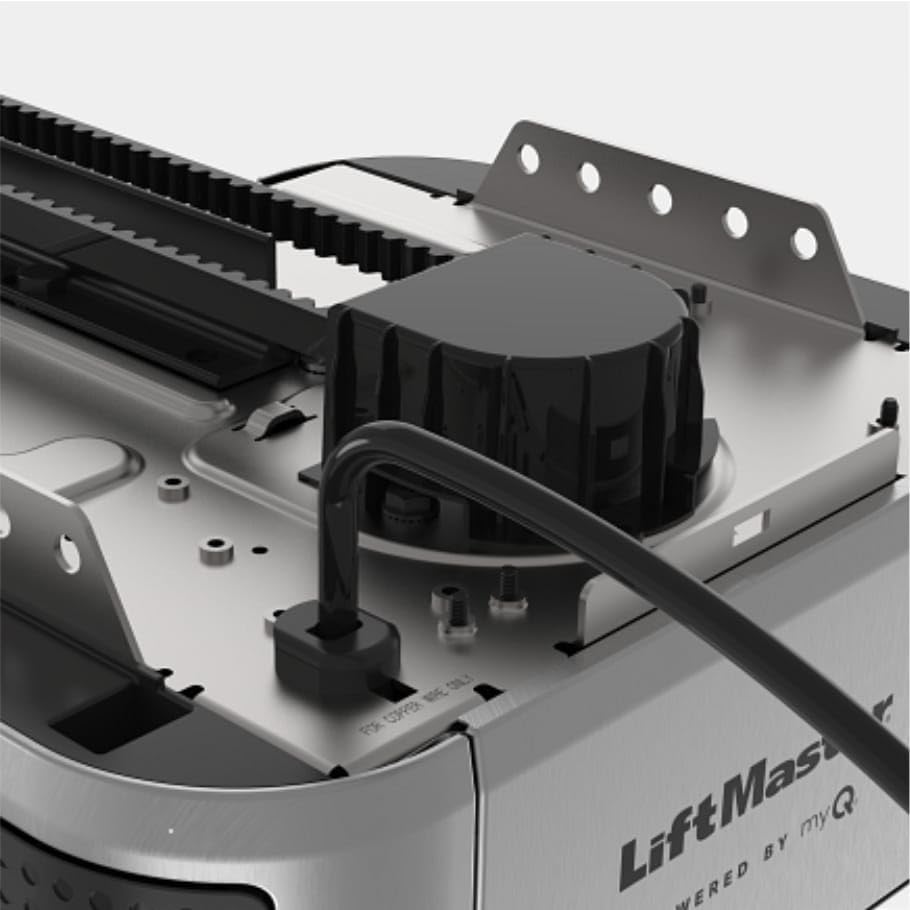
Image: A detailed view of the belt drive mechanism within the LiftMaster 6580L opener, showing the belt and a hex key for potential adjustments.
4.3 Installing the Battery Backup
Open the battery compartment on the opener head and connect the 458LM Garage Door Opener Battery. Ensure the connections are secure. The battery backup provides power during outages.

Image: The battery backup unit securely placed within its designated compartment on the LiftMaster 6580L opener, with wiring visible.
4.4 Wiring and Power Connection
Connect the control panel and safety sensors (if applicable) to the motor head. Once all wiring is complete and verified, plug the opener into a grounded electrical outlet. The opener will perform an initial self-test.
5. Operating Instructions
5.1 Using the Remote Control
The included L993M LiftMaster 3 Button Remote can be programmed to operate your garage door. Follow the instructions in the remote's manual to pair it with your opener. Pressing a programmed button will open or close the garage door.

Image: Two LiftMaster remote controls, one designed for wall mounting and a smaller, portable three-button remote, both featuring myQ branding.
5.2 myQ Connectivity
The LiftMaster 6580L features myQ connectivity, allowing you to monitor and control your garage door from your smartphone. Download the myQ app and follow the in-app instructions to connect your opener to your home Wi-Fi network. This enables features like remote operation, status alerts, and access to the integrated camera feed.

Image: Two smartphone screens illustrating the myQ application. One screen shows notifications for detected persons and garage door activity, while the other displays a live camera feed from the garage and the current garage door status.
5.3 Battery Backup Operation
In the event of a power outage, the integrated battery backup will automatically engage, allowing you to continue operating your garage door. The system provides power for at least 10 open and close cycles. The opener's indicator light will signal when the unit is running on battery power or when the battery needs charging/replacement.
6. Maintenance
Regular maintenance ensures the longevity and safe operation of your garage door opener.
- Monthly: Test the safety reversal system and photo-eye sensors. Inspect the garage door for proper balance and lubrication.
- Annually: Check the belt tension. Inspect all hardware for wear and tear. Ensure all mounting brackets are secure.
- Battery Backup: The battery should be tested periodically and replaced approximately every 1-2 years, or when its performance significantly degrades.
- Cleaning: Keep the photo-eye lenses clean and free from obstructions.
7. Troubleshooting
If you encounter issues with your LiftMaster 6580L, refer to the following common troubleshooting tips:
- Opener does not respond to remote: Check remote battery. Ensure the remote is properly programmed. Verify the opener has power.
- Garage door does not close: Check photo-eye sensors for obstructions or misalignment. Ensure the safety reversal system is functioning correctly.
- Unusual noise during operation: Inspect the belt and rail for obstructions or wear. Ensure the garage door itself is properly lubricated and balanced.
- Remote compatibility: The LiftMaster 6580L is compatible with myQ and Security+ 3.0 accessories. Ensure any additional remotes purchased are compatible with these technologies (e.g., LiftMaster L991S, L993S, L993M, L932M).
- Battery backup not working: Check battery connections. Ensure the battery is charged. Replace the battery if it is old or defective.
For more complex issues, consult the full product manual or contact LiftMaster customer support.
8. Specifications
| Feature | Specification |
|---|---|
| Model Number | 6580L |
| Manufacturer | Chamberlain (LiftMaster) |
| Motor Type | 1 HP DC Belt Drive |
| Power Outage Protection | Battery Backup (458LM Battery Included) |
| Connectivity | myQ, Security+ 3.0 |
| Integrated Features | Security Camera, LED Lighting |
| Included Components | 458LM Battery, L957W Control Panel, L993M Remote |
| Item Weight | 22 pounds |
| Product Dimensions | 12 x 10 x 18 inches |
| Color | Gray |
9. Warranty Information
LiftMaster products are backed by a manufacturer's warranty. Specific warranty terms and conditions, including duration and coverage, may vary. Please refer to the warranty card included with your product or visit the official LiftMaster website for detailed information.
10. Support
For technical assistance, troubleshooting, or to purchase replacement parts, please contact LiftMaster customer support. You can find contact information and additional resources on the official LiftMaster website:


