
Introduction
Thank you for purchasing the Ion Audio Magnet Rocker Portable Bluetooth Speakers. This manual provides essential information for the safe and efficient use of your speakers. The Magnet Rocker speakers are designed for high-power audio delivery, featuring a built-in magnetic mount, Bluetooth 5.3 connectivity, and a Wireless Stereo-Link function for an immersive stereo sound experience. Their rugged, IPX5 water-resistant design makes them suitable for various indoor and outdoor environments.
Please read these instructions carefully before operating the product and retain them for future reference.
Package Contents
- 2 x Magnet Rocker Speakers
- 2 x USB Charging Cables
- 2 x Carabiners
- Quickstart Guide (not included in this digital manual)
Setup
1. Charging the Speakers
Before first use, fully charge the speakers.
- Connect one end of the included USB charging cable to the charging port on the speaker.
- Connect the other end to a standard USB power adapter (not included) or a computer's USB port.
- The charging indicator light will illuminate during charging and turn off when fully charged. A full charge takes approximately 12 hours.
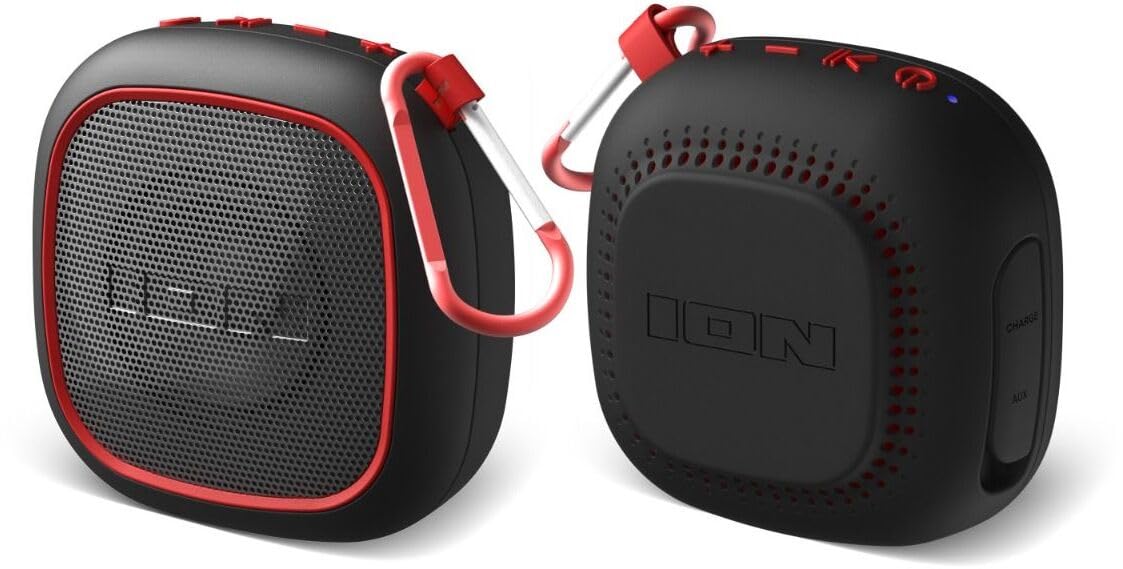
Image: Ion Audio Magnet Rocker speaker showing the charging port and cable connection.
2. Powering On/Off
- To power on, press and hold the Power button for 2 seconds. The speaker will emit an audible tone and the LED indicator will flash.
- To power off, press and hold the Power button for 2 seconds. The speaker will emit an audible tone and the LED indicator will turn off.
3. Bluetooth Pairing
To connect a single Magnet Rocker speaker to your Bluetooth device:
- Ensure the speaker is powered on and in Bluetooth pairing mode (LED indicator will be flashing rapidly).
- On your Bluetooth device (e.g., smartphone, tablet), navigate to the Bluetooth settings.
- Select "Magnet Rocker" from the list of available devices.
- Once paired, the speaker will emit an audible tone and the LED indicator will glow solid blue.
4. Wireless Stereo-Link (Pairing Two Speakers)
To connect two Magnet Rocker speakers for stereo sound:
- Ensure both Magnet Rocker speakers are powered on and not connected to any Bluetooth device.
- On one speaker (this will be the primary speaker), double-press the Power button. The speaker will enter Stereo-Link pairing mode.
- The primary speaker will automatically search for and connect to the second speaker.
- Once connected, both speakers will emit an audible tone, and the LED indicators on both speakers will glow solid blue.
- Now, connect your Bluetooth device to the primary speaker as described in the "Bluetooth Pairing" section above.
5. Mounting Options
- Magnetic Mount: The Magnet Rocker speakers feature a strong built-in magnet. Simply attach the speaker to any metallic surface for secure placement. Ensure the surface is clean and flat for optimal adhesion.
- Carabiner: Use the included carabiners to hang the speakers from loops, hooks, or other suitable attachment points.
Operating Instructions
Basic Controls
The Magnet Rocker speakers feature touch controls for playback and volume adjustment.
- Play/Pause: Tap the Power button once to play or pause audio.
- Volume Up: Tap the '+' button to increase volume.
- Volume Down: Tap the '-' button to decrease volume.
- Next Track: Press and hold the '+' button for 2 seconds to skip to the next track.
- Previous Track: Press and hold the '-' button for 2 seconds to go to the previous track.
Water Resistance (IPX5)
The Magnet Rocker speakers are IPX5 water-resistant. This means they are protected against low-pressure water jets from any direction. They are suitable for use outdoors, near pools, or in light rain. Do not submerge the speakers in water. Ensure the charging port cover is securely closed before exposure to water.
Maintenance
Cleaning
To clean the speakers, wipe them with a soft, damp cloth. Do not use abrasive cleaners, solvents, or harsh chemicals, as these may damage the finish or internal components.
Storage
Store the speakers in a cool, dry place away from direct sunlight and extreme temperatures. If storing for an extended period, charge the battery periodically (e.g., every 3 months) to maintain battery health.
Battery Care
The Magnet Rocker speakers contain a built-in rechargeable battery. For optimal battery life:
- Avoid fully discharging the battery frequently.
- Do not expose the speakers to extreme heat or cold.
- Charge the speakers using only the provided USB cable or a compatible charger.
Troubleshooting
| Problem | Solution |
|---|---|
| Speaker will not power on. | Ensure the battery is charged. Connect the speaker to a power source using the USB cable. |
| Cannot connect via Bluetooth. |
|
| No sound or low volume. |
|
| Stereo-Link not working. |
|
Specifications
| Feature | Detail |
|---|---|
| Model Number | iSP153-X2 |
| Brand | Ion Audio |
| Connectivity Technology | Bluetooth 5.3 |
| Bluetooth Range | Up to 10 meters (30 feet) |
| Speaker Output Power | 2 Watts (per speaker) |
| Woofer Diameter | 2 Inches |
| Audio Output Mode | Stereo (with Stereo-Link) |
| Water Resistance | IPX5 |
| Battery Life | Up to 12 hours |
| Battery Charge Time | Approximately 12 hours |
| Control Method | Touch |
| Item Dimensions (D x W x H) | 3.86" x 2.13" x 3.86" |
| Power Source | Battery Powered |
Warranty Information
The Ion Audio Magnet Rocker speakers come with a Limited 1-Year Warranty from the date of purchase. This warranty covers manufacturing defects in materials and workmanship under normal use. It does not cover damage caused by misuse, accident, unauthorized modification, or external causes.
For detailed warranty terms and conditions, please refer to the official Ion Audio website or contact customer support.
Support
For further assistance, technical support, or to view frequently asked questions, please visit the official Ion Audio support website. You may also find contact information for customer service there.
Website: www.ionaudio.com/support


