
1. Product Overview and Features
The Halitaa 3-Drawer Farmhouse File Cabinet is designed to provide efficient storage and organization for your home or office. Its rustic grey finish and compact design make it a versatile addition to various spaces.
- Ample Storage: Features three spacious drawers, each equipped with adjustable hanging rods to accommodate both A4 and Letter-size file folders, ensuring your documents remain organized.
- Charming Farmhouse Style: The rustic grey aesthetic provides a comfortable and nostalgic feel, suitable for diverse interior designs.
- Space-Saving and Versatile: With dimensions of 15.75"D x 17.01"W x 27.91"H, this cabinet is ideal for placement under desks, serving as both a filing solution and a printer stand.
- Sturdy and Durable Construction: Crafted from high-quality solid wood with smooth metal drawer slides, ensuring stability, durability, and reliable daily use.
- Easy Assembly: All components come with detailed labels and step-by-step instructions for straightforward assembly.
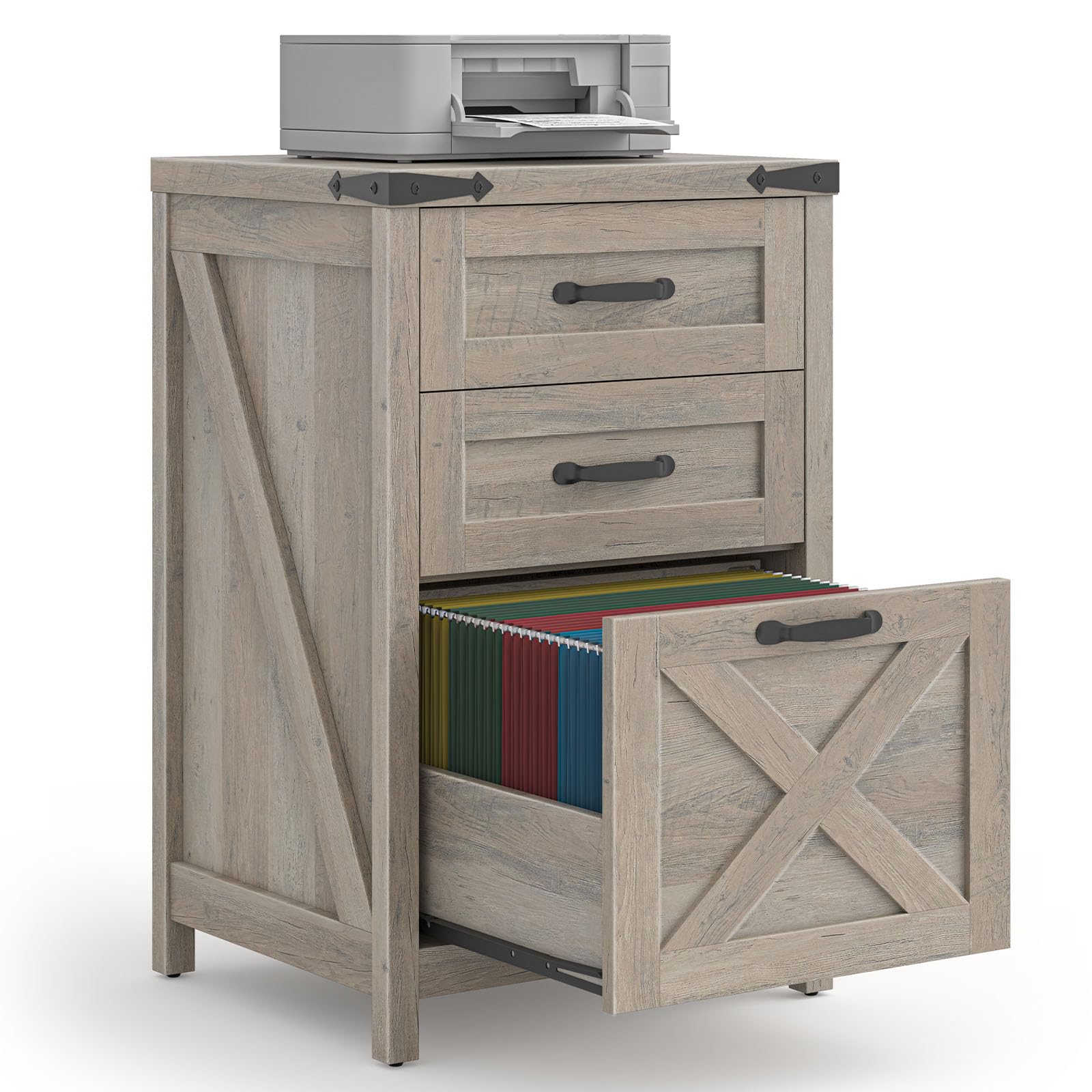
Image 1.1: The Halitaa 3-Drawer Farmhouse File Cabinet in a home office environment.
2. Safety Information
Please read and understand all safety instructions before assembly and use. Failure to follow these instructions may result in injury or product damage.
- Keep all small parts and packaging materials away from children and pets.
- Ensure all screws and fasteners are securely tightened before use. Periodically check and re-tighten as necessary.
- Do not overload drawers. Distribute weight evenly to prevent tipping.
- Avoid standing or climbing on the cabinet.
- Place the cabinet on a level, stable surface.
3. Package Contents
Before beginning assembly, verify that all parts listed below are present and undamaged. If any parts are missing or damaged, please contact customer support.
- Cabinet Panels (Top, Bottom, Sides, Back)
- Drawer Fronts, Sides, and Bottoms
- Drawer Handles
- Metal Drawer Slides
- Adjustable Hanging Rods (for files)
- Assembly Hardware (screws, dowels, cam locks, etc.)
- Assembly Tools (e.g., Allen wrench, screwdriver)
- Instruction Manual
4. Setup and Assembly
Assembly is required for this product. Follow the detailed, step-by-step instructions provided in the included manual. It is recommended to assemble the cabinet on a soft, clean surface to prevent scratches.
- Unpack and Identify Parts: Carefully remove all components from the packaging. Lay them out and compare them against the parts list in your separate assembly guide.
- Assemble the Main Frame: Connect the side panels to the top and bottom panels using the provided hardware. Ensure all connections are secure.
- Install Drawer Slides: Attach the metal drawer slides to the interior of the cabinet frame and to the sides of each drawer box, following the directional indicators.
- Assemble Drawers: Construct each drawer by attaching the front, back, and side panels, then insert the bottom panel. Secure the drawer handles to the front panels.
- Insert Drawers: Carefully slide the assembled drawers onto the installed drawer slides.
- Attach Hanging Rods: Install the adjustable hanging rods inside the drawers as needed for Letter or A4 size files. Refer to the specific holes for each size.

Image 4.1: Product dimensions and individual drawer measurements for assembly reference.
5. Operating Instructions
This file cabinet is designed for ease of use and efficient organization.
- Opening/Closing Drawers: Use the handles to smoothly pull drawers open and push them closed. Avoid forcing drawers.
- File Organization: Utilize the adjustable hanging rods within each drawer to organize Letter or A4 size hanging file folders. The rods can be repositioned into designated holes to fit your preferred file size.
- Printer Stand Functionality: The sturdy top surface of the cabinet can support a printer, providing a convenient and space-saving solution for your home office. The maximum weight capacity for the top surface is approximately 110 lbs (50 kg).

Image 5.1: Drawers open, demonstrating file storage capacity.

Image 5.2: Detail of adjustable hanging rods for Letter and A4 size files.
Video 5.3: A demonstration of the Halitaa File Cabinet's features and usage.
6. Maintenance
Proper care and maintenance will extend the life of your file cabinet.
- Cleaning: Wipe surfaces with a soft, damp cloth. Avoid harsh chemicals or abrasive cleaners, which can damage the finish.
- Dusting: Regularly dust the cabinet with a dry, soft cloth.
- Hardware Check: Periodically check all screws and fasteners to ensure they remain tight. Re-tighten if necessary.
- Avoid Direct Sunlight: Prolonged exposure to direct sunlight can cause fading or damage to the wood finish.
7. Troubleshooting
If you encounter any issues with your Halitaa file cabinet, refer to the following common solutions:
- Drawers are Sticking or Not Closing Smoothly:
Solution: Check if the drawer slides are properly aligned and free of obstructions. Ensure all assembly screws for the slides are tightened. Do not overload drawers. - Cabinet Feels Unstable:
Solution: Verify that the cabinet is placed on a level surface. Check all main frame assembly screws and re-tighten if loose. - Missing Parts or Damaged Components:
Solution: Refer to the package contents list. If parts are missing or damaged upon arrival, contact Halitaa customer support immediately for assistance.
8. Specifications
| Feature | Detail |
|---|---|
| Brand | Halitaa |
| Model Number | DA0428GR02A |
| Color | Grey |
| Material | Engineered Wood |
| Product Dimensions (D x W x H) | 15.75" x 17" x 27.91" |
| Item Weight | 34.17 Pounds |
| Number of Drawers | 3 |
| File Compatibility | Letter and A4 Size |
| Assembly Required | Yes |
| Mounting Type | Floor Mount |
| Recommended Uses | Files & Folders, Office Cabinet, Printer Stand |
9. Warranty and Support
Halitaa products are manufactured with quality and customer satisfaction in mind. For specific warranty information or technical support, please refer to the warranty card included with your product or visit the official Halitaa website. If you have any questions or require assistance, please contact Halitaa customer service.