
Important Safety Instructions
Please read all instructions carefully before using this appliance. Keep this manual for future reference.
- Ensure the coffee maker is placed on a stable, level surface.
- Do not immerse the appliance, cord, or plug in water or other liquids.
- Unplug from outlet when not in use and before cleaning.
- Do not operate any appliance with a damaged cord or plug.
- Close supervision is necessary when any appliance is used by or near children.
- Do not use outdoors.
- Use only cold, fresh water in the reservoir.
- Do not open the brew head during the brewing process.
Product Overview
The Horavie KC101C Single Serve Coffee Maker offers versatile brewing options for both K-Cup pods and ground coffee. It features multiple brew sizes, a strong brew option, and an over-ice mode for cold beverages. The large removable water reservoir simplifies refilling.

Image: Horavie KC101C Single Serve Coffee Maker in white, showing its compact design and control panel.
Setup
- Unpacking: Carefully remove all packaging materials and ensure all components are present.
- Placement: Place the coffee maker on a clean, dry, and level surface.
- Initial Cleaning: Before first use, wash the removable water reservoir, K-Cup pod holder, and reusable filter basket with warm, soapy water. Rinse thoroughly and dry.
- Fill Water Reservoir: Fill the 50oz removable water reservoir with fresh, cold water up to the MAX line. Place it back securely on the unit.
- First Clean Cycle:
- Ensure no coffee pod or grounds are in the holder.
- Place a large mug (at least 14oz capacity) on the drip tray.
- Press the "ON/OFF" button to power on.
- Select the largest brew size (14oz).
- Press the "HOT BREW" button to start a cleaning cycle.
- Discard the hot water. Repeat this process 2-3 times to ensure the internal components are clean.

Image: A hand removing the 50oz water reservoir from the Horavie KC101C coffee maker, highlighting its capacity and ease of access.
Operating Instructions
Brewing with K-Cup Pods
- Fill Water Reservoir: Ensure the water reservoir is filled with fresh, cold water.
- Insert K-Cup Pod: Lift the brew head handle. Place a K-Cup pod into the K-Cup pod holder. Close the handle firmly until it clicks.
- Place Mug: Place your mug on the drip tray. Ensure the mug size is appropriate for your selected brew size (max 6.5 inches tall).
- Select Brew Size: Use the "SIZE" button on the control panel to select your desired brew size (6, 8, 10, 12, or 14 oz).
- Select Brew Mode: Choose your desired brew mode:
- HOT BREW: For standard hot coffee.
- STRONG: For a bolder, more intense flavor.
- OVER ICE: For iced coffee. Note: This mode dispenses 6 or 8 oz. Add ice to your cup first for balanced flavor.
- Start Brewing: Press the selected brew mode button to start brewing. The machine will automatically stop when brewing is complete.
- Remove Pod: Carefully lift the brew head handle to remove the used K-Cup pod. Dispose of the pod.

Image: Components for K-Cup pods and ground coffee, including a K-Pod holder and a reusable filter basket, demonstrating the coffee maker's dual compatibility.
Brewing with Ground Coffee
- Fill Water Reservoir: Ensure the water reservoir is filled with fresh, cold water.
- Prepare Grounds: Open the reusable filter basket. Fill it with your desired amount of medium-coarse ground coffee. Do not overfill. Close the lid securely.
- Insert Filter Basket: Lift the brew head handle. Place the filled reusable filter basket into the coffee maker. Close the handle firmly until it clicks.
- Place Mug: Place your mug on the drip tray.
- Select Brew Size and Mode: Follow steps 4 and 5 from "Brewing with K-Cup Pods" to select your brew size and mode.
- Start Brewing: Press the selected brew mode button to start brewing.
- Remove Filter Basket: Carefully lift the brew head handle and remove the reusable filter basket. Discard used grounds and clean the basket.

Image: A woman enjoying coffee brewed by the Horavie KC101C, illustrating the fast brewing capability of the machine.
Maintenance
Daily Cleaning
- Drip Tray: Remove and empty the drip tray after each use. Wash with warm, soapy water and rinse.
- Water Reservoir: Empty any remaining water from the reservoir daily. Wash with warm, soapy water and rinse.
- K-Cup Pod Holder/Reusable Filter Basket: Wash these components after each use. The bottom of the K-Pod holder is removable for thorough cleaning.
- Exterior: Wipe the exterior of the coffee maker with a damp cloth. Do not use abrasive cleaners.
Descaling
Regular descaling is essential to prevent mineral buildup and maintain optimal performance. The frequency depends on water hardness and usage, but generally every 3-6 months.
- Prepare Descaling Solution: Mix 10 oz of white vinegar with 20 oz of water, or use a commercial descaling solution according to its instructions.
- Fill Reservoir: Pour the descaling solution into the water reservoir.
- Enter Descaling Mode: With the machine powered on, press and hold the "HOT BREW" and "OVER ICE" buttons simultaneously for 2 seconds to enter descaling mode. The indicator lights will flash.
- Run Descaling Cycle: Place a large mug on the drip tray. Press the "HOT BREW" button to start the descaling cycle. The machine will dispense the solution intermittently.
- Rinse Cycles: After the descaling cycle is complete, empty the reservoir and fill it with fresh, cold water. Run 2-3 full water-only cycles (14oz each) to rinse out any remaining descaling solution.
Video: A demonstration of the Horavie KC101C coffee maker's features, including brewing modes, cup sizes, and the descaling process. This video is provided by the seller, Horavie Home.
Troubleshooting
| Problem | Possible Cause | Solution |
|---|---|---|
| Coffee maker does not turn on. | Not plugged in; power outlet issue. | Ensure the power cord is securely plugged into a working outlet. |
| Water shortage alert (SIZE button flashes, machine beeps). | Water reservoir is empty or low. | Refill the water reservoir with fresh, cold water. |
| Coffee is not brewing or brewing slowly. | Brew head not fully closed; K-Cup pod or filter basket improperly placed; mineral buildup (needs descaling). | Ensure brew head is closed securely. Reposition K-Cup pod or filter basket. Perform a descaling cycle. |
| Coffee tastes weak or watery. | Incorrect brew size selected; insufficient coffee grounds; old coffee grounds. | Select a smaller brew size or the "STRONG" mode. Use more fresh coffee grounds. |
| Lid pops open during brewing (for K-Cup pods). | K-Cup pod not properly seated or punctured; excessive pressure buildup. | Ensure the K-Cup pod is firmly seated and the brew head is closed until it clicks. If issue persists, contact customer support. |
Specifications
- Model: KC101C
- Brand: Horavie
- Dimensions: 10.6"D x 6.3"W x 11.2"H
- Weight: 5.41 pounds
- Water Reservoir Capacity: 50 oz (removable)
- Brew Sizes: 6, 8, 10, 12, 14 oz (Hot Brew/Strong), 6, 8 oz (Over Ice)
- Compatibility: K-Cup Pods, Ground Coffee
- Special Features: Adjustable Brew Strength, Auto Shut-Off, Permanent Filter (reusable filter basket), Removable Tank, Single Cup Brew, Descaling Mode, Water Shortage Alert.
- Mug Clearance: Fits mugs up to 6.5 inches tall (with drip tray removed).
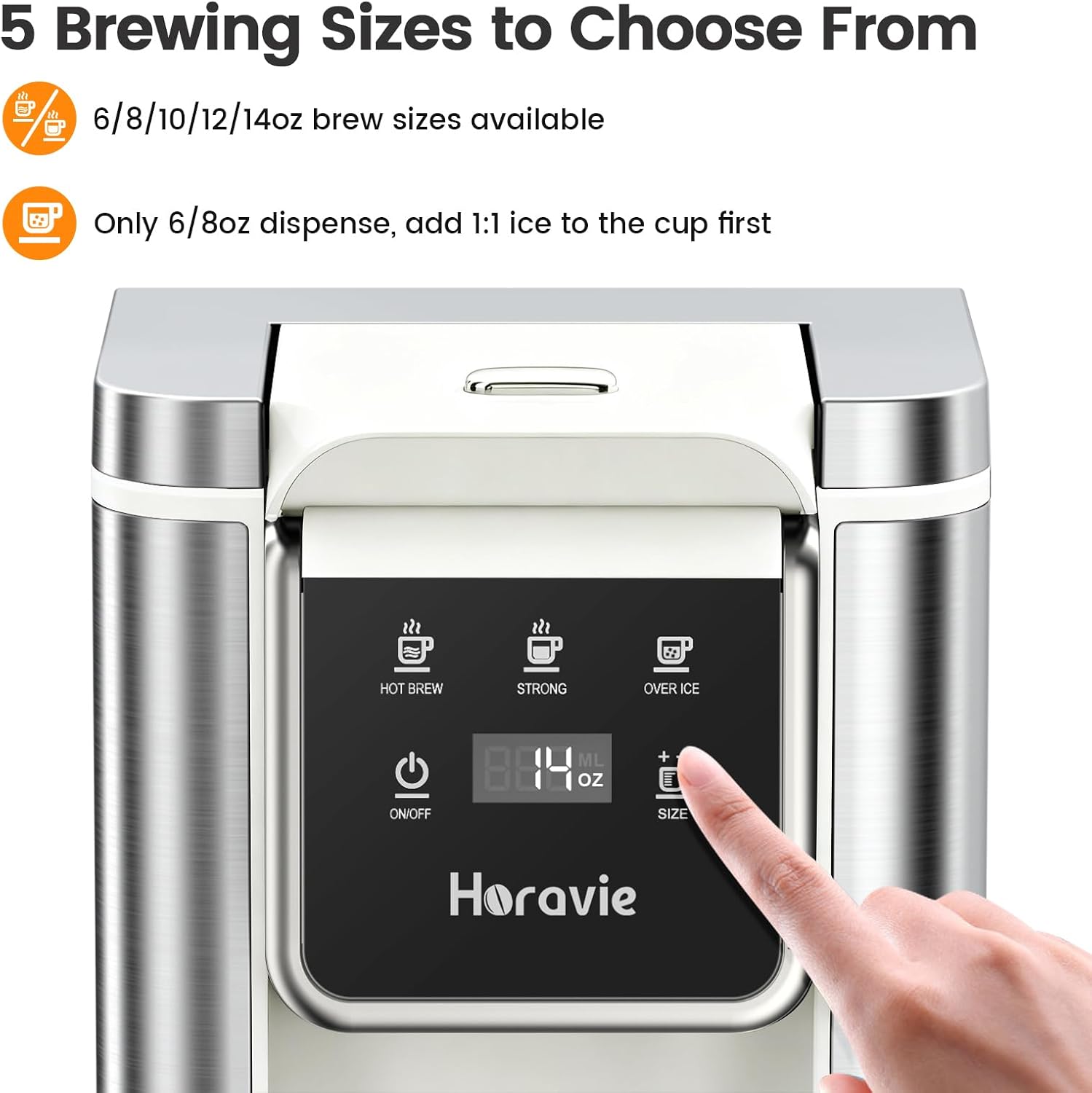
Image: Diagram showing the compact dimensions of the Horavie KC101C coffee maker and its compatibility with mugs up to 6.5 inches in height.
Warranty and Support
For warranty information and customer support, please refer to the official Horavie website or contact their customer service department. Keep your purchase receipt for warranty claims.
Horavie Customer Service: Visit the Horavie Store on Amazon