
1. Product Overview
The EBL 12+2 Bay Universal Rechargeable Battery Charger (Model EBL-C9036W) is designed to charge various types of Ni-MH and Ni-CD rechargeable batteries. It features 12 independent charging slots for AA/AAA batteries, 6 slots for C/D batteries, and 2 slots for 9V batteries, allowing for flexible charging of multiple battery sizes simultaneously. The charger incorporates advanced safety features and an LCD display for monitoring the charging status.

Image 1.1: EBL 12+2 Bay Universal Rechargeable Battery Charger with AC power cable.
2. Safety Instructions
- Use this charger only for Ni-MH and Ni-CD rechargeable batteries. Do not attempt to charge alkaline, lithium, or any other non-rechargeable battery types, as this may lead to explosion, leakage, or personal injury.
- Do not disassemble or modify the charger.
- Avoid exposing the charger to rain, moisture, or extreme temperatures.
- Ensure proper battery polarity (+/-) when inserting batteries into the charging slots. Incorrect insertion can cause damage to the charger or batteries.
- Keep the charger away from children.
- Unplug the charger from the power outlet when not in use or before cleaning.
- If the charger or batteries become excessively hot during charging, discontinue use immediately and unplug the charger.

Image 2.1: The charger features multiple safety protections including over-charge, over-discharge, over-current, over-heat, and short-circuit protection.
3. Setup
- Unpack the EBL 12+2 Bay Universal Rechargeable Battery Charger and its AC power cable.
- Place the charger on a flat, stable, and well-ventilated surface.
- Connect the AC power cable to the charger's power input port located at the back.
- Plug the other end of the AC power cable into a standard 100-240V AC 50/60Hz wall outlet. The charger's LCD screens will illuminate briefly, indicating it is powered on.
4. Operating Instructions
4.1 Inserting Batteries
- For AA/AAA batteries: Insert 1 to 12 AA or AAA Ni-MH/Ni-CD batteries into the corresponding slots. Ensure the positive (+) and negative (-) terminals of the batteries match the polarity markings in the charger slots.
- For C/D batteries: Insert 1 to 6 C or D Ni-MH/Ni-CD batteries into the larger slots. Observe correct polarity.
- For 9V batteries: Insert 1 to 2 9V Ni-MH/Ni-CD batteries into the dedicated 9V slots. Ensure the terminals align correctly.

Image 4.1: The charger supports simultaneous charging of various battery types and sizes.

Image 4.2: Ensure correct positive and negative terminal alignment when inserting batteries.
4.2 Charging Process and Indicators
- Once batteries are correctly inserted, the charger will automatically begin charging.
- For AA/AAA/C/D batteries: The LCD screen corresponding to each battery will display "CHG" and a battery icon with segments filling up, indicating the charging progress.
- For 9V batteries: A red LED indicator next to the 9V slot will illuminate, signifying that charging is in progress.
- When AA/AAA/C/D batteries are fully charged, the LCD screen will show a full battery icon.
- When 9V batteries are fully charged, the red LED indicator will turn green.
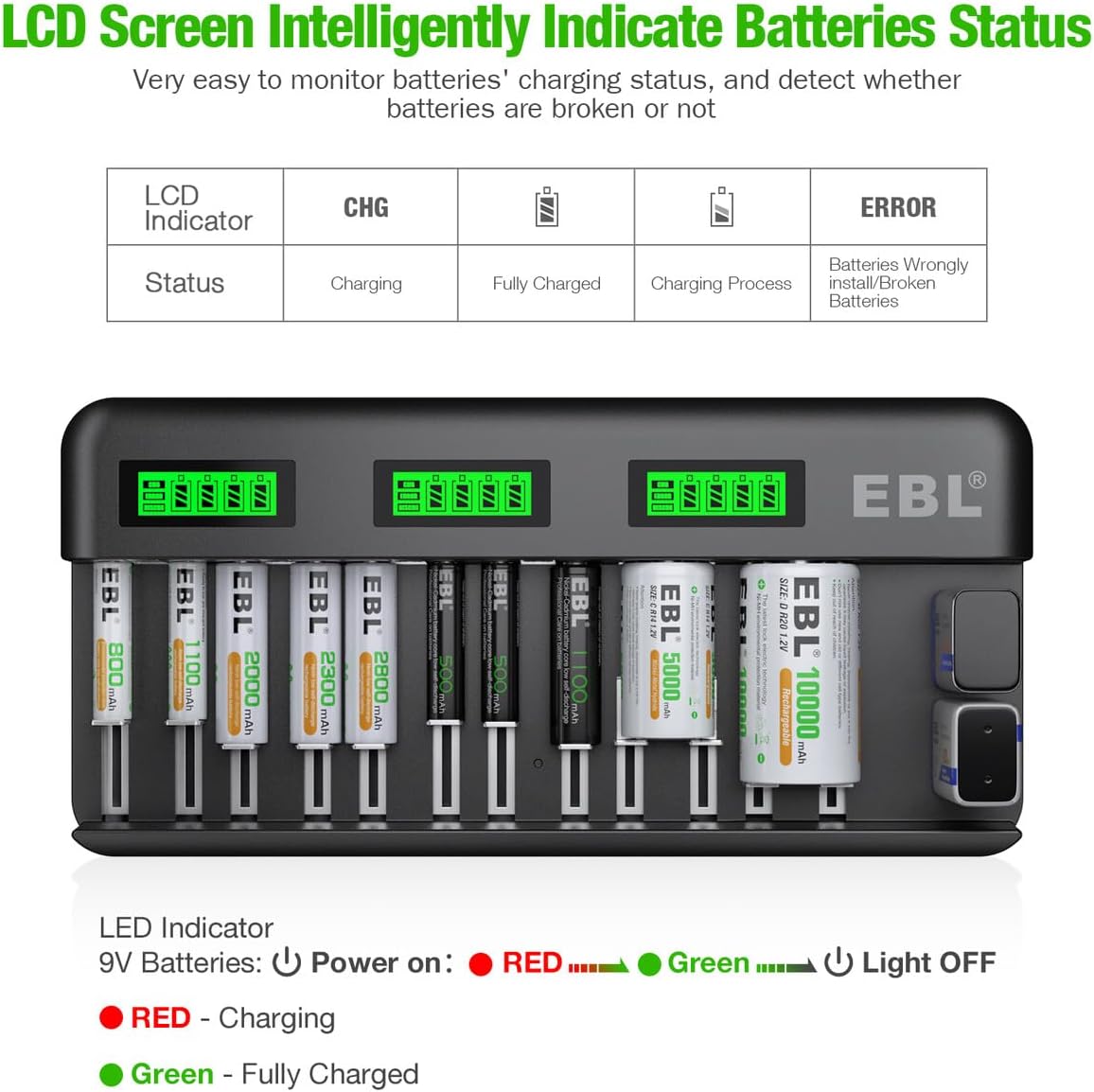
Image 4.3: LCD screen indicators for charging status and error messages. The 9V LED indicator shows red for charging and green for fully charged.
4.3 Approximate Charging Times
| Battery Type | Capacity | Approximate Charging Time |
|---|---|---|
| AAA Ni-MH | 800-1100mAh | 0.8-1.2 hours |
| AA Ni-MH | 2300-2800mAh | 2.5-3 hours |
| C Ni-MH | 5000mAh | 2.7 hours |
| D Ni-MH | 10000mAh | 5.5 hours |
| 9V Ni-MH | 600mAh | 2.3 hours |
| 9V Ni-MH | 280mAh | 3.5 hours |
Note: Charging times are approximate and may vary based on battery capacity, discharge level, and environmental conditions.
5. Maintenance
- Cleaning: Disconnect the charger from the power outlet before cleaning. Use a soft, dry cloth to wipe the surface of the charger. Do not use abrasive cleaners or solvents.
- Storage: Store the charger in a cool, dry place away from direct sunlight and extreme temperatures.
- Battery Care: For optimal battery life, avoid fully discharging batteries before recharging. It is recommended to store rechargeable batteries with a partial charge if not used for extended periods.
6. Troubleshooting
- Charger not powering on: Ensure the AC power cable is securely connected to both the charger and a working wall outlet.
- "ERROR" displayed on LCD: This indicates a damaged battery or incorrect battery installation. Remove the battery, check its condition, and reinsert it with correct polarity. If the error persists, the battery may be defective and should not be used.
- Battery not charging: Verify that the battery is a Ni-MH or Ni-CD rechargeable type and that it is inserted with correct polarity. Ensure the charger is powered on.
- Slow charging: Ensure the charger is operating within the recommended temperature range (0℃ - 35℃). Extremely cold or hot environments can affect charging performance.
7. Specifications
| Feature | Specification |
|---|---|
| Model | EBL-C9036W |
| Input | 100-240V AC, 50/60Hz, 0.3A MAX |
| Output (C/D) | DC 1.2V 1800mA |
| Output (AA/AAA) | DC 1.2V 900mA |
| Output (9V) | DC 8.4V 260mA / 9V 80mA |
| Compatible Batteries | AA, AAA, C, D, 9V Ni-MH/Ni-CD |
| Working Temperature | 0℃ - 35℃ |
| Storage Temperature | -10℃ - 50℃ |
| Product Dimensions | 10.62 x 1.88 x 5.19 inches |
| Item Weight | 1.15 pounds |
8. Warranty and Support
EBL products are designed for reliability and performance. For warranty information or technical support, please refer to the warranty card included with your purchase or visit the official EBL website. Keep your purchase receipt as proof of purchase for warranty claims.


