
Product Overview
This manual provides essential information for the safe and effective use of your SINCEBORN ER-X3+ Memory Foam 4-in-1 Electric Rollator. This versatile mobility aid functions as a foldable walker, transport wheelchair, electric wheelchair, and offers adaptive recovery training support.

The SINCEBORN ER-X3+ Memory Foam 4-in-1 Electric Rollator offers versatile mobility solutions, transforming between a transport wheelchair, electric wheelchair, rollator walker, and adaptive recovery training device.
Key Features
- Versatile 4-in-1 functionality: foldable walker, transport wheelchair, electric wheelchair, and rollator.
- Lightweight and durable aluminum alloy frame.
- Foldable design for compact storage and travel.
- Padded seat and ergonomic handles for comfort.
- Power assist function for walking and pushing.
- Joystick controller with 5 adjustable speed levels and sensitivity settings.
- Anti-tip assist wheels for enhanced safety.
- Memory foam pad for comfort.
- Removable and washable armrest pads.
- 600W Magnesium Alloy rear wheel brushless motor.
- Up to 15.6 miles range on a single charge.
- Smart assist (C1-C3) for responsive assistance.
- Instant hill-conquering power button.
- 3-level adjustable push resistance for rehabilitation.
This video showcases the various modes and features of the SINCEBORN ER-X3+ Memory Foam 4-in-1 Electric Rollator, demonstrating its versatility for driving, walking, and recovery.
Setup and Unfolding
Unfolding the Rollator
To unfold your rollator from its compact state, follow these steps:
- Crouch down to access the folding mechanism.
- Locate the small lever, typically maroon or ruby red, near the base of the seat.
- Push down on this lever to release the lock.
- Gently widen the frame of the rollator.
- Once the frame is partially open, push down firmly on the seat until it locks into place.
Folding the Rollator for Storage
To fold the rollator for storage or transport:
- If the padding is installed, lift the seat padding to reveal the pull tab underneath.
- Pull up on the tab to release the seat mechanism.
- Begin pulling the sides of the rollator inwards to collapse the frame.
- Continue pushing the frame together until it is fully folded and locks into its compact position.

This image illustrates the quick-folding design of the rollator, showing a one-step folding process from an open to a compact state.

The image demonstrates the rollator's 'Adventure-Ready Mobility' with its one-second fold, fitting easily into a car trunk.
Operating Instructions
Joystick Controller
The joystick controller provides precise control over the electric wheelchair function.

This image displays the joystick controller with labels for its various functions, including power on/off, speed adjustment, horn, battery level, and speed level.
- Power On/Off: Press button (1) to power the unit on or off.
- Speed Adjustment: Use buttons (2) "+" to increase speed and "-" to decrease speed.
- Horn: Press button (3) for the horn.
- Joystick: Use the joystick (4) for directional control.
- Battery Level: Indicator (5) shows current battery charge.
- Speed Level: Indicator (6) displays the current speed setting.
Adjustable Speed Levels
The rollator features 5 adjustable speed levels, ranging from 1.2 to 3.7 miles per hour.
This image shows the digital display indicating the 5 adjustable speed levels of the rollator, from 1.2 mph to 3.7 mph.
Joystick Controller Sensitivity Settings
To adjust joystick sensitivity:
- Enter user setting mode by pressing "Gear+" and "Power" simultaneously.
- The display will show "U", indicating user mode.
- Select sensitivity:
- 1-1: Low Speed Sensitivity
- 1-2: Middle Speed Sensitivity
- 1-3: High Speed Sensitivity
This image illustrates the process for adjusting the joystick controller's sensitivity settings, including entering user mode and selecting between low, middle, and high sensitivity options.
Power Assist for Walking
The power assist function helps with walking, reducing the effort required to push the rollator.

This image shows a man walking with the rollator, demonstrating the "New Sensing Assist Power" feature which provides assistance without needing to press a button.

This image explains the C1-C3 Smart Assist feature, which offers responsive assistance from a gentle nudge to turbo thrust, adapting to walking speed.
Hill-Climbing Assistance
For inclines, use the "More Power Button" to provide additional thrust.
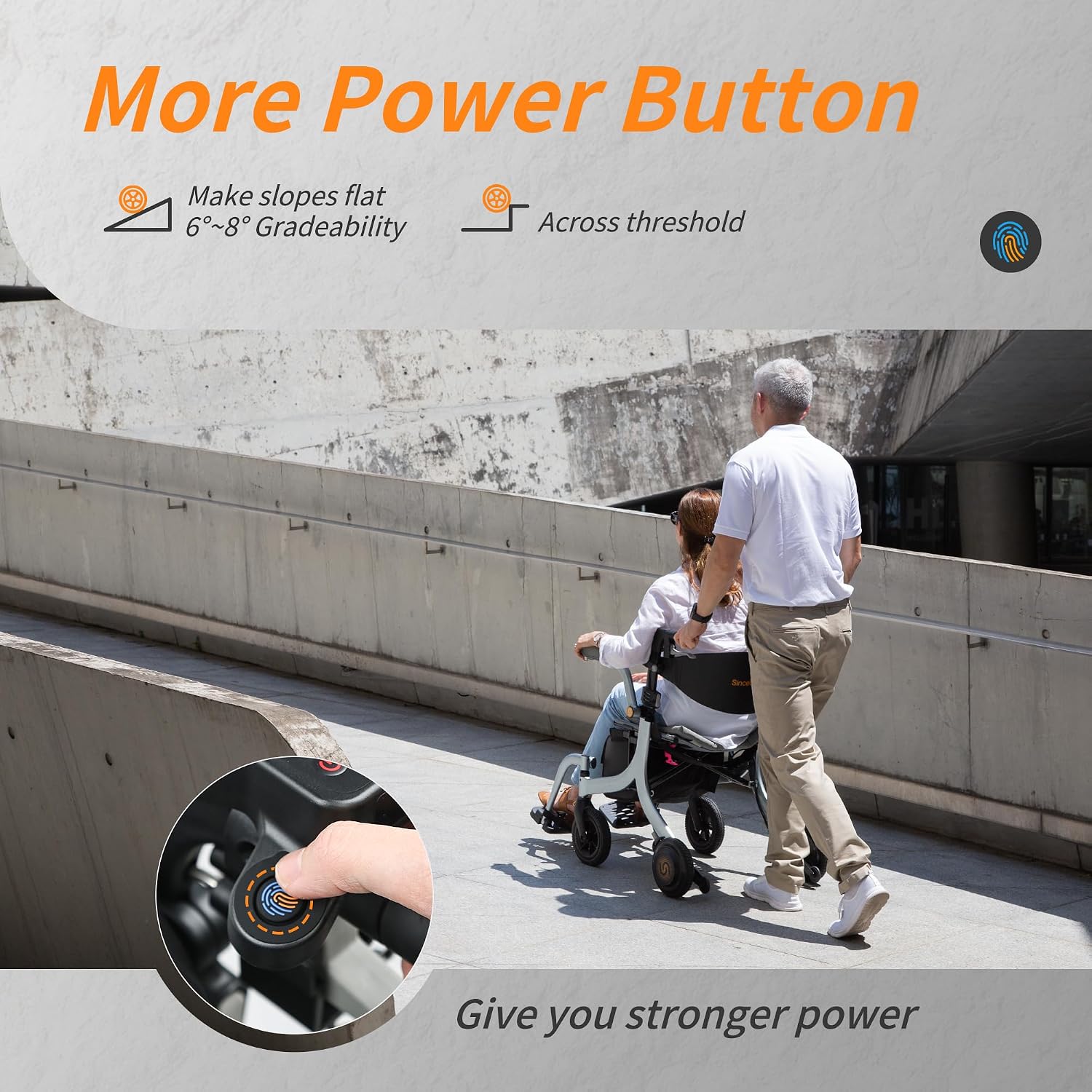
This image shows a finger pressing the "More Power Button" on the rollator's handle, indicating its use for overcoming inclines and thresholds.

This image demonstrates the "More Power Button" in action, showing a man easily pushing a woman in the rollator up a ramp, highlighting its instant hill-conquering superpower.
Electric Wheelchair Mode
When seated, the joystick provides precision control for electric wheelchair operation.

This image shows a man comfortably seated in the rollator, operating it as an electric wheelchair with the joystick, emphasizing smooth and responsive driving.
Resistance Mode for Rehabilitation
The rollator offers adjustable push resistance for physical therapy and muscle building.

This image illustrates the Resistance Mode Excellence feature, showing a digital display and a man walking with the rollator, indicating its use for building strength with adjustable push resistance.
- Provides 30% body weight support during rehab walks.
- Prevents slips during post-op steps (5-15 lbs support).
This video provides a detailed overview of the ER-X3 Hertz Silver Edition, showcasing its design and various operational features.
Maintenance
Cleaning
The removable armrest pads are washable. For other surfaces, wipe with a damp cloth and mild detergent. Avoid abrasive cleaners.

This image shows a close-up of the rollator's armrest pads, which are removable and washable for easy cleaning.
Battery Care
Ensure the battery is charged regularly. Refer to the charging instructions for optimal battery life.
General Inspection
Periodically check all bolts, screws, and moving parts to ensure they are secure and functioning correctly. Inspect wheels for wear and tear.
Troubleshooting
Power Issues
- Rollator not turning on: Check battery level and ensure it is properly connected and charged.
- Loss of power during use: The battery may be low. Recharge the battery.
Movement Issues
- Difficulty steering: Ensure the joystick is clean and free of obstructions. Adjust joystick sensitivity if needed.
- Uneven movement: Check for debris in the wheels or uneven tire pressure (if applicable).
Folding/Unfolding Issues
- Difficulty folding/unfolding: Ensure the release levers and tabs are fully engaged/disengaged. Do not force the mechanism.
Product Specifications
| Feature | Detail |
|---|---|
| Product Dimensions | 41 x 25.6 x 30.3 inches |
| Item Weight | 38.8 Pounds (17.6 Kilograms) |
| Brand Name | SINCEBORN |
| Model Name | ER-X3 |
| Age Range Description | 40-60 years |
| Item Dimensions D x W x H | 41"D x 25.6"W x 30.3"H |
| Maximum Height | 36.5 Inches |
| Color | Hertz Silver |
| Is Foldable | Yes |
| Walker Type | Rollator Walker |
| Material Type | Aluminum |
| Range | 15.6 miles |
| Motor | 600W Magnesium Alloy |
Warranty and Support
For warranty information, please refer to the documentation included with your purchase or contact SINCEBORN customer service.
For further assistance or technical support, please visit the SINCEBORN Store on Amazon or contact their support team directly.