
Introduction
This manual provides instructions for the setup, operation, maintenance, and troubleshooting of your dellersound Coolmusic Folding Piano Keyboard 88 Keys. This portable electric piano features 88 semi-weighted keys, MIDI connectivity, and a rechargeable design, making it suitable for various skill levels and environments.

The dellersound Coolmusic Folding Piano Keyboard is designed for portability, weighing 2.6 kg and featuring a 180-degree fold for convenient storage and transport.
Setup
1. Unpacking and Contents
Carefully remove all components from the packaging. Verify that all items are present:
- Folding Piano Keyboard
- Sustain Pedal
- Power Adapter
- USB Cable (for MIDI/charging)
- Music Stand
- Storage Bag

Image showing the main components included with the keyboard: the folding piano, sustain pedal, power adapter, cables, music stand, and carrying bag.
2. Unfolding the Keyboard
Place the keyboard on a flat, stable surface. Gently unfold the two sections of the keyboard until they lock into place, forming a continuous 88-key surface.
3. Powering On and Charging
Connect the power adapter to the DC IN port on the keyboard and plug it into a wall outlet. The keyboard has a built-in rechargeable battery. Charge fully before first use. Press the Power Switch to turn the unit on.
4. Connecting Accessories
- Sustain Pedal: Plug the sustain pedal into the designated pedal input jack.
- Headphones: For private practice, connect standard headphones to the headphone jack.
- MIDI Connection: Use the micro USB cable to connect the keyboard to a computer or smart device for MIDI functionality.
Operating Instructions
1. Control Panel Overview
The control panel provides access to various functions and settings. Refer to the image below for button identification.

Detailed view of the keyboard's control panel, indicating the Power switch, LED display, Encoder switch, and function buttons.
- Power Switch: Turns the keyboard on or off.
- LED Display: Shows current settings and information.
- Encoder Switch: Used to navigate menus and adjust values.
- Function Buttons: Dedicated buttons for Metronome, Record/Play, Sustain, Drum Kit, Tempo+/-, Transpose+/-, Chord, Vibrato, and Dynamic functions.
2. Basic Functions
- Tones and Rhythms: Select from 128 tones and 128 rhythms using the appropriate function buttons and the encoder switch.
- Demos: Access 30 built-in demo songs for listening or practice.
- Metronome: Activate the metronome for timing assistance during practice. Adjust tempo as needed.
- Recording: Use the record function to capture your performances.
- Sustain: Engage the sustain function for longer note decay, either via the button or the connected sustain pedal.
3. MIDI Terminal Functionality
The MIDI function allows connection to external devices such as computers or smartphones. This enables interaction with music software for composing, learning, or controlling other MIDI-compatible instruments. Connect using the provided micro USB cable.
4. LED Key Lights
The keyboard features LED lights that trigger when keys are played, providing visual feedback. This can be particularly useful for learning and practice.
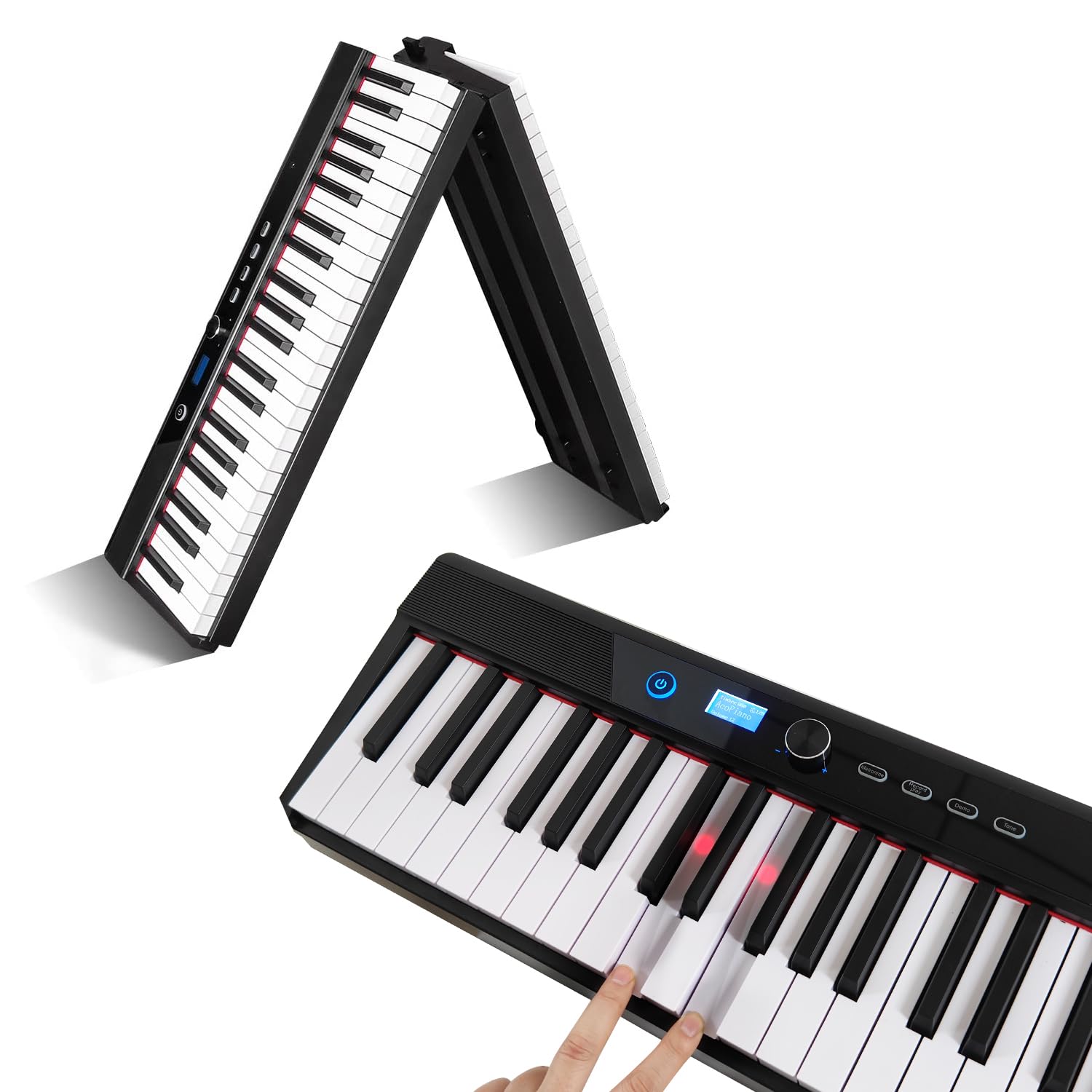
The keyboard features LED lights that illuminate when keys are pressed, providing visual feedback.
5. Audio Output
The keyboard includes built-in stereo speakers for clear sound reproduction. For private practice, connect headphones to the headphone jack. This allows you to play without disturbing others.

Using headphones allows for private practice sessions without disturbing others.
Maintenance
1. Cleaning
Wipe the keyboard surface with a soft, dry cloth. For stubborn dirt, slightly dampen the cloth with water. Avoid using abrasive cleaners, solvents, or waxes, as these can damage the finish.
2. Storage
When not in use, fold the keyboard and store it in its provided storage bag. Store in a cool, dry place away from direct sunlight, extreme temperatures, and high humidity. Avoid placing heavy objects on top of the keyboard.

The keyboard folds for compact storage and easy transport.
3. Battery Care
To prolong battery life, avoid fully discharging the battery frequently. If storing for an extended period, charge the battery to approximately 50% and recharge every few months.
Troubleshooting
- No Sound:
Check if the keyboard is powered on. Ensure volume is not set to zero. If using headphones, ensure they are fully plugged in and not faulty. If using external speakers, verify their connection and power. - Keys Not Responding:
Ensure the keyboard is fully powered on. If only specific keys are not responding, contact customer support. - MIDI Connection Issues:
Verify the USB cable is securely connected to both the keyboard and the external device. Ensure the external device's software is correctly configured to recognize the MIDI input. Try a different USB port or cable. - Battery Not Charging:
Ensure the power adapter is correctly connected to the keyboard and a working power outlet. Check if the power adapter or cable is damaged. - Distorted Sound:
Reduce the volume. Ensure no other audio devices are causing interference.
Specifications
| Feature | Specification |
|---|---|
| Brand | dellersound |
| Model | Folding Piano Keyboard 88 Keys |
| Color | Black |
| Number of Keys | 88 |
| Key Type | Semi-Weighted, Touch Sensitive |
| Skill Level | All |
| Special Feature | Advanced Sequencer, MIDI Terminal, Rechargeable, LED Key Lights |
| Weight | 2.6 kg |
| Dimensions (Folded) | Approx. 21.8 cm (8.58 in) x 12.34 cm (4.86 in) (width x height of folded section) |
Warranty and Support
For warranty information and technical support, please refer to the documentation provided at the time of purchase or contact the seller directly. Keep your purchase receipt as proof of purchase.