
1. Introduction
Thank you for choosing the VOLISUN 52-inch Flush Mount Ceiling Fan. This manual provides essential information for the safe installation, operation, and maintenance of your new ceiling fan. Please read these instructions thoroughly before installation and retain them for future reference.
This ceiling fan is designed for indoor use in rooms ranging from 12 ft. x 12 ft. to 15 ft. x 15 ft., offering efficient air circulation and adjustable LED lighting.
2. Safety Information
- WARNING: To reduce the risk of electric shock, ensure electricity is turned off at the circuit breaker or fuse box before installation.
- All wiring must be in accordance with national and local electrical codes. If you are unfamiliar with wiring, consult a qualified electrician.
- The ceiling fan must be mounted to a structurally sound ceiling joist or outlet box capable of supporting a minimum of 35 lbs (15.9 kg).
- Do not bend the blade holders during installation, balancing, or cleaning.
- Keep hands clear of the fan blades when the fan is operating.
- Do not operate the fan if any part is damaged.
- This appliance is not intended for use by persons (including children) with reduced physical, sensory or mental capabilities, or lack of experience and knowledge, unless they have been given supervision or instruction concerning use of the appliance by a person responsible for their safety.
3. What's in the Box
Your VOLISUN Ceiling Fan package includes the following components:
- Ceiling Fan Light Kit
- Remote Control
- All necessary mounting hardware and screws
- User Manual
4. Specifications
| Feature | Specification |
|---|---|
| Brand | VOLISUN |
| Model Number | CF1789B |
| Product Dimensions | 52"D x 52"W x 8.5"H |
| Color | Black |
| Material | Aluminum, Engineered Wood |
| Motor Type | DC |
| Number of Blades | 5 |
| Number of Speeds | 6 |
| Air Flow Capacity | 3557 Cubic Feet Per Minute |
| Noise Level | 30 Decibels |
| Light Wattage | 22W LED |
| Color Temperatures | 3000K (Warm), 4000K (Natural), 6000K (Cool) |
| Dimmable Range | 5% - 100% |
| Control Method | Remote Control, App Control |
| Timer Function | 1H, 2H, 4H |
| Voltage | 110 Volts |
| Recommended Room Size | 12 ft. x 12 ft. to 15 ft. x 15 ft. |
5. Setup and Installation
Before beginning installation, ensure all components are present and undamaged. Turn off power at the circuit breaker before proceeding.
5.1. Assembly
Attach the fan blades to the motor housing using the provided screws. Ensure all connections are secure.

Figure 5.1: Product Details - High-Quality Plywood Blades, 22W Bright LED Light, High-Performance DC Motor.
The fan blades feature a dual-side design: one side with a walnut finish and the other with a black finish. Choose the side that best suits your room's aesthetic during assembly.

Figure 5.2: Dual-sided fan blades for customizable appearance.
5.2. Installation Video Guide
For a detailed visual guide on assembly and installation, please refer to the official video below:
Video 5.1: Official VOLISUN tutorial on how to assemble and install the ceiling fan.
5.3. Mounting
Mount the fan to a secure ceiling electrical box or support structure. Ensure all wiring connections are made correctly (Live, Neutral, Ground) and secured with wire nuts. The flush mount design ensures a low profile installation.
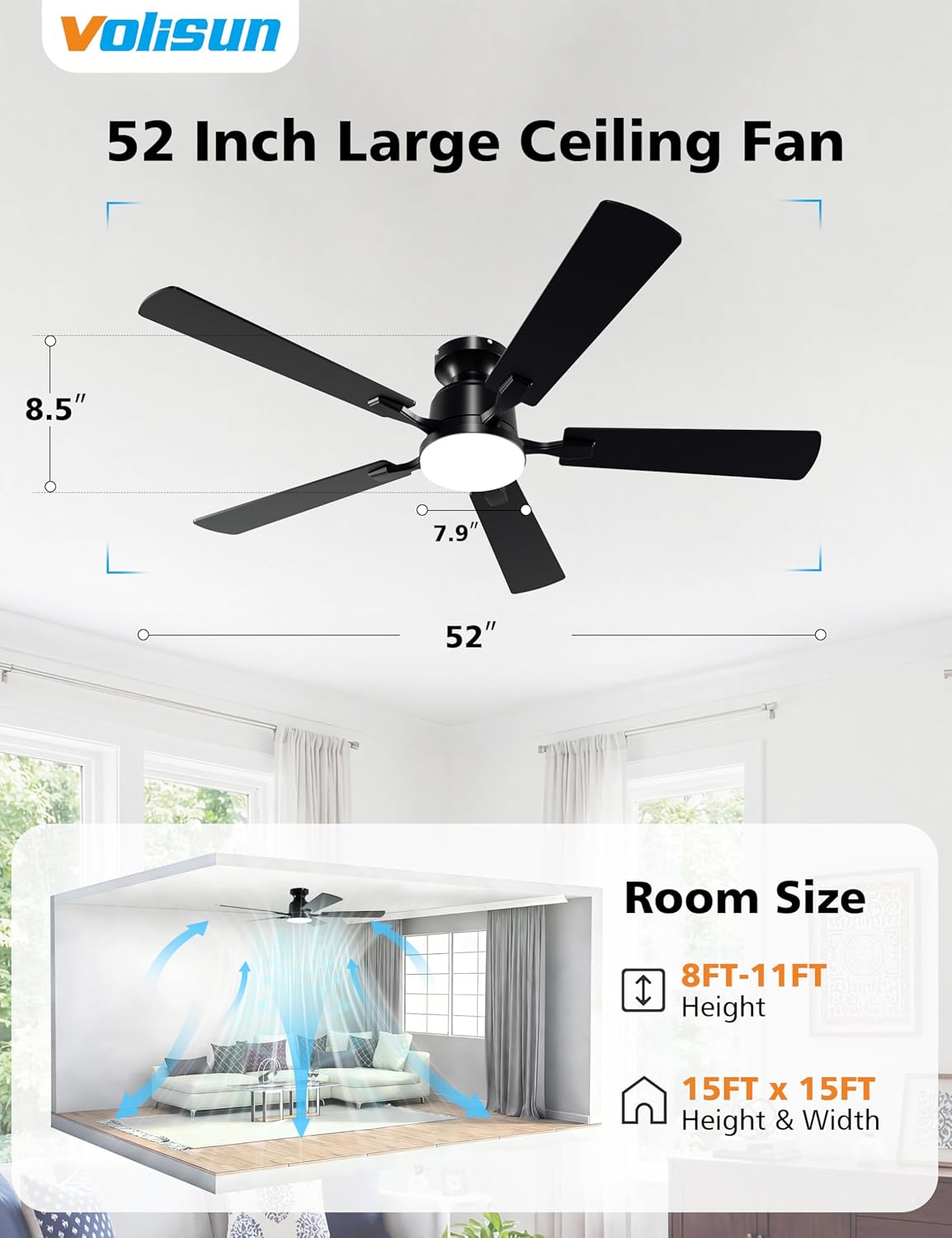
Figure 5.3: Ceiling fan dimensions and recommended room size (12ft x 12ft to 15ft x 15ft).
6. Operating Instructions
Your VOLISUN ceiling fan can be controlled via the included remote control or a dedicated smartphone application.
6.1. Remote Control Operation
The remote control allows you to adjust fan speed, light settings, and activate the timer function.

Figure 6.1: Remote Control for the VOLISUN Ceiling Fan.
- Fan Speed: Use buttons 1-6 to select desired fan speed.
- Fan ON/OFF: Press the central fan button to turn the fan on or off.
- Light ON/OFF: Press the light bulb button to turn the light on or off.
- Light Brightness: Use the '+' and '-' buttons to adjust light brightness (5% to 100%).
- Color Temperature: Cycle through 3000K (Warm), 4000K (Natural), and 6000K (Cool) using the color temperature switch button.
- Memory Function: The light retains your last brightness and color temperature settings when turned off and on again.
- Reversible Fan: Use the forward/reverse button to change blade direction for summer cooling or winter heat circulation.
- Timer: Set the fan to turn off after 1, 2, or 4 hours using the timer buttons.

Figure 6.2: Customizable Light Settings (Color Temperatures and Brightness).
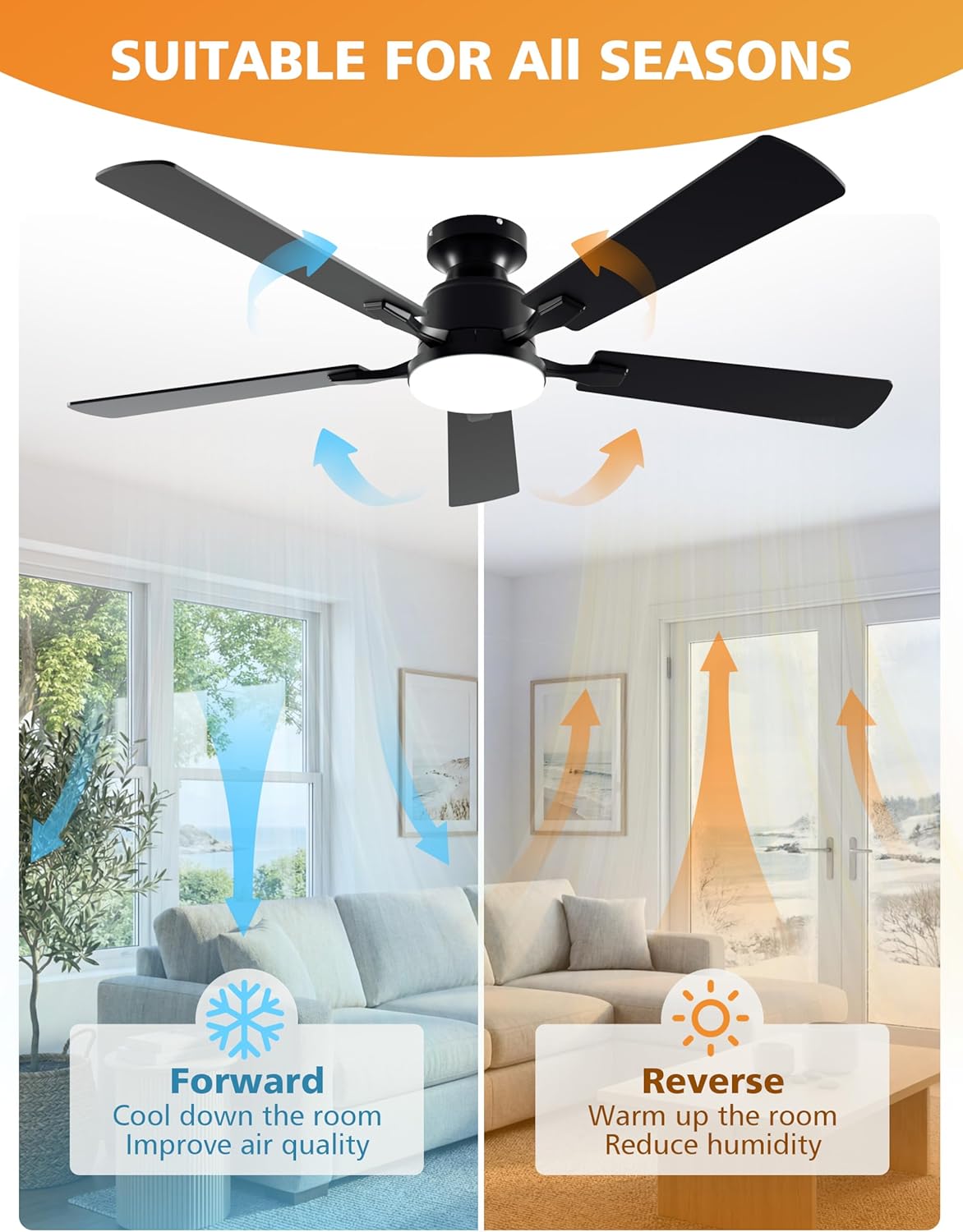
Figure 6.3: Reversible Fan Function for All Seasons.
6.2. App Control Operation
The VOLISUN ceiling fan supports control via a smartphone application. Ensure Bluetooth is enabled on your device.

Figure 6.4: Remote and App Control Interface.
6.2.1. App Connection Tutorial
Follow these steps to connect your fan to the app:
- Turn on Bluetooth on your smartphone.
- Allow the app to access Bluetooth when prompted.
- Open the app, click "Add group", select "Fan", and click '+'.
- Turn on the light using the wall switch (not the remote).
- Press the "Paircode" button in the app quickly within 5 seconds.
- The fan light will flash to indicate a successful connection.

Figure 6.5: Steps for App Connection.
For a visual demonstration of the app connection process, please watch the video below:
Video 6.1: Official VOLISUN tutorial on connecting the ceiling fan to the mobile application.
7. Maintenance
Regular maintenance ensures optimal performance and longevity of your ceiling fan.
- Cleaning: Periodically clean the fan blades and motor housing with a soft, damp cloth. Do not use abrasive cleaners or solvents that may damage the finish. Ensure power is off before cleaning.
- Tightening Screws: Check all screws and connections annually to ensure they are properly tightened. Loose connections can cause noise or wobble.
- Light Source: The integrated LED light is designed for long-term use. If the light source fails, contact customer support for assistance; it is not user-replaceable.
8. Troubleshooting
If you encounter issues with your VOLISUN ceiling fan, refer to the following common problems and solutions:
| Problem | Possible Cause | Solution |
|---|---|---|
| Fan does not start | No power to the fan; Loose wire connections; Remote control battery low. | Check circuit breaker/fuse; Ensure all wire connections are secure; Replace remote control battery. |
| Fan wobbles | Loose blade screws; Improperly installed mounting bracket; Unbalanced blades. | Tighten all blade screws; Recheck mounting bracket installation; Use a balancing kit (not included) if necessary. |
| Light does not work | No power to the light; Loose wire connection; LED driver issue. | Check power supply; Verify light kit wiring; Contact customer support if LED driver is suspected. |
| Remote control not working | Low battery; Remote not paired with fan. | Replace remote battery; Re-pair the remote control with the fan (refer to pairing instructions in the app connection section). |
| App control not connecting | Bluetooth off; Incorrect pairing procedure; App permissions. | Ensure Bluetooth is on; Follow app connection tutorial precisely; Check app permissions for Bluetooth access. |
9. Warranty and Support
VOLISUN provides a 5-year motor service and a 2-year service for other parts for this ceiling fan. This warranty covers defects in materials and workmanship under normal use.
For warranty claims, technical support, or any questions regarding your VOLISUN ceiling fan, please contact our customer service team. Please have your model number (CF1789B) and purchase information ready when contacting support.
You can visit the official VOLISUN store on Amazon for more information and support: VOLISUN Store