
1. Safety Instructions
Please read this entire manual carefully before operating the GYMAX GM2231 Walking Treadmill. Adhere to all warnings and instructions to ensure safe and effective use.
- Emergency Stop Safety Key: Always attach the safety key to your clothing before starting any workout. In case of an emergency or if you lose balance, pulling the safety key will immediately stop the treadmill.
- Extended Handrails: Utilize the extended and enclosed handrails for enhanced support and balance, especially important for users requiring additional stability.
- Starting and Stopping: Always stand on the side rails before starting the treadmill. Begin at the lowest speed and gradually increase. Ensure the treadmill has come to a complete stop before dismounting.
- Weight Capacity: Do not exceed the maximum user weight capacity of 300 pounds.
- Placement: Place the treadmill on a flat, stable surface with adequate clearance around it.
- Children and Pets: Keep children and pets safely away from the machine during operation and when not in use.
2. Package Contents
Verify that all components are present in the box before assembly:
- Treadmill Main Unit
- Silicone Treadmill Lubricant
- Safety Key
- Instruction Manual
- Assembly Tools (Allen wrench, wrench)
3. Assembly Instructions
The GYMAX GM2231 Walking Treadmill is designed for straightforward assembly. All necessary tools and extra screws are included. Follow the pictorial directions in the provided user manual for detailed steps.
- Carefully remove all components from the packaging.
- Lift the main treadmill unit and position it on a flat surface.
- Attach the upright supports to the main frame using the provided screws and tools.
- Secure the console/display unit to the top of the upright supports. Ensure all electrical connections are properly made.
- Attach the extended handrails to the designated points on the frame, ensuring they are securely fastened.
- Verify all screws are tightened and the treadmill is stable before use.

4. Operating Instructions
4.1 Basic Operation
- Power On/Off: Locate the power switch on the main unit (usually near the power cord connection) and flip it to the 'ON' position. The LED display will illuminate.
- Start/Stop: Press the START button on the console to begin your workout. The treadmill will start at a very slow speed (0.5 MPH). Press the STOP button to gradually bring the treadmill to a halt.
- Speed Adjustment: Use the SPEED + and SPEED - buttons on the console or handrails to adjust the walking speed. The speed range is 0.5-7.5 MPH.
- Display Modes: The LED display tracks various metrics including Time, Speed, Distance, Calories, and Steps. Use the MODE button to cycle through the display options or activate scan mode to view all metrics sequentially.

4.2 Preset Programs
The treadmill includes 15 built-in preset programs (P1-P15) to vary your workout intensity. Press the PROG. button to select a program. Each program has a predefined speed profile over time. Once a program is selected, press START to begin.
4.3 Heart Rate Monitoring
To monitor your heart rate, place both hands on the pulse sensors located on the handrails. Your heart rate will be displayed on the LED screen after a few seconds. This feature helps you stay within your target heart rate zone for effective exercise.
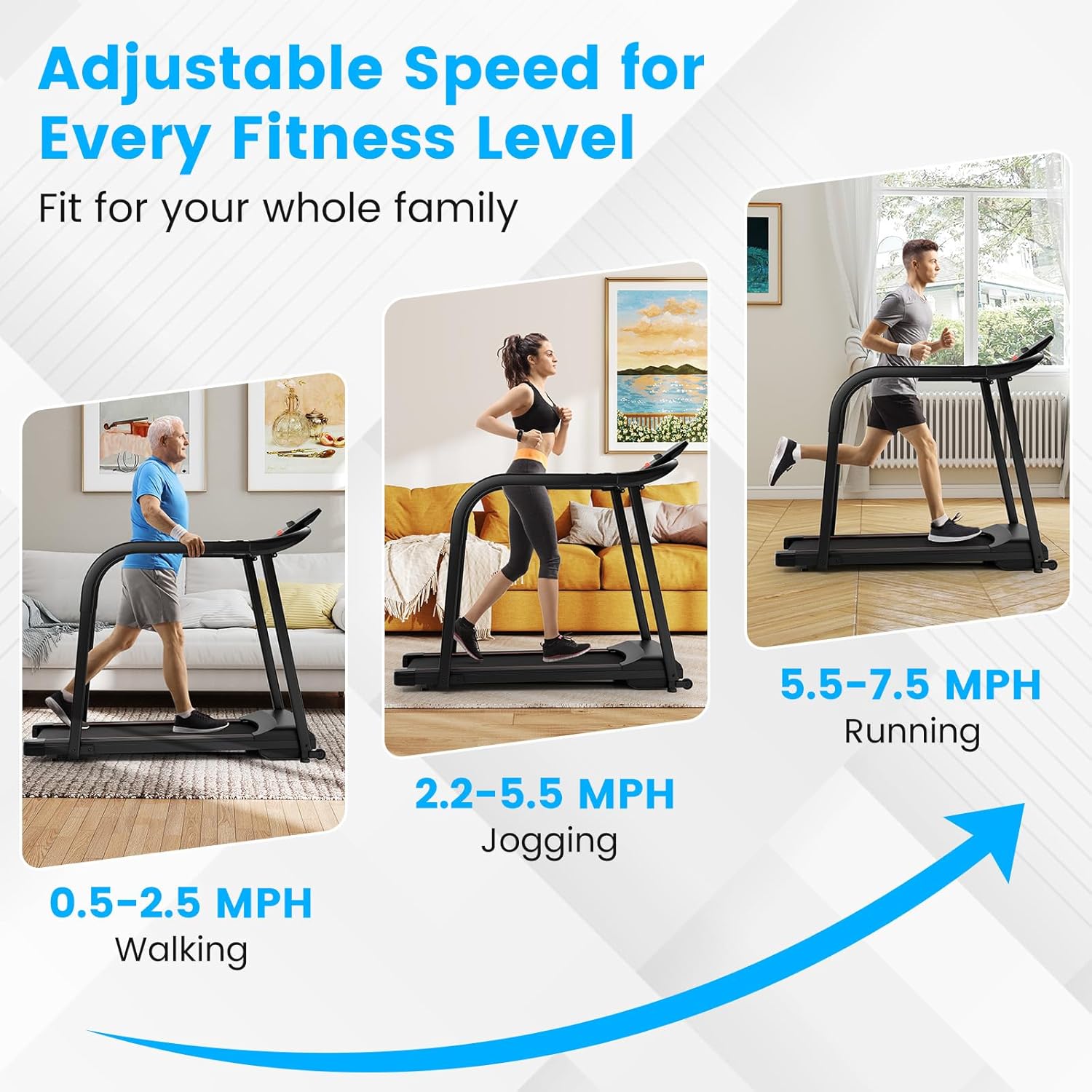
4.4 Adjustable Speed for Various Fitness Levels
The treadmill offers a versatile speed range to accommodate different fitness levels and exercise types:
- Walking (0.5-2.5 MPH): Ideal for gentle exercise, recovery, or users requiring maximum stability.
- Jogging (2.2-5.5 MPH): Suitable for a moderate cardiovascular workout.
- Running (5.5-7.5 MPH): For more intense cardio sessions.
4.5 Folding and Storage
The treadmill features detachable handrails and built-in transportation wheels for easy storage and portability.
- Folding: To fold the treadmill, ensure it is powered off and stopped. Detach the handrails by loosening the securing knobs. The running deck can then be folded upwards towards the console for a compact storage footprint of 53 x 25 x 8.5 inches.
- Transportation: Use the integrated wheels at the front of the unit to easily move the folded treadmill to your desired storage location.

5. Maintenance
- Lubrication: Regularly lubricate the running belt with the provided silicone treadmill lubricant to ensure smooth operation and prolong the life of the belt. Refer to the user manual for specific lubrication intervals and instructions.
- Belt Adjustment: If the running belt starts to slide or feel uneven, adjust it according to the instructions in the user manual.
- Cleaning: Keep the treadmill clean by wiping it down with a damp cloth after each use. Avoid using abrasive cleaners.
6. Troubleshooting
If you encounter any issues with your GYMAX GM2231 Walking Treadmill, please refer to the following common troubleshooting steps:
- Treadmill Not Starting: Ensure the power cord is securely plugged in, the power switch is in the 'ON' position, and the safety key is correctly inserted into the console.
- Belt Slipping: The running belt may need adjustment or lubrication. Follow the maintenance instructions for belt adjustment and lubrication.
- Unusual Noises: Check for any loose parts or foreign objects under the belt. Ensure the treadmill is on a level surface. If the noise persists, contact customer support.
- Display Not Working: Check all cable connections to the console. Ensure the power supply is stable.
For issues not covered here, please consult the full user manual or contact GYMAX customer support.
7. Specifications
| Feature | Specification |
|---|---|
| Brand | GYMAX |
| Model Number | GM2231 |
| Motor Horsepower | 2.5 HP |
| Speed Range | 0.5 - 7.5 MPH |
| Weight Capacity | 300 lbs |
| Product Dimensions (L x W x H) | 53"D x 25"W x 44"H |
| Folded Size | 53"D x 25"W x 8.5"H |
| Item Weight | 69 lbs |
| Noise Level | ≤45dB |
| Display Type | LED |
| Number of Preset Programs | 15 |
| Material | Acrylonitrile Butadiene Styrene (ABS), Metal |
| Special Features | Foldable, Heavy Duty, Portable, Water Bottle Holder, Wheeled, Heart Rate Sensor |
8. Warranty and Support
The GYMAX GM2231 Walking Treadmill comes with a 90-day warranty. For any product inquiries, technical assistance, or warranty claims, please contact GYMAX customer support. The product is shipped from Gymax and offers 30-day easy returns.
Please retain your proof of purchase for warranty validation.