
1. Product Overview
The COMHOMA LT003-COM is a versatile tiltable mobile standing desk designed for various uses, including as an overbed table, bedside table, or portable laptop workstation. It features pneumatic height adjustment and a dual-zone desktop for enhanced functionality.
- Dual-Zone Functionality: One side remains fixed for stable item placement, while the other provides a flexible workspace.
- Dual Flip Panels: Both desktop panels tilt independently up to 48 degrees for ergonomic adjustment.
- Pneumatic Height Adjustment: Smoothly adjust the desk height from 26.5 inches to 43 inches using a gas-spring lift system.
- Hidden Rolling Casters: Concealed wheels allow for quiet and easy repositioning and can tuck under furniture.
- Durable Construction: Made from high-quality wood and a stainless steel frame, supporting up to 100 lbs.
2. Safety Information
Please read and understand all safety instructions before assembly and use.
- Always ensure the desk is properly secured and stable before placing items on it or using it.
- Do not exceed the maximum weight capacity of 100 lbs (45 kg).
- Keep hands, fingers, and other body parts clear of moving parts, especially during height adjustment and panel tilting, to prevent injury.
- Avoid touching the side adjustment paddle prematurely during assembly, as the pneumatic tension is powerful and can cause the column to snap upward.
- Place heavier beverages or unstable items on the fixed desktop section rather than the tilted panel.
- Regularly check all fasteners to ensure they are tight. Retighten as necessary.
3. Setup and Assembly
The COMHOMA LT003-COM desk requires self-assembly. An assembly guide is included with your product. Follow these general steps for successful setup:
- Unpack and Inventory: Carefully unpack all components and lay them out. Verify that all parts listed in the included assembly guide are present.
- Base Assembly: Attach the base supports to the main column. Ensure all screws are hand-tightened initially to avoid stripping threads.
- Desktop Attachment: Secure the desktop panels to the pneumatic lift mechanism. Pay close attention to the orientation of the panels. The laptop lip can be installed on either side to suit left- or right-handed users.
- Caster Installation: The hidden casters are typically pre-installed or easily snap into place at the base.
- Final Tightening: Once all components are in place and aligned, fully tighten all screws and fasteners. Do not overtighten.
Note: Some hardware may be pre-installed. Refer to the specific diagrams in your included manual for precise instructions.
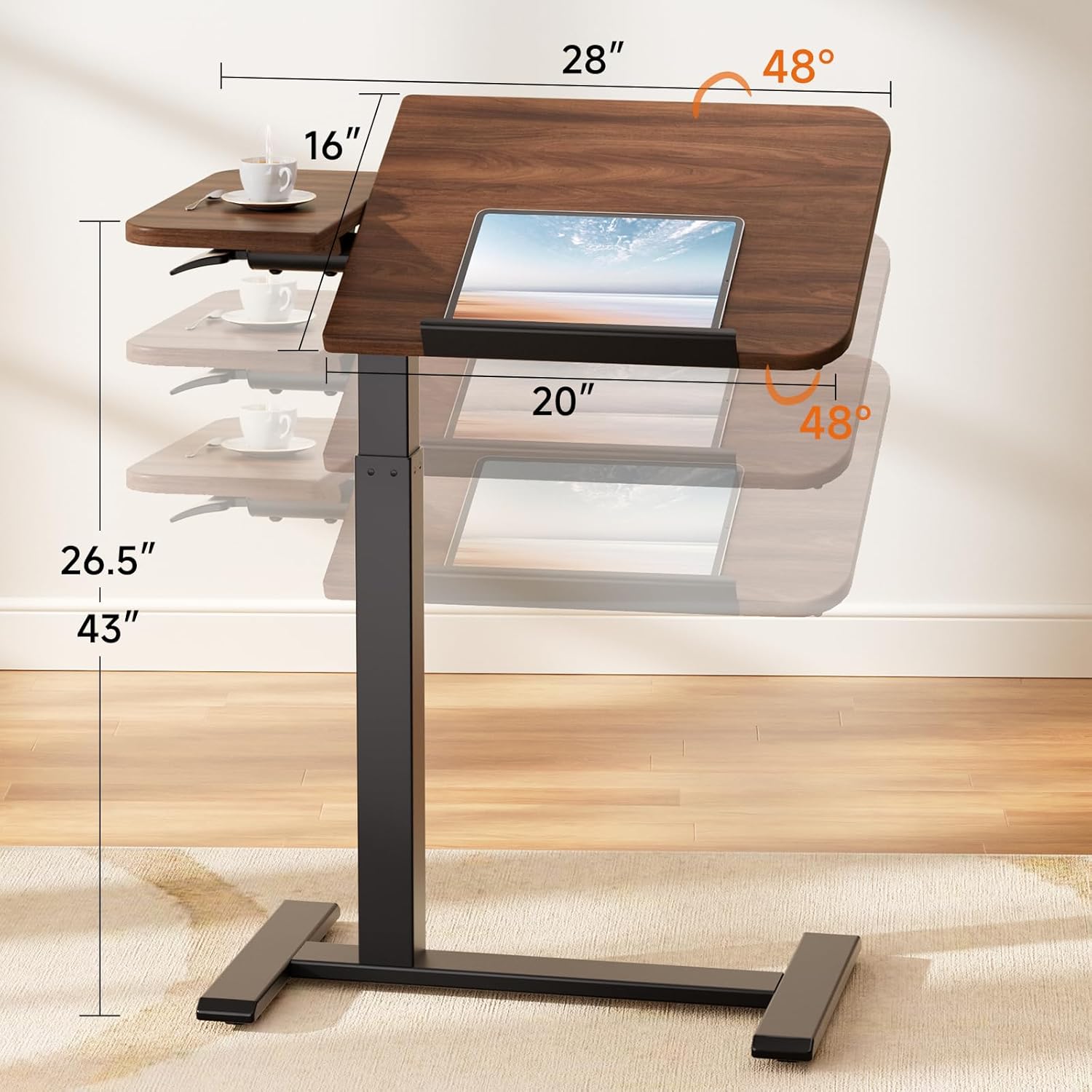
Figure 3.1: Desk dimensions and tilt range. The main desktop measures 28 inches wide, 16 inches deep, and can tilt up to 48 degrees. The height adjusts from 26.5 to 43 inches.
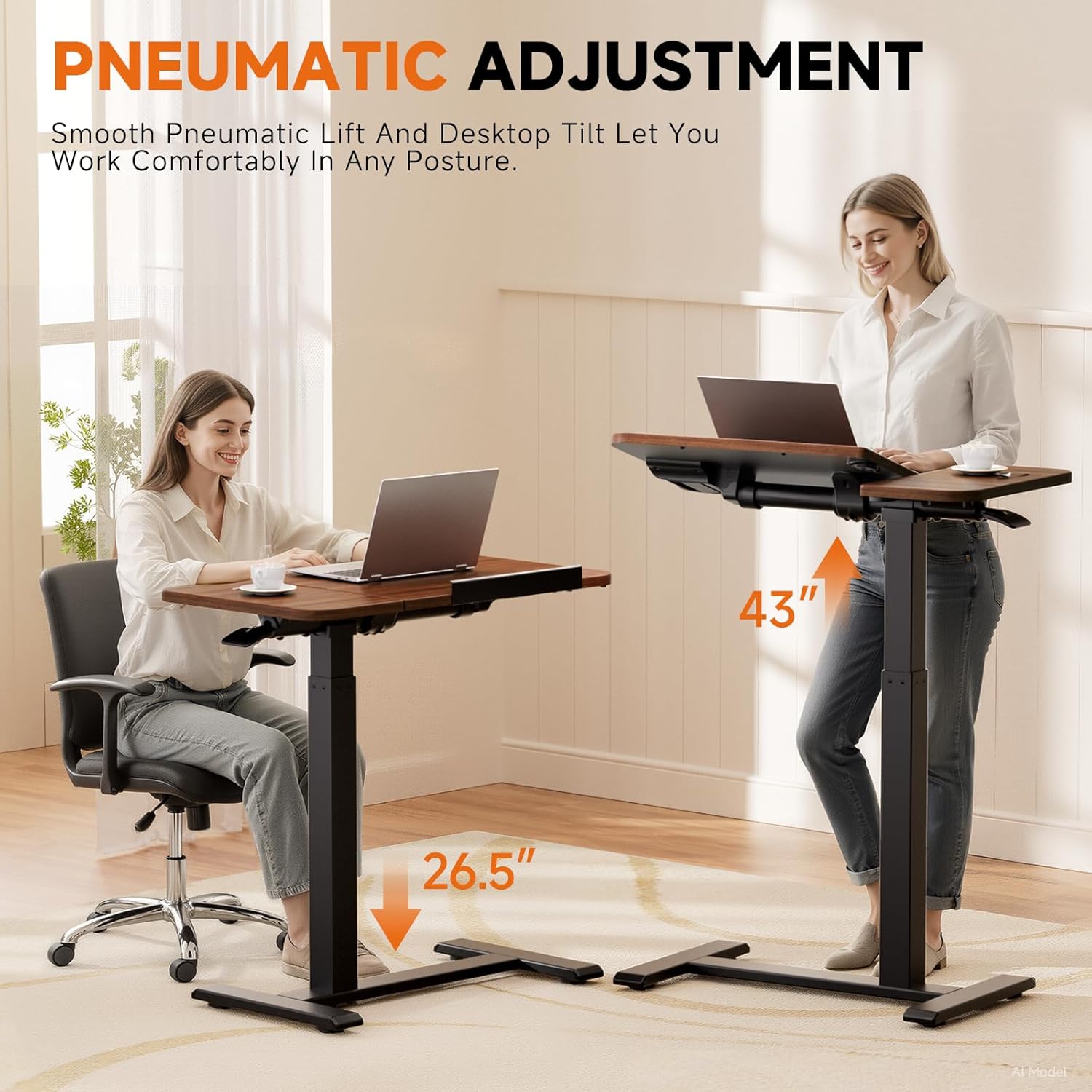
Figure 3.2: Demonstrating the pneumatic height adjustment from 26.5 inches (sitting) to 43 inches (standing).
4. Operating Instructions
4.1 Adjusting Height
To adjust the desk height, locate the pneumatic lift lever, typically found under the desktop. Press the lever and gently guide the desktop up or down to your desired height. Release the lever to lock the desk in position. The gas-spring system ensures smooth and effortless adjustment.

Figure 4.1: Detail of the easy pneumatic lift lever for height adjustment.
4.2 Tilting Desktop Panels
The main desktop panel and the smaller fixed panel can tilt independently up to 48 degrees. To tilt a panel, locate the adjustment mechanism (usually a knob or lever) beneath the panel. Loosen it, adjust the panel to the desired angle, and then tighten to secure. The main panel includes a removable partition to prevent items from slipping when tilted.

Figure 4.2: Dual-zone desktop design, illustrating the movable and fixed sections.

Figure 4.3: The dual-direction flip allows for flexible use and optimal viewing angles, with a 96-degree total flip range.

Figure 4.4: Removable partition design to prevent items from sliding off the tilted panel.
4.3 Moving the Desk
The desk is equipped with hidden rolling casters for easy mobility. Simply push or pull the desk to reposition it. The C-shape base with hidden casters is designed to slide under beds, sofas, or other furniture with a clearance of at least 1.18 inches.

Figure 4.5: C-shape base with hidden casters for easy movement and tucking under furniture.
4.4 Official Product Video
Video 4.1: Official product demonstration of the COMHOMA Tiltable Mobile Standing Desk, showcasing its features and adjustability.
5. Maintenance and Care
- Cleaning: Wipe the desk surfaces with a soft, damp cloth. Avoid harsh chemicals or abrasive cleaners that could damage the finish.
- Caster Care: Occasionally clean the hidden rolling casters to remove any dust, hair, or carpet lint that may hinder smooth movement.
- Fastener Check: Periodically inspect all screws and bolts. Tighten any loose fasteners to maintain stability and safety.
- Weight Distribution: Distribute weight evenly on the desktop and avoid placing excessively heavy items on the tilting panel.
6. Troubleshooting
- Desk is wobbly:
- Ensure all assembly screws are securely tightened.
- Verify the desk is on a flat, even surface.
- Height adjustment is stiff or not working:
- Check for any obstructions around the pneumatic lift mechanism.
- Ensure the lift lever is fully engaged when attempting to adjust.
- Do not exceed the maximum weight capacity.
- Desktop panels do not tilt smoothly:
- Ensure the tilting mechanism's knob/lever is sufficiently loosened before attempting to adjust.
- Check for any debris or obstructions in the tilting mechanism.
- Desk does not roll easily:
- Clean the casters to remove any accumulated debris (e.g., hair, lint).
- Ensure the desk is not overloaded.
7. Specifications
| Feature | Detail |
|---|---|
| Model Number | LT003-COM |
| Brand | COMHOMA |
| Product Dimensions (D x W x H) | 16"D x 28"W x 26.5"H |
| Adjustable Height Range | 26.5" to 43" |
| Tabletop Thickness | 1.18 inches |
| Maximum Weight Capacity | 100 lbs (45 kg) |
| Material Type | Engineered Wood (Top), Stainless Steel (Base) |
| Color | Walnut |
| Special Features | Adjustable Height, Portable, Space Saving, Wheels, Dual-Zone Desktop, Tilting Panels |
| Assembly | Self-assembly required, assembly guide included |
8. Warranty and Support
This COMHOMA product comes with a Limited Warranty. For specific warranty terms and conditions, please refer to the documentation included with your purchase or contact COMHOMA customer service.
For further assistance, troubleshooting, or to inquire about replacement parts, please visit the official COMHOMA store or contact their customer support channels.
Official COMHOMA Store: COMHOMA Store on Amazon