
1. Introduction
Thank you for choosing the Trisomy 4-in-1 Walking Pad Treadmill. This manual provides essential information for the safe and effective use of your new fitness equipment. Please read it thoroughly before assembly and operation, and keep it for future reference.
2. Safety Information
To ensure your safety and prolong the life of your treadmill, observe the following precautions:
- Always consult with a physician before starting any new exercise program.
- Place the treadmill on a flat, stable surface, away from water and heat sources.
- Ensure adequate clearance around the treadmill (at least 2 feet on sides and front, 6 feet at the rear).
- Keep children and pets away from the treadmill during operation.
- Wear appropriate athletic footwear and clothing.
- Use the safety key at all times. Attach the clip to your clothing before starting.
- Do not operate the treadmill if it is damaged or malfunctioning.
- Do not step on or off the treadmill while the belt is moving.
- Maximum user weight capacity is 350 lbs.
3. Product Overview
The Trisomy 4-in-1 Walking Pad Treadmill is designed for versatile home workouts, offering walking, running, climbing, and under-desk modes. It features a powerful yet quiet motor, adjustable handrails, and multiple incline levels.
Key Features:
- Adjustable Handrails: 6-level adjustable handrails (35" to 47") to accommodate various user heights.
- 12% Incline: 3 adjustable incline levels (0-12%) for varied workout intensity and increased calorie burn.
- 4-in-1 Versatile Design: Supports working mode (0.6-1.5 MPH), walking mode (0.6-4.0 MPH), running mode (4.0-6.0 MPH), and climbing mode.
- Powerful & Quiet Motor: 3.5HP motor with low noise operation (<40dB), supporting up to 350 lbs.
- Advanced Shock Absorption: 7-layer anti-slip belt and 10 silicone shock-absorbers reduce joint pressure by up to 50%.
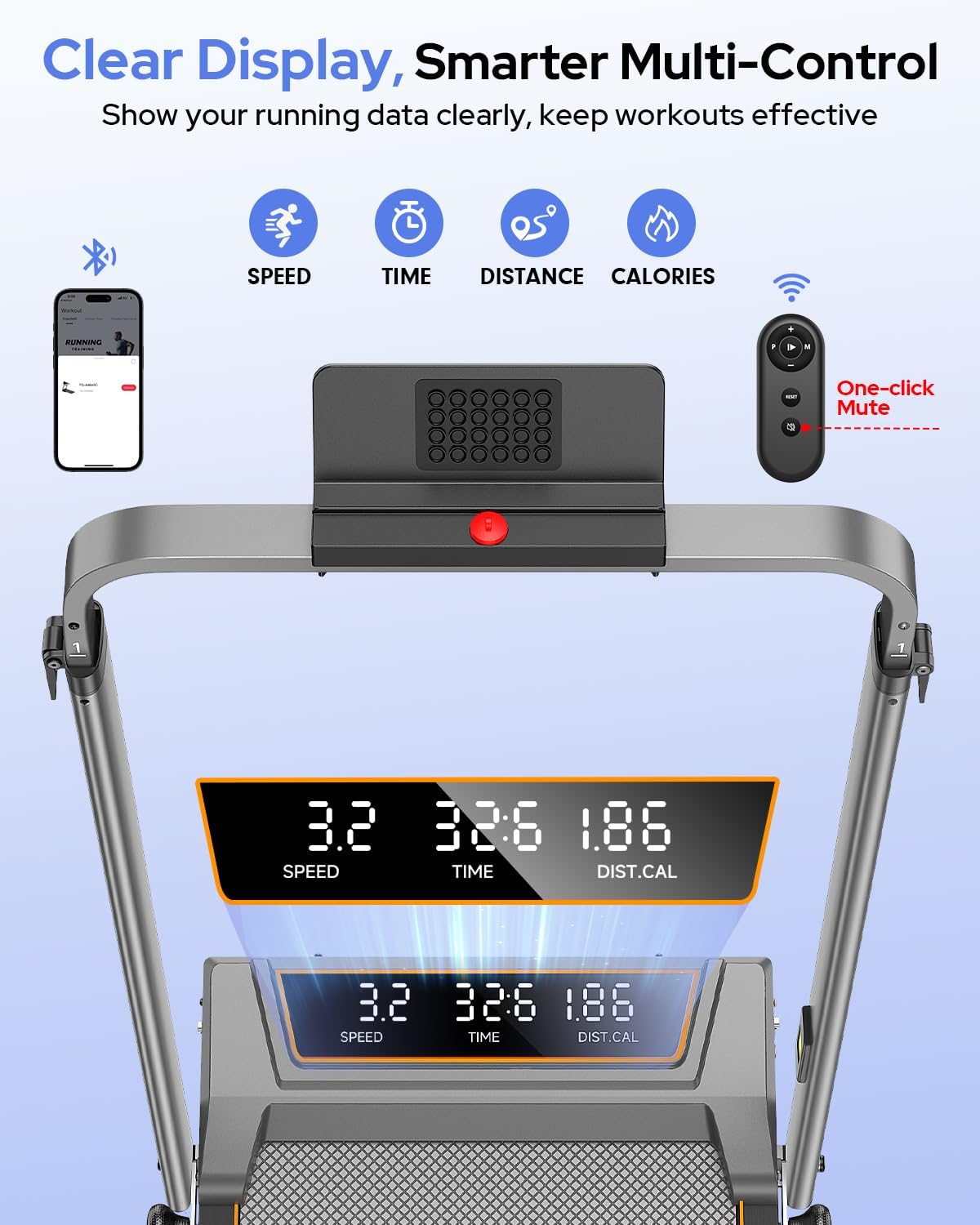
- Clear LED Display: Real-time tracking of speed, time, distance, and calories.
- Smart Control: Includes a remote control and APP connectivity for convenient operation.
- Easy Storage: Foldable design with built-in wheels for effortless movement and compact storage (folded height 4.72").
Components:

4. Setup
Follow these steps to set up your treadmill:
- Unpack the Treadmill: Carefully remove all components from the packaging. Place the main unit on a flat, stable surface.
- Install the Handlebar:Attach the handlebar to the main unit using the provided handlebar fixing nuts. Ensure it is securely tightened.

Figure 4.1: Handlebar Fixing Screw - Rotate to adjust and lock securely. - Attach Tablet Holder: Secure the tablet holder to the top of the handlebar using the tablet holder screws.
- Adjust Handlebar Height: The handlebar has 6 adjustable levels. Use the quick-release levers to set the desired height (from 35" to 47") and lock them in place.
- Set Incline Level:Manually adjust the incline to 0%, 6%, or 12% by lifting the rear of the treadmill and securing the support legs into the desired slots.

Figure 4.2: Three Levels Incline Adjustment - Manually adjust the incline to 0%, 6%, or 12% by lifting the rear of the treadmill and securing the support legs into the desired slots. - Connect Power: Plug the power cord into a grounded electrical outlet.
5. Operating Instructions
5.1 Safety Key
Always attach the safety key clip to your clothing before starting the treadmill. If the safety key is detached, the treadmill will stop immediately for safety.
5.2 Starting the Treadmill
Press the 'Start' button on the remote control or through the connected APP. The treadmill will begin at a low speed. You can also use the remote control to adjust speed and other settings.
5.3 Speed Adjustment
Use the '+' and '-' buttons on the remote control to increase or decrease the speed. The speed range is 0.6 to 6.0 MPH.
5.4 Incline Adjustment
The incline is adjusted manually as described in the Setup section. Stop the treadmill before adjusting the incline for safety.
5.5 Modes of Operation

- Working Mode: Handrails folded down, speed 0.6-1.5 MPH, ideal for use under a desk.
- Walking Mode: Handrails folded down, speed 0.6-4.0 MPH.
- Running Mode: Handrails raised, speed 4.0-6.0 MPH.
- Climbing Mode: Handrails raised, utilize incline settings for a more intense workout.
5.6 APP Control
Download the 'FITSHOW' APP to connect your treadmill via Bluetooth. The APP allows you to control speed, track workout data, and access guided programs.

5.7 Stopping the Treadmill
Press the 'Stop' button on the remote control or APP. The treadmill will gradually slow down and stop. You can also pull the safety key to stop it immediately.
5.8 Video Demonstration
6. Maintenance
Regular maintenance ensures optimal performance and longevity of your treadmill.
- Cleaning: Wipe down the treadmill with a damp cloth after each use. Do not use abrasive cleaners.
- Lubrication: The running belt requires periodic lubrication. Apply the provided lubricant under the belt as instructed in the quick installation guide.
- Belt Adjustment:If the running belt drifts to one side, use the L-shaped wrench to adjust the screws at the rear of the treadmill. Follow the instructions in Figure 6.1 for proper adjustment.

Figure 6.1: Adjustable Running Belt - If the belt drifts, use the L-shaped wrench to adjust the screws at the rear of the treadmill. Tighten the right screw or loosen the left if the belt drifts right, and vice-versa. The self-centering function corrects slight belt misalignment during low-speed operation.
7. Troubleshooting
If you encounter issues with your treadmill, refer to the following common problems and solutions:
- Treadmill not starting: Ensure the power cord is securely plugged in and the safety key is properly engaged. Check the power switch.
- Belt slipping: The running belt may need adjustment or lubrication. Refer to the Maintenance section.
- Unusual noise: Check for loose parts or foreign objects under the belt. If the noise persists, contact customer support.
- Display not working: Ensure all connections are secure. If the issue continues, contact support.
8. Specifications
| Feature | Detail |
|---|---|
| Brand | Trisomy |
| Model | B0FZRMVTVB |
| Color | Gunmetal Gray |
| Maximum Speed | 6 Miles per Hour |
| Special Features | Adjustable Height, Adjustable Speed, Compact Design, Cushioned Running Belt, Foldable |
| Target Audience | Adult, Kid, Youth |
| Assembly Required | No |
| Display Type | LED |
| Power Source | Corded Electric |
| Metrics Measured | Distance, Speed |
| Maximum Weight Recommendation | 350 Pounds |
| Frame Material Type | Alloy Steel |
9. Warranty & Support
Your Trisomy Walking Pad Treadmill comes with a 2-year warranty and lifetime technical assistance. For any questions, support, or warranty claims, please refer to the contact information provided in your user manual or on the product packaging. Our 24/7 support team is ready to assist you.
