
1. Introduction
This manual provides detailed instructions for the operation and maintenance of your JORLAI 9-in-1 Record Player, Model T409. This versatile audio system combines a 3-speed turntable with Bluetooth connectivity, AM/FM radio, USB, SD/MMC card playback, CD player, and cassette player, offering a comprehensive solution for your audio entertainment needs.

Figure 1: Overview of the JORLAI 9-in-1 Record Player's multiple functions.
2. Safety Instructions
Please read and understand all safety instructions before operating this device. Keep this manual for future reference.
- Power Source: Connect the unit only to an AC power outlet of the specified voltage.
- Ventilation: Ensure adequate ventilation. Do not block ventilation openings.
- Water and Moisture: Do not expose the unit to rain, moisture, or dripping/splashing liquids.
- Heat: Keep the unit away from heat sources such as radiators, heat registers, stoves, or other heat-producing appliances.
- Cleaning: Unplug the unit from the wall outlet before cleaning. Use a soft, dry cloth.
- Servicing: Do not attempt to service this product yourself. Refer all servicing to qualified service personnel.
- Placement: Place the unit on a stable, flat surface to prevent it from falling.
3. Package Contents
Verify that all items listed below are included in your package:
- JORLAI 9-in-1 Record Player (Model T409)
- Remote Control
- User Manual
- Power Adapter (pre-attached)
4. Product Features and Components
Familiarize yourself with the main components and features of your record player.
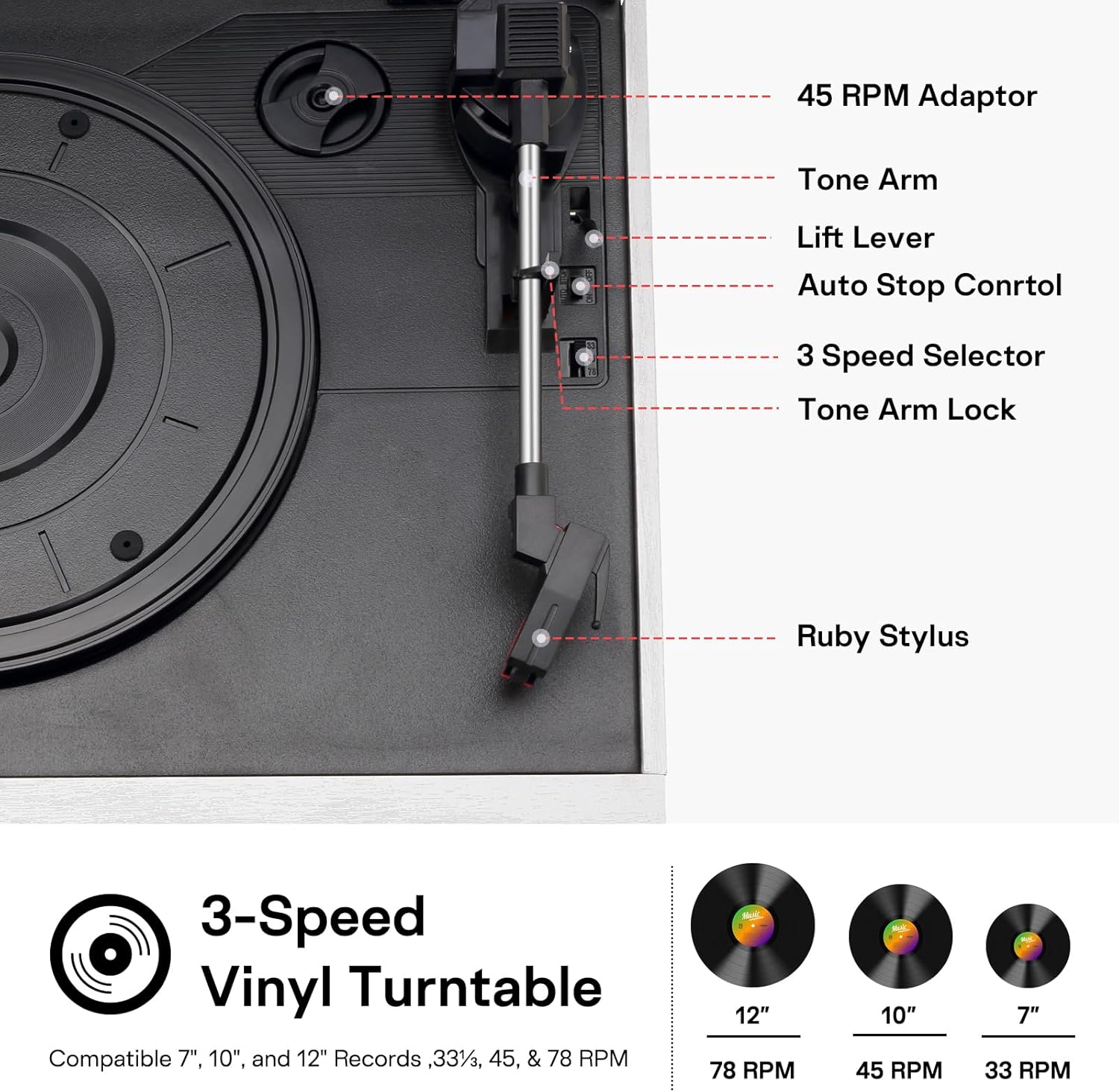
Figure 2: Turntable Components.
Key Components:
- 3-Speed Turntable: Supports 33-1/3, 45, and 78 RPM records.
- Tone Arm with Ruby Stylus: For playing vinyl records.
- 45 RPM Adaptor: For playing 7-inch records with a large center hole.
- CD Player: Front-loading tray for audio CDs.
- Cassette Player: Side-loading slot for audio cassettes.
- AM/FM Radio: Built-in tuner for radio broadcasts.
- USB Port: For USB drive playback.
- SD/MMC Card Slot: For SD or MMC card playback.
- Bluetooth Connectivity: For wireless audio streaming from compatible devices.
- Built-in Dual Speakers: Integrated stereo speakers for direct audio output.
- RCA Line Out: For connecting to external amplifiers or powered speakers.
- Headphone Jack: For private listening.
- Remote Control: For convenient operation of various functions.

Figure 3: Rear panel with RCA Line Out and power connection.
5. Setup
Follow these steps to set up your record player:
- Unpack: Carefully remove the unit and all accessories from the packaging.
- Placement: Place the record player on a flat, stable surface away from direct sunlight, heat sources, and excessive dust or vibration.
- Power Connection: Plug the power adapter into the AC IN jack on the rear of the unit, then plug the other end into a standard wall outlet.
- Dust Cover: Remove any protective film or packaging from the dust cover and turntable platter.
- Initial Power On: Press the POWER button to turn on the unit.
6. Operating Instructions
This section details how to use each playback function of your JORLAI 9-in-1 Record Player.
Video 1: Demonstrates various playback functions of the JORLAI 9-in-1 Record Player, including vinyl, CD, USB, SD card, cassette, AM/FM radio, and Bluetooth connection.
6.1. Vinyl Playback
To play vinyl records:
- Open the dust cover.
- Place a record on the turntable platter. If playing a 7-inch record, use the 45 RPM adaptor.
- Select the appropriate speed (33, 45, or 78 RPM) using the speed selector switch.
- Release the tone arm lock.
- Use the lift lever to gently raise the tone arm.
- Manually position the tone arm over the desired track on the record.
- Lower the tone arm using the lift lever. The record will begin to play.
- Adjust the volume using the VOLUME knob.
- At the end of the record, the turntable may stop automatically (if auto-stop is enabled). Use the lift lever to raise the tone arm and return it to its rest.
Refer to Video 1, timestamp 0:05 for a demonstration of vinyl playback.
6.2. CD Playback
To play audio CDs:
- Press the FUNCTION button repeatedly until 'CD' mode is selected.
- Press the OPEN/CLOSE button to open the CD tray.
- Place a CD with the label side facing up into the tray.
- Press the OPEN/CLOSE button again to close the tray. The unit will read the CD.
- Playback will start automatically. Use the PLAY/PAUSE, NEXT, and PREVIOUS buttons to control playback.
- Adjust the volume using the VOLUME knob.
Refer to Video 1, timestamp 0:15 for a demonstration of CD playback.
6.3. Cassette Playback
To play audio cassettes:
- Press the FUNCTION button repeatedly until 'TAPE' mode is selected.
- Insert an audio cassette into the cassette slot on the side of the unit.
- Press the PLAY button on the cassette deck to start playback.
- Use the FAST FORWARD, REWIND, and STOP buttons to control playback.
- Adjust the volume using the VOLUME knob.
Refer to Video 1, timestamp 0:31 for a demonstration of cassette playback.
6.4. USB Playback
To play music from a USB drive:
- Press the FUNCTION button repeatedly until 'USB' mode is selected.
- Insert a USB flash drive into the USB port.
- The unit will automatically detect and begin playing compatible audio files.
- Use the PLAY/PAUSE, NEXT, and PREVIOUS buttons to control playback.
- Adjust the volume using the VOLUME knob.
Refer to Video 1, timestamp 0:22 for a demonstration of USB playback.
6.5. SD/MMC Card Playback
To play music from an SD or MMC card:
- Press the FUNCTION button repeatedly until 'CARD' mode is selected.
- Insert an SD or MMC card into the card slot.
- The unit will automatically detect and begin playing compatible audio files.
- Use the PLAY/PAUSE, NEXT, and PREVIOUS buttons to control playback.
- Adjust the volume using the VOLUME knob.
Refer to Video 1, timestamp 0:26 for a demonstration of SD card playback.
6.6. AM/FM Radio
To listen to the radio:
- Press the FUNCTION button repeatedly until 'FM' or 'AM' mode is selected.
- Rotate the TUNING knob to scan for radio stations.
- Adjust the volume using the VOLUME knob.
Refer to Video 1, timestamp 0:37 for a demonstration of AM/FM radio tuning.
6.7. Bluetooth Connection
To stream audio wirelessly via Bluetooth:
- Press the FUNCTION button repeatedly until 'BT' (Bluetooth) mode is selected. The display will show 'BT' and flash, indicating it's in pairing mode.
- Enable Bluetooth on your external device (smartphone, tablet, etc.).
- Search for available devices and select 'JOPOSTAR' from the list.
- Once paired, the 'BT' indicator will stop flashing, and you can play music from your device through the record player.
- Adjust the volume using the VOLUME knob on the unit or your external device.
Refer to Video 1, timestamp 0:49 for a demonstration of Bluetooth connection.
6.8. RCA Line Out
To connect to external speakers or an amplifier:
- Connect an RCA cable (not included) to the 'LINE OUT' ports on the rear of the record player.
- Connect the other end of the RCA cable to the audio input of your external amplifier or powered speakers.
- Ensure the external audio system is powered on and set to the correct input.
- Audio will now be routed through your external system.
7. Maintenance
Proper maintenance ensures the longevity of your record player.
- Cleaning the Unit: Use a soft, dry cloth to wipe the exterior surfaces. Do not use abrasive cleaners or solvents.
- Cleaning the Stylus: Gently clean the stylus periodically with a soft brush, brushing from back to front.
- Dust Cover: Keep the dust cover closed when not in use to protect the turntable from dust and debris.
- Record Care: Handle records by their edges. Store them vertically in their sleeves to prevent warping.
8. Troubleshooting
If you encounter issues, refer to the following common problems and solutions:
| Problem | Possible Cause | Solution |
|---|---|---|
| No power | Power cord not connected; outlet not active | Ensure power cord is securely plugged in; test outlet with another device. |
| No sound | Volume too low; incorrect function selected; external speakers not connected/powered | Increase volume; select correct function (e.g., PHONO, CD); check external speaker connections and power. |
| Turntable not spinning | Belt dislodged; speed selector incorrect | Contact customer support for belt issues; ensure correct speed is selected. |
| Bluetooth not pairing | Device too far; Bluetooth not enabled on external device; incorrect pairing mode | Move device closer; enable Bluetooth on your device; ensure record player is in BT pairing mode. |
| CD/USB/SD not playing | Disc/media inserted incorrectly; incompatible file format; media damaged | Reinsert media correctly; ensure files are compatible (e.g., MP3); try different media. |
9. Specifications
Technical specifications for the JORLAI T409 Record Player:
- Model Name: T409
- Brand: JORLAI
- Product Dimensions: 12.6 x 10.23 x 7.67 inches
- Item Weight: 8.28 pounds
- Turntable Speeds: 33-1/3, 45, 78 RPM
- Motor Type: Belt-Driven
- Power Source: Corded Electric
- Included Components: Remote Control
- Special Features: Bluetooth Connectivity, AM FM Radio, USB SD MMC Inputs, CD Cassette Playback, Built-in Dual Speakers, Remote Control

Figure 4: Product Dimensions.
10. Warranty and Support
For warranty information or technical support, please refer to the warranty card included with your product or contact JORLAI customer service. Keep your purchase receipt as proof of purchase.