Introduction
This manual provides essential information for setting up, operating, and maintaining your Acer Nitro V 16 AI Gaming Laptop. Please read this manual thoroughly to ensure optimal performance and longevity of your device.

Image: Front view of the Acer Nitro V 16 AI Gaming Laptop, showcasing its display and keyboard.
Setup
What's in the Box
Upon unboxing, verify that all components are present:
- Acer Nitro V 16 AI Gaming Laptop
- Power Adapter/Charger
- iCarp Type-C 3-in-1 Hub (USB 3.0, HDTV 4K Output, Type-C PD)

Image: The included iCarp Type-C 3-in-1 Hub, providing additional connectivity options.
Initial Power On
- Connect the power adapter to the laptop's DC-in jack and a power outlet.
- Open the laptop lid.
- Press the power button to turn on the laptop.
- Follow the on-screen instructions to complete the initial Windows 11 Home setup.
Connectivity
The Acer Nitro V 16 AI offers a comprehensive selection of ports for various peripherals and external devices.
- USB-A 3.2: Three ports for connecting standard USB devices.
- USB-C 4: One port for high-speed data transfer and display output.
- HDMI 2.1: For connecting to external displays or TVs.
- RJ45 Gigabit Ethernet: For wired network connectivity.
- Headset Jack: For audio input/output.
- MicroSD Card Slot: For expanding storage or transferring data from memory cards.
- Kensington Lock: For physical security.

Image: Left side view of the laptop detailing the various input/output ports.
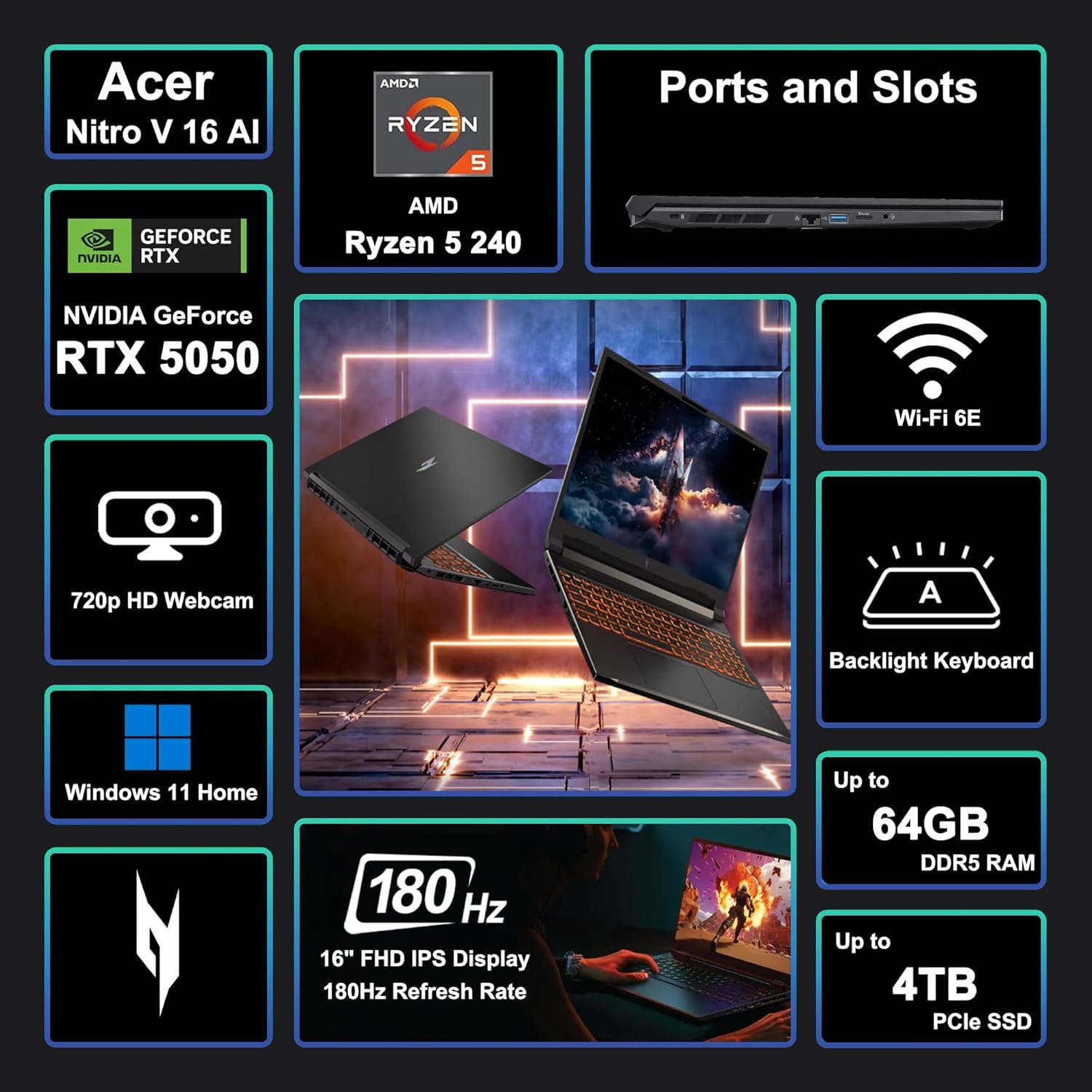
Image: A visual summary of key features and specifications of the Acer Nitro V 16 AI.
Operating Your Laptop
Display Features
The laptop features a 16-inch WUXGA (1920 x 1200) IPS display with a 180Hz refresh rate, providing smooth visuals for gaming and other demanding applications.

Image: Visual representation of the difference between 60Hz and 180Hz refresh rates, highlighting smoother motion at higher rates.
Keyboard and Touchpad
The integrated keyboard is backlit, enhancing visibility in low-light conditions. The touchpad provides precise navigation and supports multi-touch gestures.

Image: Close-up of the backlit keyboard, showing key layout and illumination.
Performance Overview
The Acer Nitro V 16 AI is equipped with an AMD Zen 4 Hexa-Core Ryzen 5 240 Processor and a dedicated NVIDIA GeForce RTX 5050 8GB Graphic card, alongside 32GB of RAM and a 1TB SSD, ensuring robust performance for gaming, content creation, and multitasking.

Image: Details of the AMD Ryzen 5 240 processor, highlighting its core count, threads, cache, and clock speed.

Image: Information about the NVIDIA GeForce RTX 5050 GPU, emphasizing its capabilities for gaming and creative tasks.
Cooling System
The laptop incorporates an advanced cooling system designed to maintain optimal temperatures during intensive use, preventing thermal throttling and ensuring consistent performance.
Battery Life
The 76Wh battery provides several hours of usage depending on the workload. For prolonged high-performance tasks like gaming or video editing, it is recommended to keep the laptop connected to the power adapter.
Maintenance
- Cleaning: Use a soft, lint-free cloth to clean the screen and exterior. Avoid harsh chemicals.
- Software Updates: Regularly update your operating system and drivers to ensure security and performance.
- Ventilation: Ensure the laptop's vents are clear and unobstructed to prevent overheating.
- Battery Care: Avoid fully discharging the battery frequently. For long-term storage, charge the battery to about 50-60%.
Troubleshooting
- No Power: Ensure the power adapter is securely connected and the outlet is functional.
- Display Issues: Check external monitor connections if applicable. Update graphics drivers.
- Performance Lag: Close unnecessary applications. Check for background processes consuming resources. Ensure proper ventilation.
- Connectivity Problems: For Wi-Fi, restart your router and the laptop. For wired connections, check the Ethernet cable.
Specifications
| Feature | Detail |
|---|---|
| Brand | acer |
| Model Name | Acer Nitro V 16 AI |
| Screen Size | 16 Inches |
| Screen Resolution | 1920 x 1200 pixels (WUXGA) |
| Refresh Rate | 180Hz |
| Processor | AMD Zen 4 Hexa-Core Ryzen 5 240 (4.3 GHz base, up to 5GHz boost) |
| RAM | 32GB DDR5 |
| Storage | 1TB SSD |
| Graphics Coprocessor | NVIDIA GeForce RTX 5050 8GB |
| Operating System | Windows 11 Home |
| Wireless Type | Wi-Fi 6E (802.11ax) |
| Ports | 3x USB-A 3.2, 1x USB-C 4, 1x HDMI 2.1, 1x RJ45, Headset Jack, MicroSD Card Reader |
| Battery | 76Wh |
| Item Weight | 5.38 pounds |
| Product Dimensions (LxWxH) | 10.9 x 14.2 x 0.96 inches |

Image: Physical dimensions and weight of the Acer Nitro V 16 AI laptop.
Warranty and Support
For warranty information and technical support, please refer to the documentation included with your product or visit the official Acer support website. Protection plans may be available for extended coverage.


