
1. Safety Information
Please read all instructions carefully before assembly and use. Retain this manual for future reference.
- Do not exceed the maximum weight capacity of 900 lbs for the Twin size bed.
- Exercise caution with sharp edges and metal components during assembly and handling.
- Always follow the assembly instructions precisely to ensure the bed's stability and prevent structural failure.
- Keep small parts and packaging materials away from children to prevent choking hazards.
- Ensure all connections are securely tightened before use. Periodically check and re-tighten fasteners as needed.
2. Product Features
The DICTAC Twin Gaming Bed is designed for comfort and functionality, integrating several features to enhance your bedroom experience.
- Multi-functional Storage Headboard: Features a 3-layer bookcase design with open storage, three open compartments, two fabric drawers, and hidden storage behind the padded backrest.
- Under-bed Storage: Includes two large drawers with wheels for convenient storage of clothes or bedding. These drawers can be installed on either the left or right side.
- Integrated Charging Station: Equipped with 2 AC outlets, 1 USB port, and 1 Type-C port for charging electronic devices directly from the headboard.
- RGB LED Lights: Customizable RGB lighting strips are integrated into the headboard and footboard, controllable via button or mobile app, offering over 60,000 colors, various modes (style, music, microphone), and a timer function.
- Durable Construction: Constructed with a high-quality FSC-certified wood headboard and a sturdy metal slat frame with metal legs, providing robust support without the need for a box spring.
- Esports-Style Design: Features a sleek black faux leather finish with streamlined stitching and carbon fiber vinyl accents, creating a modern gaming aesthetic.
3. Assembly Instructions
This bed frame is designed for straightforward assembly. An instruction manual with clear part numbers and detailed steps, along with necessary assembly tools, is included with your purchase. For visual guidance, please refer to the installation video below.
Video: DICTAC Cool Gaming Bed: A Step-by-Step Installation Guide. This video provides a detailed walkthrough of the assembly process for the bed frame.
3.1 Key Components and Dimensions
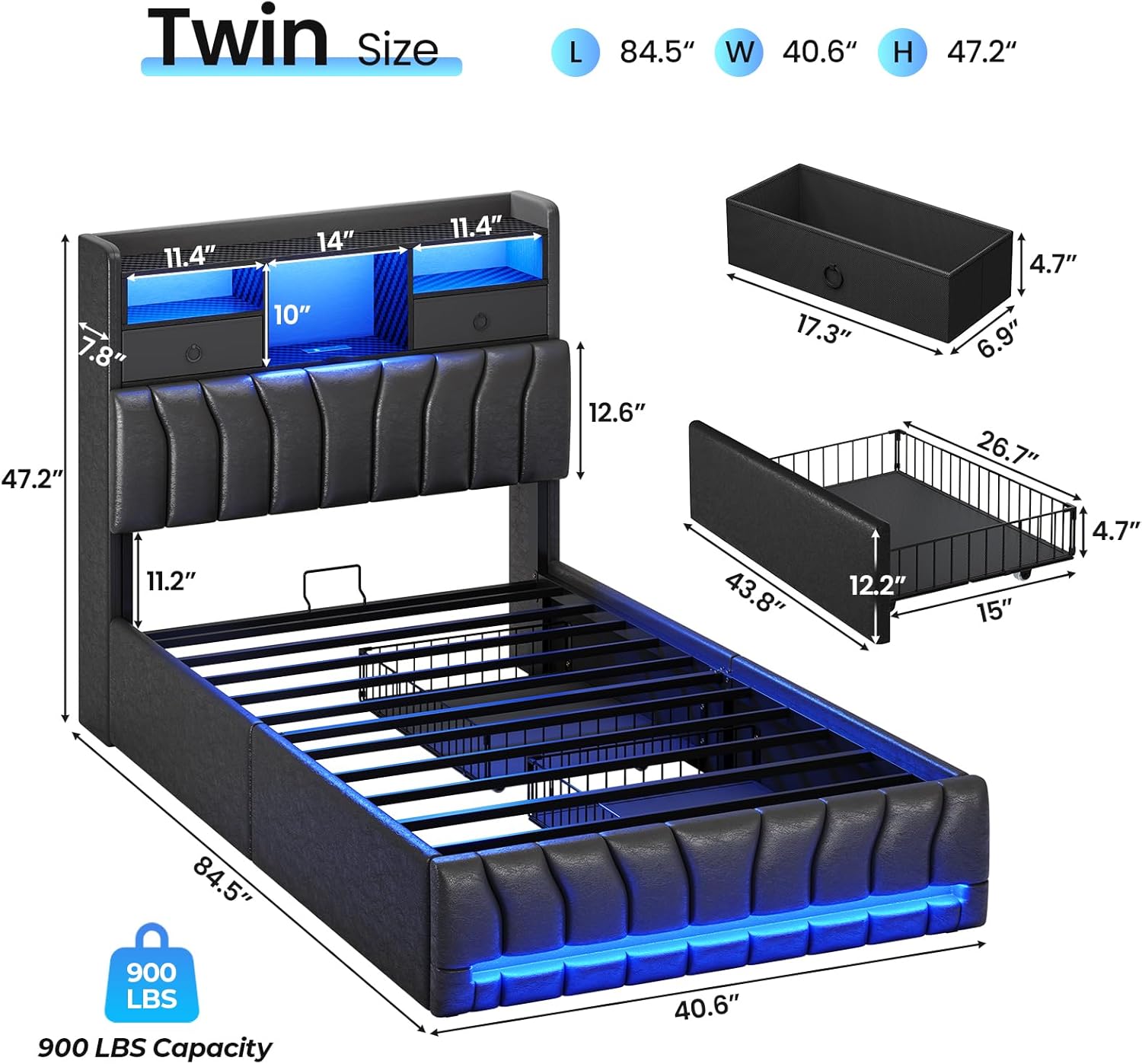
Image: Overall dimensions and key component measurements for the Twin size bed frame.
3.2 Headboard Assembly
The headboard features multiple storage options. Ensure all sections are aligned correctly before securing fasteners.

Image: Detailed view of the multi-functional storage headboard, highlighting open shelves, fabric drawers, and hidden storage.
3.3 Frame and Drawer Installation
The metal frame provides robust support. The under-bed drawers are equipped with wheels for easy movement and a locking design to keep them in place.

Image: Under-bed drawers with wheels and locking mechanism for secure placement.
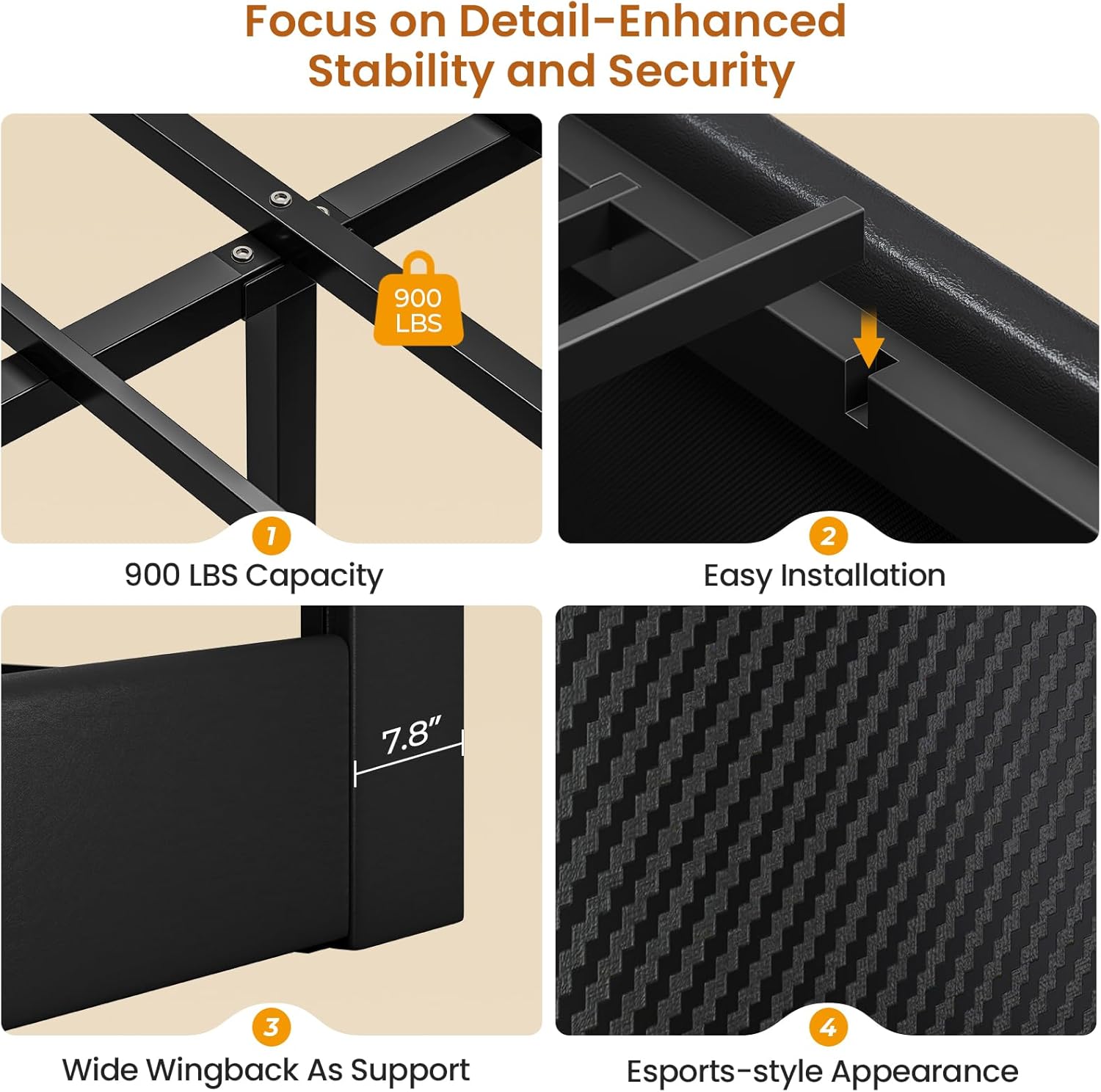
Image: Details on the bed frame's stability, including weight capacity and structural design.
4. Operation
4.1 RGB LED Lights
The integrated RGB LED lights can be controlled via a physical button or a dedicated mobile application. The app allows for advanced customization.
- Color Selection: Choose from over 60,000 colors.
- Brightness Adjustment: Customize the light intensity.
- Modes: Select from various modes including style, music sync, and microphone mode, which reacts to sound.
- Timer Function: Set schedules for the lights to turn on or off automatically.

Image: The bed frame with RGB LED lights active, demonstrating the gaming-style ambiance.
4.2 Charging Station
The headboard includes a built-in charging station for convenient access to power.
- Outlets: Two 120V/12A AC outlets.
- USB Ports: One 5V/2A USB port and one Type-C port.
- Power Cord: Features a 5.2-foot power cord for connection to a wall outlet.

Image: Detail of the integrated charging station with power outlets and USB ports.
4.3 Storage Drawers
The bed offers multiple storage solutions to keep your space organized.
- Headboard Drawers: Two fabric drawers within the headboard for smaller items.
- Under-bed Drawers: Two large drawers on wheels for bulkier items. These can be positioned on either side of the bed.
- Hidden Storage: A compartment behind the upholstered backrest for private items.
5. Maintenance
Proper care will extend the life and appearance of your bed frame.
- Upholstered Surfaces: Wipe faux leather surfaces with a soft, damp cloth. Avoid harsh chemicals or abrasive cleaners. For spills, blot immediately with a clean, dry cloth.
- LED Lights: Keep the LED light strips clean and free of dust. If the adhesive weakens, use appropriate double-sided tape to re-secure them. Do not attempt to repair or modify the electrical components.
- Frame: Periodically check all bolts and screws to ensure they remain tight. Re-tighten as necessary to maintain stability.
- Drawers: Keep the drawer wheels clean to ensure smooth operation.
6. Troubleshooting
If you encounter issues with your DICTAC Twin Gaming Bed, refer to the following common solutions.
- LED Lights Not Functioning: Ensure the power cord for the lights is securely plugged into a working outlet. Check the connection of the light strips to the control unit. If using the app, ensure Bluetooth is enabled and the app is correctly paired.
- LED Lights Not Sticking: If the adhesive on the LED strips loses its effectiveness, use strong, clear double-sided tape to re-attach them to the bed frame.
- Charging Station Not Working: Verify that the bed's main power cord is plugged into a live wall outlet. Check for any loose connections at the charging station module.
- Assembly Difficulties: Review the included instruction manual and the assembly video carefully. Ensure all parts are correctly oriented and that the correct fasteners are used for each step. If parts seem misaligned, retrace your steps.
- Bed Squeaking: While the design aims for a quiet sleep environment, if squeaking occurs, check all frame connections and tighten any loose bolts. Ensure the mattress is properly seated on the slats.
7. Specifications
| Feature | Detail |
|---|---|
| Size | Twin |
| Product Dimensions (L x W x H) | 89.2" x 62" x 47.2" |
| Material | Leather, Metal, Wood |
| Headboard Material | Wood |
| Color | Black |
| Style | Modern, Esports-style |
| Maximum Weight Recommendation | 900 lbs |
| Number of Drawers | 4 (2 headboard fabric, 2 under-bed) |
| Charging Station | 2 AC Outlets (120V/12A), 1 USB Port (5V/2A), 1 Type-C Port |
| LED Lights | RGB, 60,000+ colors, App/Button Control, Music Sync, Timer |
| Assembly Instructions | Included |
| Box Spring Required | No |
8. Warranty and Support
For any questions, concerns, or support regarding your DICTAC Twin Gaming Bed frame, please contact the manufacturer directly. Details on specific warranty coverage can be obtained by contacting DICTAC customer service.
Video: Overview of the DICTAC Twin Bed Frame with Storage Headboard and Drawers. This video highlights the key features and design of the bed.
Video: DICTAC Twin Upholstered Bed Frames for kids. This video provides an additional perspective on the bed's features and suitability.