
1. Introduction
Thank you for choosing the T4TREAM 24-inch Farmhouse End Table. This manual provides essential information for the safe assembly, operation, and maintenance of your new furniture. Please read these instructions carefully before beginning assembly and retain them for future reference.

Image 1.1: The T4TREAM 24-inch Farmhouse End Table, showcasing its design and functionality in a home environment.
2. Safety Information
WARNING: This table has a maximum weight limit of 150 lbs (68 kg). Always use caution when lifting and handling the table. For assembly, we recommend having a second person to help prevent injury or damage.
- Ensure all parts are present and undamaged before assembly. Do not use damaged parts.
- Assemble the product on a soft, clean surface to prevent scratches.
- Do not overtighten screws, as this may damage the material.
- Keep small parts away from children during assembly.
- Periodically check all connections and re-tighten if necessary to maintain stability.
- Do not stand or sit on the table.
- Place the table on a level surface to prevent tipping.
3. Package Contents
Your T4TREAM Farmhouse End Table package includes all necessary components and hardware for assembly. All parts are labeled for easy identification. Please refer to the included assembly guide for a detailed list of specific parts and hardware.
- Tabletop
- Side Panels
- Drawer Components
- Solid Wood Feet
- Charging Station Unit
- Hardware Pack (screws, cam locks, etc.)
- Assembly Guide
4. Assembly Instructions
Assembly of the T4TREAM Farmhouse End Table is designed to be straightforward. We recommend having a second person assist for a smoother and safer process. A screwdriver is the only tool recommended for assembly.
- Unpack and Identify Parts: Carefully unpack all components and lay them out on a soft, clean surface. Match each part to the corresponding label in the assembly guide.
- Assemble the Frame: Follow the step-by-step diagrams in the provided assembly guide to connect the side panels, bottom panel, and support structures. Ensure all cam locks and screws are securely fastened without overtightening.
- Install Drawers: Assemble the two smooth-gliding drawers according to the instructions. Install the drawer slides onto the table frame and the drawers.
- Attach Solid Wood Feet: Securely attach the four solid wood feet to the base of the table.
- Integrate Charging Station: Place the 4-in-1 charging station into the designated recessed area on the tabletop. Route the power cord through the cutout in the semi-open cubby for tidy cable management.
- Final Checks: Once assembled, gently lift and place the table in its desired location. Verify that all connections are tight and the table is stable.
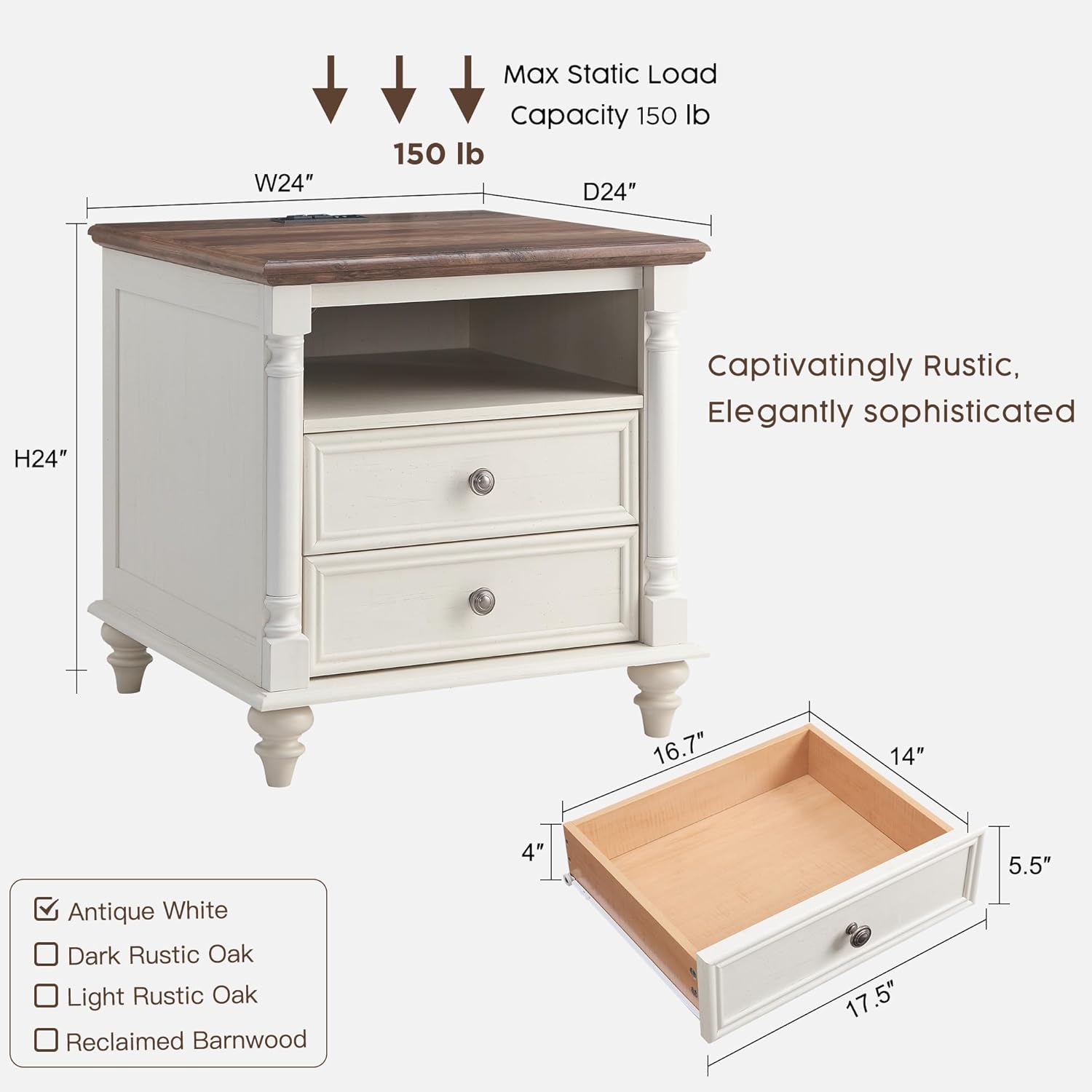
Image 4.1: Product dimensions (24"W x 24"D x 24"H) and maximum static load capacity (150 lbs).

Image 4.2: Detailed view of the two smooth-gliding drawers, the deep open cubby with a wire cutout, and the solid wood feet.
5. Operating Instructions
Your T4TREAM Farmhouse End Table is designed for versatile use, offering storage and convenient charging capabilities.
5.1 Using the Charging Station
The integrated 4-in-1 charging station is located on the tabletop for easy access. It includes 2 standard AC outlets (125V/12A) and 2 USB ports (5V/2.1A).
- Plug the table's power cord into a standard wall outlet.
- Connect your devices to the AC outlets or USB ports as needed.
- The 2.3-inch round cutout in the back of the semi-open cubby allows for organized cable management, keeping your tabletop clutter-free.

Image 5.1: The convenient 4-in-1 tabletop charging station with 2 AC outlets and 2 USB ports.
5.2 Utilizing Storage Features
- Drawers: The two smooth-gliding drawers provide enclosed storage for personal items, books, or other essentials.
- Semi-Open Cubby: The spacious semi-open cubby is ideal for storing larger items like laptops, magazines, or decorative baskets, with the added benefit of cable management for charging devices.
Video 5.2: An overview of the T4TREAM 24-inch Large Farmhouse Nightstand with Charging Station, demonstrating its features and dimensions.
6. Maintenance
To ensure the longevity and appearance of your T4TREAM Farmhouse End Table, follow these maintenance guidelines:
- Cleaning: Wipe with a dry cloth. Avoid using harsh chemicals or abrasive cleaners, which can damage the finish.
- Spills: Promptly wipe up any spills to prevent staining, especially on the distressed finish.
- Heat and Moisture: Use coasters under drinks and hot pads under warm items to protect the tabletop surface.
- Sunlight: Avoid prolonged exposure to direct sunlight to prevent fading or discoloration.
- Stability Check: Periodically check all screws and connections to ensure they remain tight. Re-tighten as needed.
7. Troubleshooting
If you encounter any issues with your end table, refer to the following common troubleshooting tips:
- Wobbly Table: Ensure all screws and bolts are tightened. Check that the table is placed on a level surface. Adjust the feet if they are uneven.
- Drawers Not Sliding Smoothly: Check that the drawer slides are correctly installed and free of obstructions. Ensure the drawers are not overloaded.
- Charging Station Not Working: Verify that the table's power cord is securely plugged into a functional wall outlet. Check if the devices you are trying to charge are working correctly with other power sources.
- Scratches/Dents: For minor scratches on the distressed finish, a furniture repair marker matching the color may help conceal them.
8. Specifications
| Feature | Specification |
|---|---|
| Brand | T4TREAM |
| Model Name | ACSC24ST-ROWAW |
| Product Dimensions | 24"D x 24"W x 24"H (61cm x 61cm x 61cm) |
| Item Weight | 56 Pounds (25.4 kg) |
| Maximum Weight Recommendation | 150 Pounds (68 kg) |
| Frame Material | Engineered Wood, Solid Wood |
| Color | Antique White |
| Number of Drawers | 2 |
| Charging Station | 2 Standard AC Outlets (125V/12A), 2 USB Ports (5V/2.1A) |
| Power Cord Length | 4.9 Feet |
| Assembly Required | Yes (Recommended 2 people) |
| Product Care Instructions | Wipe with Dry Cloth |
9. Warranty and Support
T4TREAM is committed to providing quality products and customer satisfaction. While specific warranty details are not provided in this manual, please retain your proof of purchase for any warranty claims.
If you encounter any issues during assembly, have questions about product use, or require further assistance, please contact T4TREAM customer support. Refer to the contact information provided with your purchase or visit the official T4TREAM website for support options.