
LJPXHHU MY8331
LJPXHHU Digital Multimeter MY8331 Instruction Manual
Model: MY8331 | Brand: LJPXHHU
1. Introduction
This manual provides detailed instructions for the safe and effective use of your LJPXHHU MY8331 Digital Multimeter. This True RMS 4000-count voltmeter is designed for accurate measurement of AC/DC voltage, resistance, continuity, and battery testing. Its intelligent auto-range mode simplifies operation, making it suitable for hobbyists, car owners, and home users.

Image: The LJPXHHU MY8331 Digital Multimeter is versatile for DIY, educational, automotive, and industrial applications.
2. Safety Information
Always adhere to safety precautions when using electrical testing equipment. This multimeter is designed with safety in mind, featuring:
- Non-Contact Voltage (NCV) Detection: Allows detection of AC wire voltage without direct contact, enhancing safety.
- Overload Protection: Built-in mechanisms protect the device and user from electrical overloads.
- Protective Silicone Cover: A removable orange silicone cover provides protection against drops and potential electric shock.
- Certifications: CE and RoHS certified, ensuring compliance with European safety and environmental standards.
- CAT III/CAT IV Safety Caps: Test leads are equipped with safety caps for enhanced protection during measurements.
Warning: Do not attempt to measure voltages or currents exceeding the specified maximum limits. Always inspect test leads for damage before use. Ensure proper connection before applying power.

Image: The NCV function provides audible and visual warnings for voltage detection, indicated by "---L" for weak signals (green light) and "---H" for strong signals (yellow light).
3. Product Features
The LJPXHHU MY8331 Digital Multimeter offers a range of features for efficient and accurate electrical testing:
- Smart Auto-Range Mode: Automatically selects the correct measurement range for AC/DC voltage (0.8 to 600V), resistance (4 kΩ to 40 MΩ), continuity, and battery tests.
- True RMS Measurement: Provides accurate readings for non-sinusoidal AC waveforms.
- Non-Contact Voltage (NCV) Detection: Detects AC voltage without physical contact, with audible and visual indicators.
- Large Backlit LED Display: Ensures clear readability in various lighting conditions.
- Data Hold Function: Freezes the displayed measurement for easy recording.
- Auto Power-Off: Conserves battery life by automatically shutting down after 15 minutes of inactivity.
- Low Battery Warning: Alerts the user when battery replacement is needed.
- Integrated Flashlight: Illuminates the work area in dimly lit environments.
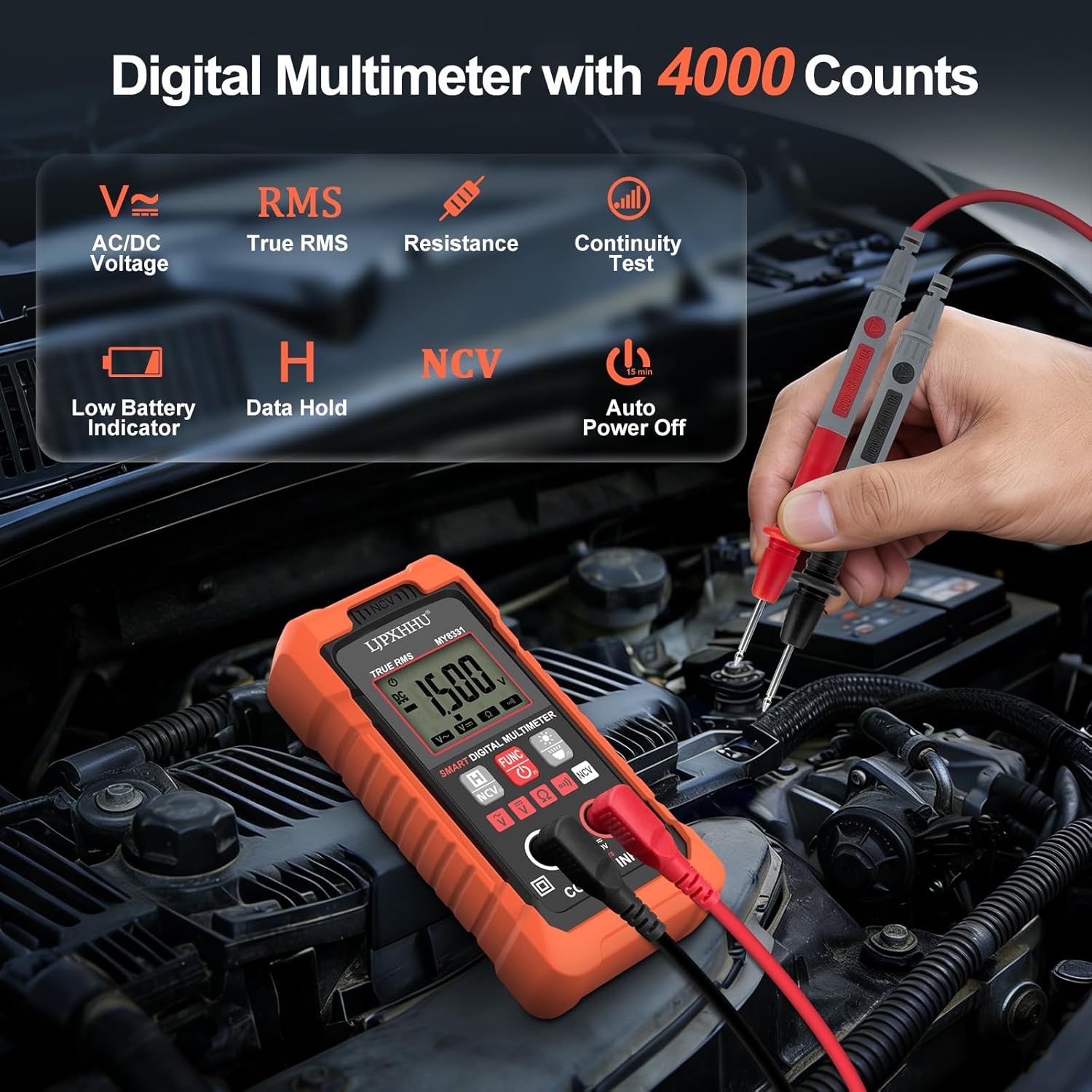
Image: Overview of the LJPXHHU MY8331 Digital Multimeter's main functions and indicators.
4. Package Contents
Upon opening the package, verify that all items are present:
- LJPXHHU MY8331 Digital Multimeter
- Test Leads (with CAT III/CAT IV safety caps)
- User Manual
- 2 x AAA Batteries
- Fabric Bag (for storage)

Image: All components included in the LJPXHHU MY8331 Digital Multimeter package.
5. Setup
5.1 Battery Installation
- Locate the battery compartment cover on the back of the multimeter.
- Use a screwdriver to open the battery compartment.
- Insert the two AAA batteries, ensuring correct polarity (+ and -).
- Replace the battery compartment cover and secure it with the screw.
5.2 Connecting Test Leads
- Insert the red test lead into the "VΩmA" input jack.
- Insert the black test lead into the "COM" input jack.
- Ensure the test leads are securely connected before use.
6. Operating Instructions
6.1 Power On/Off
Press the Power button to turn the multimeter on or off. The device will automatically enter auto-range mode upon startup.
6.2 Auto-Range Measurement
In auto-range mode, the multimeter automatically detects and measures AC/DC voltage, resistance, and continuity. Simply connect the test leads to the circuit or component you wish to measure. The display will show "Auto" indicating this mode.

Image: The multimeter in "Auto" mode, simplifying measurement selection.
6.3 Specific Measurement Functions
While in auto-range, the multimeter will automatically identify the measurement type. For specific functions or to cycle through modes, press the FUNC button.
- AC Voltage (V~): Connect test leads across the AC voltage source.
- DC Voltage (V=): Connect test leads across the DC voltage source, observing polarity.
- Resistance (Ω): Connect test leads across the component to measure resistance. Ensure the circuit is de-energized.
- Continuity Test ()))): Connect test leads across the circuit or component. An audible beep indicates continuity.
- Battery Test: The multimeter can automatically detect and test 1.5V, 9V, and 12V batteries.

Image: Examples of automatic measurement for AC voltage, DC voltage, resistance, and continuity.
6.4 Non-Contact Voltage (NCV) Detection
Press the NCV button to activate non-contact voltage detection. Move the top of the multimeter near an AC voltage source. The device will indicate voltage presence with audible beeps and visual alerts on the display and LED indicator:
- "---L" and green LED: Weak AC signal detected.
- "---H" and yellow LED: Strong AC signal detected.
6.5 Backlight and Flashlight
Press the Light button to toggle the backlight for the display. Press and hold the Light button to activate or deactivate the integrated flashlight.

Image: The backlit screen and flashlight provide visibility in dark conditions.
6.6 Data Hold (H)
Press the HOLD button to freeze the current reading on the display. Press it again to release the hold function and resume live measurements.
6.7 Auto Power-Off
The multimeter will automatically power off after approximately 15 minutes of inactivity to conserve battery life. To disable this feature temporarily, refer to the full user manual.
6.8 Official Product Video
Video: An official product video demonstrating the LJPXHHU Digital Multimeter's features and operation.
7. Maintenance
7.1 Cleaning
Wipe the multimeter casing with a damp cloth and mild detergent. Do not use abrasive cleaners or solvents. Ensure the device is powered off and disconnected from any circuits before cleaning.
7.2 Battery Replacement
When the low battery indicator appears on the display, replace the AAA batteries as described in the "Battery Installation" section (5.1). Remove batteries if the device will not be used for an extended period.
7.3 Test Lead Inspection
Regularly inspect the test leads for any signs of damage, such as cracked insulation or exposed wires. Replace damaged leads immediately to prevent electrical shock hazards.

Image: High-quality test leads are crucial for safety and longevity.
8. Troubleshooting
| Problem | Possible Cause | Solution |
|---|---|---|
| Multimeter does not power on. | Dead or incorrectly installed batteries. | Check battery polarity or replace batteries. |
| No reading or "OL" (Overload) displayed. | Measurement range exceeded, or open circuit. | Ensure the measurement is within the device's limits. Check for proper test lead connection or an open circuit. |
| Inaccurate readings. | Damaged test leads, low battery, or external interference. | Inspect test leads, replace batteries, or move away from strong electromagnetic fields. |
| NCV function not responding. | No AC voltage present, or device not close enough to source. | Ensure AC voltage is present and bring the NCV sensor closer to the source. |
9. Specifications
| Parameter | Value |
|---|---|
| Brand | LJPXHHU |
| Model | MY8331 |
| Display Counts | 4000 |
| AC/DC Voltage Range | 0.8V to 600V |
| Resistance Range | 4 kΩ to 40 MΩ |
| Power Source | Battery Powered (2 x AAA) |
| Min. Operating Voltage | 0.8 Volts |
| Safety Rating | CAT III/CAT IV (with safety caps) |
| Certifications | CE, RoHS |
| Auto Power-Off | Approx. 15 minutes |
10. Warranty and Support
10.1 Warranty Information
LJPXHHU offers a 3-year quality guarantee covering all material and craftsmanship issues for the MY8331 Digital Multimeter. If any problem occurs within 36 months of purchase, an unconditional replacement will be provided.
10.2 Customer Support
For technical assistance, warranty claims, or any questions regarding your LJPXHHU MY8331 Digital Multimeter, please contact LJPXHHU customer support through the retailer where the product was purchased or visit the official LJPXHHU website for contact details.
Ask a question about this manual
Ask about setup, troubleshooting, compatibility, parts, safety, or missing instructions. Manuals+ will review the question and use this page’s manual context to help answer it.