
1. Introduction
Thank you for choosing the Keehusux Rattan TV Stand. This manual provides detailed instructions for assembly, operation, maintenance, and troubleshooting to ensure safe and efficient use of your new entertainment center. Please read this manual thoroughly before beginning assembly or use, and retain it for future reference.
This TV stand is designed to accommodate televisions up to 60 inches and features a unique boho style with handwoven rattan details, solid wood legs, and a built-in charging station. It offers ample storage with adjustable shelves and cable management solutions.
2. Safety Information
- Always assemble the product on a soft, clean surface to prevent scratches.
- Ensure all screws and fasteners are securely tightened before use. Periodically check and re-tighten as necessary.
- Do not overload the shelves or tabletop. Refer to the specifications for weight limits.
- Keep small parts and packaging materials away from children to prevent choking hazards.
- Place the TV stand on a level surface to prevent wobbling and potential tipping. Use the adjustable feet for stability on uneven floors.
- Do not allow children to climb on the TV stand.
- For the built-in charging station, ensure devices are compatible with the provided USB and AC outlets. Do not exceed the rated electrical capacity.
3. Package Contents
Before assembly, verify that all components listed below are present and undamaged. If any parts are missing or damaged, please contact customer support.
- 1 x Keehusux Rattan TV Stand (disassembled components)
- 1 x Instruction Manual
- 1 x Tools Bag (containing necessary hardware and assembly tools)
4. Specifications
| Feature | Detail |
|---|---|
| Brand | Keehusux |
| Model Number | 999KES000MDSG |
| Dimensions (W x D x H) | 50.2" x 14.6" x 19.9" (127.5 cm x 37 cm x 50.5 cm) |
| Item Weight | 41.3 Pounds |
| Material | Engineered Wood, Rattan, Solid Wood Legs |
| Number of Shelves | 2 (adjustable/removable) |
| Charging Station | 2 AC Outlets (120V/12A), 2 USB Ports (5V/2A), 4.9-Foot Power Cord |
| Leg Height | 5.5" (14 cm) |
| Features | Curved Edges, 2 Cable Holes, Adjustable Legs |

Image 1: Overview of the Keehusux Rattan TV Stand with key dimensions, showing compatibility with various TV sizes up to 60 inches.
5. Assembly Instructions
The Keehusux Rattan TV Stand is designed for straightforward assembly. A detailed step-by-step instruction manual with numbered components and illustrations is included in the package. Please follow these general guidelines:
- Prepare Your Workspace: Clear a spacious area and lay out all components and hardware on a soft, clean surface to prevent damage.
- Identify Parts: Match each component with its corresponding number or letter as indicated in the included manual.
- Follow Step-by-Step Instructions: Adhere strictly to the sequence of steps provided in the manual. Do not skip steps.
- Secure Fasteners: Ensure all screws, bolts, and connectors are tightened firmly. Avoid over-tightening to prevent stripping.
- Install Adjustable Shelves: The internal shelves are adjustable. Select the desired height before securing them.
- Attach Legs: Securely attach the solid wood legs. Use the adjustable central feet to level the stand on uneven floors.

Image 2: Illustration of the ample storage space and adjustable shelves within the TV stand.

Image 3: Detail of the solid wood legs and clearance for robot vacuum cleaning.

Image 4: The TV stand in a living room, highlighting the height-adjustable table legs for stability.
6. Operating Instructions
6.1 Using the Built-in Charging Station
The TV stand includes a convenient built-in charging station located on the top surface. This station features two AC power outlets and two USB ports.
- Power Connection: Plug the 4.9-foot power cord from the charging station into a standard wall outlet.
- AC Outlets: Use the 120V/12A AC outlets to power devices such as TVs, media players, or lamps.
- USB Ports: Use the 5V/2A USB ports to charge smartphones, tablets, remote controls, and other USB-powered devices.
- Cable Management: Utilize the two cable holes located at the back of the stand to route power cords and device cables, keeping your entertainment area tidy.

Image 5: Detailed view of the built-in charging station and its specifications.
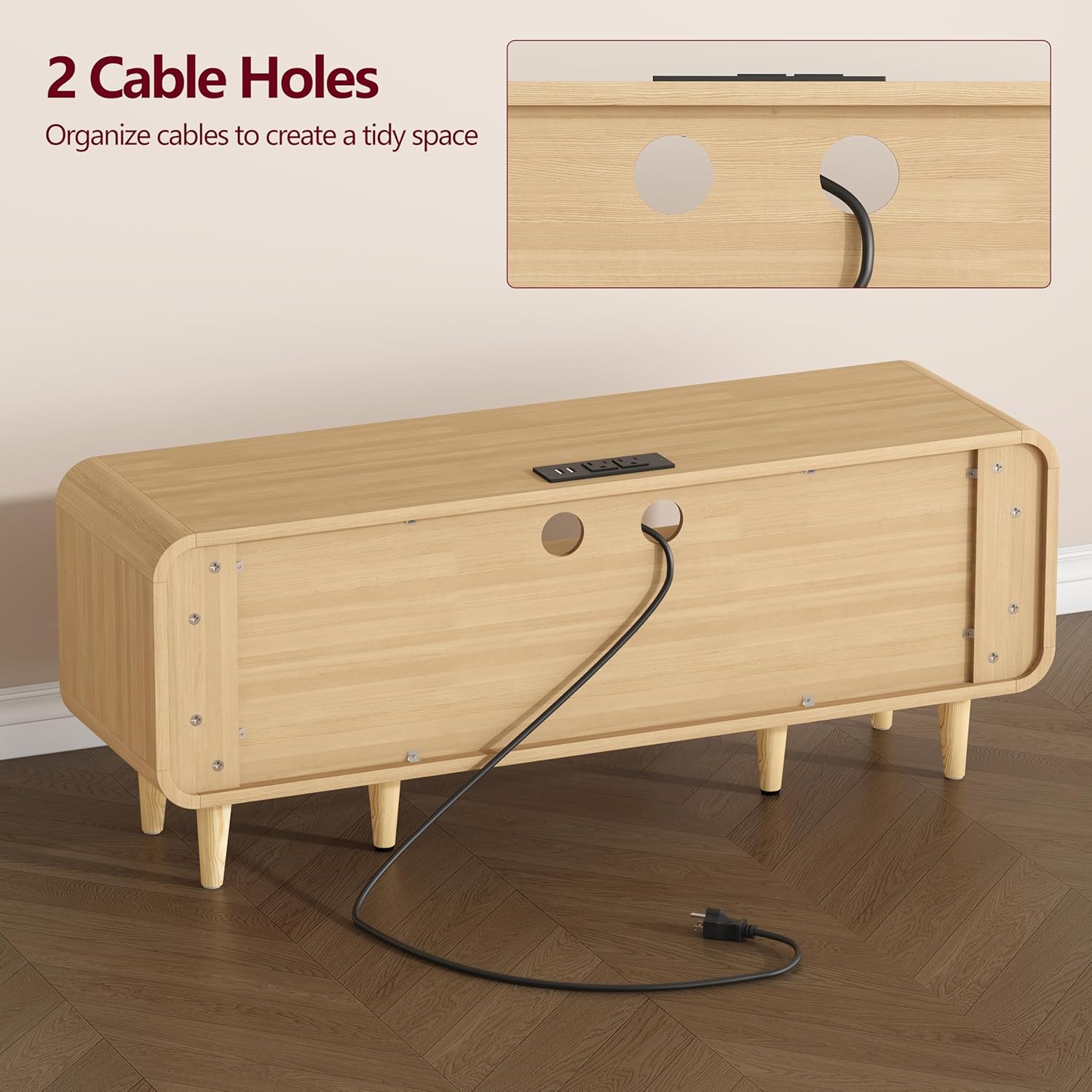
Image 6: Rear view highlighting the two cable holes for wire organization.
6.2 Adjusting Shelves
The internal shelves within the cabinets are adjustable and removable. To change their height:
- Empty the shelf of any items.
- Carefully lift the shelf to disengage it from the support pegs.
- Relocate the support pegs to the desired height level. There are three height options available.
- Place the shelf back onto the support pegs, ensuring it is level and secure.
6.3 Stability Adjustment
The TV stand is equipped with adjustable central feet. If the stand wobbles on an uneven floor, gently turn these feet clockwise or counter-clockwise until the stand is stable and level.
Video 1: An official product video demonstrating the features and design of the Keehusux 50.2"W Rattan TV Stand with Power Outlet.
7. Maintenance and Care
- Cleaning: Wipe the surfaces with a dry, soft cloth. Avoid using harsh chemicals, abrasive cleaners, or excessive moisture, which can damage the finish and rattan.
- Rattan Care: For the rattan elements, a soft brush can be used to gently remove dust.
- Spills: Immediately wipe up any spills to prevent staining or damage to the wood.
- Sunlight Exposure: Avoid prolonged direct sunlight exposure to prevent fading or discoloration of the wood and rattan.
- Regular Checks: Periodically inspect all fasteners and connections to ensure they remain tight. Re-tighten if necessary.
8. Troubleshooting
| Problem | Possible Cause | Solution |
|---|---|---|
| TV stand wobbles | Uneven floor; loose leg connections | Adjust the central leveling feet until stable. Check and tighten all leg screws. |
| Charging station not working | Power cord not plugged in; faulty outlet; device incompatibility | Ensure the power cord is securely plugged into a working wall outlet. Test the outlet with another device. Verify your device is compatible with 120V AC or 5V USB. |
| Doors do not close properly | Hinges misaligned; obstruction | Check hinge alignment and adjust if necessary (refer to assembly manual for hinge adjustment details). Ensure no items are obstructing the door's path. |
| Difficulty during assembly | Incorrect part identification; steps out of order | Double-check part numbers against the manual. Review the assembly steps and ensure they are followed sequentially. Do not force parts together. |
9. Warranty and Support
Keehusux is committed to providing quality products. For any questions regarding your Keehusux Rattan TV Stand, including pre-sales or after-sales support, please contact our customer service team. We aim to respond to all inquiries within 24 hours.
Please refer to your purchase documentation for specific warranty details. Keep your proof of purchase for any warranty claims.