
1. Introduction
This manual provides detailed instructions for the installation, operation, and maintenance of your Gustard Audalytic DR70 R2R Streaming DAC. Please read this manual thoroughly before using the device to ensure optimal performance and safety. The DR70 is a high-performance digital-to-analog converter designed for audiophiles, featuring R2R decoding, DSD512 and PCM768 support, and comprehensive streaming capabilities.
2. Safety Information
- Power Supply: Use only the provided power cord and ensure the voltage matches your local power supply (AC 115V/230V, 50/60Hz).
- Ventilation: Ensure adequate ventilation around the unit. Do not block ventilation openings.
- Moisture: Keep the device away from water, moisture, and high humidity environments.
- Heat: Avoid placing the unit near heat sources or in direct sunlight.
- Cleaning: Disconnect power before cleaning. Use a soft, dry cloth. Do not use liquid or aerosol cleaners.
- Servicing: Do not attempt to service the unit yourself. Refer all servicing to qualified personnel.
3. Package Contents
Please check that all items are present in the package:
- Gustard Audalytic DR70 Unit
- USB Cable
- Bluetooth Antenna
- Power Cord
4. Product Overview

Image: The Gustard Audalytic DR70 R2R Streaming DAC in black, showcasing its compact design.
4.1 Key Features
- True 1-Bit DSD D/A Converter: Supports native DSD512, routing the DSD signal directly to the 1-bit switching array DAC circuit, bypassing PCM conversion for pure hardware processing.
- FPGA Implementation: Utilizes a custom-configured Field-Programmable Gate Array for flexible logic functions, clock management, and digital shaping, including DoP demodulation and PCM/DSD depop switching.
- USB Audio XU316: Features the third-generation USB Audio XU316, supporting PCM up to 768kHz and DSD512.
- CK01 Clock Module: Delivers femtosecond-grade precision timing for the entire system, ensuring high accuracy in digital audio conversion.
- Independent Voltage Regulation: Each circuit group has independent voltage regulation to minimize interference and optimize performance.
- Analog Output Driver Circuit: Employs a low-impedance design for seamless integration with various audio devices while maintaining signal integrity.
- Network Bridge Streaming: Supports Roon Bridge, AirPlay, UPnP, and NAA for versatile audio streaming.
- Bluetooth 5.0: Supports high-resolution transmission codecs including LDAC, AAC, SBC, and aptX.
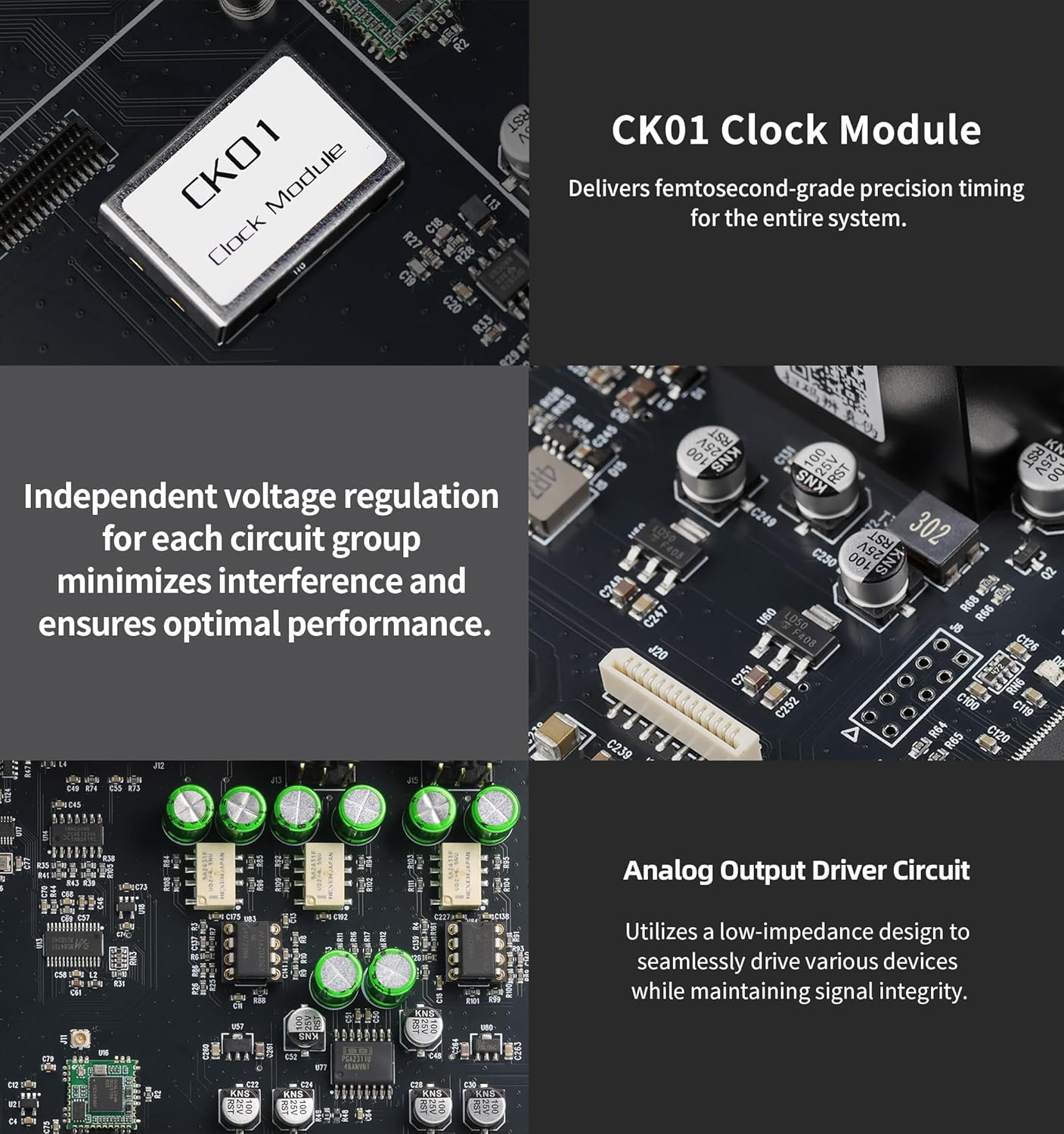
Image: Detailed view of the internal components, highlighting the CK01 Clock Module, independent voltage regulation circuits, and the analog output driver circuit.

Image: Close-up of the Field-Programmable Gate Array (FPGA) chip, central to the DR70's digital processing capabilities.
4.2 Front Panel
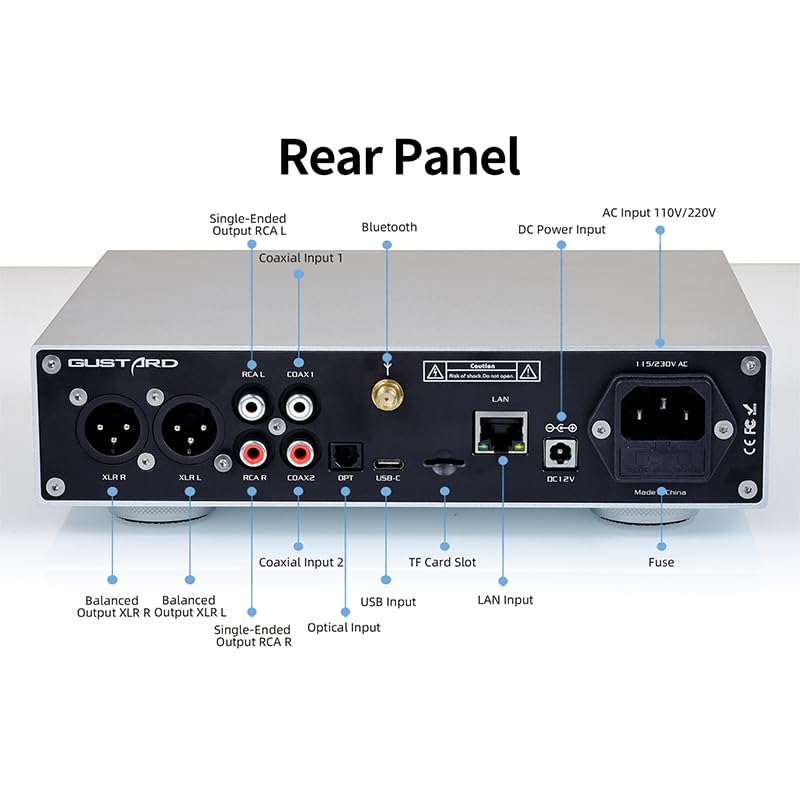
Image: Front panel of the Gustard Audalytic DR70, showing the touch standby control, display area, and touch interface for navigation.
The front panel features a touch-sensitive standby control, a central display area showing current status and playback information, and a touch interface for navigating menus and controlling playback. A Bluetooth antenna port is also visible.
4.3 Rear Panel

Image: Rear panel of the Gustard Audalytic DR70, illustrating various input and output ports including RCA, XLR, Coaxial, Optical, USB, LAN, Bluetooth antenna, and power input.
The rear panel provides a comprehensive array of input and output options:
- Analog Outputs: Single-Ended RCA (L/R) and Balanced XLR (L/R).
- Digital Inputs: Coaxial Input 1, Coaxial Input 2, Optical Input, USB Input (Type-B), TF Card Slot.
- Network: LAN Input for streaming.
- Wireless: Bluetooth Antenna connector.
- Power: AC Input (110V/220V) and DC Power Input (DC 12V).
- Other: Fuse holder.
5. Setup
- Connect Bluetooth Antenna: Screw the provided Bluetooth antenna into the designated connector on the rear panel.
- Connect Audio Outputs:
- For single-ended connection, connect RCA cables from the DR70's RCA outputs to your amplifier or active speakers.
- For balanced connection, connect XLR cables from the DR70's XLR outputs to your amplifier or active speakers.
- Connect Audio Inputs:
- USB: Connect a USB cable from your computer or streamer to the DR70's USB-B input.
- Coaxial/Optical: Connect digital audio sources (CD player, media streamer) to the COAXIAL or OPTICAL inputs.
- LAN: For network streaming, connect an Ethernet cable from your router to the DR70's LAN input.
- Connect Power: Connect the power cord to the AC input on the rear panel, then plug it into a wall outlet. Ensure the voltage switch (if present) is set correctly for your region.
- Power On: Press the touch standby control on the front panel to power on the device.
6. Operating Instructions
6.1 Basic Operation
- Power On/Off: Briefly touch the standby control icon on the front panel to turn the unit on or off.
- Input Selection: Use the touch interface (usually '+' and '-' or dedicated input buttons) on the front panel to cycle through available digital inputs (USB, Coaxial 1, Coaxial 2, Optical, Bluetooth, Streamer).
- Display: The central display area shows the currently selected input, sample rate, and DSD/PCM status.
6.2 Bluetooth Connection
- Select "Bluetooth" as the input source on the DR70.
- On your mobile device or computer, search for Bluetooth devices and select "DR70" to pair.
- Once paired, audio from your device will be streamed to the DR70. The DR70 supports LDAC, AAC, SBC, and aptX codecs.

Image: Illustration of Bluetooth 5.0 connectivity and the XMOS XU316 USB Audio chip, highlighting the device's wireless and USB audio capabilities.
6.3 Network Streaming
The DR70 supports various network streaming protocols. Ensure the device is connected to your network via the LAN port.
- Accessing the Web Interface: Open a web browser on a computer connected to the same network and enter "//dr70.local" in the address bar. This interface allows you to control and configure streaming protocols.
- Supported Protocols: The DR70 supports Roon Bridge, AirPlay, UPnP/DLNA Render, HQPlayer NAA, and Spotify. Activate or deactivate these services as needed through the web interface.

Image: Screenshot of the DR70's web interface, showing options to control various streaming protocols like AirPlay, Roon Bridge, UPnP, HQPlayer NAA, and Spotify.
7. Maintenance
- Cleaning: Use a soft, dry, lint-free cloth to clean the exterior of the unit. Do not use abrasive cleaners, waxes, or solvents.
- Firmware Updates: Periodically check the manufacturer's website for any available firmware updates to ensure optimal performance and access to new features. Follow the instructions provided with the update carefully.
- Storage: If storing the unit for an extended period, disconnect it from power and store it in a cool, dry place.
8. Troubleshooting
| Problem | Possible Cause | Solution |
|---|---|---|
| No power | Power cord not connected; power outlet faulty; fuse blown. | Ensure power cord is securely connected. Check power outlet. Inspect and replace fuse if necessary (refer to safety guidelines). |
| No sound output | Incorrect input selected; output cables loose; amplifier/speakers off or muted; incorrect driver installed (for USB). | Select the correct input source on the DR70. Check all audio cable connections. Ensure connected amplifier/speakers are powered on and not muted. For USB, ensure the correct driver is installed on your computer. |
| Bluetooth connection issues | DR70 not in pairing mode; device too far; interference. | Ensure Bluetooth input is selected on DR70. Move your device closer to the DR70. Avoid sources of strong electromagnetic interference. |
| Network streaming not working | LAN cable disconnected; network configuration issue; streaming service not enabled. | Check LAN cable connection. Verify network settings. Access the web interface (//dr70.local) to ensure desired streaming services are enabled. |
9. Specifications
9.1 Digital Input Support
- COAX/OPT Input: PCM 16-24bit/44.1-192kHz; DSD DoP64
- USB/Streamer Input: PCM: 16-32bit/44.1-768kHZ; DSD: DoP64-DoP256; Native DSD: DSD64-DSD512
- Bluetooth 5.0: LDAC, AAC, SBC, aptX (LDAC enables 24-bit/96kHz high-resolution transmission)
9.2 Analog Output Performance
- Frequency Response: 20Hz-20kHz (±0.2dB, OS Mode)
- Dynamic Range: >111dB
- Signal-to-Noise Ratio (SNR): >113dB
- Channel Crosstalk: -125dB @ 1kHz
- THD+N: ≤0.004% @ 1kHz
- IMD: ≈0.009% @ -2dBFS
- RCA Output Level: 2Vrms (Fixed)
- RCA Output Impedance: 100Ω
- XLR Output Level: 4Vrms (Fixed)
- XLR Output Impedance: 100Ω
9.3 General
- Power Supply: AC 115V/230V, 50/60Hz
- Power Consumption: <10W
- Dimensions (WxDxH): 220 x 170 x 50 mm (excluding protrusions)
- Net Weight: 1.5 kg (3.3 lbs)
- Item Weight: 4.11 pounds
9.4 D/A Converter Specification Table

Image: Table detailing D/A converter specifications for PCM, DSD (Native), and DSD (DoP) across USB/Streamer, Coaxial/Optical, and Bluetooth 5.0 interfaces, along with device dimensions.
| Interface Type | PCM | DSD (Native) | DSD (DoP) |
|---|---|---|---|
| USB.Streamer | 44.1kHz-768kHz, 16Bit-32Bit | DSD64-DSD512 | DSD64-DSD256 |
| Coaxial Optical | 44.1kHz-192kHz, 16Bit-24Bit | Not supported | DSD64 |
| Bluetooth 5.0 | Up to 96kHz | Not supported | Not supported |
10. Warranty Information
The Gustard Audalytic DR70 is covered by a manufacturer's warranty. Please refer to the warranty card included with your product or visit the official Gustard/LEAUDIO website for detailed warranty terms and conditions. Keep your proof of purchase for warranty claims.
11. Support
For technical assistance, troubleshooting beyond this manual, or service inquiries, please contact your authorized dealer or visit the official LEAUDIO/Gustard support website. Provide your product model and serial number when seeking support.
