
1. Important Safety Information
Please read and understand all safety instructions before assembling, using, or maintaining this product. Failure to follow these instructions may result in injury or damage to the product.
- Always unplug the cabinet from any power source before assembly, disassembly, cleaning, or maintenance.
- Wear appropriate safety gear, such as gloves, when handling components with sharp edges.
- Do not overload the cabinet shelves, especially those with integrated power outlets. Refer to specifications for weight limits.
- Keep the cabinet away from direct heat sources, open flames, and excessive moisture to prevent damage to the engineered wood material.
- Ensure all parts are securely fastened during assembly. Periodically check and tighten fasteners as needed.
- Follow all manufacturer's instructions for assembly, use, and maintenance.
2. Product Overview
The Jocoevol Coffee Bar Cabinet is a versatile furniture piece designed to enhance your living space with functional storage and a dedicated area for beverages and appliances. It features a farmhouse design and includes a built-in charging station.
Key Features:
- Integrated Fridge Space: Designed to accommodate most mini fridge models (mini fridge not included). Dimensions for fridge space: approximately 21.7" W x 36.6" H.
- Ample Storage: Features three open shelves in the upper section, a spacious countertop, a large lower cabinet, and a side door with three shelves of varying heights.
- Built-in Charging Station: Equipped with 3 AC outlets and 2 USB ports for convenient power access for appliances and devices.
- Multi-Functional Design: Can be used as a coffee station, bar cabinet, kitchen pantry, microwave stand, sideboard, buffet, or general storage cabinet.
- Wine Glass Rack: Includes a dedicated rack for hanging wine glasses.
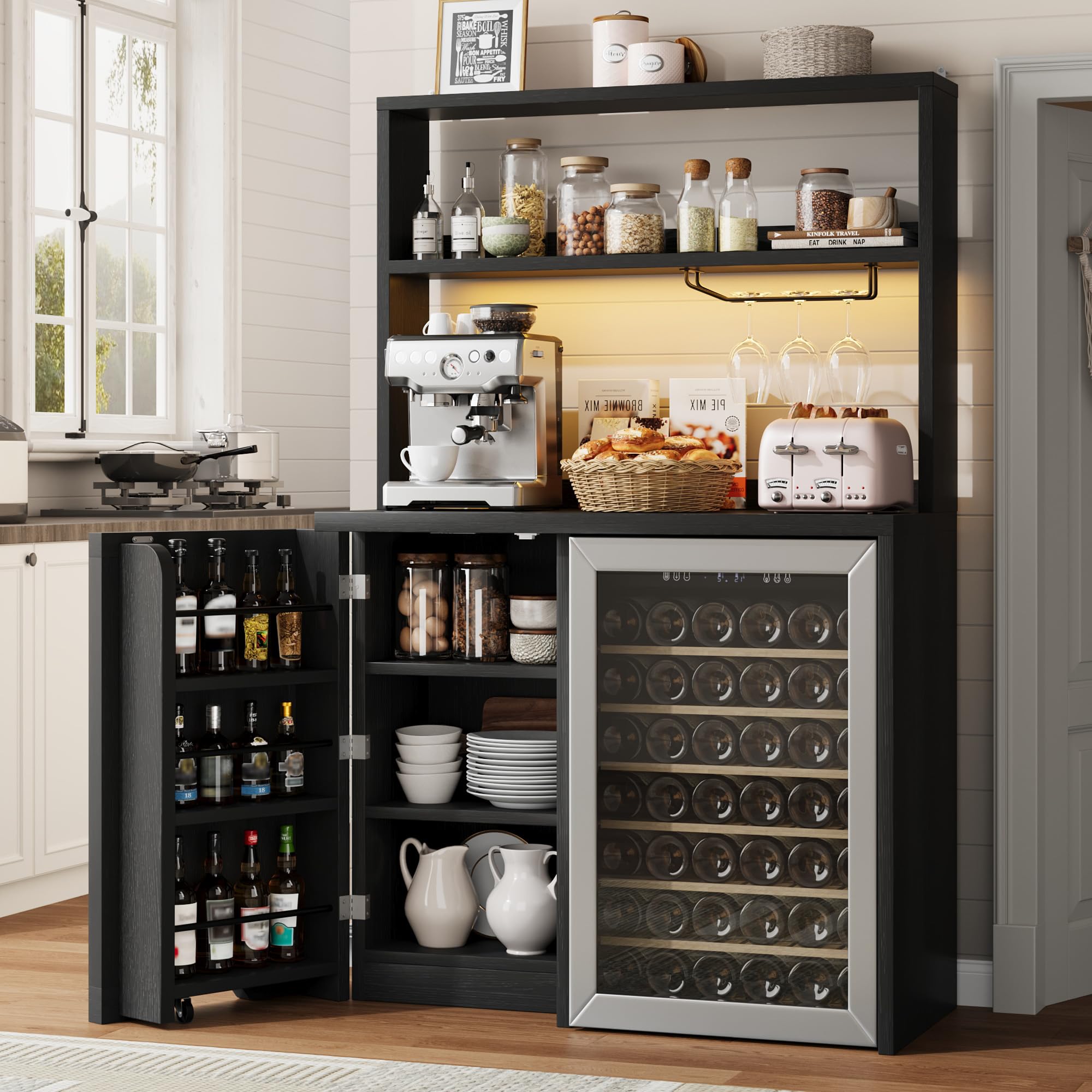
Image 2.1: The Jocoevol Coffee Bar Cabinet, showcasing its overall design and functionality.
3. Components List
Before beginning assembly, ensure all parts and hardware are present and undamaged. Refer to the included assembly instructions for a detailed list and identification of each component.
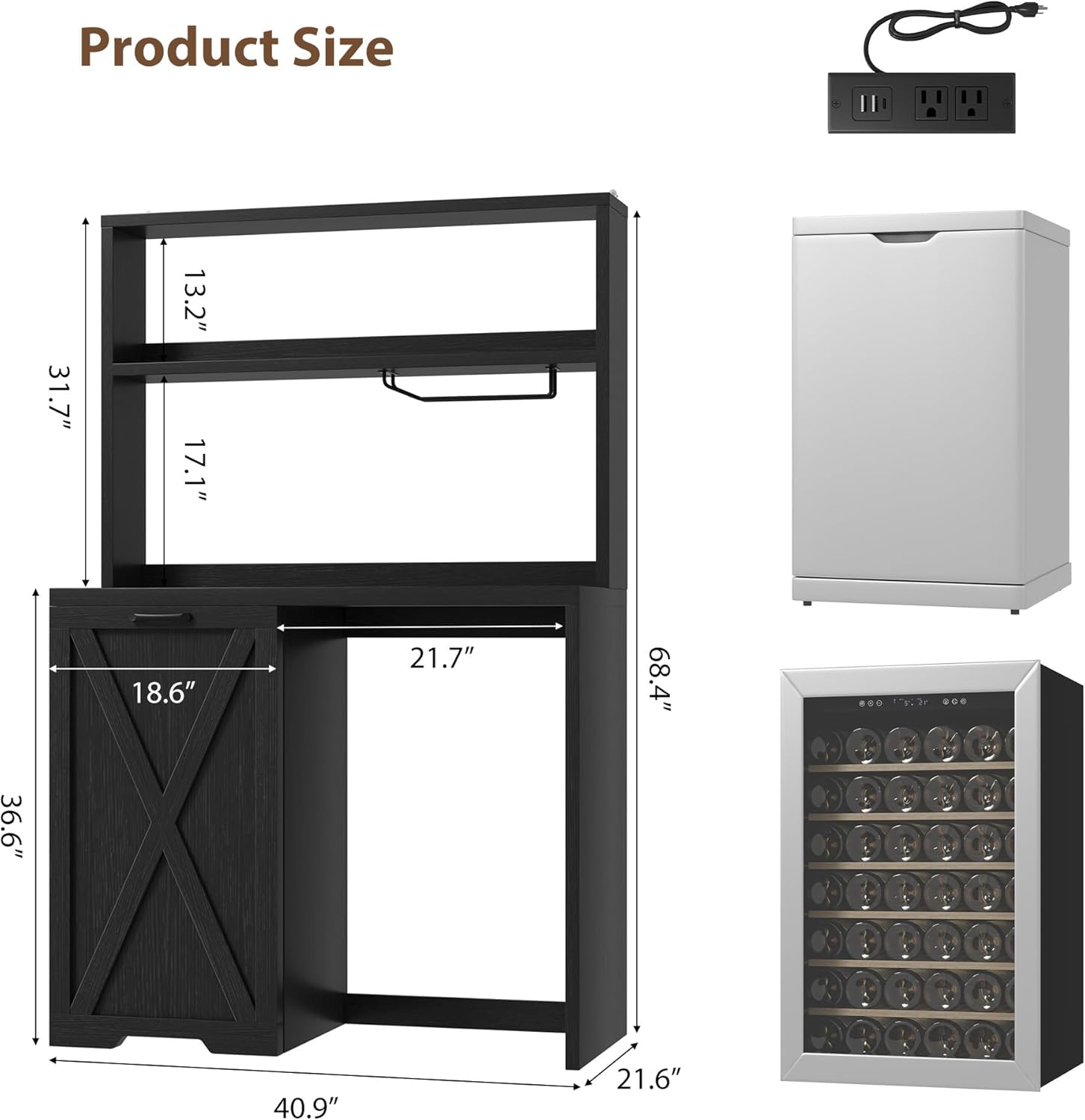
Image 3.1: Product size diagram with key dimensions for assembly planning.
The cabinet is constructed from engineered wood and includes various panels, shelves, and hardware for assembly. The power strip with AC outlets and USB ports is a pre-assembled component.
4. Setup and Assembly
This wine cabinet is designed for straightforward installation. It comes with detailed instructions, and all parts and hardware are clearly numbered for quick identification. Precision-drilled holes ensure a fast and accurate assembly process.
Assembly Steps:
- Unpack and Identify: Carefully unpack all components and lay them out on a clean, soft surface to prevent scratches. Identify each part using the provided numbering in the assembly manual.
- Assemble Base Structure: Follow the step-by-step diagrams to connect the main panels and shelves of the lower cabinet section. Ensure all cam locks and screws are tightened securely.
- Install Fridge Space Components: Assemble the panels that define the mini fridge compartment.
- Attach Upper Shelving: Secure the upper shelving unit to the lower cabinet.
- Install Doors and Hardware: Attach the cabinet door(s) using the provided hinges. Install handles and the wine glass rack.
- Integrate Power Station: Place the built-in charging station into its designated slot on the countertop.
- Final Checks: Verify that all connections are tight and the cabinet is stable.
For visual guidance, please refer to the official assembly video below:
Video 4.1: Official assembly guide for the Jocoevol Coffee Bar Cabinet with Fridge.
Video 4.2: Detailed assembly steps for the Jocoevol Large Coffee Bar Cabinet.

Image 4.3: View of the internal storage and wine glass rack, illustrating storage options.
5. Operating Instructions
Using the Power Outlets:
The cabinet includes a built-in charging station with 3 AC outlets and 2 USB ports. This allows you to power various appliances and charge electronic devices directly from the cabinet.
- Connect to Wall Outlet: Plug the cabinet's power cord into a standard wall outlet.
- Appliance Use: Plug your coffee maker, blender, or other small kitchen appliances into the AC outlets.
- Device Charging: Use the USB ports to charge your smartphone, tablet, or other USB-powered devices.
- Overload Protection: Avoid plugging in high-power appliances simultaneously to prevent overloading the circuit. Refer to the power station's specifications for maximum load.

Image 5.1: Close-up of the built-in charging station, showing AC outlets and USB ports.
Utilizing Storage Space:
- Upper Shelves: Ideal for organizing coffee mugs, jars, snacks, and decorative items.
- Countertop: Suitable for placing a coffee maker, microwave, or other small appliances.
- Fridge Compartment: Insert your mini fridge into the designated space. Ensure proper ventilation around the fridge.
- Lower Cabinet & Side Door: Use for storing canned beverages, wine bottles, or other essentials. The side door features adjustable shelves for flexible storage.

Image 5.2: Detailed view of the countertop and upper storage area, highlighting organization possibilities.
LED Lighting (if applicable):
Some models may include smart LED lighting. If present, operate the lights using the integrated controls or remote, typically allowing for multiple modes and color options.

Image 5.3: The cabinet illuminated by its smart LED lighting feature.
6. Maintenance
Proper care and maintenance will extend the life and appearance of your Jocoevol Coffee Bar Cabinet.
- Cleaning: Wipe surfaces with a soft, damp cloth. Avoid harsh chemicals, abrasive cleaners, or excessive moisture, which can damage the engineered wood finish.
- Spills: Immediately wipe up any spills, especially on the countertop, to prevent water damage or blistering. Consider using coasters for beverages.
- Fasteners: Periodically check all screws and connections to ensure they remain tight. Tighten as necessary to maintain stability.
- Power Outlets: Keep the power outlets clean and free from dust. Do not insert foreign objects into the outlets.
- Placement: Avoid placing the cabinet in direct sunlight or near heat vents, as this can cause fading or warping of the wood.
7. Troubleshooting
If you encounter issues with your Jocoevol Coffee Bar Cabinet, refer to the following common troubleshooting tips:
- Cabinet Instability: Ensure all assembly screws and cam locks are fully tightened. Verify the cabinet is placed on a level surface.
- Doors Not Aligning/Closing: Check hinge alignment and adjust if necessary. Ensure no obstructions are preventing the door from closing properly.
- Power Outlets Not Working: Verify the cabinet's main power cord is securely plugged into a functional wall outlet. Check if the wall outlet itself is receiving power (e.g., by testing with another device). Avoid overloading the power strip.
- Missing Parts/Damaged Components: If you received the product with missing parts or damaged components, contact customer service for assistance.
8. Specifications
| Attribute | Detail |
|---|---|
| Brand | Jocoevol |
| Model Number | 1104 bar cabinet |
| Overall Dimensions (W x D x H) | 40.9" x 21.6" x 68.4" (approximate, based on product images) |
| Mini Fridge Space (W x H) | 21.7" x 36.6" (approximate, based on product images) |
| Material | Engineered Wood |
| Color | Black |
| Power Outlets | 3 AC Outlets, 2 USB Ports |
| Power Cord Length | 6.6 Feet |
| Number of Shelves | 6 (including internal door shelves) |
| Assembly Required | Yes (Instructions Included) |
9. Warranty and Support
For warranty information or customer support, please refer to the documentation included with your purchase or contact Jocoevol customer service directly. Our team is available to assist you with any questions or concerns regarding your product.
Please have your model number (1104 bar cabinet) and purchase date ready when contacting support.