
1. Introduction
The LICAEVEY Volume Control Knob is a versatile multimedia controller designed to enhance your digital experience. It offers multiple connection modes, customizable shortcut functions, and a durable 360-degree rotary design. This manual provides detailed instructions for setting up, operating, and maintaining your device.

Image 1.1: Overview of the LICAEVEY Volume Control Knob highlighting its tri-mode connectivity, ease of operation, 360-degree rotation, and RGB lighting.
2. Product Overview
Familiarize yourself with the components of your Volume Control Knob.
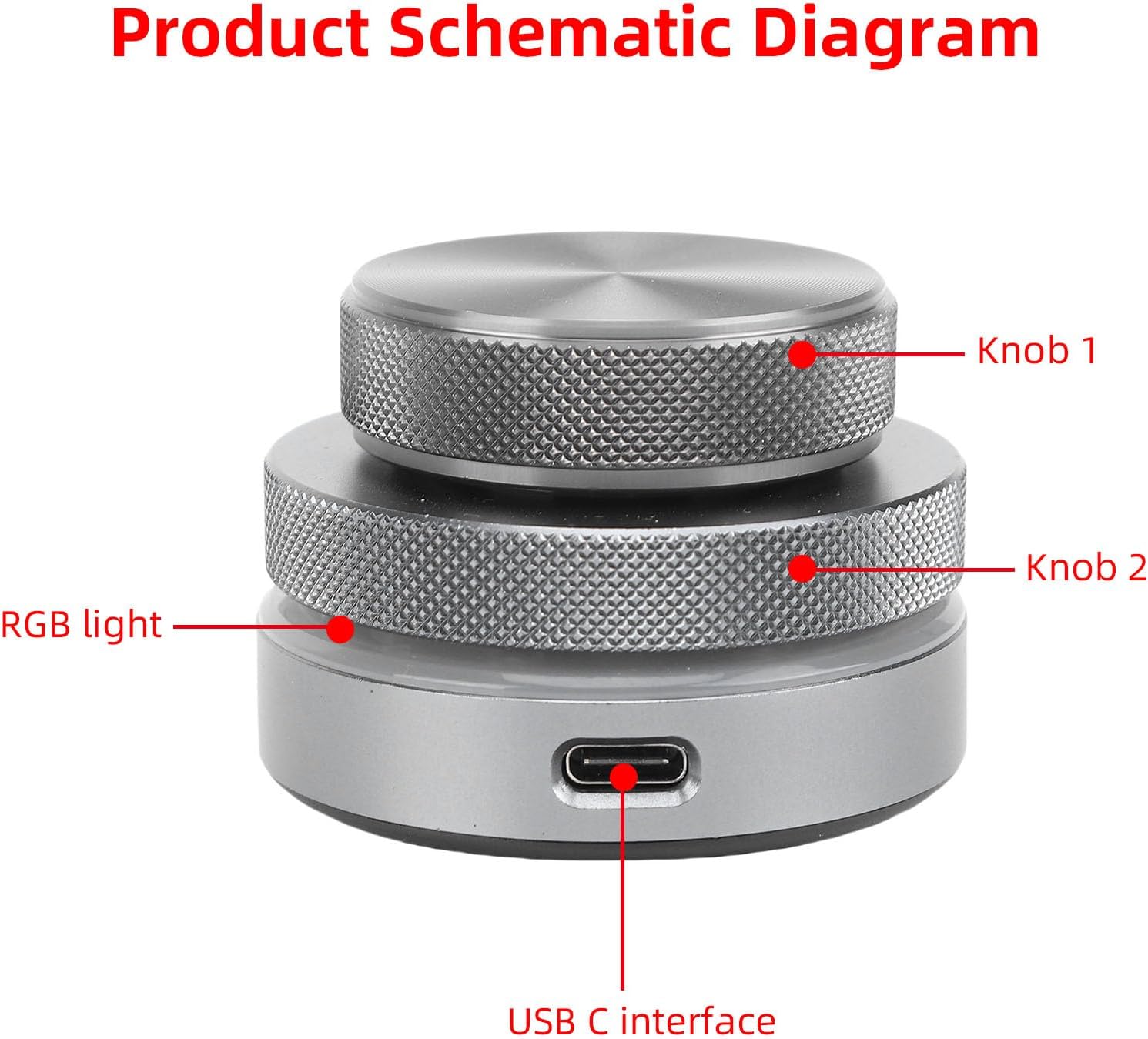
Image 2.1: Schematic diagram illustrating the key components: Knob 1 (top), Knob 2 (middle), RGB light, and USB-C interface.

Image 2.2: Dimensions of the Volume Control Knob, showing a height of 40mm (1.57in) and a width of 55mm (2.17in).
3. Setup and Connection
The Volume Control Knob supports three connection modes: USB-C wired, 2.4G wireless, and Bluetooth. No driver installation is required for any mode.
3.1 USB-C Wired Connection
- Connect the provided USB-C cable to the USB-C interface on the Volume Control Knob.
- Plug the other end of the USB-C cable into an available USB port on your computer, laptop, tablet, or smartphone.
- The device is plug-and-play and should be recognized automatically.
3.2 2.4G Wireless Connection
For 2.4G wireless mode, ensure your device supports 2.4G wireless connectivity. Specific pairing instructions may vary based on the host device. Typically, this mode involves a USB dongle (if included) or an integrated 2.4G receiver in the host device.
3.3 Bluetooth Connection
- Ensure the Volume Control Knob is powered on and in Bluetooth pairing mode (refer to device indicators if available).
- On your computer, laptop, tablet, or smartphone, navigate to the Bluetooth settings.
- Search for available Bluetooth devices. The Volume Control Knob should appear in the list.
- Select the Volume Control Knob to pair. Follow any on-screen prompts to complete the pairing process.

Image 3.1: The Volume Control Knob connected via USB-C to a laptop, demonstrating its plug-and-play functionality without requiring additional software or drivers.

Image 3.2: Example of a Bluetooth pairing interface on a smartphone, illustrating the process of connecting wireless devices.
4. Operating Instructions
The Volume Control Knob offers intuitive control and customizable functions.
4.1 Basic Operation
- Volume Control: Rotate the main knob (Knob 2) clockwise to increase volume and counter-clockwise to decrease volume.
- Mute/Unmute: Press the main knob (Knob 2) to mute or unmute audio.
- Additional Knob (Knob 1): The smaller top knob (Knob 1) can be assigned to various functions, such as fine-tuning volume, scrolling, or other custom actions.
4.2 Customizable Shortcut Functions
The Volume Control Knob allows you to customize all standard keyboard key functions, enabling complex combination shortcuts with a single input. This feature is ideal for enhancing workflow efficiency.
- One-Key Input: Assign frequently used commands or complex key combinations to a single press or rotation of the knobs.
- Multi-Functions: Supports various functions including short video browsing (like/dislike, scroll), adjusting screen brightness, web page switching, electronic book page flipping, music player controls (previous/next song, play/pause), and more.

Image 4.1: The Volume Control Knob connected to a laptop, tablet, and smartphone, illustrating its support for Windows, macOS, Android, HarmonyOS, and iOS systems, along with a list of customizable multi-functional settings.

Image 4.2: The Volume Control Knob positioned on a desk, emphasizing its capability to set all key functions on a standard computer keyboard for complex combination shortcut key functions with one key.
4.3 RGB Lighting
The device features integrated RGB lighting, which enhances the aesthetic appeal and can provide visual feedback for certain operations or modes.
5. Battery and Charging
The Volume Control Knob is equipped with a built-in 400mAh battery for portable use.
- Charging: Connect the device to a power source using the provided USB-C cable.
- Battery Life: The 400mAh battery provides reliable operation for use anytime, anywhere.

Image 5.1: The Volume Control Knob shown alongside its USB-C charging cable, indicating its rechargeable nature.
6. Maintenance
To ensure the longevity and optimal performance of your Volume Control Knob, follow these maintenance guidelines:
- Cleaning: Use a soft, dry cloth to wipe the surface of the device. Avoid using abrasive cleaners or solvents.
- Storage: Store the device in a cool, dry place away from direct sunlight and extreme temperatures.
- Handling: Avoid dropping the device or subjecting it to strong impacts.
7. Troubleshooting
If you encounter issues with your Volume Control Knob, try the following steps:
- No Response: Ensure the device is charged and powered on. Check the connection (USB-C cable, 2.4G dongle, or Bluetooth pairing).
- Connection Issues: For Bluetooth, try unpairing and re-pairing the device. For wired connections, try a different USB port or cable.
- Incorrect Function: Verify that the shortcut functions are correctly configured according to your preferences.
- Intermittent Operation: Ensure there are no obstructions or strong electromagnetic interference affecting wireless signals.
8. Specifications
| Feature | Description |
|---|---|
| Brand | LICAEVEY |
| Connectivity Technology | USB, Bluetooth, 2.4G Wireless |
| Special Feature | Shortcut Key Function, 360° Rotation, RGB Lighting |
| Compatible Devices | PC, Laptop, Tablet, Smartphone |
| Connector Type | USB Type C |
| Hardware Interface | Bluetooth, USB Type C |
| Control Type | Rotary Controller, Buttons |
| Platform Compatibility | Android, Mac OS X, Windows, iOS |
| Battery Capacity | 400mAh (Built-in) |
9. Warranty and Support
This LICAEVEY Volume Control Knob comes with a manufacturer warranty.
- Warranty Period: 90 days from the date of purchase.
- Manufacturer: LICAEVEY
- Support: For technical assistance or warranty claims, please contact LICAEVEY customer support through your retailer or the official brand website.