
1. Introduction
This manual provides comprehensive instructions for the safe and effective use of the Megger S1-1068/2 Expert Digital Insulation Resistance Tester. Designed for power utilities and industrial applications, this 10 kV megohmmeter offers advanced features for accurate insulation resistance measurements in various environments. Please read this manual thoroughly before operating the instrument.
2. Safety Information
Your safety and the proper operation of the Megger S1-1068/2 are paramount. Adhere to all safety warnings and instructions.
2.1 General Safety
- The instrument is safety rated to CAT IV 600V up to an altitude of 3000 meters.
- Always ensure the instrument is in good working condition before use.
- Do not operate the instrument in wet conditions or in the presence of explosive gases or vapors.
- Use only the supplied test leads and accessories.
2.2 Voltage Warnings
The S1-1068/2 incorporates five levels of voltage warnings to ensure user safety:
- Level 1: Indicates live voltage above 30V has been applied.
- Level 2: 75% of the instrument's noise limit has been exceeded. Check filter settings.
- Level 3: External voltage is overheating the discharge resistors while measuring voltage. 110% measurements are outside of the instrument's capabilities.
- Level 4: 200% of the instrument's noise limit has been exceeded. Warnings and tests are inhibited.
- Level 5: During testing in high noise environments, if induced noise surges result in voltages higher than the instrument's reinforced insulation limits, the instrument will halt the test, reduce terminal voltage, and warn the user not to touch the instrument.
2.3 RE>Act Test Mode Safety
The RE>Act test mode enhances safety by:
- Removing the possibility of incorrectly passing insulation that should have failed due to re-absorption current.
- Monitoring discharge following a test to prevent dangerous return voltages.
2.4 Test Leads
The supplied test leads are double insulated with clamps rated at 3 kV (medium clip) and 5 kV (large clip), equivalent to 6 kV and 10 kV single insulation respectively. All test leads feature non-detachable test clips, and the 4mm high voltage insulated plugs lock into the instrument for additional safety.
3. Product Overview
The Megger S1-1068/2 is a robust and accurate digital insulation resistance tester designed for demanding applications. It features an intuitive color display, remote operation capabilities, and advanced diagnostic functions.
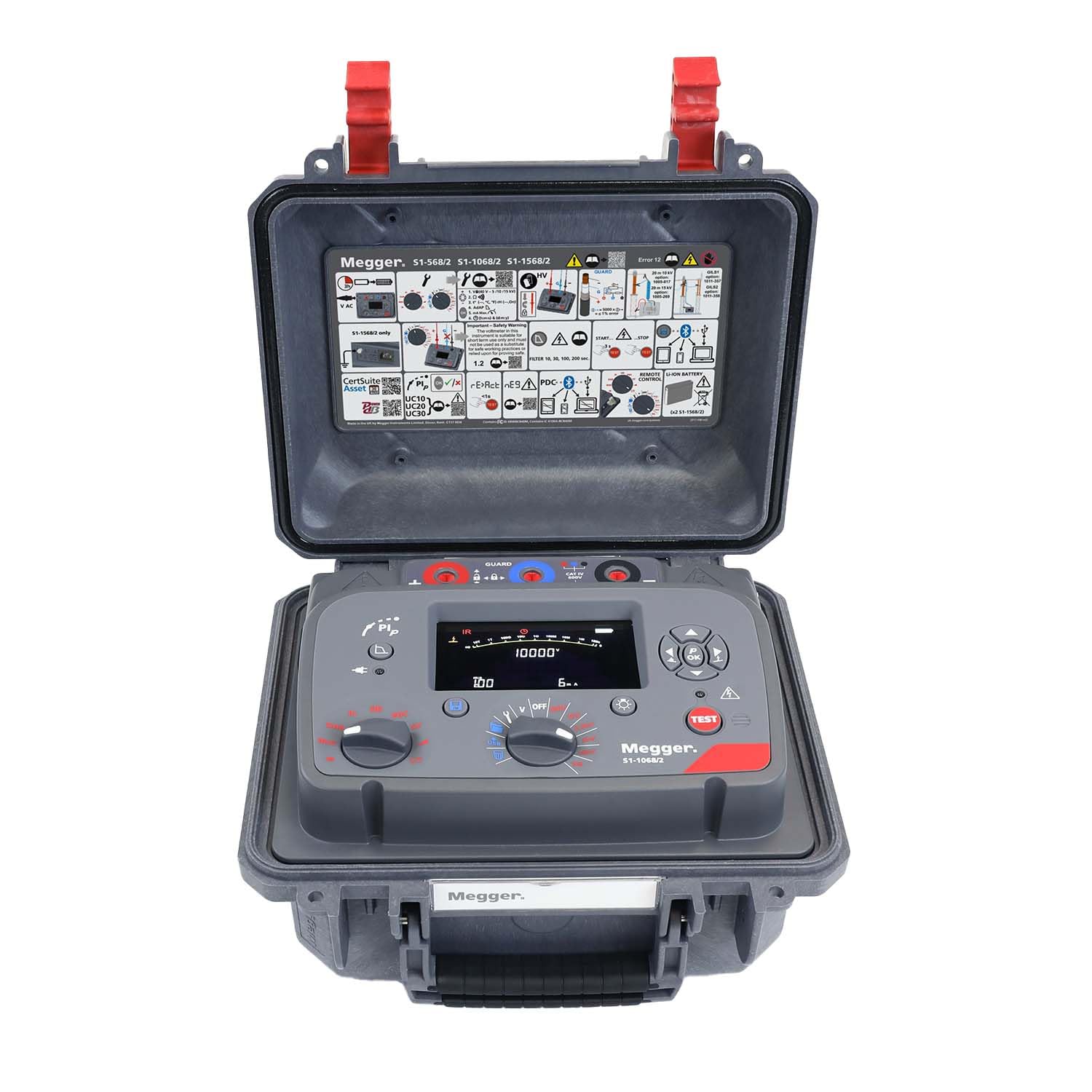
Image of the Megger S1-1068/2 Expert Digital Insulation Resistance Tester, showing its robust casing and user interface.
3.1 Key Features
- Maximum test voltage up to 10 kV.
- Accuracy of ±5% up to 1 TΩ at 5000V or 2 TΩ at 10000V.
- Intuitive color custom display with unbeatable viewing angle.
- PI Predictor Function (PIp) for time-saving Polarization Index tests.
- RE>Act Test Mode for reliable measurements by managing re-absorption current.
- Remote operation via USB cable with full control of output current.
- Dual case design for protection and moisture/dust ingress prevention.
- Memory storage with time/date stamping, data logging, and recall.
- Isolated USB and Bluetooth interfaces for data transfer.
- Integration with CertSuite Asset mobile app and browser-based software.
4. What's in the Box
Carefully unpack the contents and ensure all items are present:
- 1 x S1-1068/2 Expert Digital Insulation Resistance Tester and Megohmmeter
- 1 x 3-Piece Lead Set with Medium Insulated Clips, 5 kV, 3m (1008-022)
- 1 x 3-Piece Lead Set with Large Insulated Clips, 10 kV, 3m (1007-311)
- 1 x Remote Control Indicator Beacon
- 1 x Screened USB Cable with Filters
- 1 x Power Lead
- 1 x Certificate of Conformance (Non-NIST)
- 1 x Quick-Start Label
5. Setup
Follow these steps to prepare your Megger S1-1068/2 for operation.
5.1 Charging the Battery
The S1-1068/2 features rapid charge batteries. Connect the supplied power lead to the instrument and a suitable AC power source. The instrument can operate from an AC source even when the battery is flat or low.
5.2 Connecting Test Leads
- Ensure the instrument is powered off before connecting leads.
- Insert the 4mm high voltage insulated plugs of the test leads into the corresponding terminals on the instrument. Ensure they lock securely into place.
- The test leads are non-detachable from their clips for enhanced safety.
5.3 Initial Power-On
Press the power button to turn on the instrument. An intuitive user interface with two rotary switches and a large backlight display will guide you. A graphical quick-start guide is provided inside the lid for first-time users.
6. Operating Instructions
This section details the various operating modes and functions of the S1-1068/2.
6.1 User Interface
Navigate the instrument using the two rotary switches and observe measurement information on the large backlight display. The display allows various measurement data to be shown simultaneously.
6.2 Insulation Test Mode
The instrument offers five preset voltage ranges for insulation testing, along with a user-settable lock voltage range. Select the appropriate voltage range using the rotary switches before initiating a test.
6.3 Diagnostic Tests
The S1-1068/2 includes preconfigured diagnostic tests:
- Polarization Index (PI)
- Dielectric Absorption Ratio (DAR)
- Dielectric Discharge (DD)
- Polarization Depolarization Current (PDC)
- Stepped Voltage (SV)
- Ramp Test
6.4 PI Predictor Function (PIp)
To use the PIp function, initiate a Polarization Index test. The PIp function uses the initial part of the IR curve to predict the rest of the test at five minutes. It can start as early as three minutes into the test and will stop when a confident prediction is made, saving valuable test time.
6.5 RE>Act Test Mode
Activate the RE>Act test mode to measure and manage re-absorption current before starting an insulation test. This ensures that remaining absorption current does not falsely influence IR measurements, improving reliability.
6.6 Remote Operation
Connect the instrument to a computer via the supplied screened USB cable. This allows for remote control of the tester and full control of the output current, which is beneficial for automated testing or operating from a safe distance.
6.7 Data Management and Transfer
The S1-1068/2 features internal memory for storing test results with time/date stamping. You can log data and recall results directly to the screen. For data transfer, use the fully isolated USB interface or the on-board Bluetooth interface. Results can be transferred to the CertSuite Asset mobile app (Android/iOS) or Windows laptop.
7. Maintenance
Proper maintenance ensures the longevity and accuracy of your Megger S1-1068/2.
7.1 Cleaning
The dual case design provides IP rating against moisture and dust ingress. Clean the exterior of the instrument with a soft, damp cloth. Do not use abrasive cleaners or solvents.
7.2 Battery Care
Regularly charge the instrument's battery. If storing the instrument for an extended period, ensure the battery is partially charged and recharge periodically to maintain battery health.
7.3 Test Lead Inspection
Periodically inspect the test leads for any signs of damage, such as cuts, cracks, or frayed insulation. Replace damaged leads immediately to ensure safety and accurate measurements.
8. Troubleshooting
This section addresses common issues and their resolutions.
8.1 Interpreting Voltage Warnings
Refer to Section 2.2, "Voltage Warnings," for detailed explanations of each warning level and recommended actions. For example, a Level 2 warning suggests checking filter settings due to high noise.
8.2 Inaccurate Readings
- Ensure test leads are securely connected and undamaged.
- Verify that the correct test voltage and diagnostic mode are selected.
- Check for excessive noise in the environment; consider using RE>Act mode.
- Ensure the insulation under test is fully discharged before starting a new test.
8.3 Data Transfer Issues
- Ensure the USB cable is properly connected or Bluetooth is paired correctly.
- Verify that the CertSuite Asset app or software is running and updated.
- Check device permissions for data transfer.
9. Specifications
| Specification | Value |
|---|---|
| Brand | Megger |
| Model | S1-1068/2 |
| Power Source | Battery Powered (with AC operation) |
| Maximum Test Voltage | 10 kV |
| Insulation Resistance Accuracy | ±5% up to 1 TΩ at 5000V or 2 TΩ at 10000V |
| Safety Rating | CAT IV 600V (up to 3000m altitude) |
| Item Weight | 6 Pounds |
| Connectivity | Isolated USB, Bluetooth |
| First Available Date | October 31, 2025 |
10. Support and Software
Megger provides various tools and software to enhance your experience with the S1-1068/2.
10.1 CertSuite Asset Lite
CertSuite Asset Lite comes standard with the S1-1068/2. It allows you to tag test results with an Asset ID and transfer them directly from the tester, streamlining data collection.
10.2 CertSuite Asset Full Package (Optional)
The full CertSuite Asset app (not included) offers advanced features, including the ability to store results, comments, and photos with asset data. It supports multi-user collaboration for remote reviewing by team members.
10.3 PowerDB Pro (Optional)
Users can optionally utilize the PC-based asset management software, PowerDB Pro (not included), for comprehensive asset management and reporting.


