
1. Introduction
Welcome to the Hotdot M1 Rechargeable Hand Warmers user manual. This guide provides essential information for the safe and effective use, setup, operation, and maintenance of your new hand warmers. Please read this manual thoroughly before first use and retain it for future reference.
2. Safety Information
To ensure safe operation, please observe the following precautions:
- Do not expose the device to extreme temperatures outside its operating range (104-131°F / 40-55°C).
- Avoid direct, prolonged skin contact with the heating surface at the highest temperature settings to prevent low-temperature burns, especially for children and individuals with sensitive skin.
- Keep the device away from water and moisture.
- Do not attempt to disassemble, repair, or modify the device.
- Use only the provided charging cable or a certified Type-C cable.
- The device is FCC certified and includes built-in protections against over-heat, short circuit, over-power, and overcharge.
3. Package Contents
Your Hotdot M1 Rechargeable Hand Warmer package includes:
- 2 x Hotdot M1 Rechargeable Hand Warmers
- 1 x Dual Type-C Charging Cable
- 2 x Lanyards
- 1 x Magic Thermochromic Blessing Card
- 1 x User Manual
- 1 x Golden Bow Tie Gift Box
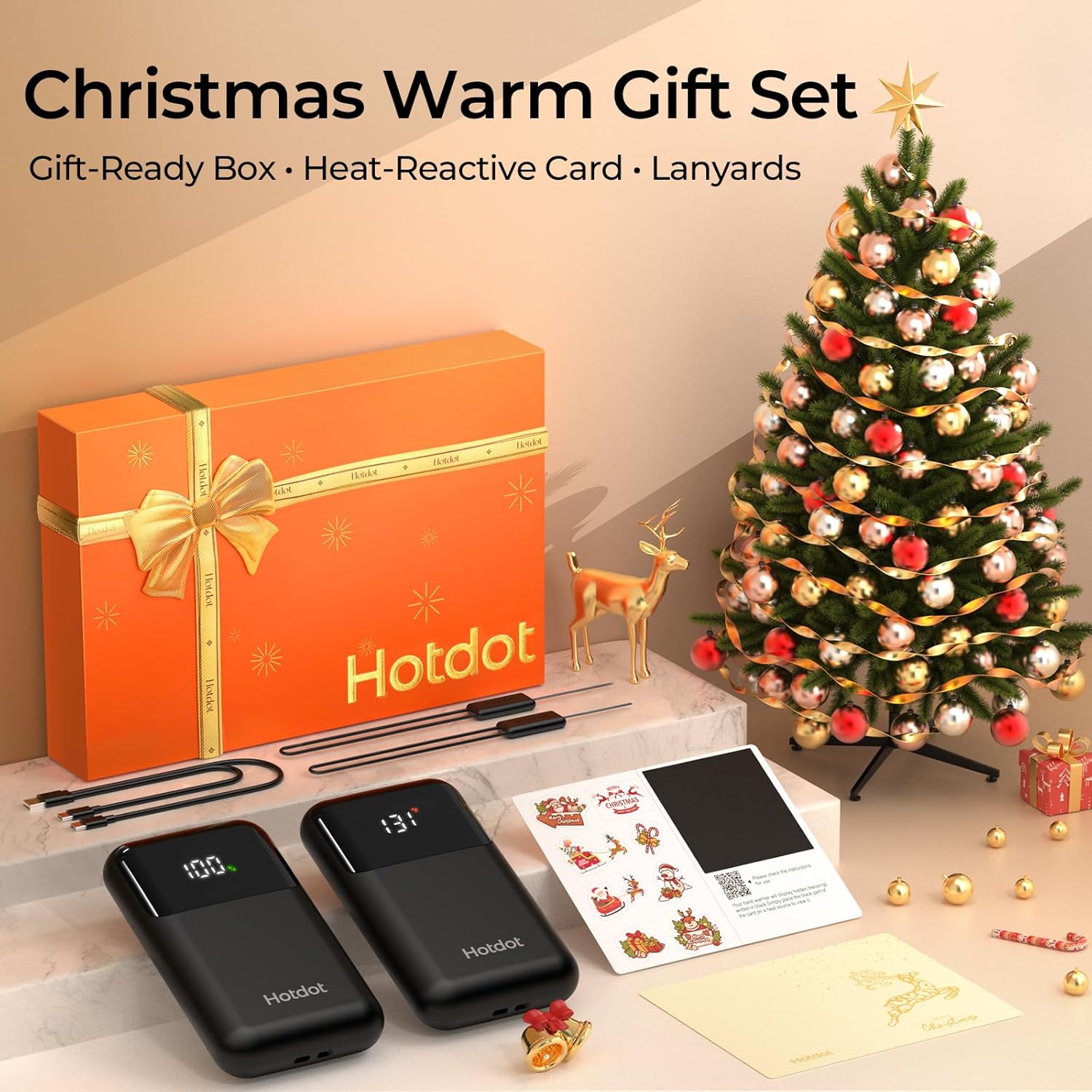
Image: Contents of the Hotdot M1 Hand Warmer gift set, including two hand warmers, charging cable, and a blessing card.
Video: A demonstration of the Hotdot M1 Hand Warmers package contents, including the hand warmers, charging cable, and gift box.
4. Setup
4.1 Initial Charging
Before first use, fully charge both hand warmers using the provided dual Type-C charging cable. The LED display will show the battery percentage, indicating charging progress.
4.2 Attaching the Lanyard
Thread the included lanyard through the designated loop on each hand warmer. This helps prevent loss and allows for easy access when worn around the wrist or attached to a bag.
4.3 Using the Thermochromic Blessing Card
Write your personal message on the designated area of the blessing card. Cover the message with the provided heat-reactive sticker. When the hand warmer is turned on and placed against the black part of the card, the heat will reveal your hidden message.
Video: A demonstration of how to use the thermochromic blessing card with the hand warmer to reveal a hidden message.
5. Operating Instructions
5.1 Power On/Off
To power on, press and hold the power button for approximately 3 seconds. The LED display will illuminate, showing the current battery percentage and temperature. To power off, press and hold the power button again for 3 seconds.
5.2 Adjusting Heat Levels
The Hotdot M1 offers 4 heat levels:
- Level 1: 104°F (40°C)
- Level 2: 113°F (45°C)
- Level 3: 122°F (50°C)
- Level 4: 131°F (55°C)
Once powered on, short press the power button to cycle through the different heat levels. The LED display will show the selected temperature.
5.3 Temperature and Battery Display
The clear LED screen provides real-time information:
- Temperature: Displays the current heating level in Fahrenheit (°F) or Celsius (°C).
- Battery Percentage: Shows the remaining battery life.
To switch between Fahrenheit and Celsius, double-press the power button.

Image: The intelligent LED display on the Hotdot M1 Hand Warmer, showing real-time temperature and battery percentage.
Video: A user demonstrating the fast heating and display window of the Hotdot M1 Hand Warmer.
Video: A short demonstration highlighting the 1-second fast heating capability of the hand warmer.
6. Features
- Instant Heat: Experience warmth in approximately 1 second upon activation.
- Long-Lasting Warmth: Enjoy up to 20 hours of continuous heat on a single charge, depending on the heat level selected.
- Compact and Portable: Each unit weighs only 63g and features a slim, ergonomic design (3 x 1.8 x 0.5 inches), fitting comfortably in pockets or gloves.
- AI Smart Chip: Equipped with an advanced AI chip for precise thermostatic control and multiple safety protections, including over-heat, short circuit, over-power, and overcharge protection.
- Versatile Use: Ideal for various outdoor activities and cold environments such as camping, hiking, skiing, fishing, construction work, delivery services, and stadium events.

Image: The Hotdot M1 Hand Warmer highlighting its 1-second fast heating capability.
Video: A user demonstrating the compact size and portability of the Hotdot M1 Hand Warmer, fitting easily into a pocket.

Image: The Hotdot M1 Hand Warmer illustrating its 20-hour all-day battery life.
Video: A user demonstrating the Hotdot M1 Hand Warmer's effectiveness during skiing, highlighting its warmth and fit in mittens.
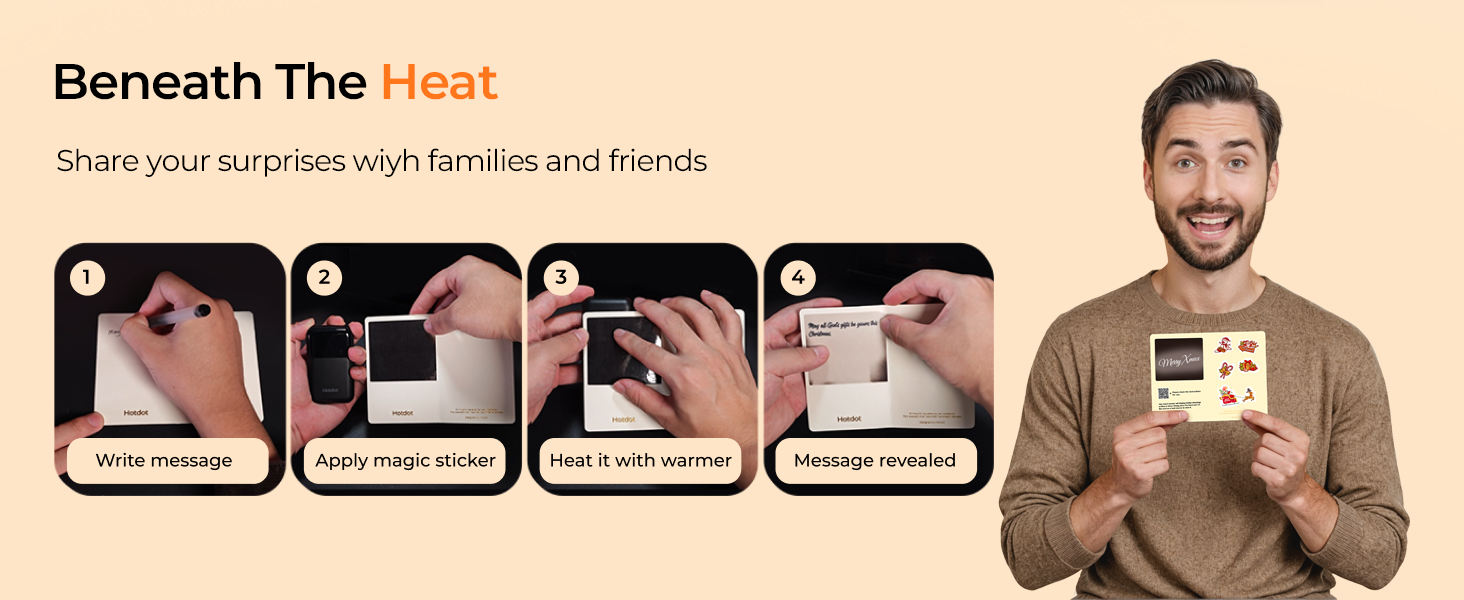
Image: Hotdot M1 Hand Warmer showcasing its safety certifications and protection features.
7. Maintenance
- Cleaning: Wipe the surface of the hand warmers with a soft, dry cloth. Do not use abrasive cleaners or immerse in water.
- Storage: Store the hand warmers in a cool, dry place when not in use. Ensure they are fully charged before long-term storage to preserve battery health.
8. Troubleshooting
- Device not turning on: Ensure the device is charged. Press and hold the power button for 3 seconds.
- Device not heating: Check the selected heat level on the LED display. Ensure the device is not in a low battery state.
- Charging issues: Verify the charging cable is securely connected to both the hand warmer and a power source. Try a different USB port or adapter.
If issues persist, please refer to the warranty and support section.
9. Specifications
| Feature | Detail |
|---|---|
| Model Name | M1 |
| Brand | Hotdot |
| Material | Aluminum, Plastic |
| Battery Type | Lithium-Ion |
| Battery Capacity | 3200 Milliamp Hours |
| Charging Time | 3.5 Hours |
| Heat Levels | 4 (104°F - 131°F / 40°C - 55°C) |
| Reusability | Rechargeable |
| Item Dimensions (LxWxH) | 3 x 1.8 x 0.5 inches |
| Package Weight | 0.19 Kilograms |
| UPC | 607604591554 |
10. Warranty and Support
Your Hotdot M1 Rechargeable Hand Warmers come with a Lifetime Warranty, ensuring long-term satisfaction and reliability.
For any questions, troubleshooting assistance, or warranty claims, please contact Hotdot customer support through the official Hotdot Store on Amazon or refer to the contact information provided in your product packaging.