
Introduction
This manual provides instructions for the safe and efficient use of your treewell Remote Control Outlet System. This system allows you to wirelessly control household appliances and lighting with ease. Please read this manual thoroughly before installation and operation, and retain it for future reference.
Safety Information
- For indoor use only. Do not expose to water or damp conditions.
- Do not exceed the maximum load of 15A/1875W. Overloading may cause overheating and fire.
- Ensure the appliance connected to the outlet is in good working condition.
- Do not disassemble or modify the device. Refer all servicing to qualified personnel.
- Keep out of reach of children.
- Always unplug the remote control outlet from the wall before cleaning.
Package Contents
- 5 x treewell Remote Control Outlets
- 2 x treewell Remote Controls (with 2 CR2032 batteries included)
Product Overview
The treewell Remote Control Outlet System consists of compact plug-in outlets and handheld remote controls. Each outlet features a manual ON/OFF switch and a program button. The remotes allow individual control of up to five outlets or simultaneous control of all paired outlets.

Image: The complete treewell Remote Control Outlet System, including five compact outlets and two handheld remote controls.

Image: A close-up view of a single treewell remote control outlet, highlighting its compact design and the manual ON/OFF/program button on the side.
Setup
- Plug in the Outlet: Insert a treewell remote control outlet into a standard 125V AC wall socket. The compact design ensures it does not block the second socket.
- Initial Pairing (Pre-paired): The outlets and remotes are pre-paired at the factory. Simply plug in an appliance to the remote control outlet and use the corresponding button on the remote to turn it ON/OFF.
- Manual Pairing (If needed): If an outlet does not respond to the remote, or if you wish to re-pair or expand your system:
- Plug the remote control outlet into a wall socket.
- Press and hold the program button on the side of the outlet until the indicator light flashes.
- While the light is flashing, press the desired ON or OFF button (1-5) on the remote control. The indicator light on the outlet will stop flashing, confirming successful pairing.
- To pair multiple remotes to one outlet, repeat the process with each remote.
- To pair one remote button to multiple outlets, repeat the process for each outlet.

Image: The compact design of the treewell remote control outlet, demonstrating that it leaves the adjacent wall socket free for other plugs.
Operating Instructions
- Turning Devices ON/OFF: Press the corresponding ON or OFF button (1-5) on the remote control to operate the paired device. The remote's strong RF signal allows control through walls, doors, and windows, up to 200 feet.
- Controlling All Devices: Use the 'ALL ON' or 'ALL OFF' buttons on the remote to simultaneously control all paired outlets.
- Manual Control: Each remote control outlet has a manual ON/OFF button on its side. Press this button to toggle the power state of the connected appliance directly at the outlet.

Image: A user comfortably operating various household devices with a treewell remote control, demonstrating the convenience of wireless control.
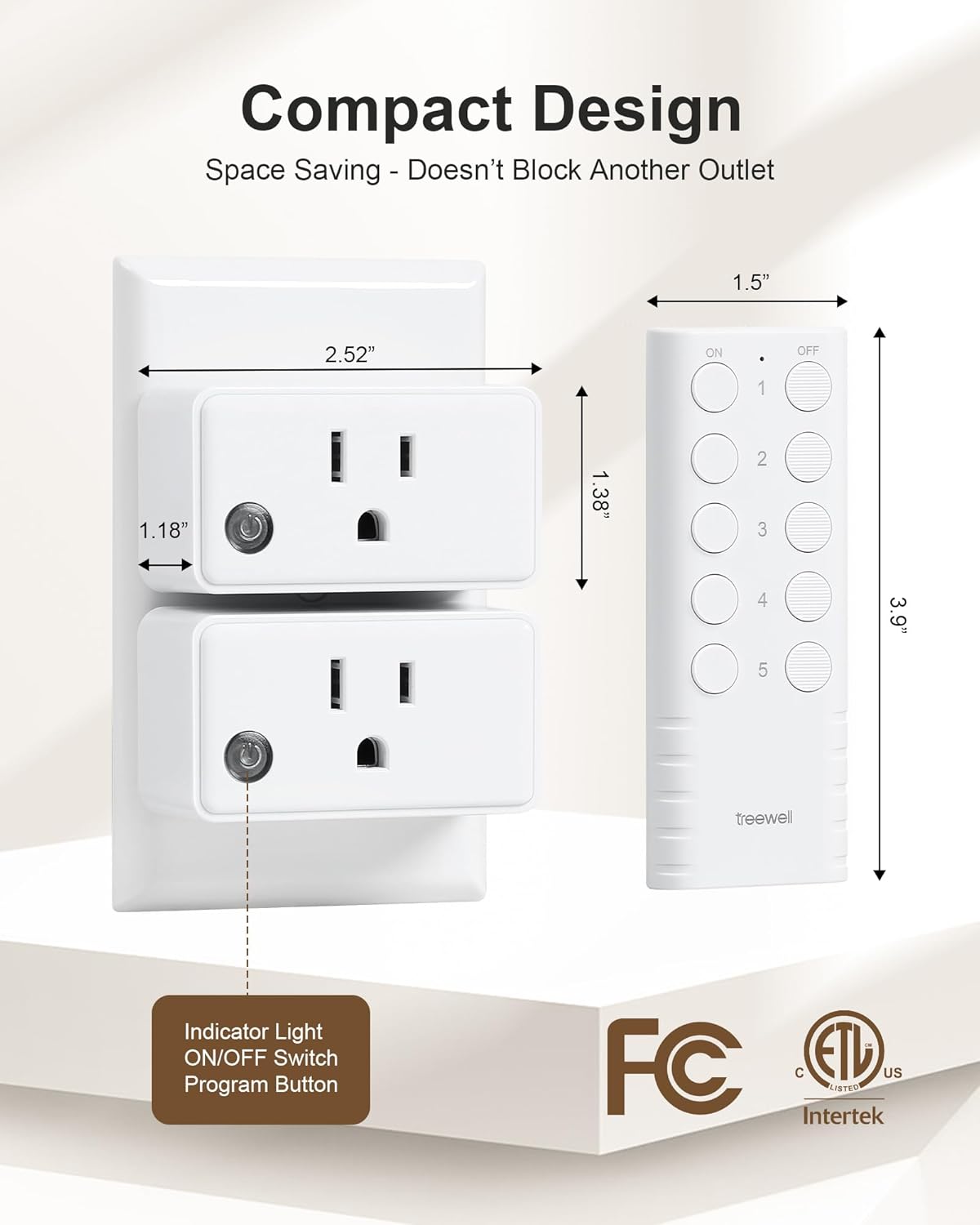
Image: A visual representation of the treewell remote control's 200-foot range, indicating its ability to transmit signals effectively through various household barriers.

Image: Examples of common household appliances that can be conveniently controlled using the treewell remote control outlets, including seasonal lighting, fans, and small kitchen appliances.
Maintenance
- Cleaning: Wipe the devices with a dry, soft cloth. Do not use abrasive cleaners or solvents.
- Remote Battery Replacement: The remote controls use CR2032 batteries. When the remote's indicator light dims or it becomes unresponsive, replace the battery. To replace, open the battery compartment on the back of the remote, remove the old battery, and insert a new CR2032 battery with the positive (+) side facing up.

Image: The battery compartment of the treewell remote control, illustrating how to access and replace the CR2032 battery.
Troubleshooting
- Device not responding:
- Check if the remote control outlet is securely plugged into the wall.
- Ensure the appliance connected to the outlet is properly plugged in and powered on.
- Verify the remote control battery is not depleted. Replace if necessary.
- Re-pair the remote and outlet following the manual pairing instructions in the Setup section.
- Interference: The system uses a strong RF signal to minimize interference. If you experience issues, ensure there are no large metal objects or other strong RF-emitting devices directly between the remote and the outlet.
- Expanding the System: Additional treewell wireless light switches and receiver kits can be purchased to expand your remote control system. These can be easily paired with your existing remotes.

Image: An illustration demonstrating the expandability of the treewell remote control system, allowing integration with other treewell wireless switches and receivers for broader home automation.
Specifications
| Feature | Specification |
|---|---|
| Operation Mode | ON-OFF |
| Current Rating | 15 Amps |
| Operating Voltage | 125 Volts (AC) |
| Contact Type | Plug in |
| Connector Type | Plug In |
| Brand | treewell |
| Terminal | Through Hole |
| Circuit Type | 1-way |
| Actuator Type | Push Button |
| Contact Material | Copper |
| Number of Positions | 5 |
| Controller Type | Push Button |
| Control Method | Remote |
| Wattage | 1875 watts |
| Unit Count | 1.0 Count |
| Number of Items | 5 |
| Manufacturer | treewell |
| Smart Home Compatibility | Smart Home Compatible |
| Package Dimensions | 7.13 x 4.06 x 1.73 inches |
| Item Weight | 13.7 ounces |
| ASIN | B0CZKM79NQ |
| Item model number | TREEWELL-XXXX |
| Batteries | 2 CR2032 batteries required. (included) |
| Date First Available | April 1, 2024 |
Warranty and Support
This product is covered by a 30-day refund/replacement policy. For any questions, technical support, or warranty claims, please contact treewell customer service through the retailer's platform or visit the official treewell store online.
For additional information and product updates, please visit the treewell Store.