Introduction
This manual provides instructions for the Re-Flix Superior Light 4-in-1 Remote Control, model 747516. This remote is specifically pre-programmed for use with the SILVERCREST KH6524 DVD/BD player, offering immediate functionality without complex setup. Its ergonomic design ensures ease of use as a primary or replacement remote control.
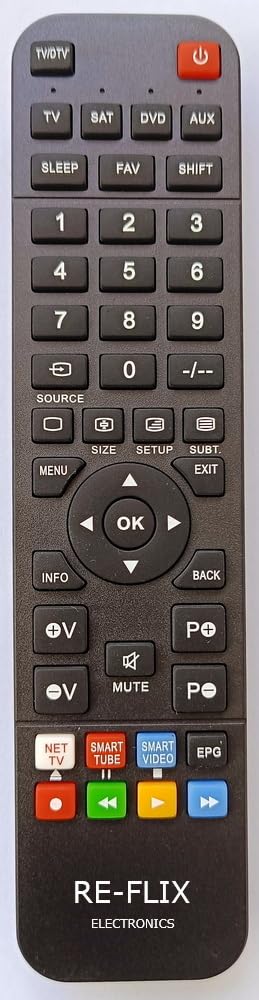
Figure 1: Front view of the Re-Flix Superior Light 4-in-1 Remote Control.
Safety Information
- Do not expose the remote control to direct sunlight, heat sources, or extreme temperatures.
- Avoid dropping the remote control or subjecting it to strong impacts.
- Do not immerse the remote control in water or other liquids.
- Keep batteries out of reach of children. If swallowed, seek immediate medical attention.
- Dispose of used batteries according to local regulations.
Setup
1. Battery Installation
- Locate the battery compartment on the back of the remote control.
- Slide the battery compartment cover downwards or press the latch to open it.
- Insert two AAA batteries (not included), ensuring the correct polarity (+ and -) as indicated inside the compartment.
- Close the battery compartment cover securely.

Figure 2: Back view of the remote control with the battery compartment.
2. Initial Use (Plug & Play)
The Re-Flix Superior Light remote control is pre-programmed for the SILVERCREST KH6524 DVD/BD player. No complicated programming or code entry is required. Once batteries are installed, the remote is ready for immediate use with your compatible device.
Operating Instructions
Point the remote control directly at the infrared receiver of your SILVERCREST KH6524 DVD/BD player or connected TV.
Basic Functions
- Power Button: Turns the DVD/BD player on or off.
- Playback Controls: Use buttons such as Play, Pause, Stop, Fast Forward, and Rewind for media control.
- Navigation Buttons: Use the directional arrows (Up, Down, Left, Right) and OK/Enter button to navigate menus.
- Volume Controls: Adjust the volume of your connected TV or audio system (if supported by the DVD/BD player's output).
- Number Buttons: Select specific tracks, chapters, or input numerical values.
Smart TV Control (If Applicable)
This remote may feature dedicated buttons for popular streaming services like Netflix and YouTube. If present, these buttons allow direct access to these applications on compatible Smart TVs when the remote is used to control the TV functions. Verify if these specific buttons are available on your remote model.
Maintenance
- Cleaning: Wipe the remote control with a soft, dry cloth. Do not use abrasive cleaners or solvents.
- Battery Replacement: Replace batteries when the remote's response becomes sluggish or stops working. Always replace both batteries at the same time with new ones of the same type.
- Storage: If the remote control will not be used for an extended period, remove the batteries to prevent leakage. Store in a cool, dry place.
Troubleshooting
- Remote not responding:
- Check if the batteries are inserted correctly with the right polarity.
- Replace old batteries with new ones.
- Ensure there are no obstructions between the remote control and the device's infrared receiver.
- Make sure you are within the operating range and pointing the remote directly at the device.
- Specific buttons not working:
- Verify that the function you are trying to use is supported by your SILVERCREST KH6524 DVD/BD player.
- For Smart TV functions, ensure your TV is compatible and the remote has the specific buttons.
Specifications
| Brand | Re-Flix |
| Model Number | 747516 |
| Color | Black |
| Connectivity Technology | Infrared |
| Compatible Devices | SILVERCREST KH6524 DVD/BD Player, TV Decoder |
| Max. Supported Devices | 1 (Pre-programmed for specific model) |
Warranty and Support
Information regarding spare parts availability and software update guarantees is not available for this product. For any issues or support inquiries, please refer to the retailer or the manufacturer's official website for assistance.


