
Introduction
This manual provides detailed instructions for the assembly, operation, and maintenance of your Bellemave Twin Platform Bed with Trundle, LED Headboard, and Storage Drawers. Please read all instructions carefully before beginning assembly and retain this manual for future reference.
Safety Information
- Always assemble the bed on a soft, clean surface to prevent damage to the product or your floor.
- Ensure all parts are securely fastened before use. Periodically check and tighten all connections.
- Do not allow children to play on or around the trundle bed or drawers without supervision.
- Keep small parts out of reach of children during assembly to prevent choking hazards.
- Do not overload the trundle bed or storage drawers beyond their specified weight capacities.
- Exercise caution when operating the flip-up headboard compartment to avoid pinching fingers.
- Ensure electrical connections for LED lights and USB ports are properly installed and not damaged. Disconnect power before cleaning or maintenance of electrical components.
- This product is intended for indoor use only.
Parts List and Hardware
Refer to the included step-by-step installation manual for a complete list of all parts and hardware. Verify all components are present and undamaged before starting assembly.

Image: Overview of product specifications including packaging, sizes, construction materials, weight capacities, color options, recommended mattress thickness, and assembly requirements.
Setup and Assembly
Assembly of this platform bed is required. All necessary tools and a detailed step-by-step installation manual are included in the packaging. Follow the instructions provided in the manual carefully for a smooth assembly process.
- Unpack Components: Carefully remove all parts from the packaging. Lay them out on a soft, clean surface to prevent scratches.
- Identify Parts: Match each part to the corresponding diagram in the assembly manual.
- Assemble Frame: Begin by assembling the main bed frame according to the manual's instructions. Ensure all bolts and screws are tightened securely.
- Install Slats: Place the bed slats onto the frame. No box spring is needed for this platform bed.
- Assemble Headboard: Attach the headboard, including the LED lighting and USB charging station components, as directed.
- Assemble Trundle and Drawers: Construct the trundle bed and storage drawers. Ensure the smooth-rolling wheels are properly attached to the trundle and drawers for easy operation.
- Final Check: Before use, double-check all connections and ensure the bed is stable and secure.
Note: Manual installation is recommended. If you encounter any problems during assembly, please contact customer support.
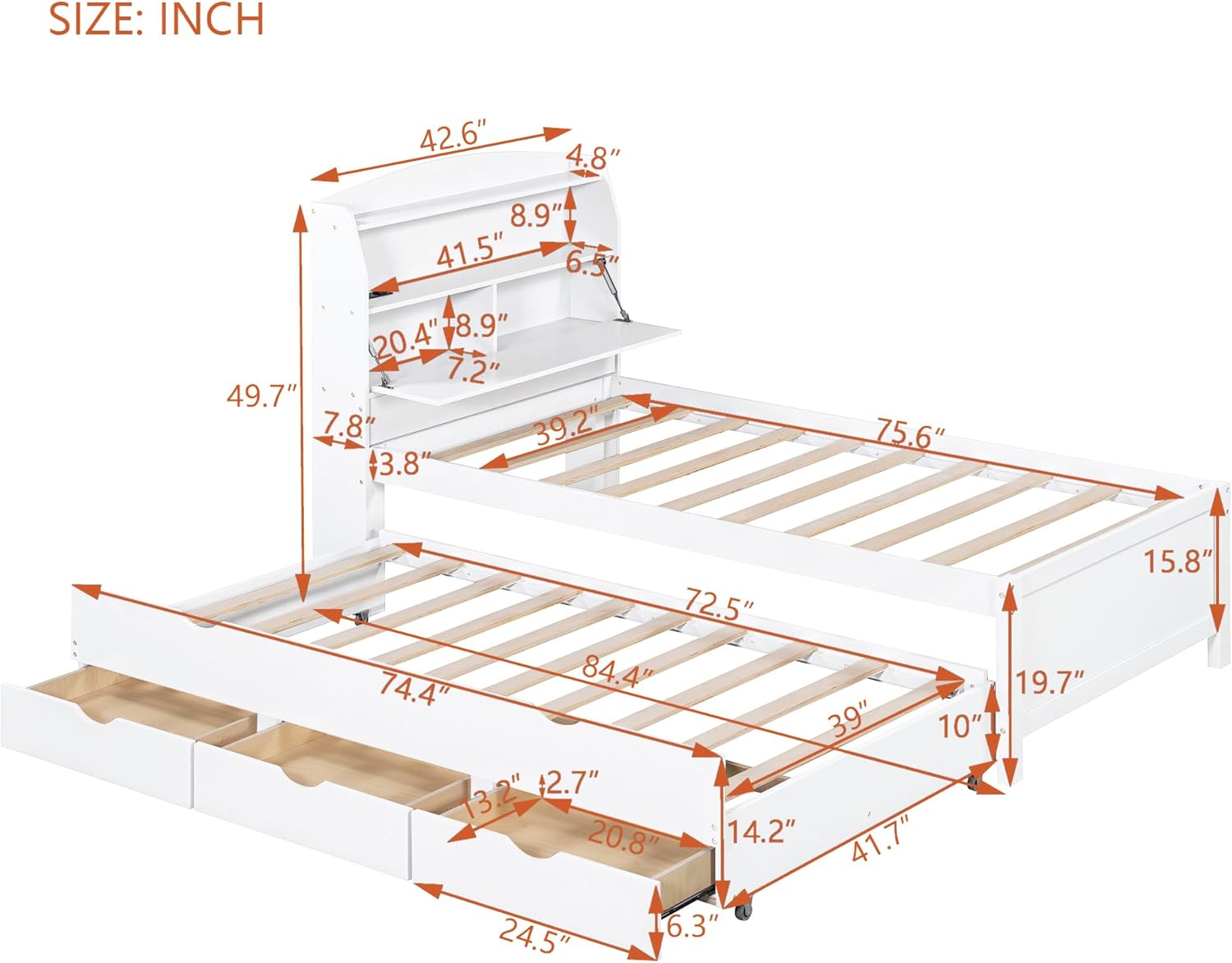
Image: Dimensional diagram for the Twin size bed, illustrating overall measurements and specific component sizes.
Operating Instructions
1. Trundle Bed Operation
The trundle bed is designed for easy access and storage. It can be pulled out from either side of the main bed.
- To extend the trundle: Gently pull the trundle unit outwards from under the main bed. The smooth-rolling wheels will facilitate movement.
- To retract the trundle: Push the trundle unit back under the main bed until it is fully concealed. Safety-lock wheels help prevent accidental sliding when stored.
- Ensure the trundle is clear of obstructions before pulling out or pushing in.

Image: The trundle bed and three slide-out storage drawers, demonstrating their extension from beneath the main bed. Close-ups show the cut-out handles and smooth wheels for easy access.

Image: The trundle bed and three storage drawers fully extended, showcasing their capacity and accessibility.
2. Storage Drawers Operation
The three under-bed drawers provide additional storage and can be accessed from either side of the bed.
- To open: Use the cut-out handles to gently pull the drawers outwards.
- To close: Push the drawers back into their compartments until fully closed.
- Do not force drawers if they encounter resistance. Check for obstructions.
3. LED Night Light and USB Charging Ports
The headboard features a built-in LED night light with 3 dimmable levels and dual USB charging ports.
- LED Light: Locate the control button on the headboard. Press to cycle through the 3 dimmable light levels (low, medium, high) and off.
- USB Ports: Plug your USB charging cables into the dual USB ports to charge compatible devices. Ensure the bed's power cord is connected to a functional wall outlet.

Image: The integrated USB charging ports and power outlets on the headboard, providing convenient access for electronic devices.

Image: The bed at night with the LED night light turned on, demonstrating its functionality and the ambient lighting it provides.
4. Flip-Up Headboard Compartment
The concealed flip-up compartment in the headboard offers additional storage space.
- To open: Gently lift the front panel of the headboard compartment. The hydraulic mechanism will assist in opening and holding it in place.
- To close: Carefully push the panel down until it latches securely. Ensure no items are obstructing the closing mechanism.

Image: The flip-up headboard compartment in an open position, showcasing the additional storage space available for various items.

Image: A close-up view of the flip-up headboard compartment, highlighting the internal structure and hydraulic mechanism that assists in opening and closing.
Maintenance
- Cleaning: Wipe the wooden surfaces with a soft, damp cloth. Avoid harsh chemicals or abrasive cleaners that may damage the finish.
- Electrical Components: Before cleaning the headboard area, unplug the bed from the power outlet. Use a dry cloth to wipe the LED strip and USB ports. Do not spray liquids directly onto electrical components.
- Hardware Check: Periodically inspect all bolts, screws, and connections. Tighten any loose hardware to ensure the bed remains stable and safe.
- Trundle/Drawer Wheels: Keep the wheels free of dust and debris to ensure smooth operation.
Troubleshooting
| Problem | Possible Cause | Solution |
|---|---|---|
| LED light not working or USB ports not charging. |
|
|
| Trundle or drawers are difficult to pull out/push in. |
|
|
| Bed feels wobbly or unstable. |
|
|
Specifications
| Feature | Detail |
|---|---|
| Product Dimensions (L x W x H) | 84.4" x 42.6" x 49.7" |
| Material | Pine Wood, Engineered Wood (Plywood + MDF + Pinewood) |
| Color | White |
| Bed Weight Capacity | 250 lbs (Twin size) |
| Trundle Weight Capacity | 250 lbs |
| Integrated Drawer Capacity | 22 lbs per drawer |
| Recommended Mattress Thickness (Upper Bed) | Up to 8" thick mattress |
| Recommended Mattress Thickness (Trundle Bed) | Up to 6" thick mattress |
| Special Features | Storage Drawer, LED Lighting (3-level dimmable), Storage Headboard (with flip-up compartment), Trundle Bed, Dual USB Outlets |
| Assembly Required | Yes |
Warranty and Support
While specific warranty details are not provided in this manual, Bellemave is committed to customer satisfaction. If you encounter any problems during the assembly or use of your product, please do not hesitate to contact us. We aim to reply within 24 hours to assist you with any concerns or issues.
For support, please refer to the contact information provided with your purchase or visit the official Bellemave store on Amazon: Bellemave Store.


