
Braun AIO 5510
Braun Series 5 All-in-One Grooming Kit AIO 5510 User Manual
Model: AIO 5510
Introduction
The Braun Series 5 All-in-One Grooming Kit AIO 5510 is designed for versatile grooming of your beard, hair, ears, nose, and body. This manual provides essential information for safe and effective use, maintenance, and troubleshooting of your device. Please read these instructions carefully before first use and keep them for future reference.
Important Safety Information
- This appliance is suitable for cleaning under running water.
- Do not use this appliance with a damaged foil or comb, as this may cause injury.
- This appliance is supplied with a special cord set with an integrated Safety Extra Low Voltage power supply. Do not exchange or manipulate any part of it.
- Do not open the appliance. The integrated rechargeable batteries can only be replaced by an authorized Braun Service Center.
- This appliance is not intended for use by persons (including children) with reduced physical, sensory or mental capabilities, or lack of experience and knowledge, unless they have been given supervision or instruction concerning use of the appliance by a person responsible for their safety.
- Children should be supervised to ensure that they do not play with the appliance.
- For hygiene reasons, do not share this appliance with other persons.
Package Contents
Your Braun Series 5 All-in-One Grooming Kit includes the following components:
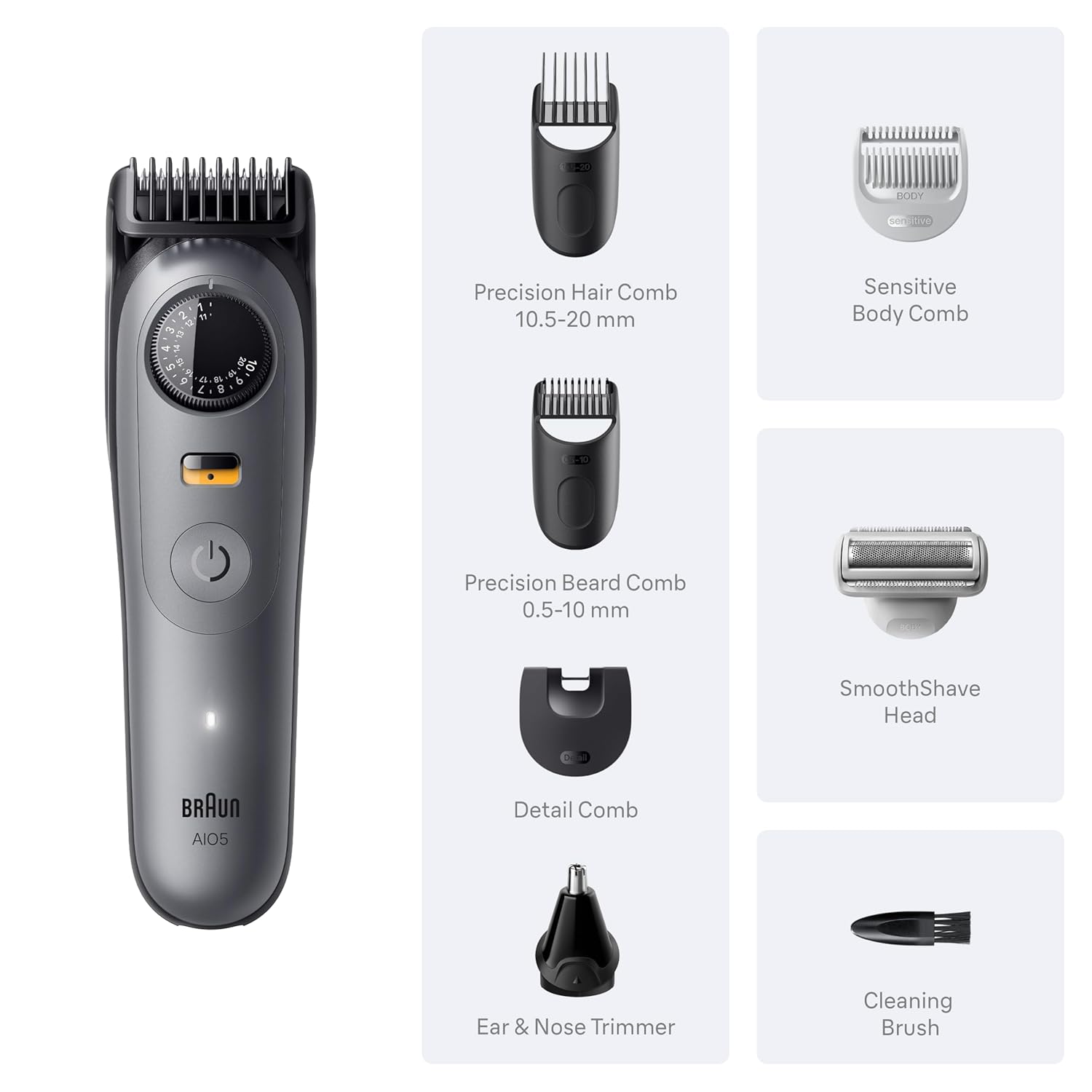
Image: Braun Series 5 AIO 5510 trimmer with various attachments including precision hair comb, precision beard comb, detail comb, ear & nose trimmer, sensitive body comb, SmoothShave head, and cleaning brush.
- Braun AIO 5510 Trimmer Unit
- Precision Hair Comb (10.5-20 mm)
- Precision Beard Comb (0.5-10 mm)
- Detail Comb
- Ear & Nose Trimmer
- Sensitive Body Comb
- SmoothShave Head
- Cleaning Brush
- SmartPlug Charger
Setup and Charging
Charging the Appliance
- Ensure the appliance is switched off.
- Connect the special cord set to the appliance and plug it into an electrical outlet.
- The charging indicator light will illuminate to show that the appliance is charging. A full charge provides up to 120 minutes of cordless runtime.
- For optimal battery life, allow the appliance to fully charge before first use.
Attaching and Detaching Trimmer Heads/Combs
- To attach a trimmer head or comb, align it with the trimmer unit and press firmly until it clicks into place.
- To detach, gently pull the head or comb away from the trimmer unit.
Operating Instructions
General Operation
- Press the power button to switch the appliance on or off.
- Ensure the desired attachment is securely fitted before use.
PrecisionWheel & Lock

Image: Close-up of the PrecisionWheel and Lock, showing 40 length settings in 0.5 mm steps.
The PrecisionWheel allows you to select from 40 length settings in precise 0.5 mm steps. Rotate the wheel to adjust the cutting length. Once the desired length is set, the Precision Lock feature ensures the setting remains secure during use, preventing accidental changes.
Trimming Beard and Hair

Image: Demonstrates the trimmer being used for beard and hair styling.
- Attach the appropriate Precision Beard Comb (0.5-10 mm) or Precision Hair Comb (10.5-20 mm).
- Use the PrecisionWheel to select your desired length setting.
- For best results, move the trimmer against the direction of hair growth.
- Ensure the comb attachment is flat against the skin for an even trim.
Body Grooming

Image: Close-up of the SmoothShave head, designed for smooth skin and comfort.
- Attach the Sensitive Body Comb for gentle trimming in sensitive areas.
- For a smooth shave, attach the SmoothShave Head.
- Move the appliance slowly and gently over the skin.
Detailing and Edging
- Use the Detail Comb for precise lines and edges.
- Hold the trimmer at an angle to create sharp lines.
Ear and Nose Trimming
- Attach the Ear & Nose Trimmer head.
- Gently insert the trimmer into the nostril or ear canal.
- Move the trimmer in a circular motion to remove unwanted hair.
Maintenance and Cleaning

Image: The Braun Series 5 AIO 5510 trimmer being rinsed under running water, highlighting its 100% waterproof design.
- Cleaning the Trimmer Head and Combs: After each use, switch off the appliance and remove the attachment. Rinse the trimmer head and combs under warm running water. Use the provided cleaning brush to remove any stubborn hair clippings.
- Cleaning the SmoothShave Head: Carefully remove the SmoothShave head. Tap it gently to dislodge hair. Rinse under warm running water. Do not press on the foil.
- Waterproof Design: The Braun Series 5 AIO 5510 is 100% waterproof and can be safely rinsed under running water for easy cleaning. Do not immerse the entire appliance in water for extended periods.
- Lubrication: Periodically apply a drop of light machine oil (not included) to the trimmer blades to maintain optimal performance.
- Storage: Store the appliance and its attachments in a dry place, away from direct sunlight and extreme temperatures.
Troubleshooting
| Problem | Possible Cause | Solution |
|---|---|---|
| Appliance does not turn on. | Battery is discharged. | Charge the appliance for at least 1 hour. |
| Reduced trimming performance. | Hair clippings are stuck in the trimmer head or comb. Blades are dull. | Clean the trimmer head and comb thoroughly. Lubricate blades. Consider replacing the trimmer head if performance does not improve. |
| Appliance gets warm during use. | Normal operation. | This is normal for motor-driven appliances. If it becomes excessively hot, discontinue use and allow it to cool. |
Specifications
- Model: AIO 5510 (P_13506)
- Power Source: Rechargeable Li-Ion Battery
- Runtime: Up to 120 minutes cordless
- Charging Time: Approximately 1 hour for full charge
- Waterproof: Yes, 100% waterproof
- Dimensions: 5.39 x 2.24 x 11.1 inches
- Weight: 0.56 Pounds (8.96 ounces)
- Blade Material: Stainless Steel
- Manufacturer: Procter & Gamble
Warranty and Support
This Braun appliance comes with a manufacturer's warranty. For detailed warranty information, please refer to the warranty card included in your package or visit the official Braun website. For customer support, service, or to purchase replacement parts, please contact Braun customer service or visit their official website:
Official Braun Website: uk.braun.com/qr-NAPackAIO5-0923
Please retain your proof of purchase for warranty claims.
Related documentsAIO 5510


Ask a question about this manual
Ask about setup, troubleshooting, compatibility, parts, safety, or missing instructions. Manuals+ will review the question and use this page’s manual context to help answer it.