
Devoko 0980
Devoko L-Shaped Desk 140x80 cm Instruction Manual
Model: 0980
1. Introduction
Thank you for choosing the Devoko L-Shaped Desk. This manual provides detailed instructions for assembly, operation, maintenance, and troubleshooting to ensure optimal use and longevity of your product. Please read this manual thoroughly before assembly and retain it for future reference.

Image 1.1: The Devoko L-Shaped Desk (140x80 cm) in a typical home office setup, showcasing its design and functionality.
2. Key Features
- Reversible L-Shape Design: Adaptable configuration for left or right-hand setup to fit various room layouts.
- Integrated Power Solution: Includes two AC outlets, one USB-A, and one USB-C port for convenient device charging and power access.
- Ample Storage: Features four spacious fabric drawers, an adjustable CPU shelf, and an under-desk grid for organized storage.
- Ergonomic Monitor Stand: Elevates your monitor to a comfortable viewing height, promoting better posture.
- Durable Construction: Built with high-quality wood surfaces and a stable metal frame with X-shaped support and adjustable foot pads.
3. Safety Information
Please observe the following safety precautions:
- Ensure all components are present and undamaged before assembly.
- Assemble the desk on a soft, clean surface to prevent scratches.
- Do not overtighten screws during assembly to avoid damaging the material.
- Keep small parts away from children.
- Do not exceed the maximum weight capacity of the desk.
- For electrical components (USB/Type-C ports, power outlets), ensure proper grounding and avoid liquid contact.
4. Package Contents and Components
Verify that all parts listed below are included in your package. If any parts are missing or damaged, please contact customer support.
4.1. Component List
- Desk panels (L-shaped top, monitor stand, CPU shelf)
- Metal frame components (legs, crossbars)
- Drawer units (fabric drawers, drawer frames)
- Integrated power strip (2 AC outlets, 1 USB-A, 1 USB-C)
- Adjustable foot pads
- Assembly hardware (screws, bolts, Allen wrench)
- Instruction manual

Image 4.1: An exploded diagram illustrating the various components of the Devoko L-Shaped Desk, including panels, frame, and hardware.
5. Setup and Assembly Instructions
Follow these steps carefully for proper assembly. It is recommended to have two people for certain steps.
5.1. Preparation
- Clear a spacious area for assembly.
- Lay out all components and hardware, comparing them with the component list.
- Keep the included Allen wrench handy. A screwdriver (not included) may also be useful.
5.2. Assembly Steps
- Assemble the Main Frame: Attach the metal legs to the main desk panels using the provided screws. Ensure all connections are secure but do not fully tighten yet.
- Install Crossbars: Secure the X-shaped crossbars to the back of the frame for added stability.

Image 5.1: Details of the desk's construction, including the durable surface, X-shaped frame for stability, and adjustable foot pads for leveling.
- Attach L-Extension: Connect the L-shaped extension panel to the main desk frame. The design allows for reversible left or right-hand configuration. Decide your preferred orientation before securing.

Image 5.2: Illustration demonstrating the reversible L-shaped configuration, allowing the user to choose between left or right orientation for the extension.
- Install Drawer Unit: Assemble the drawer frames and insert the fabric drawers into their respective slots.

Image 5.3: A detailed view of the four fabric drawers, highlighting their spacious design for organizing office supplies and documents.
- Attach Monitor Stand: Secure the elevated monitor stand to the main desk surface. This stand is designed to improve ergonomics.
- Install CPU Shelf: Position the adjustable CPU shelf within the designated area. The height can be adjusted to accommodate different computer tower sizes.

Image 5.4: A visual guide demonstrating how to adjust the height of the CPU shelf to fit various computer tower dimensions.
- Integrate Power Strip: Insert the built-in power strip into the pre-cut opening on the desk surface. Connect its power cable to a wall outlet.

Image 5.5: A close-up view of the integrated power strip, featuring two AC outlets, one USB-A port, and one USB-C port for convenient device charging.
- Final Tightening: Once all components are in place and aligned, carefully tighten all screws.
- Adjust Foot Pads: Level the desk by adjusting the foot pads at the bottom of the legs.
6. Operating Instructions
6.1. Using the Integrated Power Strip
The desk features a built-in power strip for convenient access to power. It includes:
- Two standard AC power outlets (220-250V/15A)
- One USB-A charging port (5V/2.1A)
- One USB-C charging port (5V/2.1A)
To use, simply plug the desk's power cord into a wall outlet. Then, connect your devices to the available ports. Avoid overloading the power strip.
6.2. Utilizing Storage Features
- Drawers: Use the four fabric drawers for organizing documents, stationery, and small electronic accessories. Note that these drawers are designed for lighter items.
- Monitor Stand: Place your monitor on the elevated stand for an ergonomic viewing height. The space underneath can be used for keyboards, notebooks, or other small items.
- CPU Shelf: Store your computer tower on the adjustable CPU shelf to keep it off the floor and save desk space.
- Under-desk Grid: The metal grid under the main desk surface can hold books or other frequently used items.
7. Care and Maintenance
Proper care will extend the life of your Devoko L-Shaped Desk.
- Cleaning: Wipe the desk surfaces with a soft, damp cloth. Avoid abrasive cleaners or harsh chemicals that could damage the finish. For the fabric drawers, spot clean with a mild detergent if necessary.
- Spills: Immediately wipe up any spills to prevent staining or damage to the wood surface.
- Heat and Moisture: Avoid placing hot items directly on the desk surface. Use coasters for drinks. Keep the desk away from excessive moisture or direct sunlight.
- Hardware: Periodically check all screws and bolts to ensure they remain tight. Retighten if necessary.
- Weight Distribution: Distribute weight evenly across the desk surface. Avoid placing excessively heavy items on one spot.
8. Troubleshooting
| Problem | Possible Cause | Solution |
|---|---|---|
| Desk is wobbly. | Screws are loose; uneven floor. | Tighten all assembly screws. Adjust the foot pads to level the desk. |
| Power outlets/USB ports not working. | Desk power cord not plugged in; wall outlet issue; device issue. | Ensure the desk's power cord is securely plugged into a functional wall outlet. Test the wall outlet with another device. Check if the device itself is working. |
| Drawers do not slide smoothly. | Drawer frame misaligned; drawer overloaded. | Check the assembly of the drawer frames. Ensure drawers are not overloaded with heavy items. |
| Scratches on surface. | Sharp objects; abrasive cleaning. | Use desk mats or coasters. Avoid dragging objects across the surface. Clean with soft cloths. |
9. Product Specifications
| Feature | Detail |
|---|---|
| Brand | Devoko |
| Model | 0980 |
| Type | L-Shaped Computer Desk |
| Dimensions (L x W x H) | 140 x 80 x 75 cm (55.1 x 31.5 x 29.5 inches) |
| Weight | 25 kg (55 lbs) |
| Color | White |
| Material | Wood (top), Metal (frame) |
| Power Outlets | 2 x AC (220-250V/15A) |
| USB Ports | 1 x USB-A (5V/2.1A), 1 x USB-C (5V/2.1A) |
| Special Features | Reversible L-shape, 4 fabric drawers, Monitor stand, Adjustable CPU shelf, Adjustable foot pads, X-shaped stability frame. |
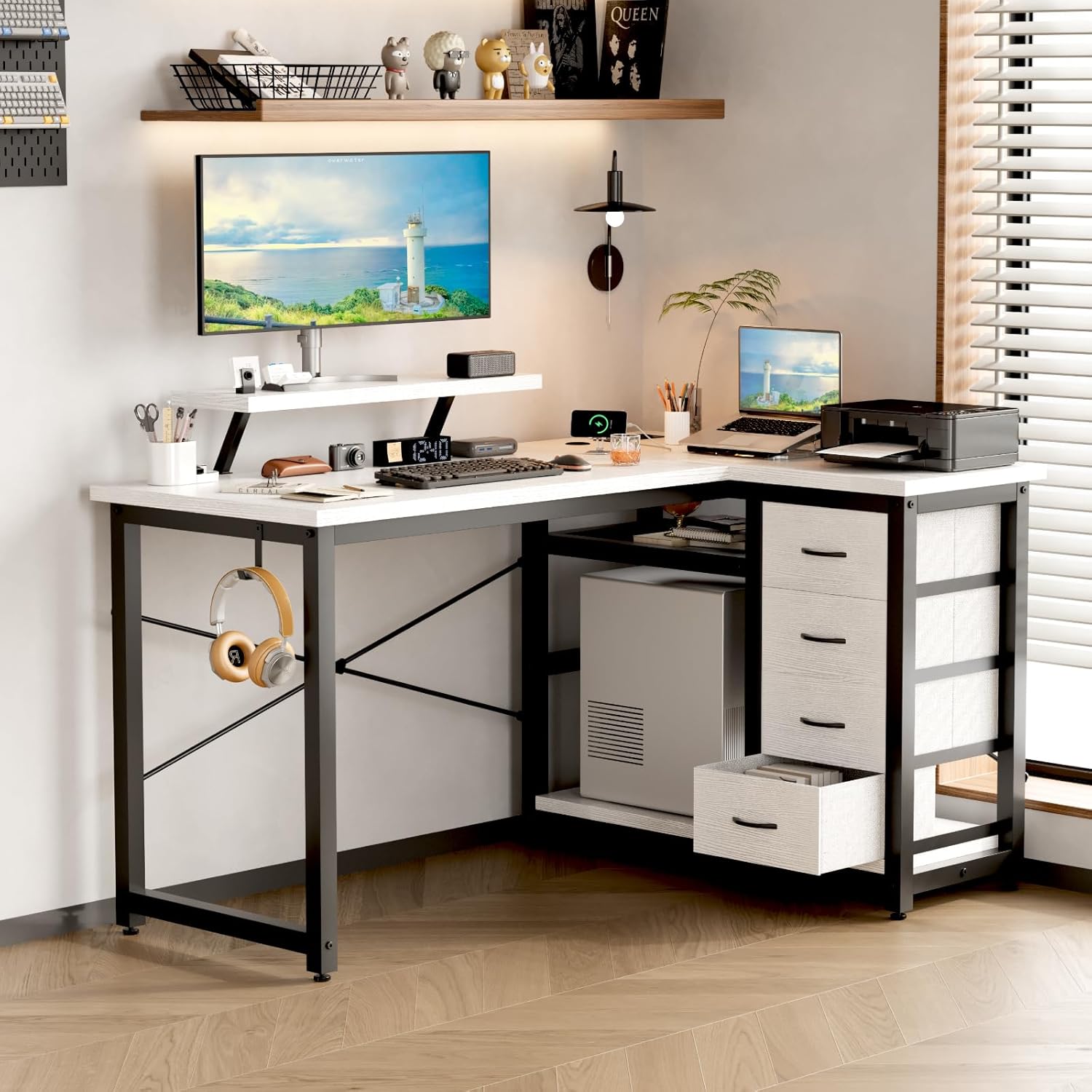
Image 9.1: A technical drawing showing the precise dimensions of the Devoko L-Shaped Desk, including length, width, and height of various sections.
10. Warranty and Support
10.1. Warranty Information
Devoko products are manufactured to high-quality standards. For specific warranty details, please refer to the warranty card included in your package or visit the official Devoko website. The warranty typically covers manufacturing defects under normal use.
10.2. Customer Support
If you encounter any issues or have questions regarding your Devoko L-Shaped Desk, please contact our customer support team:
- Email: support@devoko.com
- Website: www.devoko.com
- Please have your model number (0980) and purchase date ready when contacting support.
Related documents0980


Ask a question about this manual
Ask about setup, troubleshooting, compatibility, parts, safety, or missing instructions. Manuals+ will review the question and use this page’s manual context to help answer it.