
Introduction
This manual provides detailed instructions for the safe and efficient use of your Mukiya Foldable 3-in-1 Magnetic Wireless Charging Station. This versatile device is designed to simultaneously charge your iPhone, Apple Watch, and AirPods, offering a convenient and clutter-free charging experience.
Safety Information
- Use only the provided 20W USB-C wall charger and USB-C to C cable for optimal performance and safety.
- Avoid using the charger in extremely hot or humid environments.
- Do not disassemble, modify, or repair the device yourself. Contact customer support if service is required.
- Keep the charging station away from water or other liquids.
- Ensure proper ventilation around the charger during use.
- Remove metal cases or objects from devices before charging to prevent overheating or malfunctions.
Package Contents
- Mukiya 3-in-1 Magnetic Wireless Charger Stand x1
- 20W USB-C Charger x1
- USB-C to C Cable (5ft/1.5m) x1
- User Manual x1
Product Overview
The Mukiya 3-in-1 Magnetic Wireless Charging Station features a unique camera-inspired design with a leather-like surface, combining aesthetics with functionality. It is foldable for portability and offers multiple charging angles.
Key Features
- Classic Camera-Inspired Design: Finished with a soft-touch leather-like surface, combining retro design with modern MagSafe charging.
- 3-in-1 Magnetic Wireless Charging: Simultaneously charges iPhone, Apple Watch, and AirPods with high-speed fast charging.
- Advanced Heat Dissipation & Smart Safety: Built with premium thermal silica gel and an internal cooling pad to prevent overheating. Features multi-protection chip (over-current, over-voltage, short circuits). CE, FCC, UL certified.
- Adjustable Night Light: Built-in 3-level adjustable night light for soft illumination.
- Strong Magnetic Charging: Premium N52 magnets ensure auto-alignment and a firm hold for stable charging.
- Foldable & Multi-Adjustable Angles: Compact, foldable design for easy portability and versatile viewing angles (horizontal/vertical).

Image Description: A close-up view of the Mukiya 3-in-1 Magnetic Wireless Charging Station in its folded, compact state, highlighting its camera-inspired design with a leather-like texture and silver accents. A USB-C cable is plugged into the side.
Setup
Unfolding the Charging Station
- Gently lift the magnetic phone charging pad from its folded position until it locks into an upright stand.
- Push the Apple Watch charging module from the back to extend it.
- Ensure all charging surfaces are clear of obstructions.
Connecting to Power
- Connect the provided USB-C to C cable to the charging port on the back of the station.
- Plug the other end of the USB-C cable into the provided 20W USB-C wall charger.
- Plug the wall charger into a power outlet. The night light may briefly illuminate to indicate power.
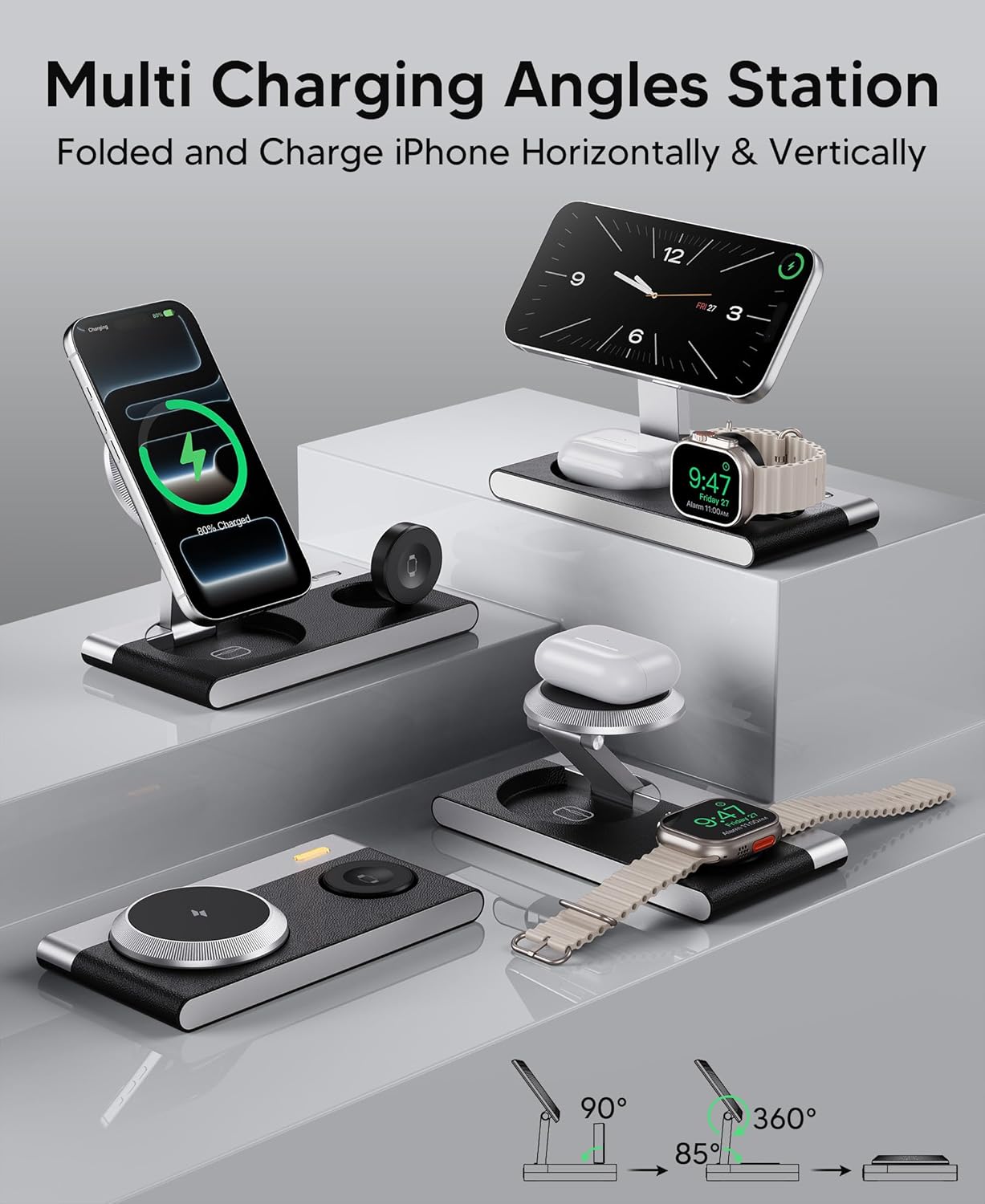
Image Description: The Mukiya 3-in-1 Magnetic Wireless Charging Station shown in various unfolded configurations, demonstrating its adjustable phone stand and watch charger, with an iPhone, Apple Watch, and AirPods charging simultaneously.
Operating Instructions
Charging Your iPhone
- Ensure your iPhone is from the 17/16/15/14/13/12 series and has MagSafe compatibility or a magnetic phone case (thickness under 2mm, no metal rings).
- Align your iPhone with the magnetic charging pad. The magnets will auto-align the phone for optimal charging.
- The phone can be charged horizontally or vertically.
Charging Your Apple Watch
- Place your Apple Watch (S11/10/9/8/7/6/5/4/3/2/SE/Ultra 3/2) onto the dedicated watch charging module.
- Ensure the watch is properly seated for charging to begin.
Charging Your AirPods
- Place your AirPods (Pro 3/2, 2/3 with wireless charging case) onto the designated AirPods charging area on the base.
- For optimal charging, remove any cases from AirPods that are not wireless charging compatible.
Using the Night Light
- Short Press: Cycle through bright, medium, and soft light modes.
- Long Press: Turn the night light off.

Image Description: A visual guide to the night light function of the Mukiya 3-in-1 Magnetic Wireless Charging Station, showing a user interacting with the light button and illustrating the different brightness levels (bright, medium, soft) and FOD mode indicators.
Important Charging Tips
- For magnetic wireless charging, use a magnetic phone case.
- Keep case thickness under 2mm.
- Cases with metal rings will not charge.
- For AirPods and Apple Watch, remove any non-wireless charging cases for smooth charging.
- Always use a power adapter greater than 20W for optimal performance.

Image Description: An infographic detailing usage norms for the Mukiya 3-in-1 Magnetic Wireless Charging Station, emphasizing the need to remove cases for AirPods and Apple Watch, and to use a power adapter greater than 20W.
Maintenance
To maintain your Mukiya charging station, wipe it regularly with a soft, dry cloth. Avoid using harsh chemicals or abrasive cleaners. Ensure the device is unplugged before cleaning.
Troubleshooting
Abnormal Heat or Inability to Charge
- Remove the device case.
- Unplug the charger for 30 minutes to allow it to cool.
- Retry charging without the case, ensuring the phone is centered on the pad.
- If issues persist, contact the service center.
FOD Function (Foreign Object Detection)
The charger will stop charging automatically and the ice-blue light will flash if there is metal or foreign objects in the charging area. FOD + Night Light Mode: Ice-Blue & Orange Alternate.

Image Description: An infographic illustrating examples of phone cases with metal parts that should be removed before charging to prevent overheating, and a troubleshooting guide for abnormal heat or inability to charge.
Specifications
| Feature | Detail |
|---|---|
| Model Number | T817-F |
| Brand | Mukiya |
| Package Dimensions | 6.85 x 5.24 x 1.26 inches |
| Item Weight | 12.6 ounces |
| Connector Type | USB Type C |
| Input Voltage | 9 Volts |
| Output Current | 2 Amps |
| Compatible Devices | iPhone 17/16/15/14/13/12 series, Apple Watch S11/10/9/8/7/6/5/4/3/2/SE/Ultra 3/2, AirPods Pro 3/2, and AirPods 2/3 (with wireless charging case) |
| Special Features | 3 IN 1 Wireless Charger Station, Foldable, Leather-Like Exterior, Premium Charging Station, Night Light Mode, Strong Magnetic Charging & FOD Efficient Safety |
Warranty and Support
Your Mukiya 3-in-1 Magnetic Wireless Charger Stand is backed by a 2-Year Warranty. For any questions or support, please contact our dedicated support team for a 24-hour email response.
Product Videos
Mukiya Magnetic Charging Station. FOLDABLE + EASY TO USE!
Video Description: This video demonstrates the Mukiya 3-in-1 Magnetic Wireless Charging Station, highlighting its foldable design and ease of use for charging an iPhone, Apple Watch, and AirPods simultaneously.
3-in1 Magnetic Charger With Night Light - IPhone/Apple Watch
Video Description: A detailed review of the Mukiya 3-in-1 Magnetic Wireless Charging Station, focusing on its magnetic charging capabilities for iPhone and Apple Watch, and demonstrating the integrated night light feature.