
1. Introduction
This manual provides essential information for the proper setup, operation, and maintenance of your ARRAROWN ZK-1002Q Bluetooth 5.1 Amplifier Board. Please read these instructions carefully before use to ensure optimal performance and safety. The ZK-1002Q is a 2.0 channel stereo amplifier designed for DIY audio projects, offering Bluetooth 5.1 and AUX input with advanced audio processing.
2. Safety Information
- Ensure the power supply voltage is within the specified range of DC 12-24V. Using an incorrect voltage can damage the device.
- Connect speakers with an impedance of 3-8Ω and a power rating within 100W per channel.
- Do not expose the amplifier board to moisture, water, or extreme temperatures.
- Avoid operating the amplifier at maximum volume for extended periods to prevent distortion and potential speaker damage.
- Keep the device away from children.
- Disconnect power before making any connections or disconnections.
3. Product Features
The ZK-1002Q amplifier board incorporates several advanced features for enhanced audio performance:
- 2.0 Channel Stereo Output: Delivers 100W + 100W output, suitable for two passive speakers (3-8Ω, up to 100W each).
- Bluetooth 5.1 Connectivity: Features an upgraded Bluetooth 5.1 module (Qualcomm QCC3034) for faster transmission, broader coverage (up to 15 meters/50 feet), and stable connection.
- High-Fidelity Audio: Supports SBC, AAC, APTX, APTX-LL, and APTX-HD transmission encoding for lossless audio decoding, capturing dynamic nuances and details.
- Premium Components: Utilizes original Texas Instruments TPA3116D2 chips for power amplification, Qualcomm QCC3034 module, and original TI NE5532 operational amplifiers for reduced distortion and clear sound.
- Dedicated Inductor: Includes a high-power digital amplifier dedicated inductor with high current and low magnetic loss for improved sound quality.
- Treble and Bass Adjustment: Independent knobs allow customization of sound effects to suit different audio preferences and environments.
- Microphone Expansion: Reserved microphone ports and button expansion wiring diagrams support multi-functional expansion, including karaoke functionality with a compatible microphone preamp board.
- Protection Mechanisms: Built-in over-voltage, under-voltage, over-heat, short-circuit, and DC detection protection for device safety.

Figure 3.1: Comparison of ZK-1002T and ZK-1002Q amplifier boards, highlighting ZK-1002Q's advanced features like a more powerful motherboard, dedicated inductor, Qualcomm QCC3034 module, microphone extension, and longer Bluetooth range.

Figure 3.2: Close-up view of the ZK-1002Q amplifier board's internal components, showcasing the Qualcomm QCC3034 module, Texas Instruments TPA3116D2 chips, TI NE5532 operational amplifier, and high-power digital amplifier inductor.
4. Package Contents
Please check the package for the following items:
- ZK-1002Q Bluetooth 5.1 Amplifier Board
- Small screwdriver (for speaker terminal connections)
- Antenna (for Bluetooth range extension, if included)
- Auxiliary audio cable (if included)
- Power adapter (Note: Verify compatibility. See Section 6.1 for details.)
5. Product Overview
Familiarize yourself with the various components and connection points of the ZK-1002Q amplifier board.

Figure 5.1: Detailed diagram of the ZK-1002Q amplifier board, labeling key components such as the QCC3034 Qualcomm module, PCM5102 decoding chip, TPA3116D2 power amplifier chip, NE5532 operational amplifier, high power digital amplifier inductor, and karaoke board expansion interface.
Controls and Ports:
- Volume Knob: Adjusts the overall output volume.
- Treble Knob: Adjusts high-frequency audio levels.
- Bass Knob: Adjusts low-frequency audio levels.
- DC Power Input: Connects to the 12-24V DC power supply.
- Speaker Output Terminals: Connects to passive speakers (Left and Right channels).
- AUX Input: 3.5mm jack for wired audio input.
- Antenna Connector: For external Bluetooth antenna (if used).
- Microphone Expansion Ports: For connecting a microphone preamp board (e.g., ZK-AMP).
6. Setup
6.1. Power Supply Connection
The ZK-1002Q requires a DC power supply between 12V and 24V. The DC power input jack typically requires a 5.5mm x 2.5mm or 5.5mm x 2.1mm barrel plug. Ensure your power adapter meets these specifications. An adapter with insufficient voltage or current may lead to poor performance or non-functionality. A 12V 5A or 24V 5A adapter is generally recommended for optimal performance.
6.2. Speaker Connection
Connect your passive speakers to the speaker output terminals. Use the provided screwdriver to loosen the terminals, insert the speaker wires (positive to positive, negative to negative), and tighten the screws securely. Ensure no bare wires are touching to prevent short circuits. The amplifier supports speakers with 3-8Ω impedance and up to 100W power per channel.
6.3. Audio Input Connection
The amplifier supports two audio input methods:
- Bluetooth: This is the primary wireless input.
- AUX: Use a 3.5mm audio cable to connect an external audio source (e.g., smartphone, MP3 player) to the AUX input jack.
6.4. Microphone Expansion (Optional)
For microphone functionality, connect a compatible microphone preamp board (e.g., ZK-AMP) to the reserved microphone expansion ports. Refer to the diagram for correct wiring. When using the expansion interface, ensure the dial switch on the amplifier is set to the OFF position as indicated in the diagram.
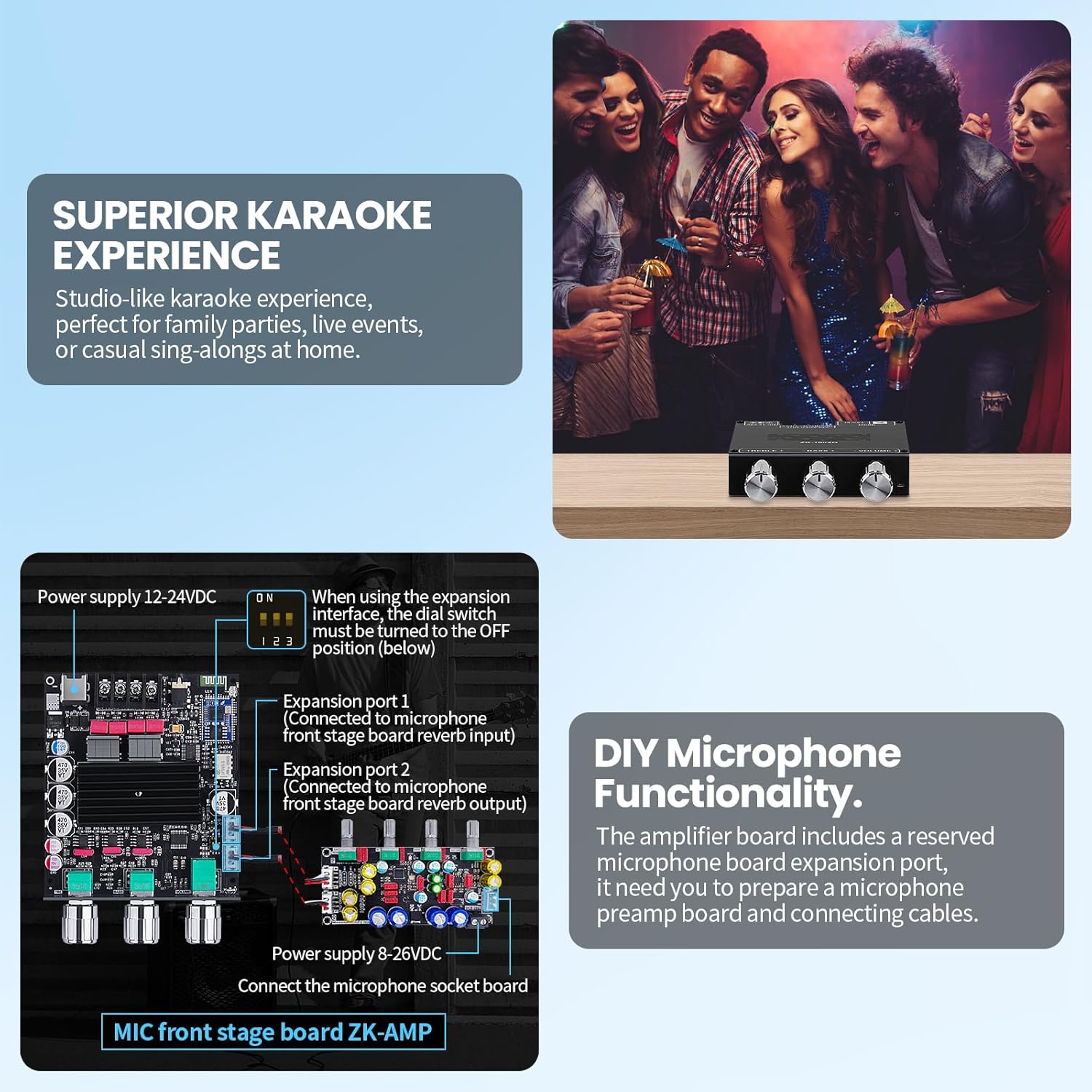
Figure 6.1: Diagram illustrating the DIY microphone functionality of the ZK-1002Q amplifier board, showing connections for microphone front stage board reverb input and output, power supply, and the microphone socket board. A note indicates the dial switch position for expansion interface use.
7. Operating Instructions
7.1. Powering On/Off
Once all connections are secure, connect the power adapter to a power outlet. The amplifier will power on automatically. Disconnect the power adapter from the outlet to power off the device.
7.2. Adjusting Volume, Treble, and Bass
Use the dedicated knobs on the front panel to adjust the volume, treble, and bass levels according to your preference. Start with the volume at a low setting and gradually increase it.
7.3. Bluetooth Pairing
- Ensure the amplifier is powered on.
- On your audio device (e.g., smartphone), enable Bluetooth and search for available devices.
- Select "ZK-1002Q" from the list of devices to pair.
- Once paired, a confirmation sound may be heard, and you can begin streaming audio wirelessly.
7.4. Using AUX Input
Connect your audio source to the AUX input jack using a 3.5mm audio cable. The amplifier will automatically switch to AUX input when a cable is detected, or you may need to manually select the input mode if a switch is present (refer to product overview if applicable).

Figure 7.1: Image demonstrating the Bluetooth 5.1 wireless connection with a smartphone and the ZK-1002Q amplifier board connected to speakers. An inset shows the treble, bass, and volume adjustment knobs on the amplifier.
8. Maintenance
- Keep the amplifier board clean and free from dust. Use a soft, dry cloth for cleaning.
- Do not use liquid cleaners or solvents.
- Store the device in a cool, dry place when not in use.
- Regularly check all connections for tightness and ensure no wires are frayed or exposed.
9. Troubleshooting
9.1. No Power / Incorrect Power Adapter
- Issue: Amplifier does not power on or powers on intermittently.
- Solution: Verify that the power adapter is correctly connected and provides DC 12-24V. Crucially, ensure the DC barrel plug size is 5.5mm x 2.5mm or 5.5mm x 2.1mm. Many issues arise from incompatible power adapters.
- Solution: Check the power outlet and the power adapter itself for functionality.
9.2. No Sound
- Issue: Amplifier is powered on, but no sound is produced.
- Solution: Check speaker connections for proper polarity and secure contact.
- Solution: Ensure the audio source is playing and its volume is turned up.
- Solution: Adjust the amplifier's volume knob.
- Solution: If using Bluetooth, ensure the device is correctly paired and connected. If using AUX, ensure the cable is fully inserted and functional.
9.3. Bluetooth Connection Issues
- Issue: Cannot pair or maintain a stable Bluetooth connection.
- Solution: Ensure the amplifier is within the 15-meter (50-foot) range of your audio device.
- Solution: Clear previous Bluetooth pairings on your audio device and try pairing again.
- Solution: Reduce interference by moving away from other wireless devices.
- Solution: If an external antenna is used, ensure it is securely connected.
9.4. Sound Distortion
- Issue: Audio sounds distorted or unclear.
- Solution: Reduce the volume level on both the amplifier and the audio source. Operating at maximum volume can cause distortion.
- Solution: Check speaker impedance and power rating to ensure they are compatible with the amplifier.
- Solution: Ensure the power supply is adequate (e.g., 12V 5A or 24V 5A) and stable.
- Solution: Adjust treble and bass knobs to a neutral position or slightly lower.
10. Specifications
| Specification | Value |
|---|---|
| Model | ZK-1002Q |
| Channels | 2.0 |
| Output Power | 200 Watts (100W + 100W) |
| Bluetooth Version | 5.1 (Qualcomm QCC3034 module) |
| Bluetooth Range | Up to 15 meters (50 feet) |
| Audio Input | Bluetooth, AUX (3.5mm) |
| Speaker Impedance | 3-8Ω |
| Supply Voltage | DC 12-24V |
| Power Adapter Plug Size | 5.5mm x 2.5mm or 5.5mm x 2.1mm (recommended) |
| Chips Used | TPA3116D2, QCC3034, NE5532, PCM5102A |
| Dimensions | 110mm x 80mm x 24mm (approx. 4.33 x 3.15 x 0.945 inches) |
| Item Weight | 7 ounces |
| Protection Features | Over-voltage, Under-voltage, Over-heat, Short-circuit, DC detection |

Figure 10.1: Diagram detailing the dimensions of the ZK-1002Q amplifier board (110mm x 80mm x 24mm) and listing its protection mechanisms: over-voltage, under-voltage, over-heat, short-circuit, and DC detection protection.
11. Warranty and Support
For warranty information and technical support, please refer to the seller's policies or contact the manufacturer directly. Keep your purchase receipt for any warranty claims.