
1. Introduction
The Audien Hearing Ion Pro 2 is a next-generation Bluetooth rechargeable over-the-counter (OTC) hearing aid designed to provide a powerful, crystal-clear hearing experience. It features app control, UV cleaning, extended battery life, and enhanced streaming audio for calls and music. This manual provides essential information for the proper setup, operation, and maintenance of your device.
2. What's in the Box
Upon opening your Audien Hearing Ion Pro 2 package, you should find the following components:
- 1 Pair of Audien Hearing Ion Pro 2 Hearing Aids
- Charging Case with built-in UV cleaning
- USB-C Charging Cable
- Power Adapter
- Cleaning Brush
- 6x Replacement Earbuds (various sizes)
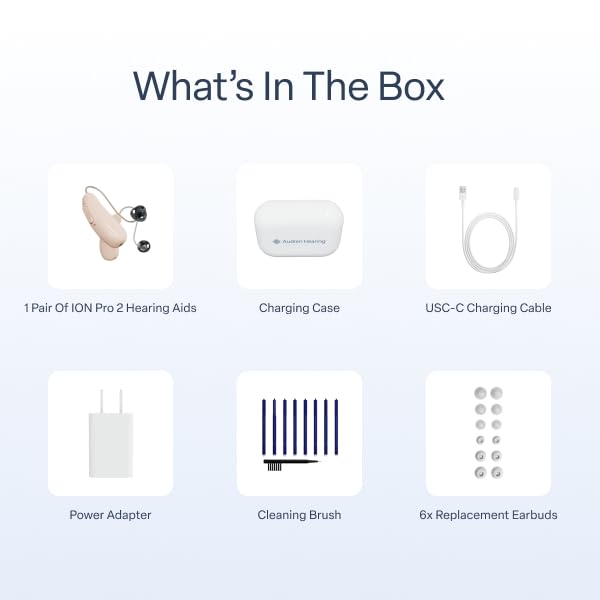
Image: All components included in the Audien Hearing Ion Pro 2 package.
Video: An unboxing demonstration of the Audien Hearing Ion Pro 2, showing all included items and initial setup.
3. Setup Instructions
Follow these steps to set up your Audien Hearing Ion Pro 2 devices:
- Charge & Connect: Place your hearing aids into the charging case. Ensure they are properly seated. The indicator lights on the case will show charging status. Once charged, pair them with the Audien Hearing app on your smartphone.
- Set Up with the App: Open the Audien Hearing app. Use the app to select your preferred sound mode and adjust the volume to your comfort. The app allows for personalized settings and profiles.
- Wear & Hear: Carefully place the hearing aids in your ears. The design is intended for comfortable, all-day wear. Begin experiencing clear, personalized sound instantly.
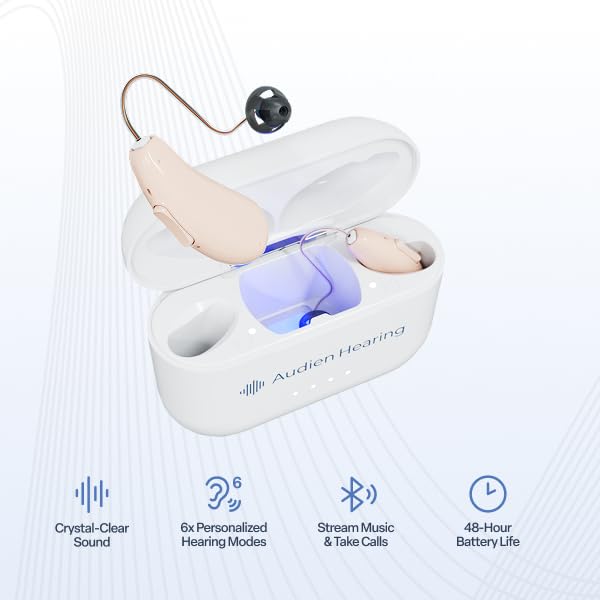
Image: Audien Hearing Ion Pro 2 hearing aids in their charging case, illustrating the charging and UV cleaning process.

Image: The Audien Hearing app interface, demonstrating volume and mode adjustments for personalized hearing.
4. Operating Instructions
The Ion Pro 2 offers intuitive controls and advanced features for an optimized hearing experience:
- App Control: Utilize the Audien Hearing app to fine-tune your hearing experience. Adjust volume for each earbud independently, switch between 3 primary hearing modes (e.g., Crowd, Conversation, TV), and select from 6 custom hearing profiles for various environments.
- Two-Button Interface: The physical two-button design on each hearing aid allows for quick adjustments to volume and mode switching without needing to access the app.
- Enhanced Streaming Audio: The Ion Pro 2 supports Bluetooth streaming, allowing you to listen to calls, music, and TV audio directly through your hearing aids with improved clarity and volume.
Video: An overview of the Audien Hearing Ion Pro 2 features, including its compact design, battery life, UV cleaning, and app control.
5. Maintenance
Proper maintenance ensures optimal performance and longevity of your hearing aids:
- UV Cleaning: The charging case features built-in UV sanitizing technology. When the hearing aids are placed in the case for charging, the UV light activates to kill 99.9% of bacteria, keeping your devices hygienic.
- Regular Cleaning: Use the provided cleaning brush to gently remove any wax or debris from the earbuds and the main body of the hearing aids. Consistent cleaning helps maintain clear sound performance.
- Earbud Replacement: Replace earbuds as needed using the extra ear caps provided to ensure a comfortable and effective fit.
6. Troubleshooting
If you encounter issues with your Audien Hearing Ion Pro 2, consider the following:
- No Sound or Low Volume:
- Ensure the hearing aids are fully charged.
- Check the volume settings via the app or the device buttons.
- Clean the earbuds and sound ports to remove any wax buildup.
- Verify the hearing aids are properly connected to your smartphone via Bluetooth.
- Connection Issues:
- Ensure Bluetooth is enabled on your smartphone and the hearing aids are within range.
- Try restarting both your hearing aids (by placing them in the case and removing them) and your smartphone.
- If issues persist, try re-pairing the devices through the Audien Hearing app.
- Uncomfortable Fit:
- Experiment with the different sizes of replacement earbuds to find the most comfortable and secure fit for your ear canal.
For further assistance, refer to the support section or contact Audien Hearing customer service.
7. Specifications
| Feature | Detail |
|---|---|
| Brand | Audien Hearing |
| Model Number | ion-pro-2 |
| Battery Type | Lithium Ion |
| Number of Batteries | 2 (included) |
| Battery Weight | 0.5 Grams |
| UPC | 850065060194 |
| Included Components | Hearing aids, Charging Case, USB-C Charging Cable, Power Adapter, Cleaning Brush, Replacement Earbuds |
8. Warranty and Support
For detailed warranty information regarding your Audien Hearing Ion Pro 2, please refer to the documentation included with your purchase or visit the official Audien Hearing website. Protection plans are available for purchase separately to extend coverage.
Should you require technical assistance, have questions about your device, or need support, please contact Audien Hearing customer service. They are available to provide guidance and resolve any issues you may encounter.
Contact Information: Please refer to the official Audien Hearing website or product packaging for the most current contact details.


