
1. Important Safety Information
Please read and understand all instructions before assembly and use. Keep this manual for future reference.
- Weight Limit: Do not exceed the maximum recommended weight of 300 lbs (approximately 136 kg). Exceeding this limit may cause damage to the chair and potential injury.
- Assembly: Ensure all screws and bolts are securely tightened before using the chair. Periodically check and re-tighten all fasteners.
- Stability: Avoid standing on the chair or using it as a step stool. Do not lean excessively to one side when reclining to prevent tipping.
- Children: Keep children away from moving parts during assembly. This chair is designed for adult use.
- Placement: Use the chair on a flat, stable surface. Avoid placing it on uneven ground or near heat sources.
2. Package Contents
Verify that all components are present before beginning assembly. If any parts are missing or damaged, please contact GTRACING customer support.
- Backrest
- Seat Base with Armrests and Retractable Footrest
- Star Base
- Casters (5 pieces)
- Gas Lift Cylinder with Cover
- Mechanism Plate
- Lumbar Support Pillow
- Headrest Pillow
- Hardware Kit (screws, washers, Allen wrench)
- Instruction Manual
3. Setup and Assembly Instructions
Follow these steps carefully to assemble your GTRACING Gaming Chair. It is recommended to have a second person assist with certain steps.
Step 1: Attach Casters to Star Base
Insert each of the five casters into the holes at the end of the star base until they click securely into place.
Step 2: Install Gas Lift Cylinder
Place the gas lift cylinder into the center hole of the star base. Cover the cylinder with the provided plastic cover.
Step 3: Attach Mechanism Plate to Seat Base
Align the mechanism plate with the screw holes on the underside of the seat base. Ensure the front of the mechanism plate faces the front of the seat. Secure with the appropriate screws and tighten firmly.
Step 4: Connect Backrest to Seat Base
Attach the backrest to the seat base using the provided screws. Ensure proper alignment and tighten all screws securely. This step may require assistance.
Step 5: Mount Assembled Seat onto Gas Lift
Carefully place the assembled seat (with backrest and mechanism plate attached) onto the gas lift cylinder. Apply downward pressure to ensure it is seated properly.
Step 6: Attach Lumbar and Headrest Pillows
Secure the lumbar support pillow and headrest pillow to the backrest using their integrated straps. Adjust their positions for optimal comfort.
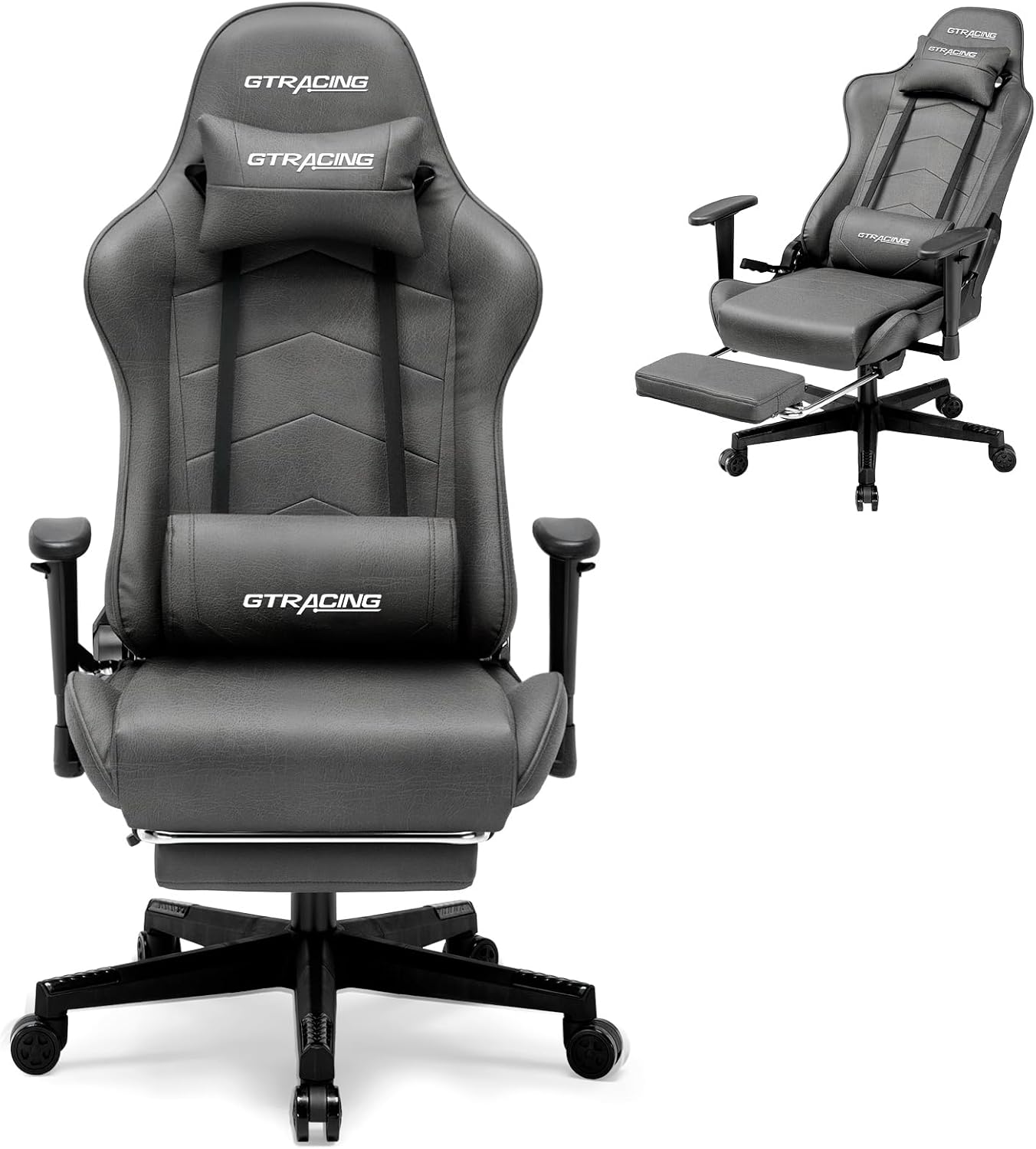
Figure 3.1: Fully assembled GTRACING Gaming Chair in Dark Grey.
4. Operating Instructions
4.1 Height Adjustment
To adjust the chair's height, pull the lever located under the right side of the seat upwards. While holding the lever, either stand up to raise the chair or sit down to lower it. Release the lever to lock the height.
4.2 Reclining Backrest
The backrest can recline from 90° to 160°. To recline, pull the lever on the right side of the chair (near the armrest) upwards. Lean back to your desired angle and release the lever to lock the position. To return to an upright position, pull the lever and lean forward.

Figure 4.1: Chair demonstrating the reclining function with the footrest extended.
4.3 Retractable Footrest
To use the footrest, pull it out from underneath the seat. Extend it fully for support. To retract, push it back underneath the seat until it is fully stored.
4.4 Armrest Adjustment
The armrests are 2D adjustable. To adjust the height, press the button located on the side of each armrest and move the armrest up or down. Release the button to lock it in place. The armrests can also pivot horizontally.

Figure 4.2: Illustration of the adjustable 2D armrests.
4.5 Lumbar and Headrest Pillow Adjustment
The lumbar and headrest pillows are adjustable. Slide them up or down along the backrest straps to find the most comfortable position for your neck and lower back support.
5. Maintenance
Regular maintenance will prolong the life and appearance of your GTRACING Gaming Chair.
- Cleaning: Wipe the PVC leather with a soft, damp cloth. For stubborn stains, use a mild soap solution and then wipe with a clean, damp cloth. Avoid harsh chemicals or abrasive cleaners.
- Inspection: Periodically check all screws and bolts to ensure they are tight. Re-tighten if necessary.
- Moving: When moving the chair, lift it rather than dragging it to prevent damage to the casters or base.
- Avoid Direct Sunlight: Prolonged exposure to direct sunlight can cause the material to fade or crack.

Figure 5.1: Close-up of the chair's durable and easy-to-clean PVC leather material.
6. Troubleshooting
Refer to the table below for common issues and their solutions.
| Problem | Possible Cause | Solution |
|---|---|---|
| Chair wobbles or is unstable. | Loose screws or uneven floor. | Check and tighten all assembly screws. Ensure the chair is on a flat surface. |
| Gas lift not adjusting height. | Lever not fully engaged or gas lift malfunction. | Ensure the height adjustment lever is pulled completely. If the issue persists, contact customer support. |
| Backrest not reclining or locking. | Recline lever not fully engaged or mechanism obstruction. | Ensure the recline lever is pulled completely. Check for any obstructions in the reclining mechanism. |
| Casters not rolling smoothly. | Debris in casters or damaged casters. | Clean any hair or debris from the caster wheels. If damaged, replacement casters may be needed. |
7. Specifications
| Feature | Detail |
|---|---|
| Brand | GTRACING |
| Model Name | GT901-NEW |
| Color | Dark Grey |
| Material | High-grade PVC Leather, High-density Foam |
| Product Dimensions (D x W x H) | 27.95"D x 27.26"W x 48.8"H |
| Maximum Weight Recommendation | 300 Pounds (136 kg) |
| Reclining Angle | 90° to 160° |
| Arm Style | 2D Adjustable Armrests |
| Special Features | Ergonomic Design, Lumbar Support, Headrest, Retractable Footrest, Heavy-Duty Build |

Figure 7.1: Detailed dimensions of the GTRACING Gaming Chair.
8. Warranty and Customer Support
GTRACING is committed to providing excellent after-sales service. If you encounter any issues with your gaming chair or have questions regarding its assembly, operation, or maintenance, please do not hesitate to contact our support team.
Our support team is ready to assist and will respond within 24 hours to ensure your satisfaction. Please refer to your purchase documentation for specific warranty details and contact information.
For further assistance, visit the official GTRACING website or contact the retailer where the product was purchased.


