
1. Introduction
Thank you for purchasing the KJK Trail Camera, Model 201-NC-06. This camera is designed for reliable outdoor and indoor monitoring, capturing high-quality 2.7K video and 36MP still images. Its robust, battery-powered, and IP66 waterproof design makes it suitable for various applications, from wildlife observation to home security.
2. Product Features
- High-Resolution Imaging: Captures crisp 2.7K Full HD video and clear 36-megapixel still images.
- Fast Trigger Speed: Features an ultra-high 0.1-second trigger speed to ensure no movement is missed.
- Wide Detection Angle: Equipped with a 130° PIR (Passive Infrared) motion detection sensor, covering a broad area.
- Extended Detection Range: Detects motion up to 22 meters (approximately 72 feet).
- Low-Glow Infrared Night Vision: Integrated infrared lights enable clear photo and video capture even in complete darkness without disturbing wildlife.
- Durable and Weatherproof: IP66 rated for waterproof and dustproof performance, suitable for harsh outdoor environments.
- Battery-Powered Operation: Operates on AA batteries (4 included), eliminating the need for complex wiring and allowing flexible placement.
- Built-in Microphone: Records clear audio with video footage.
- Versatile Recording Modes: Supports video mode, still image mode, and a combination of both.
- Storage: Supports up to 128GB MicroSD flash memory.
3. Package Contents
Please check the package to ensure all items are present:
- KJK Trail Camera (Model 201-NC-06)
- 4 x AA Batteries
- Mounting Strap
- USB Cable
- User Manual
- Note: A MicroSD card may be included depending on the specific product package. Please verify your purchase details.

Image: KJK Trail Camera 201-NC-06 shown with included accessories like batteries and a memory card.
4. Setup Guide
- Install Batteries: Open the camera's battery compartment and insert the 4 AA batteries, ensuring correct polarity.
- Insert MicroSD Card: Insert a MicroSD card (up to 128GB, Class 10 or higher recommended) into the designated slot. Ensure it is inserted correctly until it clicks into place.
- Power On: Switch the camera to the "SETUP" position. The LCD screen will light up, allowing you to configure settings.
- Initial Settings:
- Set Date and Time: Navigate through the menu to set the current date and time.
- Select Language: Choose your preferred language.
- Choose Recording Mode: Select between Video, Photo, or Photo+Video mode.
- Adjust PIR Sensitivity: Set the sensitivity of the motion sensor based on your environment.
- Mounting the Camera:
The camera can be mounted using the included strap, placed on a flat surface, or secured with screws. Ensure the camera is positioned to capture the desired area without obstructions.

Image: Various mounting options for the KJK Trail Camera, including strap, flat surface, and screw mounting.
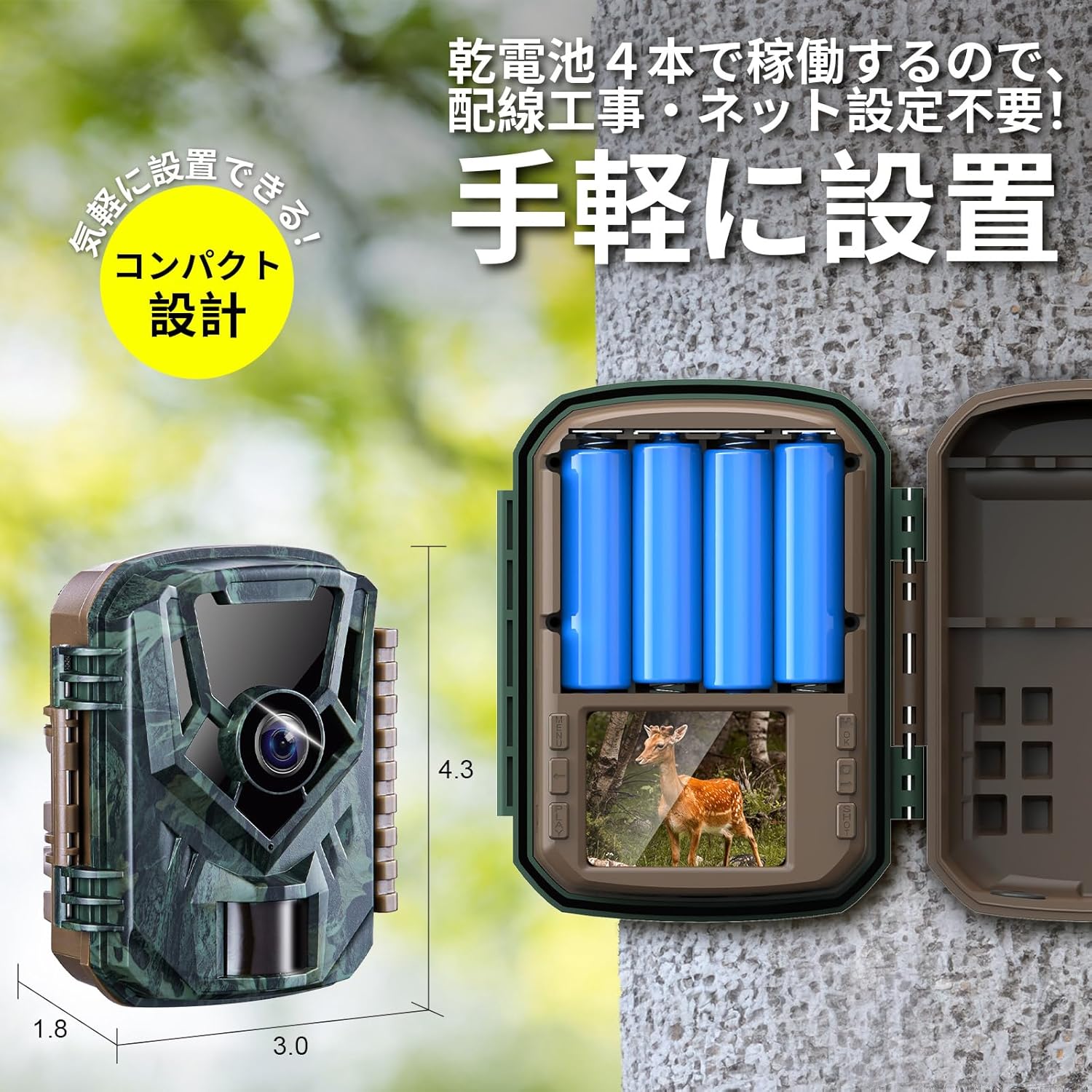
Image: The KJK Trail Camera with its battery compartment open, showing the slots for AA batteries.
5. Operating Instructions
5.1. Basic Operation
- Mode Switch: Use the mode switch to toggle between OFF, SETUP, and ON modes.
- OFF: Powers off the camera.
- SETUP: Allows access to the menu for settings configuration and viewing recorded files.
- ON: Activates the camera for motion-triggered recording. The LCD screen will turn off after a few seconds, and the camera will enter monitoring mode.
- PIR Motion Detection: In ON mode, the camera will automatically detect motion within its 130° detection angle and up to 22 meters, then trigger recording (photo or video) within 0.1 seconds.
- Night Vision: The camera automatically switches to low-glow infrared night vision in low-light conditions, capturing clear black and white images/videos.

Image: Diagram illustrating the 130-degree detection angle and 22-meter detection range of the PIR motion sensor.

Image: The camera's infrared LEDs for night vision and its automatic day/night mode switching capability.
5.2. Recording Modes
The camera offers three recording modes:
- Video Mode: Records video clips when motion is detected.
- Still Image Mode: Captures a series of still images when motion is detected.
- Photo + Video Mode: Captures a still image followed by a video clip when motion is detected.

Image: Visual representation of the three available recording modes: video, still image, and combined photo+video.
5.3. Viewing Files
You can view recorded files in three ways:
- On Camera: Switch to SETUP mode and use the navigation buttons to browse and play back files on the built-in LCD screen.
- Via USB Cable: Connect the camera to a computer using the provided USB cable. The camera will appear as a removable disk, allowing you to access and transfer files.
- Using a Card Reader: Remove the MicroSD card from the camera and insert it into a card reader connected to a computer to access files directly.

Image: Depiction of three methods to view recorded files: directly on the camera, via USB connection to a PC, or using a MicroSD card reader.
6. Maintenance
- Battery Replacement: Replace all 4 AA batteries when the low battery indicator appears on the screen or when performance degrades. Always use fresh batteries of the same type.
- MicroSD Card Management: Regularly check the MicroSD card for available space. Format the card periodically to maintain optimal performance and prevent data corruption. Back up important files before formatting.
- Cleaning:
- Wipe the camera body with a soft, damp cloth.
- Clean the lens and PIR sensor window gently with a microfiber cloth to ensure clear images and accurate detection. Do not use abrasive cleaners.
- Storage: When not in use for extended periods, remove the batteries and store the camera in a cool, dry place away from direct sunlight.
7. Troubleshooting
| Problem | Possible Cause | Solution |
|---|---|---|
| Camera does not power on. |
|
|
| Camera is not recording. |
|
|
| Poor image/video quality. |
|
|
| PIR sensor not detecting motion through glass. | PIR sensors cannot detect motion through glass or other transparent barriers. | Position the camera outdoors or in a location where the PIR sensor has a clear line of sight to the detection area. |
8. Specifications
| Model | 201-NC-06 |
| Brand | KJK |
| Video Resolution | 2.7K Full HD |
| Still Image Resolution | 36 Megapixels |
| Trigger Speed | 0.1 seconds |
| PIR Detection Angle | 130° |
| PIR Detection Distance | Up to 22 meters (72 feet) |
| Night Vision | Low-Glow Infrared LEDs |
| Waterproof Rating | IP66 |
| Power Source | 4 x AA Batteries |
| Storage | MicroSD card, up to 128GB |
| Dimensions (LxWxH) | 7 x 11 x 16 cm (approx. 2.76 x 4.33 x 6.3 inches) |
| Material | Plastic |
| Color | Green (Camouflage) |

Image: A summary of the camera's key specifications and features, including 2.7K video, 36MP photos, 0.1s trigger, IP66, 130° sensor, 22m IR range, built-in mic, and MicroSD support.
9. Warranty and Support
The KJK Trail Camera Model 201-NC-06 comes with a 12-month warranty from the date of purchase. If you encounter any issues or have questions regarding your product, please do not hesitate to contact our customer support team. We are committed to providing assistance and ensuring your satisfaction.
For support, please refer to the contact information provided with your purchase or visit the official KJK website.


