
M-VAVE POCKET AMP
M-VAVE Pocket AMP Multi-Effects Processor User Manual
Model: POCKET AMP
Introduction
The M-VAVE Pocket AMP is a compact multi-effects processor designed for guitar and bass. It offers a wide range of high-quality effects and amplifier simulations, providing a versatile tool for both stage performance and practice. Its portable design and extensive features make it an ideal companion for musicians on the go.
Key Features
- Versatile Effects: Over 80 built-in presets for guitar, bass, and vocal effects, with customizable options.
- Six Effect Modules: Includes FX (compression, excitation, noise reduction), AMP (amplifier simulation), CAB (cabinet simulation), MOD (modulation), DLY (delay), and REV (reverb). AMP and CAB effects are downloadable and replaceable.
- Portable Design: Lightweight (120g) and compact, featuring a 1.54-inch HD screen (240x240 resolution).
- Flexible Connectivity: Supports USB Type-C for charging, data transmission, and MIDI. Also features Bluetooth connectivity for app control and audio playback.
- Audio Interface: Functions as a USB audio interface for direct recording to computers or mobile devices (with OTG adapter).
- Long Battery Life: Approximately 7 hours of continuous use on a single charge.
- Practice Tools: Includes a built-in tuner and a LOOPBACK feature for convenient recording and practice with backing tracks.
Setup
Package Contents
Before you begin, ensure all items are present:
- M-VAVE Pocket AMP Unit
- USB Type-C Cable
- User Manual
- Strap Button Clip (optional attachment)
Charging the Device
The Pocket AMP can be charged via the included USB Type-C cable or a DC power adapter (not included). Connect the cable to the USB Type-C port on the device and to a power source. The charging indicator light will illuminate during charging.
Connecting Your Instrument
Connect your guitar or bass to the IN jack on the Pocket AMP using a standard 1/4-inch instrument cable.

Image: M-VAVE Pocket AMP showing input (IN) and output (OUT) jacks, USB port, and power switch.
Connecting to Output Devices
- Headphones: Connect headphones to the 3.5mm stereo headphone output for silent practice.
- Amplifier/Mixing Console: Connect the OUT jack to your amplifier or mixing console using a 1/4-inch instrument cable.
- Computer/Mobile Device (USB Audio Interface): Use the USB Type-C cable to connect the Pocket AMP to a computer or mobile device (an OTG adapter may be required for mobile devices) for direct recording.

Image: M-VAVE Pocket AMP highlighting its ultra-portable design and various connectivity options including 3.5mm headphone output and USB Type-C.

Image: M-VAVE Pocket AMP demonstrating wireless connection for tone adjustment and management via mobile and PC applications.
Operating Instructions
Power On/Off
Press and hold the Power Switch to turn the device on or off. The 1.54-inch color display will illuminate.
Navigating Presets
Use the < and > keys to cycle through the built-in presets. The display will show the current preset number (e.g., P01).

Image: M-VAVE Pocket AMP display showing a preset (P01) with active effect modules (FX, AMP, MOD, DLY, REV, CAB) and their customizable order.
Adjusting Parameters
The Pocket AMP features two main knobs: the Master Knob and the PARA Knob. The Master Knob controls the overall output volume. The PARA Knob is used to adjust parameters within selected effect modules. When an effect module is selected on the screen, rotate the PARA Knob to modify its settings (e.g., speed, depth, mix for modulation effects; decay, mix for reverb).
Customizing Effects Modules
The unit allows for customization of its six effect modules: FX, AMP, CAB, MOD, DLY, and REV. You can change the order of these modules and adjust individual parameters. Refer to the on-screen interface for specific module controls.
- FX Module: Offers compression, excitation, and noise reduction.
- AMP & CAB Modules: These modules feature downloadable and replaceable amplifier and cabinet simulations.
- MOD Module: Includes various modulation effects such as Uni-Vibe, Vibrato, Flanger, Tremolo, and Chorus.
- DLY Module: Provides different delay types (e.g., Analog) with adjustable time, feedback, and mix.
- REV Module: Offers various reverb types (e.g., Spring, Shimmer, Cloud) with adjustable decay, mix, and tone.
Using the Tuner
The Pocket AMP includes a built-in tuner. To activate it, simultaneously press the VOL- and VOL+ buttons. You can adjust the reference frequency and BYPASS volume within the tuner settings.
Bluetooth Connectivity
The device supports Bluetooth for wireless connection to a dedicated mobile application (M-EFCS app) or a computer application. This allows for remote control of presets, tone adjustment, and management. Bluetooth can also be used for playing audio backing tracks through your headphones.
USB Audio Interface and LOOPBACK Recording
When connected to a computer or mobile device via USB, the Pocket AMP functions as an audio interface. The LOOPBACK feature can be independently enabled or disabled for convenient internal recording, allowing you to record your playing along with audio from your connected device.

Image: M-VAVE Pocket AMP demonstrating OTG direct recording function, connecting to a mobile app for real-time synchronized audio-video recording.

Image: M-VAVE Pocket AMP connected to an external MIDI pedal expansion footswitch, illustrating wired/wireless control capabilities.
Maintenance
- Cleaning: Use a soft, dry cloth to clean the exterior of the device. Avoid using abrasive cleaners or solvents.
- Storage: Store the Pocket AMP in a cool, dry place away from direct sunlight and extreme temperatures.
- Battery Care: To prolong battery life, avoid fully discharging the unit frequently. Charge the device regularly, even if not in use for extended periods.
- Software Updates: Periodically check for firmware updates via the M-EFCS app or computer software to ensure optimal performance and access to new features.
Troubleshooting
| Problem | Possible Cause | Solution |
|---|---|---|
| No sound output. | Device not powered on, cables incorrectly connected, volume too low. | Ensure the device is powered on. Check all cable connections (instrument, headphones/amp). Increase Master Volume. |
| Poor sound quality/noise. | Incorrect effect settings, faulty cables, interference. | Adjust individual effect parameters. Try different cables. Ensure no strong electromagnetic interference sources are nearby. Consider using the FX module's noise reduction. |
| Bluetooth connection issues. | Device not in pairing mode, app issues, distance. | Ensure Bluetooth is enabled on both devices. Restart the Pocket AMP and the app. Keep devices within close range. |
| Device not charging. | Faulty cable/charger, USB port issue. | Try a different USB Type-C cable and power adapter. Ensure the USB port is clean and undamaged. |
Specifications
| Feature | Detail |
|---|---|
| Model Number | POCKET AMP |
| Dimensions (L x W x H) | 3.54 x 1.57 x 2.76 inches (90 x 40 x 70 mm) |
| Weight | 4.2 ounces (119 grams) |
| Display | 1.54-inch Color Display (240x240 resolution) |
| Power Input | USB Type-C (5V, 0.5A) or DC |
| Battery Life | Approximately 7 hours |
| Effects Modules | FX, AMP, CAB, MOD, DLY, REV (6 modules) |
| Presets | 80+ built-in presets |
| Connectivity | USB Type-C (Audio Interface, MIDI), Bluetooth, 1/4" Instrument Input, 1/4" Line Output, 3.5mm Headphone Output |
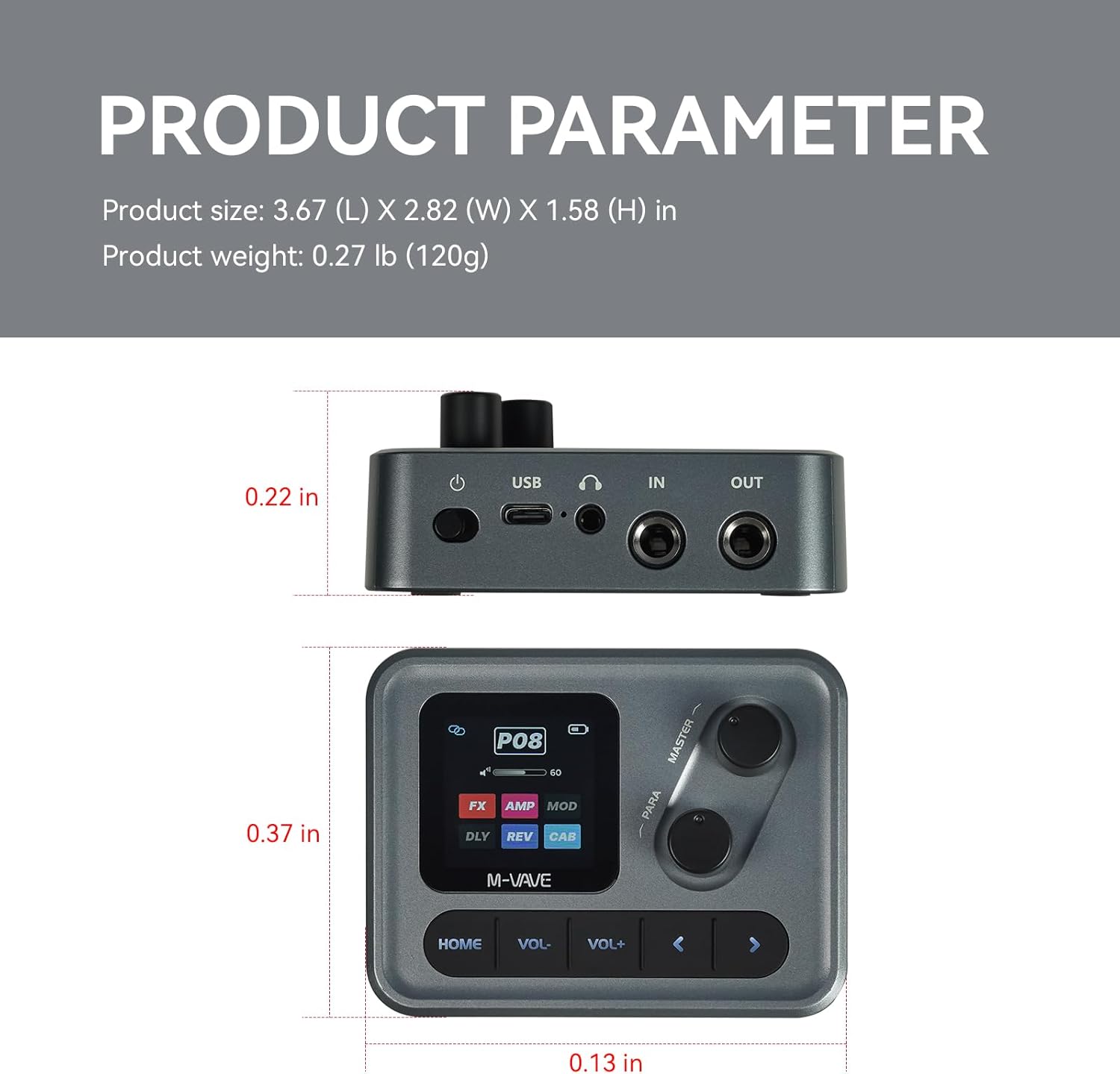
Image: M-VAVE Pocket AMP displaying its physical dimensions and weight.
Warranty and Support
The M-VAVE Pocket AMP comes with a one-year warranty from the date of purchase. For technical support, troubleshooting assistance, or to inquire about warranty claims, please contact the seller directly through your purchase platform. Provide your order details and a description of the issue for prompt assistance.
Related documentsPOCKET AMP


Ask a question about this manual
Ask about setup, troubleshooting, compatibility, parts, safety, or missing instructions. Manuals+ will review the question and use this page’s manual context to help answer it.