1. Safety Instructions
Please read and understand all instructions before assembly and use. Keep this manual for future reference.
- Electrical Safety: Ensure the vanity's charging station is connected to a grounded outlet. Do not overload the outlets. Keep liquids away from electrical components.
- Assembly Safety: Assembly requires careful attention. It is recommended to have two people for certain steps to ensure stability and prevent injury. Follow all steps in the provided assembly guide.
- Stability: Place the vanity on a flat, stable surface. Do not climb on or lean heavily on the vanity. Secure the vanity to the wall if necessary, especially in households with children or pets, to prevent tipping.
- Weight Capacity: Do not exceed the weight capacity of the glass tabletop (30 lbs) or any shelves/drawers.
- Glass Care: The tempered glass tabletop is scratch-resistant and heat-proof, but avoid dropping heavy objects on it or applying excessive force.
- Children and Pets: Keep small parts and tools away from children and pets during assembly. Ensure drawers and cabinets are properly closed to prevent accidental access.
2. Package Contents
Verify all components are present and undamaged before beginning assembly. Each component is meticulously labeled with serial numbers for easy identification.
- Vanity Desk Frame (Engineered Wood)
- 3-Way Mirror with Integrated Lights (1x 23" center mirror, 2x 12" side mirrors)
- Tempered Glass Tabletop
- Charging Station (2 AC outlets, 1 USB port, 1 Type-C charger)
- 3 Drawers (2 top drawers, 1x 28" wide middle drawer)
- 2 Storage Cabinets with Adjustable Shelves
- Gold Metal Handles
- Assembly Hardware Kit
- Instruction Manual
3. Assembly Instructions
T4TREAM Furniture streamlines the assembly process with clear, user-friendly instructions. Each component is meticulously labeled with serial numbers. While assembly is designed to be straightforward, it can be time-consuming and certain steps may require a second person for assistance, particularly when positioning the tabletops.
- Unpack and Organize: Carefully unpack all components and lay them out. Identify each part using the provided labels and hardware list.
- Review Instructions: Read the entire assembly manual before starting. Pay close attention to diagrams and warnings.
- Assemble Base Structure: Begin by assembling the main frame and legs according to the step-by-step guide.
- Install Drawers and Cabinets: Attach drawer slides and assemble the drawers and cabinet doors. Ensure smooth operation.
- Attach Tabletop and Mirror: This step often requires two people. Carefully place the main tabletop and then the mirror assembly onto the base. Connect any electrical wiring for the mirror lights and charging station as instructed.
- Final Adjustments: Ensure all screws are tightened, and the vanity is stable. Adjust cabinet shelves as desired.

Image 3.1: Fully assembled T4TREAM Fluted Makeup Vanity Desk.
4. Operating Instructions
4.1. 3-Way Mirror with Lights
The vanity features a three-way mirror system with integrated touch-controlled lighting. The two 12" side mirrors and a 23" center mirror provide comprehensive viewing angles.
- Power On/Off: Tap the touch sensor on the mirror to turn the lights on or off.
- Adjust Brightness: Long press the touch sensor to adjust the brightness level from 0% to 100%.
- Change Color Mode: Tap the touch sensor repeatedly to cycle through the 3 lighting modes: Cool Daylight, Neutral Light, and Warm Light.

Image 4.1: Close-up of the 3-way mirror with touch control for lighting adjustments.
4.2. Built-in Charging Station
The vanity includes a built-in charging station for convenience.
- AC Outlets: Two 125V/12A AC outlets are provided for powering hair dryers, curling irons, or other small appliances.
- USB/Type-C Ports: A 5V/2A USB port and a Type-C charger are available for charging mobile phones, tablets, and other compatible devices.
- Power Cord: The vanity is equipped with a 6.5-foot power cord. Ensure it is plugged into a suitable wall outlet.

Image 4.2: Overview of the vanity's large storage space and built-in charging station.
4.3. Storage Features
The T4TREAM vanity offers extensive storage options to keep your items organized.
- Glass Top Display: The transparent tempered glass tabletop allows for visible storage of cosmetics and accessories.
- Top Small Drawers: Two smaller drawers are located on the top section for refined storage of smaller items.
- Middle Drawer: A 28" wide middle drawer with a fluted panel provides ample space for various beauty products.
- Semi-Open Side Cubbies: Two semi-open cubbies offer additional accessible storage.
- Dual Storage Cabinets: Two side cabinets feature adjustable shelves for customizable storage of larger items.

Image 4.3: View of the spacious glass tabletop and the middle drawer.

Image 4.4: Close-up of the middle drawer with chic metal handle and the left and right storage cabinets.
5. Maintenance
Proper care will ensure the longevity and appearance of your T4TREAM vanity desk.
- Cleaning: Wipe with a dry cloth. For stubborn spots, use a slightly damp cloth with mild soap and dry immediately. Avoid harsh chemicals or abrasive cleaners.
- Glass Top: Clean the tempered glass tabletop with a glass cleaner and a soft cloth.
- Electrical Components: Ensure the charging station is unplugged before cleaning. Use a dry cloth to wipe the outlets and ports.
- Hardware: Periodically check and tighten any loose screws or hardware to maintain stability.
- Avoid Direct Sunlight: Prolonged exposure to direct sunlight can cause fading or damage to the wood finish.
6. Troubleshooting
Refer to this section for solutions to common issues.
| Problem | Possible Cause | Solution |
|---|---|---|
| Mirror lights not working. | Power cord unplugged, faulty connection, touch sensor issue. | Ensure the vanity is plugged into a working outlet. Check all electrical connections. Try tapping and long-pressing the touch sensor. |
| Charging station not providing power. | Vanity unplugged, device not compatible, outlet overloaded. | Verify the vanity is plugged in. Test with a different device. Ensure the total power draw does not exceed the station's capacity. |
| Drawers are stiff or do not slide smoothly. | Misaligned slides, obstruction, loose hardware. | Check that drawer slides are correctly installed and aligned. Remove any items obstructing the drawer. Tighten any loose screws on the slides. |
| Vanity feels unstable or wobbly. | Uneven floor, loose assembly hardware. | Ensure the vanity is on a level surface. Re-tighten all assembly screws. Consider using anti-tip hardware if not already installed. |
7. Specifications
- Model Number: FPSC48CVD-WTA
- Brand: T4TREAM
- Material: FSC-Certified Wood, Optimal MDF, P2 Engineered Wood, Tempered Glass, Rust-proof Coated Metal
- Color: White Alder
- Product Dimensions (Overall): 48" W x 21.44" D x 56" H
- Item Weight: 130 pounds
- Assembly Required: Yes
- Tabletop Weight Capacity: Up to 30 lbs
- Charging Station: 2x 125V/12A AC Outlets, 1x 5V/2A USB Port, 1x Type-C Charger
- Power Cord Length: 6.5 feet
- Mirror Features: 3-Way Mirror (2x 12" side, 1x 23" center), Touch-Controlled LED Lights (Adjustable Brightness & 3 Color Modes)
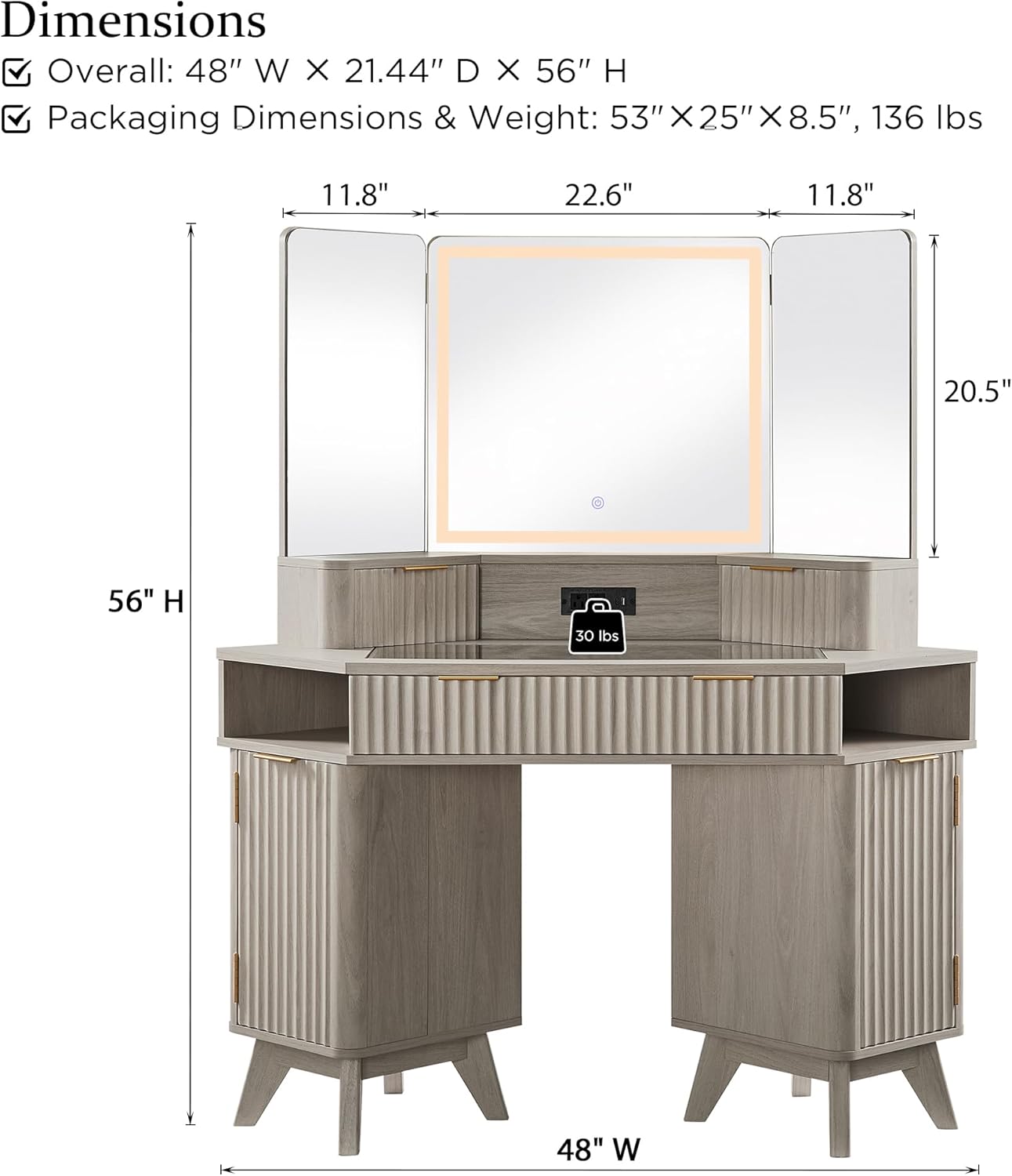
Image 7.1: Detailed dimensions of the T4TREAM Fluted Makeup Vanity Desk.
8. Warranty & Support
T4TREAM is committed to customer satisfaction. Your package is protected with Styrofoam sheets and protective boards to safeguard your vanity from harm during shipping. In case of any queries or issues, please do not hesitate to reach out to our customer support team.
- Customer Service: For assistance with assembly, missing parts, or product concerns, please contact T4TREAM customer support. Refer to the contact information provided on the packaging or the official T4TREAM website.
- Warranty Information: Specific warranty details are typically included with your product documentation. Please retain your proof of purchase for warranty claims.


