
Introduction
This manual provides comprehensive instructions for the SWOFY M10 MP3 Player with Bluetooth 5.0. Please read this guide carefully to ensure proper use and to maximize your device's capabilities. Keep this manual for future reference.
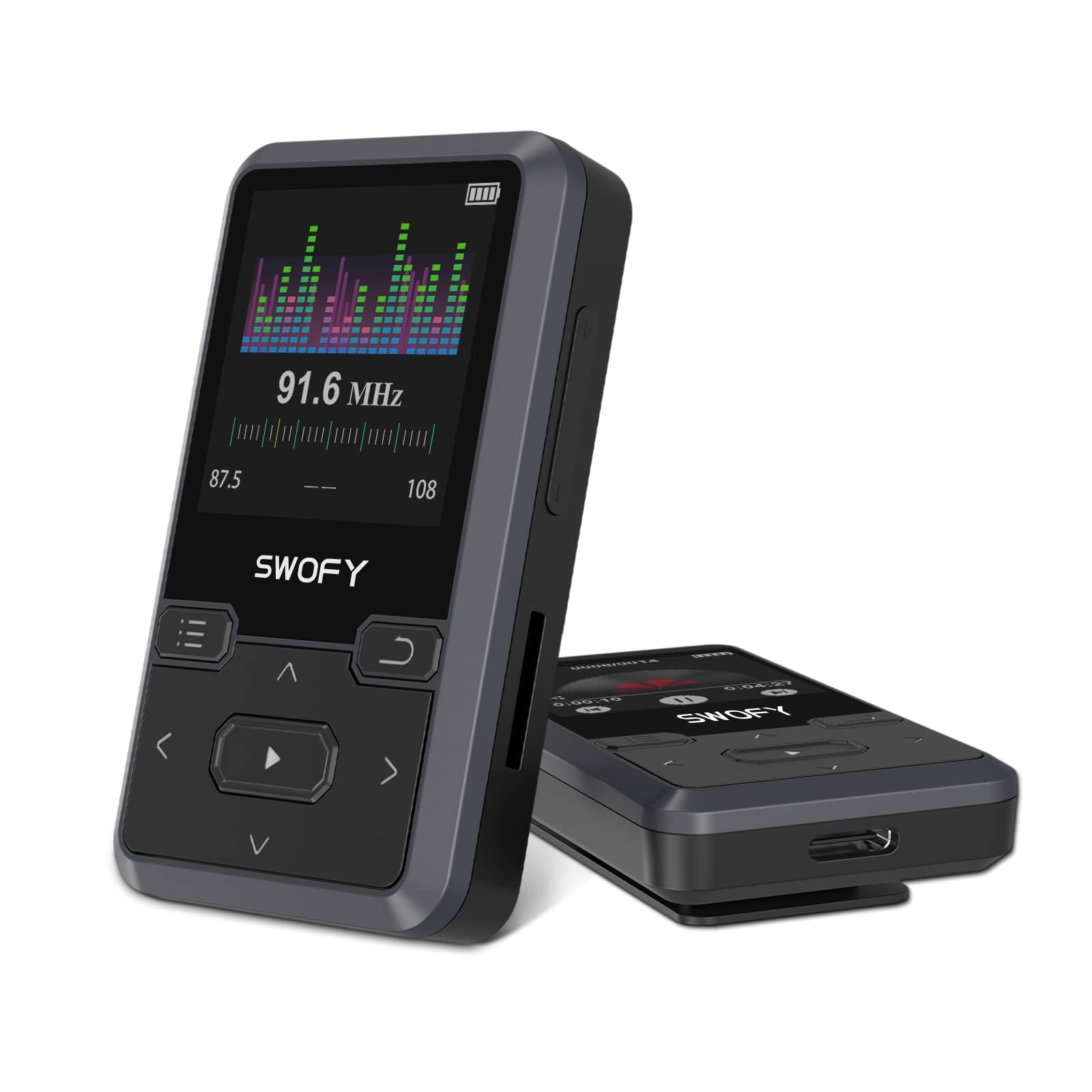
Image: The SWOFY M10 MP3 Player, a compact black device featuring a display screen and physical control buttons. This image illustrates the player's overall design and size.
1. Setup
1.1 Package Contents
Verify that all items are present in the package:
- SWOFY M10 MP3 Player
- USB Charging Cable
- User Manual
- Wired Headphones (typically included)
1.2 Charging the Device
Before first use, fully charge the MP3 player. Connect the provided USB charging cable to the player's charging port and the other end to a USB power adapter (not included) or a computer's USB port. The battery indicator on the screen will show charging status. A full charge typically takes approximately 2-3 hours.
1.3 Powering On/Off
- To Power On: Press and hold the Power button (usually located on the side or top) for a few seconds until the screen illuminates.
- To Power Off: Press and hold the Power button until a power-off option appears on the screen, then select "Power Off" or continue holding until the screen turns off.
1.4 Initial Setup
Upon first power-on, you may be prompted to select a language. Use the navigation buttons to select your preferred language and confirm.
1.5 Transferring Files
The SWOFY M10 has 32GB of internal memory and supports up to 128GB expandable storage via a microSD card (not included).
- Connect the MP3 player to your computer using the USB cable.
- The player will appear as a removable disk drive on your computer.
- Drag and drop your music, audiobook, or video files into the appropriate folders on the player (e.g., "Music", "Videos").
- Safely eject the device from your computer before disconnecting the USB cable.
2. Operating Instructions
2.1 Basic Navigation
The device features a 1.7-inch TFT color display and physical buttons for navigation. Typically, there are buttons for Up, Down, Left, Right (or Menu/Back), Play/Pause, and Volume control. Refer to the on-screen icons for specific functions.
2.2 Music Playback
- From the main menu, navigate to "Music" and press the Play/Pause button to enter.
- Browse by Artist, Album, Songs, Genres, or Playlists.
- Select a song or album and press Play/Pause to begin playback.
- Use the Volume buttons to adjust the sound level.
- Supported audio formats include MP3, AAC, FLAC, WAV, WMA, OGG.
Note: The player does not have built-in speakers. Connect wired headphones to the 3.5mm audio jack or pair with Bluetooth headphones/speakers for audio output.
2.3 Bluetooth Connectivity
The SWOFY M10 features Bluetooth 5.0 for wireless audio streaming.
- Ensure your Bluetooth headphones or speaker are in pairing mode.
- On the MP3 player, navigate to "Bluetooth" from the main menu.
- Turn Bluetooth "On" and select "Search for Devices".
- Select your device from the list of available devices to pair.
- Once paired, audio will stream wirelessly to your connected device.
Important: The SWOFY M10 MP3 player can only pair with Bluetooth headphones or speakers. It cannot pair with smartphones, tablets, or other Bluetooth-enabled media players.
2.4 FM Radio
To use the FM radio function:
- Plug wired headphones into the 3.5mm audio jack. The wired headphones act as the antenna for signal reception.
- Navigate to "FM Radio" from the main menu.
- Use the navigation buttons to scan for stations or manually tune to a frequency.
- Save your favorite stations for quick access.
2.5 Video Playback
The player supports basic video playback. Transfer compatible video files to the "Videos" folder on the device. Navigate to "Videos" from the main menu to browse and play your content.
2.6 Using the Clip-On Design
The SWOFY M10 features an integrated back clip. This allows you to securely attach the player to clothing, a waistband, or a bag strap, making it ideal for workouts, commutes, or travel. Ensure the clip is firmly attached to prevent accidental detachment.
3. Maintenance
3.1 Cleaning the Device
Wipe the exterior of the MP3 player with a soft, dry, lint-free cloth. Do not use liquid cleaners, aerosols, or solvents, as these can damage the device's finish or internal components.
3.2 Storage
Store the device in a cool, dry place away from direct sunlight, extreme temperatures, and high humidity. Avoid storing it near strong magnetic fields.
3.3 Battery Care
To prolong battery life:
- Avoid fully discharging the battery frequently.
- Charge the device regularly, even if not in use for extended periods.
- Do not expose the device to extreme heat or cold.
- Use only the provided or a certified compatible charging cable.
4. Troubleshooting
4.1 Device Not Turning On
- Ensure the battery is charged. Connect the player to a power source and allow it to charge for at least 15 minutes before attempting to power on again.
- Try performing a hard reset (if applicable, usually by holding the power button for an extended period, e.g., 10-15 seconds, or looking for a small reset pinhole).
4.2 Bluetooth Pairing Issues
- Ensure both the MP3 player and the Bluetooth audio device are in pairing mode and within range.
- Verify that the Bluetooth audio device is not already connected to another device.
- Restart both the MP3 player and the Bluetooth audio device.
- Remember, the player cannot pair with smartphones or tablets.
4.3 No Sound Output
- Check the volume level on both the MP3 player and your connected headphones/speakers.
- Ensure headphones are properly plugged into the 3.5mm jack or that Bluetooth is successfully connected.
- Test with different headphones or speakers to rule out a faulty accessory.
- Confirm the audio file format is supported (MP3, AAC, FLAC, WAV, WMA, OGG).
4.4 File Transfer Problems
- Ensure the USB cable is securely connected to both the player and the computer.
- Try a different USB port on your computer or a different USB cable.
- Verify that the player is recognized as a removable disk drive by your computer.
- Check for sufficient storage space on the player or microSD card.
5. Specifications
| Brand | SWOFY |
| Model Number | M10 |
| Memory Storage Capacity | 32 GB (expandable up to 128 GB via microSD card) |
| Connectivity Technology | Aux, Bluetooth 5.0 |
| Special Features | FM Radio, Clip-On Design |
| Screen Size | 1.7 Inches (TFT Color Display) |
| Supported Audio Standards | MP3, AAC, FLAC, WAV, WMA, OGG |
| Battery Life | Up to 50 Hours (audio playback) |
| Compatible Devices | Headphones, Personal Computer |
| Color | Black |
| UPC | 762786808330 |
6. Warranty and Support
6.1 Product Warranty
The SWOFY M10 MP3 Player is covered by a standard manufacturer's warranty. Please refer to the warranty card included in your product packaging for specific terms, conditions, and duration. Keep your proof of purchase for warranty claims.
6.2 Customer Support
For technical assistance, troubleshooting not covered in this manual, or warranty inquiries, please contact SWOFY customer support. Contact information can typically be found on the product packaging, the official SWOFY website, or through your retailer's support channels.


