
1. Introduction
This manual provides detailed instructions for the safe and efficient operation of your CHUBORY X10 PRO GPS Drone. The X10 PRO is a mid-sized drone designed for adults, featuring a 4K UHD camera, dual positioning system (Optical Flow and GPS), brushless motors for stable flight, and intelligent flight functions such as Follow Me, Tap Fly, and Point of Interest. Its lightweight design (under 0.55lb) means no FAA registration is required in the United States.
2. What's in the Box
Upon unboxing your CHUBORY X10 PRO GPS Drone, please ensure all components are present:
- CHUBORY X10 PRO Drone
- Remote Control
- 3 x Batteries
- Carrying Case
- Propellers (including spares)
- Screwdriver
- USB Charging Cables
- User Manual
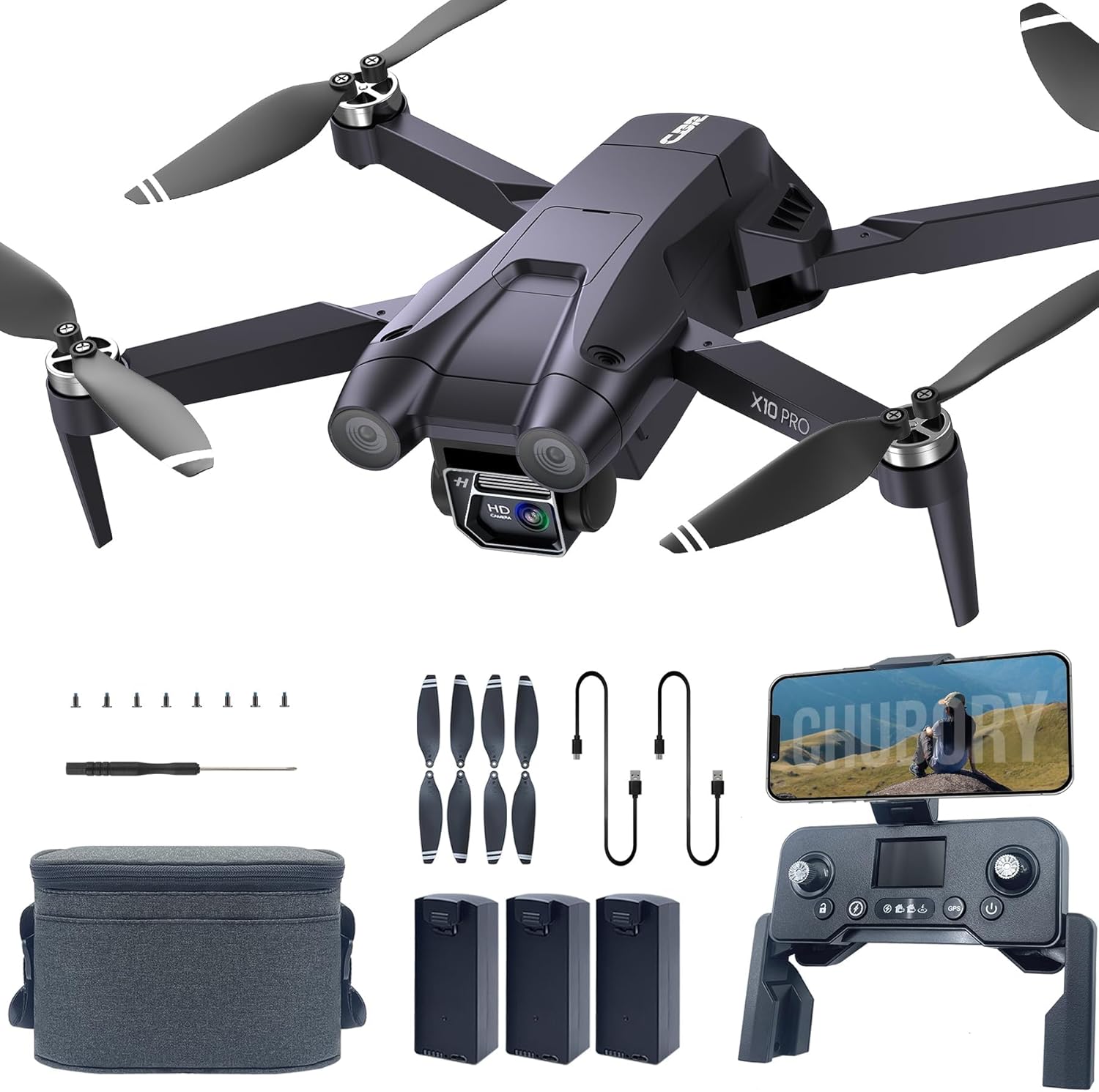
Figure 2.1: All components included with the CHUBORY X10 PRO GPS Drone.
3. Setup
3.1. Unboxing and Initial Inspection
Carefully remove all items from the carrying case. Inspect the drone and accessories for any visible damage. The drone features a foldable design for portability.
Video 3.1: CHUBORY X10 PRO GPS Drone Unboxing Review. This video demonstrates the unboxing process and initial setup of the drone and its components.

Figure 3.1: The CHUBORY X10 PRO drone in its folded, compact state, ready for transport in its carrying case.
3.2. Battery Charging
Before first use, fully charge all three drone batteries using the provided USB charging cables. The batteries slide into the rear compartment of the drone. Ensure a full charge for optimal flight time.

Figure 3.2: The CHUBORY X10 PRO drone shown alongside its three included batteries, highlighting the extended flight capability.
3.3. Controller Setup and App Connection
The remote controller features a built-in screen for direct viewing of flight data and camera feed. It also includes a bracket to mount your smartphone for an alternative view or to access advanced app features. Download the official CHUBORY app to unlock intelligent flight modes and real-time video transmission.
Video 3.2: CHUBORY X10 PRO GPS Drone Quick Start Guide. This video provides a quick overview of the drone's features and basic setup steps.
To connect your phone:
- Turn on the drone and the remote controller.
- Enable Wi-Fi on your smartphone and connect to the drone's Wi-Fi network (usually starts with "CHUBORY" or similar).
- Open the CHUBORY app. The app will display the camera feed and flight controls.
3.4. Gyroscope and Geomagnetic Calibration
For stable flight, especially outdoors, proper calibration is essential. Follow the instructions in the app or user manual to perform gyroscope and geomagnetic calibration before your first flight.
4. Operating the Drone
4.1. Basic Flight Controls
Familiarize yourself with the remote controller's joysticks and buttons. The left joystick typically controls altitude and rotation, while the right joystick controls forward/backward and left/right movement. The drone features one-key take-off and landing for ease of use.
Video 4.1: CHUBORY X10 PRO Operation Guide Video. This video demonstrates the basic flight operations and controls of the drone.
4.2. Intelligent Flight Modes
The CHUBORY X10 PRO offers several intelligent flight modes to enhance your flying experience:
- Follow Me: The drone will autonomously track and follow a designated target, such as yourself.
- Tap Fly: Tap a destination on the app's map, and the drone will navigate to that point automatically.
- Point of Interest: The drone will circle around a specified point or object, maintaining focus for cinematic shots.
- Auto Return: With GPS enabled, the drone will automatically return to its take-off point if the battery is low, signal is lost, or the one-key return button is pressed.

Figure 4.1: The drone utilizing Smart Follow mode, tracking a person on a bicycle.

Figure 4.2: The drone executing Tap Fly mode, navigating to user-defined points on a map via the app.
5. Taking Photos and Videos
The drone is equipped with a 4K UHD camera capable of capturing stunning 4096x3072 photos and 2048x1080 videos. The 100° wide-angle lens is adjustable by remote control or the app within 90°, providing flexible shooting angles. Real-time transmission ensures a smooth video stream to your device.
- Gesture Photography: Use specific hand gestures to trigger photo or video recording.

Figure 5.1: Close-up of the CHUBORY X10 PRO's 4K UHD camera, highlighting its adjustable lens for varied photographic perspectives.

Figure 5.2: A user demonstrating the Gesture Photography feature, allowing hands-free photo capture.
6. Maintenance
6.1. Propeller Replacement
In case of damage, replace propellers using the provided screwdriver and spare blades. Ensure correct blade orientation (A or B) as indicated on the drone arms and blades.
6.2. Protective Guards
For indoor flying or during initial learning phases, it is recommended to install propeller protective guards (if included or purchased separately) to prevent damage from collisions.
Video 6.1: CHUBORY X10 PRO Foldable Drone AD 4K. This short preview video highlights the drone's foldable design and portability, which can aid in maintenance access.
7. Troubleshooting
If you encounter issues with your drone, refer to the following common troubleshooting steps:
- Drone will not power on: Ensure batteries are fully charged and correctly inserted.
- Drone will not take off/fly: Verify that the drone and controller are properly connected and calibrated. Check for any obstructions to the propellers.
- Loss of signal/Auto Return: Ensure you are within the specified control range (3280 FT). The drone should automatically return home if signal is lost or battery is low.
- Unstable flight: Perform gyroscope and geomagnetic calibration. Check for damaged propellers and replace if necessary.
- Poor camera quality: Ensure the camera lens is clean. Check app settings for resolution and frame rate.
8. Specifications
| Feature | Detail |
|---|---|
| Brand | CHUBORY |
| Model Name | X10 PRO |
| Special Features | 4K UHD Photography, GPS Intelligent Flight, Long Flight Time, Dual Positioning, Foldable Design |
| Video Capture Resolution | 4K (4096x3072 photos, 2048x1080 videos) |
| Connectivity Technology | Wi-Fi |
| Item Weight | 235 Grams (Under 0.55lb, No FAA Registration) |
| Flight Time | Up to 90 minutes (with 3 batteries) |
| Control Range | 3328 Feet |
| Battery Cell Composition | Lithium Ion |
| Product Dimensions | 4.72"L x 2.95"W x 1.96"H |
9. Warranty and Support
The CHUBORY X10 PRO GPS Drone comes with a standard manufacturer's warranty. For detailed warranty information, technical support, or service inquiries, please refer to the contact information provided in your user manual or visit the official CHUBORY website. Our support team is available to assist you with any questions or issues you may encounter.


