
1. Important Safety Information
Please read all instructions carefully before assembly and use. Keep this manual for future reference.
- Assembly must be completed by an adult.
- Do not exceed the weight limit of 44 lbs (20 kg) for the entire unit.
- The top surface has a weight limit of 22 lbs (10 kg).
- Each flip cabinet has a weight limit of 11 lbs (5 kg).
- Be cautious of sharp edges during assembly and use to prevent injury.
- Ensure the wall mounting hardware is appropriate for your wall type and securely installed. Consult a professional if unsure.
2. Product Overview
The HOMCOM 71" Floating TV Stand is designed to provide a space-saving media storage solution. It features a wall-mounted design, two fluted flip-down doors for concealed storage, and a cable management hole to keep wires organized.
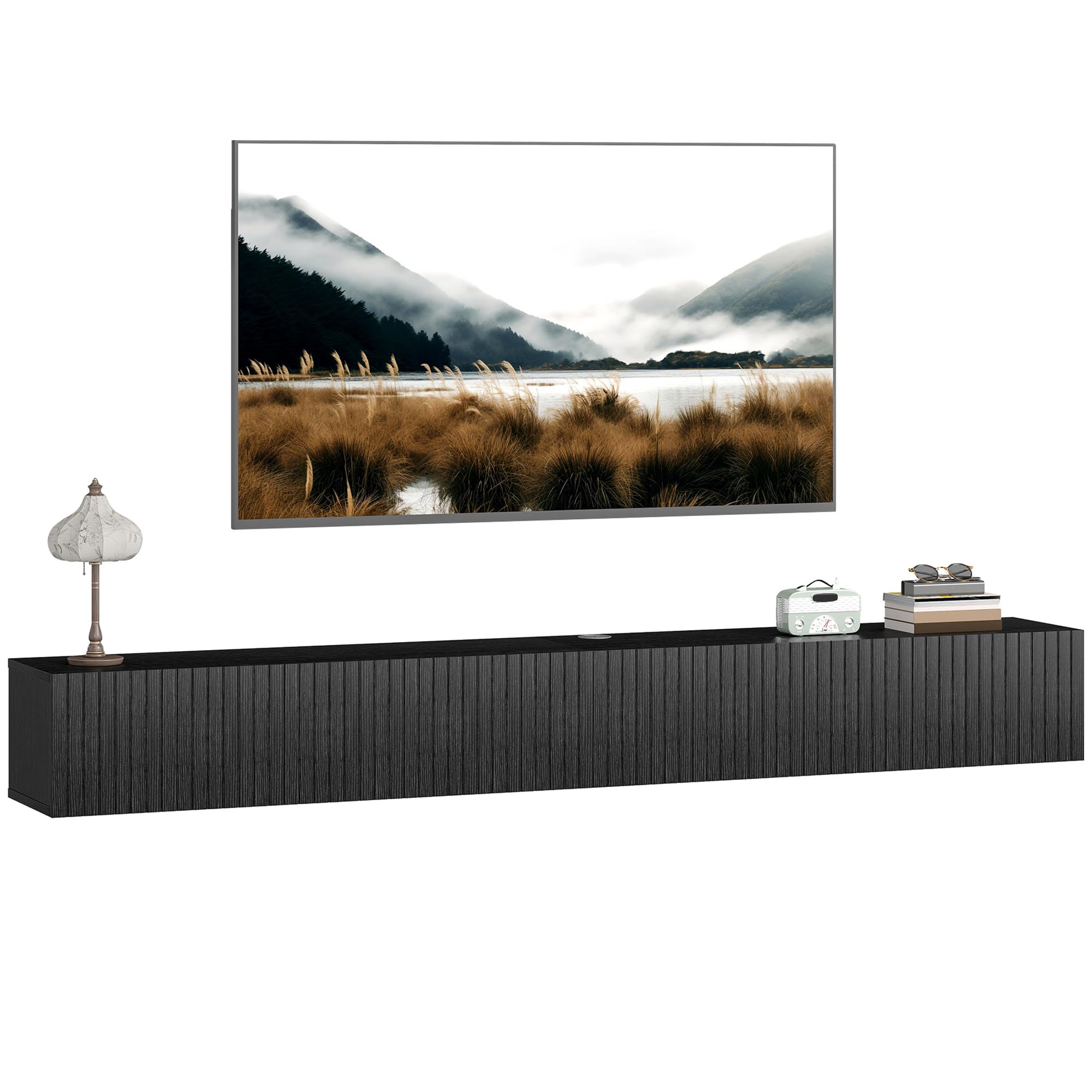
Image 1: The HOMCOM 71" Floating TV Stand, showcasing its sleek, wall-mounted design in black.

Image 2: A close-up view of the floating TV shelf, illustrating how it saves floor space by being wall-mounted.
3. Setup and Assembly
Assembly is required for this product. Please ensure all parts are present before beginning. Refer to the included assembly instructions for detailed, step-by-step guidance.
3.1. Unpacking and Part Identification
- Carefully unpack all components from the packaging.
- Verify that all parts listed in the assembly manual are present and undamaged.
- Lay out all hardware and panels on a clean, soft surface to prevent scratches.
3.2. Assembly Steps (General)
- Assemble the main frame of the TV stand according to the provided diagrams.
- Attach the back panels, ensuring the cable hole is correctly positioned.
- Install the flip-down doors using the designated hinges.
- Secure the wall mounting brackets to the back of the assembled unit.
3.3. Wall Mounting
- Choose a suitable wall location, ensuring it can support the weight of the TV stand and its contents.
- Mark the desired height and positions for the wall anchors/screws.
- Drill pilot holes as instructed in the assembly manual.
- Install the wall anchors and mounting hardware securely.
- Carefully lift the TV stand and attach it to the installed wall mounting hardware. It is recommended to have at least two adults for this step.
- Ensure the unit is level and firmly secured to the wall before placing any items on it.

Image 3: The assembled TV stand mounted on a wall, showing its internal storage compartments with various media devices and accessories.
4. Operating Instructions
4.1. Using the Flip-Down Doors
The TV stand features two fluted flip-down doors. To open, gently pull the top edge of the door downwards. To close, push the door upwards until it is flush with the front of the unit. These doors provide concealed storage for media accessories, remote controls, and other items.

Image 4: The two flip-down cabinets are shown open, revealing ample storage space for various entertainment items.
4.2. Cable Management
A dedicated cable hole is integrated into the tabletop to help manage and conceal wires from your television and media devices. Route all necessary cables through this opening to maintain a clean and organized appearance.

Image 5: A close-up of the cable hole on the TV stand's tabletop, designed to hide and organize wires from electronic devices.
5. Maintenance and Care
To ensure the longevity and appearance of your HOMCOM Floating TV Stand, follow these simple care instructions:
- Cleaning: Wipe the surface with a dry, soft cloth. Avoid using abrasive cleaners, harsh chemicals, or excessive moisture, as these can damage the finish.
- Spills: Immediately wipe up any spills with a dry cloth to prevent staining or damage to the material.
- Sunlight: Avoid prolonged exposure to direct sunlight to prevent fading or discoloration.
- Weight Limits: Always adhere to the specified weight limits for the unit and its compartments to prevent structural damage.
6. Troubleshooting
If you encounter any issues with your TV stand, please refer to the following common troubleshooting tips:
- Unit is not level after mounting: Ensure the wall mounting hardware is installed correctly and adjusted as needed. Re-check measurements and use a spirit level during installation.
- Doors do not close properly: Check the hinges for proper alignment and tightness. Adjust if necessary. Ensure no items inside the cabinet are obstructing the door's movement.
- Scratches or minor damage: For minor scratches, furniture repair pens or markers matching the finish color may be used.
- Missing parts during assembly: Double-check all packaging materials. If parts are genuinely missing, contact customer support with your product model number and a description of the missing parts.
7. Specifications
| Feature | Detail |
|---|---|
| Model Number | 83B-601V80BK |
| Overall Dimensions | 70.9" L x 9.8" W x 8.7" H (180 x 25 x 22 cm) |
| Material | Engineered Wood, Melamine |
| Color | Black |
| Total Weight Capacity | 44 lbs (20 kg) |
| Top Surface Weight Capacity | 22 lbs (10 kg) |
| Flip Cabinet Weight Capacity | 11 lbs (5 kg) per cabinet |
| Recommended TV Size | Up to 72 inches |
| Special Features | Cable Hole, Fluted Doors, Wall-Mounted Design |
| Assembly Required | Yes |
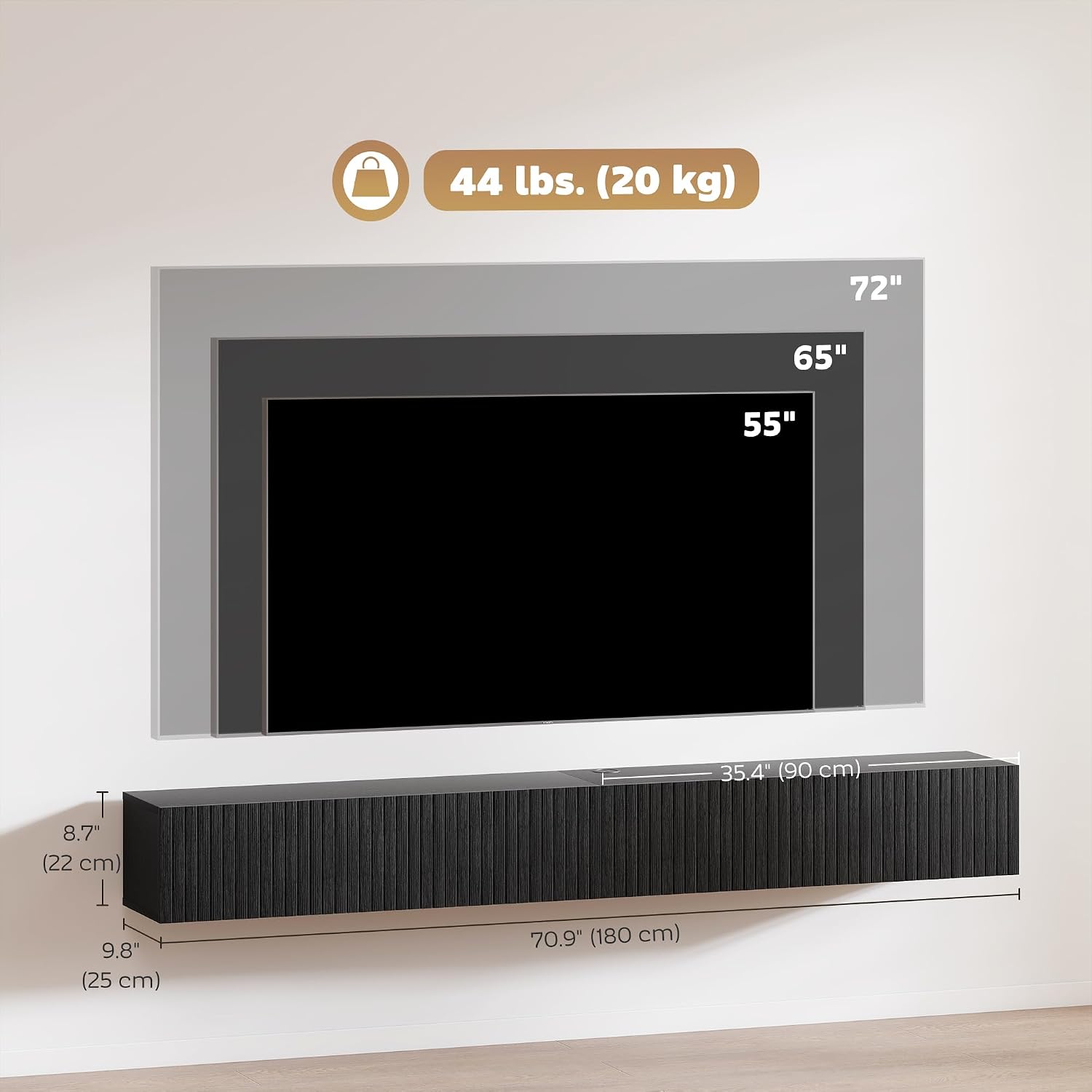
Image 6: Diagram illustrating the overall dimensions (70.9" L x 9.8" W x 8.7" H) and weight capacity (44 lbs total) of the HOMCOM Floating TV Stand, along with recommended TV sizes up to 72 inches.
8. Warranty Information
This HOMCOM product comes with a 90-day warranty against manufacturer defects. This warranty covers defects in materials and workmanship under normal use. It does not cover damage resulting from improper assembly, misuse, abuse, accidents, or unauthorized modifications. Please retain your proof of purchase for warranty claims.
9. Customer Support
For any questions, concerns, or assistance with assembly or product issues, please contact HOMCOM customer support:
- Manufacturer: Aosom Canada
- Contact Information: Markham, Ontario, CA
- Telephone: 1-416-792-6088
When contacting support, please have your product model number (83B-601V80BK) and purchase details ready.


