1. Introduction
This manual provides essential information for the installation, operation, and maintenance of your FLIPSKY FT85CS IP68 Waterproof Speed Controller. Designed for high-performance applications such as electric scooters, ebikes, motorcycles, robotics, efoils, and drones, this controller offers robust performance and reliability. Please read this manual thoroughly before using the product to ensure safe and optimal operation.
2. Safety Information
- High Voltage Warning: This device operates at high voltages (up to 85V). Always disconnect the battery before making any connections or performing maintenance.
- Electrical Safety: Ensure all connections are secure and properly insulated to prevent short circuits. Incorrect wiring can cause damage to the controller, battery, or motor, and poses a fire risk.
- Waterproof Rating: The FT85CS is IP68 rated for water and dust resistance. While designed for harsh environments, avoid intentional submersion beyond specified limits or exposure to corrosive liquids.
- Temperature: The controller can generate heat during operation. Ensure adequate air circulation, especially during high-current applications.
- Children and Pets: Keep the device and its components out of reach of children and pets.
- Proper Use: Use this controller only for its intended purpose as a motor speed controller. Do not modify the device.
3. Product Overview
The FLIPSKY FT85CS is a high-performance, waterproof speed controller featuring an ARM Cortex-M4 structure for improved PWM switching frequency and motor RPM. It is fully sealed with an IP68 rating, making it suitable for demanding conditions. The controller supports various programming and control methods, offering flexibility for different motor types and applications.
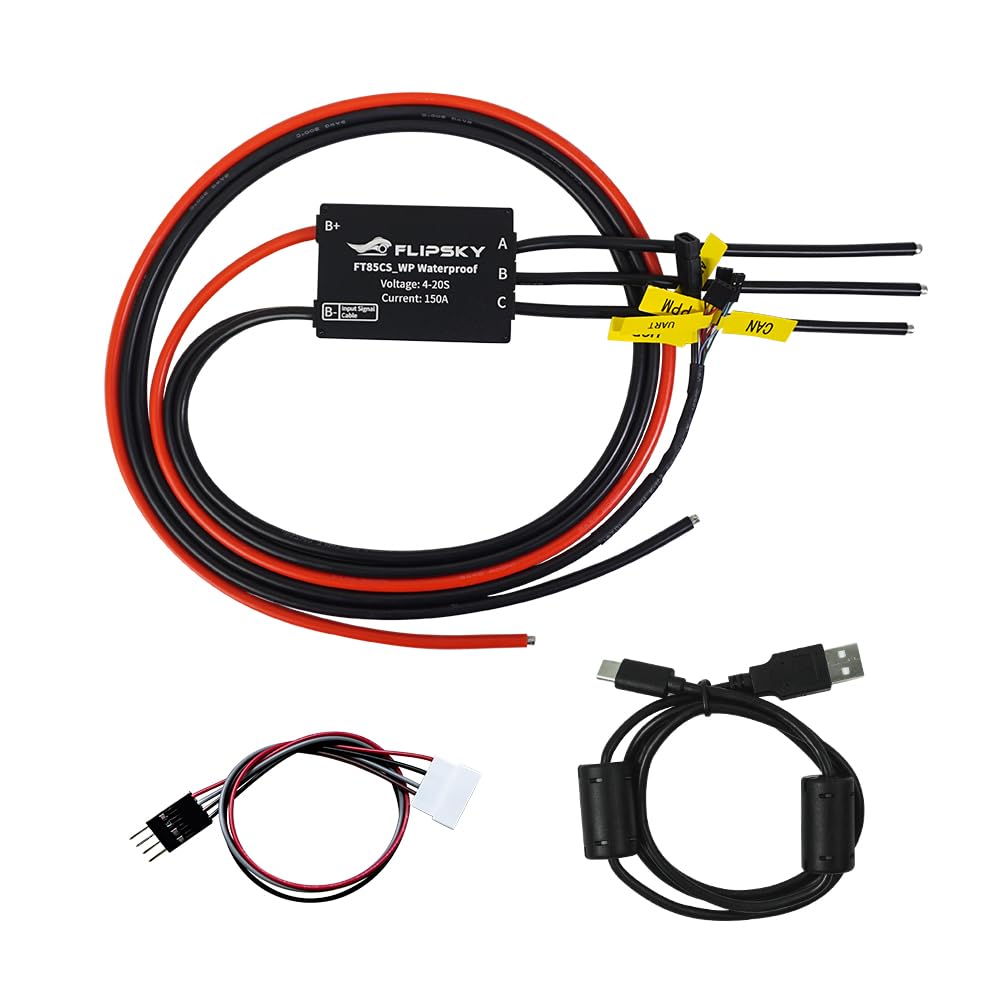
Figure 1: FLIPSKY FT85CS Waterproof Speed Controller with connected power and signal wires. This image displays the FLIPSKY FT85CS speed controller, highlighting its compact black enclosure and the various color-coded wires for power input (red/black), motor phases (black A, B, C), and signal connections (UART, ADC, PPM, CAN, USB) with yellow labels.

Figure 2: Top view of FLIPSKY FT85CS Waterproof Speed Controller. A close-up view of the FLIPSKY FT85CS_WP Waterproof speed controller's top surface. The branding 'FLIPSKY' and model 'FT85CS_WP Waterproof' are clearly visible, along with 'Voltage: 4-20S' and 'Current: 150A'. The B+ and B- (Input Signal Cable) labels are also shown.
4. Specifications
| Feature | Specification |
|---|---|
| Firmware | V1.6 and above (update via Flipsky ESC Tool) |
| Voltage Range | 14V-85V (safe for 4-20S battery configurations) |
| Continuous Current | 150A (85V) - Note: Actual values depend on mounting, ambient temperature, and cooling. |
| Peak Current | 250A |
| BEC Output | 5V@1A |
| Power Wire Gauge | 8 AWG (1200mm length) |
| Motor Wire Gauge | 8 AWG (195mm length) |
| Programmable Tool | Flipsky ESC TOOL |
| Communication Ports | USB, CAN, UART, PPM, ADC |
| Control Signals Support | PPM, ADC, UART (compatible with FLIPSKY VX Series remotes) |
| Dimensions (with enclosure) | L93.8mm x W63mm x H26mm |
| Waterproof Rating | IP68 |
| Weight | 0.3 Kilograms |
| Material | Aluminum Alloy |
5. Setup and Installation
Careful wiring is crucial for the proper function and longevity of your speed controller. Follow the diagram and instructions below for correct connections.

Figure 3: Wiring diagram for FLIPSKY FT85CS speed controller. This diagram illustrates the connection points for the FT85CS controller. It shows the main power connection to the battery (B+, B-), motor phase connections (A, B, C), and detailed pinouts for the input signal cable ports: UART, ADC, PPM, CAN, and USB. Each port is numbered and labeled for clear identification.
5.1. Power Connections
- Battery (B+, B-): Connect the main positive (red, B+) and negative (black, B-) terminals of your battery to the corresponding inputs on the controller. Ensure correct polarity.
- Motor (A, B, C): Connect the three phase wires from your motor to the A, B, and C outputs on the controller. The order may affect motor direction; this can be adjusted in the software.
5.2. Signal Connections
The FT85CS features multiple communication ports for various control methods and data exchange:
- 1. UART: Universal Asynchronous Receiver/Transmitter port. Used for communication with external devices like remote controllers (e.g., FLIPSKY VX series) or for data logging. Pinout: GND, RX, TX, 5V.
- 2. ADC: Analog-to-Digital Converter port. Can be used for analog input devices like throttles. Pinout: GND, 3.3V, ADC1.
- 3. PPM: Pulse Position Modulation port. Commonly used for RC receivers. Pinout: GND, 5V, S (Signal).
- 4. CAN: Controller Area Network bus. For inter-device communication in complex systems. Pinout: GND, CAN-L, CAN-H.
- 5. USB: Universal Serial Bus port. Used for connecting to a computer for configuration and firmware updates via the Flipsky ESC Tool.
Connect your chosen control input (e.g., remote receiver via UART or PPM, or throttle via ADC) to the appropriate port on the controller.
6. Operation
6.1. Initial Configuration
The FT85CS is programmable via the Flipsky ESC Tool software. Connect the controller to your computer using the USB port. Launch the ESC Tool to:
- Update firmware (V1.6 and above supported).
- Configure motor parameters (e.g., motor type, pole pairs).
- Set battery parameters (e.g., voltage limits).
- Select control method (Current, Duty Cycle, Speed Control).
- Calibrate input signals (PPM, ADC, UART).
- Enable or disable various protection functions.
- Save and load configuration files.
6.2. Control Methods and Features
- Programmable via Remote: The controller can also be programmed via the Flipsky remote controller VX4Pro (firmware version VX4Pro_V1.2 and above).
- Motor FOC: Supports Field-Oriented Control for low working noise and smooth starting.
- Adaptive PWM Frequency: Features adaptive variable PWM frequency control.
- Real-time Data: Provides real-time data and fault alerts.
- Multiple Speed Levels: Supports Level 1 (Low), Level 2 (Medium), Level 3 (High) for speed limiting.
- Sensorless Modes: Supports IPDS, HFPI, and OPEN sensorless startup modes.
- Traction Control: Integrated traction control functionality.
- Emergency Stop: Supports emergency stop and shutdown features.
- Safe Power-on Protection: Available in PPM and ADC control modes.
7. Maintenance
- Regular Inspection: Periodically check all wiring connections for tightness and signs of wear or damage.
- Cleaning: While IP68 rated, it is good practice to clean the exterior of the controller with a damp cloth to remove dirt and debris, especially after use in wet or dusty conditions. Ensure the device is powered off and disconnected from the battery before cleaning.
- Cooling: Ensure the controller's aluminum enclosure is not obstructed to allow for proper heat dissipation.
- Firmware Updates: Check the FLIPSKY website periodically for new firmware versions and update using the Flipsky ESC Tool for improved performance and features.
8. Troubleshooting
If you encounter issues with your FLIPSKY FT85CS controller, consider the following:
- No Power: Check battery connections and ensure the battery is charged. Verify main power wire integrity.
- Motor Not Spinning/Irregular Operation:
- Verify motor phase wire connections (A, B, C).
- Check signal input connections (UART, ADC, PPM) and ensure your remote/throttle is properly paired and calibrated.
- Use the Flipsky ESC Tool to check for fault codes or errors.
- Ensure motor parameters are correctly configured in the ESC Tool.
- Overheating: Reduce load, ensure adequate cooling, and check for short circuits in the motor or wiring.
- Protection Functions Triggered: The controller includes various protection features:
- Low/High Voltage Protection: Check battery voltage.
- MOSFET Over-temperature Protection: Indicates excessive heat; allow to cool down.
- Over Current Protection: May indicate a motor issue or excessive load.
- Battery Overcharge/Discharge Protection: Managed by the battery's BMS, but the ESC also monitors voltage.
- Connectivity Issues (USB/UART): Ensure drivers are installed for the USB port. Check cable connections.
For persistent issues, consult the Flipsky ESC Tool for detailed diagnostics or contact customer support.
9. Warranty
The FLIPSKY FT85CS Speed Controller comes with a 2-month warranty from the date of purchase. This warranty covers manufacturing defects under normal use. It does not cover damage caused by improper installation, misuse, unauthorized modifications, accidents, or natural disasters. Please retain your proof of purchase for warranty claims.
10. Support
For technical support, further assistance, or to report issues, please visit the official FLIPSKY website or contact their customer service department. Ensure you have your product model (FT85CS) and purchase details available when seeking support.
FLIPSKY Official Website: www.flipsky.net


