
1. Important Safety Information
Please read all safety instructions carefully before using the TQQ Hair Dryer. Failure to follow these instructions may result in electric shock, fire, or serious injury.
- The hair dryer, filter, and accessories contain magnets. Keep away from implanted medical devices such as pacemakers and defibrillators as they may be affected by strong magnetic fields.
- The TQQ hair dryer is equipped with overheating protection. If the device overheats, it will automatically shut off. Allow it to cool down before resuming use.
- After use or before cleaning the hair dryer, always unplug the power cord from the outlet.
- Do not disassemble, repair, or replace any part of the hair dryer yourself. Contact qualified service personnel for repairs.
- Do not use the hair dryer on children. Do not allow children to use the hair dryer without adult supervision.
- Do not use the hair dryer near flammable and explosive materials.
- Do not immerse the hair dryer in liquids.
- Do not block the air inlet as this could cause overheating and fire hazard.
- Do not wrap the power cord around the hair dryer.
- Do not unplug the hair dryer by pulling the cord. Always grasp the plug.
- Keep the power cord away from hot surfaces.
- Do not use detergents, lubricants, air fresheners, or polishes on the hair dryer or its accessories.
2. Product Overview and Package Contents
The TQQ Hair Dryer is designed for efficient and gentle hair drying with advanced features.

Image: Package Contents
This image shows the complete packaging contents: (1) Hair dryer x1, (2) 360° magnetic nozzle x1, (3) 360° magnetic diffuser x1, (4) User manual x1, and (5) Packaging box x1.
Package Contents:
- TQQ Hair Dryer (x1)
- 360° Magnetic Concentrator Nozzle (x1)
- 360° Magnetic Diffuser (x1)
- User Manual (x1)
3. Setup
Follow these steps to set up your TQQ Hair Dryer for first use:
- Unpack: Carefully remove all components from the packaging. Retain the packaging for future storage or transport.
- Inspect: Check the hair dryer and accessories for any signs of damage. Do not use if damaged.
- Attach Nozzle/Diffuser: The hair dryer comes with magnetic attachments. Align the desired attachment (concentrator nozzle or diffuser) with the front of the hair dryer. The magnets will securely snap it into place.

Image: Magnetic Attachments
This image illustrates the two magnetic attachments included: a 360° magnetic concentrator nozzle for precise styling and a 360° magnetic diffuser for enhancing curls and waves, suitable for all hair types.
- Connect to Power: Plug the power cord into a suitable electrical outlet (220V).
4. Operating Instructions
Your TQQ Hair Dryer features intuitive controls for customized drying.

Image: Control Panel
This image displays the hair dryer's control interface, showing two air speed settings (low 57 m/s, high 70 m/s) and five stable temperature settings (cold air, low hot air, medium hot air, high hot air). It also indicates how to activate intelligent temperature circulation mode (press for 3 seconds) and cleaning mode (press for 10 seconds).
Power On/Off:
- Press the power button to turn the hair dryer on or off.
Adjusting Air Speed:
- The hair dryer has two air speed settings. Use the speed control button to toggle between low (57 m/s) and high (70 m/s) settings.
Adjusting Temperature:
- There are five stable temperature settings: cold air, low hot air, medium hot air, and high hot air. Use the temperature control button to cycle through these options. The digital display will show the current temperature.
Intelligent Temperature Recirculation Mode:
- To activate this mode, press and hold the temperature button for three seconds. This mode alternates hot and cold air every few seconds to prevent extreme heat from damaging hair.
Plasma Ion Technology:
- The hair dryer emits approximately 400 million plasma ions. This technology helps to close hair cuticles, retain moisture, and reduce static and frizz, leaving hair smooth and shiny.

Image: Plasma Ion Technology
A visual representation of the 400 million plasma ions emitted by the hair dryer, which effectively eliminate static and reduce frizz, promoting smoother hair.
Fast Drying Performance:

Image: Rapid Drying Capability
This image demonstrates the TQQ hair dryer's rapid drying capability, showing estimated drying times for short (1-2 minutes), medium (2-4 minutes), and long (4-6 minutes) hair.
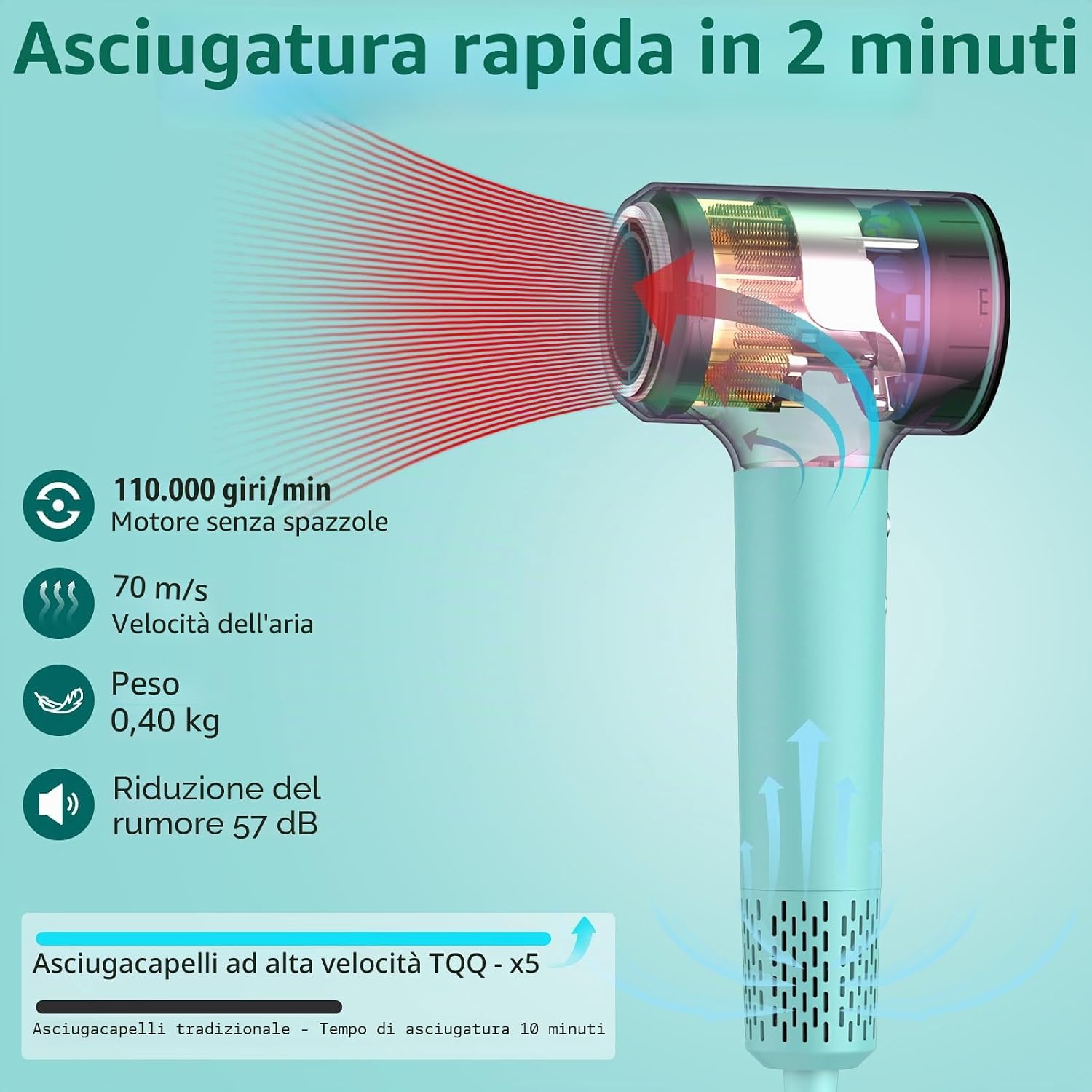
Image: Brushless Motor and Airflow
An internal diagram of the TQQ hair dryer highlighting its 110,000 rpm brushless motor, 70 m/s air speed, 0.40 kg weight, and 57 dB noise reduction, contributing to 5 times faster drying compared to traditional hair dryers.
5. Maintenance
Proper maintenance ensures the longevity and optimal performance of your hair dryer.
Cleaning Mode:
- To activate the cleaning mode, press and hold the power button for 10 seconds. This mode helps to ensure the air inlet is always clean and free from obstructions.
General Cleaning:
- Ensure the hair dryer is unplugged and completely cool before cleaning.
- Wipe the exterior of the hair dryer with a soft, damp cloth. Do not use abrasive cleaners or solvents.
- Regularly check the air inlet filter for dust and debris. Clean it as needed to maintain optimal airflow.
6. Troubleshooting
If you encounter issues with your TQQ Hair Dryer, refer to the following common problems and solutions:
| Problem | Possible Cause | Solution |
|---|---|---|
| Hair dryer does not turn on. | No power supply. | Ensure the power cord is securely plugged into a working electrical outlet. Check the circuit breaker. |
| Hair dryer stops working during use. | Overheating protection activated. | Unplug the hair dryer and allow it to cool down for several minutes. Check if the air inlet or outlet is blocked. Clean the filter if necessary. |
| Weak airflow. | Blocked air inlet filter. | Unplug the hair dryer and clean the air inlet filter. Use the cleaning mode for thorough cleaning. |
| Unusual noise or smell. | Internal malfunction or debris. | Immediately unplug the hair dryer. Do not attempt to repair it yourself. Contact customer support. |
If the problem persists after attempting these solutions, please contact TQQ customer support for assistance.
7. Specifications
Detailed technical specifications for the TQQ Hair Dryer:
| Feature | Specification |
|---|---|
| Model Number | EUGWFLZGSCFTZH |
| Dimensions (L x W x H) | 29 x 19.5 x 9.8 cm |
| Weight | 396 Grams |
| Power in Watts | 1500 Watts |
| Voltage | 220 Volts |
| Motor Type | Brushless Motor (110,000 rpm) |
| Air Speed | Up to 70 m/s |
| Noise Level | 57 dB |
| Plasma Ions | 400 Million |
| Heat Settings | 5 (Cold, Low, Medium, High, Intelligent Recirculation) |
| Speed Settings | 2 |
| Max Temperature | 85 Degrees Celsius |
| Material | PA66 Flame Retardant Material |
| Special Features | Digital Display, Ergonomic Handle, Overheating Protection, Ionic Technology, Moisture Lock Technology |
8. Warranty and Support
Warranty Information:
The TQQ Hair Dryer comes with a 2-year manufacturer's warranty from the date of purchase. This warranty covers defects in materials and workmanship under normal use. It does not cover damage caused by misuse, accidents, unauthorized repairs, or normal wear and tear.
Please retain your proof of purchase for warranty claims.
Customer Support:
For technical assistance, warranty claims, or any questions regarding your TQQ Hair Dryer, please refer to the contact information provided with your purchase or visit the official TQQ website.