
Important Safety Information
- Read all instructions carefully before assembly and use.
- Keep children and pets away from the assembly area.
- Ensure all connections are secure before use.
- Do not overload the TV stand or shelves. Refer to weight limits in specifications.
- Only use the electric fireplace as intended. Do not cover the heater or block air vents.
- Unplug the unit from the power outlet before cleaning or moving.
Package Contents
Verify that all components are present before beginning assembly. If any parts are missing or damaged, please contact customer support.
- TV Stand Panels (various sizes)
- Electric Fireplace Insert
- TV Mounting Bracket and Hardware
- Casters (4, two with locks)
- Assembly Hardware (screws, dowels, cam locks, etc.)
- Instruction Manual
Setup Instructions
Assembly Steps
Follow the numbered steps in the included instruction manual for efficient assembly. A logical parts numbering system is provided to simplify the process.
- Unpack and Identify Parts: Carefully remove all components from the packaging. Lay them out and compare with the parts list to ensure everything is present.
- Assemble the Base Frame: Attach the metal frame components using the provided screws and tools. Ensure all connections are tightened securely.
- Install Casters: Secure the four swivel casters to the bottom of the base frame. Ensure the two locking casters are positioned at the front for easy access.
- Attach Side and Back Panels: Connect the wooden side and back panels to the assembled frame.
- Insert Electric Fireplace: Carefully slide the electric fireplace insert into its designated opening. Connect the power cord as instructed.
- Assemble Shelves: Install the adjustable and removable shelves into the side compartments as desired.
- Attach TV Mount: Secure the TV mounting bracket to the rear support structure. Ensure it is level and all bolts are tightened.
- Mount TV: Attach your television to the mounting bracket. Adjust the height as needed for optimal viewing.

Image: Product dimensions and components for assembly reference.
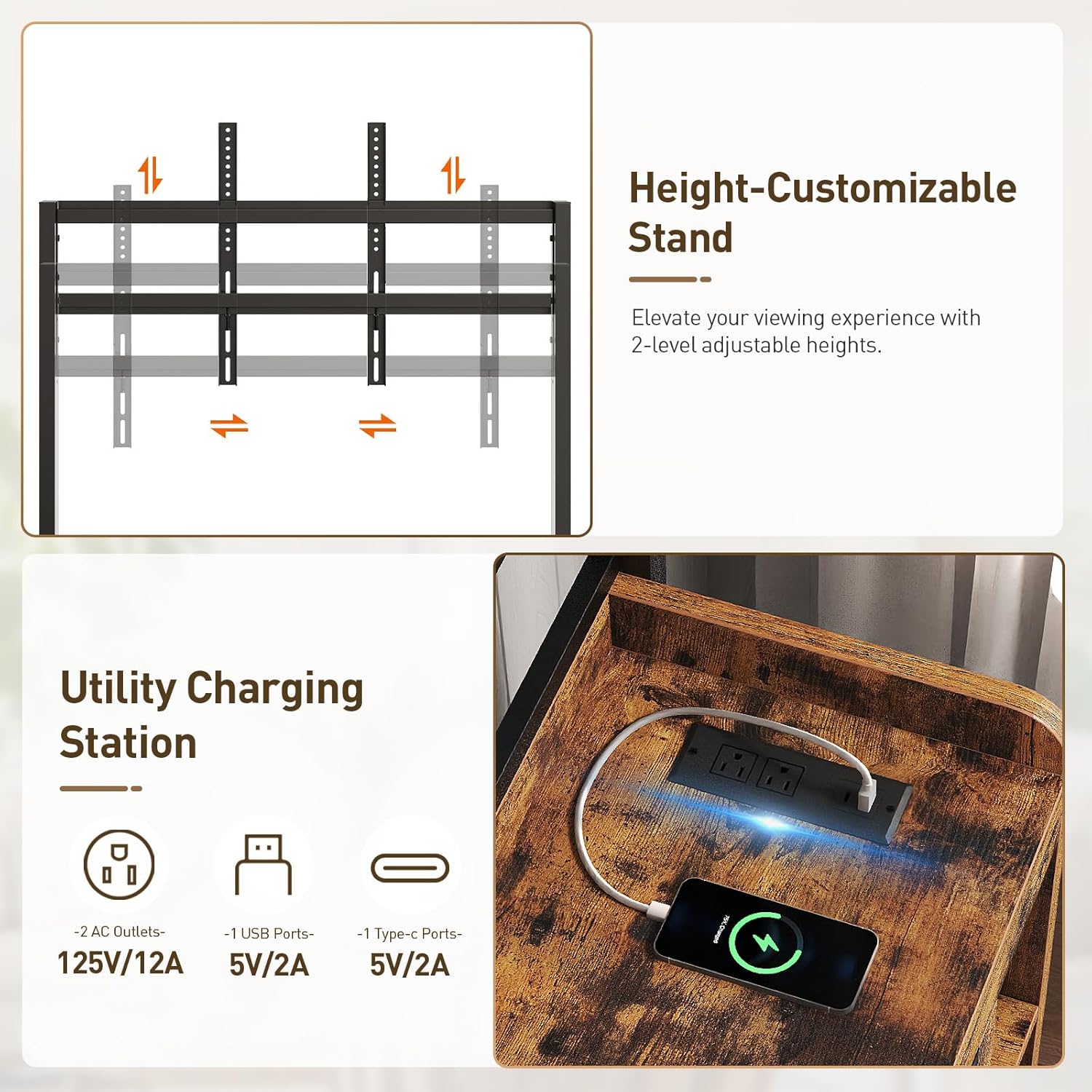
Image: Details on the height-adjustable TV mount and the integrated charging station.

Image: Adjustable and removable shelves for customized storage.
Operating Instructions
Electric Fireplace Operation
The integrated electric fireplace is operated by a single switch. This switch controls both the gentle heat output and the visual flame effect. Locate the switch on the fireplace unit and toggle it to the 'ON' position to activate. Toggle to 'OFF' to deactivate.

Image: The 18-inch electric fireplace insert with its controls and flame effect.
TV Mount Adjustment
The TV mount features a sliding, height-adjustable mechanism. To adjust the TV height, loosen the securing bolts on the vertical bars of the mount, slide the TV to the desired position, and then re-tighten the bolts firmly. Ensure the TV is level after adjustment.
Mobile Stand Usage
This entertainment center is equipped with four swivel casters for easy repositioning. Two of these casters include locks. To move the stand, ensure both locking casters are in the unlocked position. To secure the stand in place, engage the locks on the two casters.

Image: Details of the locking casters, rounded corner, and cable management port.
Charging Station Usage
The built-in charging station provides convenient power access. It includes 2 AC outlets (125V/12A), 1 USB port (5V/2A), and 1 Type-C port (5V/2A). Simply plug your devices into the appropriate ports for charging.
Video: A short demonstration of the RALGEND Fireplace TV Stand, highlighting its features such as mobility, charging station, and ambiance. This video provides a visual overview of the product's functionality.
Maintenance
Cleaning
To clean the TV stand, wipe surfaces with a soft, damp cloth. Avoid using harsh chemicals or abrasive cleaners, as these may damage the finish. For the electric fireplace, ensure it is unplugged and cool before wiping the exterior with a dry cloth.
Storage
If storing the unit, ensure it is clean and dry. Store in a cool, dry place away from direct sunlight and extreme temperatures. If disassembling for storage, keep all hardware in a secure bag to prevent loss.
Troubleshooting
Common Issues and Solutions
- Fireplace not turning on:
1. Ensure the power cord is securely plugged into a working electrical outlet.
2. Check if the power switch on the fireplace unit is in the 'ON' position.
3. Verify that the circuit breaker has not tripped. - TV mount feels unstable:
1. Re-check all bolts and screws securing the TV mount to the stand and the TV to the mount. Tighten any loose connections.
2. Ensure your TV's weight and size are within the specified limits for the mount. - Casters not locking:
1. Ensure the locking mechanism on the casters is fully engaged. Push down firmly on the lever.
2. Check for any debris obstructing the locking mechanism. - Devices not charging via charging station:
1. Ensure the TV stand's main power cord is plugged into a live outlet.
2. Check if the device's charging cable is properly connected to both the device and the charging port.
3. Try a different port or cable to rule out a faulty accessory.
Specifications
| Feature | Detail |
|---|---|
| Brand | RALGEND |
| Model Name | Fireplace TV Stand |
| Model Number | 8701DSUDBF |
| Material | Iron, Wood (Rustic Brown + Black finish) |
| TV Size Compatibility | 55/60/65/75 inch TVs |
| Fireplace Insert Size | 18 inches |
| Charging Station | 2 AC Outlets (125V/12A), 1 USB Port (5V/2A), 1 Type-C Port (5V/2A) |
| Mobility | 4 Swivel Casters (2 with locks) |
| TV Mount Adjustment | Height adjustable |
Warranty and Support
This RALGEND product is covered by a limited warranty against manufacturing defects. For specific warranty terms and conditions, please refer to the documentation included with your purchase or contact RALGEND customer support.
For technical assistance, missing parts, or warranty claims, please contact RALGEND customer support through the retailer's platform or the official RALGEND website. Please have your model number (8701DSUDBF) and purchase date available when contacting support.
Online Support: Visit the RALGEND Store on Amazon for more information and support resources.