
1. Introduction
Thank you for choosing the TABYIK D025F-25Pt3M-P Smart WiFi Dehumidifier. This appliance is designed to efficiently remove excess moisture from your indoor environment, improving air quality and comfort. Please read this manual thoroughly before operating the unit to ensure safe and optimal performance. Keep this manual for future reference.

Figure 1: Overview of the TABYIK D025F-25Pt3M-P Dehumidifier.
2. Safety Instructions
To prevent injury to the user or others and property damage, the following instructions must be followed. Incorrect operation due to ignoring instructions may cause harm or damage.
- Always connect the unit to a grounded power outlet.
- Do not operate the unit with a damaged power cord or plug.
- Ensure the unit is placed on a stable, level surface to prevent water spillage.
- Do not block the air inlet or outlet. Maintain at least 8 inches (20 cm) clearance from walls or furniture.
- Do not insert fingers or foreign objects into the air inlet or outlet.
- Unplug the unit before cleaning or performing any maintenance.
- Do not use the unit near flammable gases or combustible materials.
- This appliance is not intended for use by persons (including children) with reduced physical, sensory or mental capabilities, or lack of experience and knowledge, unless they have been given supervision or instruction concerning use of the appliance by a person responsible for their safety.
3. Product Overview
3.1 Components
The TABYIK D025F-25Pt3M-P dehumidifier features a robust design for efficient moisture removal. Key components include the control panel, air inlet, air outlet, water tank, and drain pump connection.
3.2 Control Panel
The user-friendly control panel allows for easy operation and monitoring of the dehumidifier's settings.

Figure 2: Digital display and control panel layout.
- Power Button: Turns the unit on or off.
- Mode Button: Cycles through Auto, Comfort, Basement, and Continuous modes.
- Humidity % / Timer H Buttons: Adjusts desired humidity level or sets the timer.
- Fan Button: Selects fan speed (Low, Med, High).
- Sleep Button: Activates sleep mode for quieter operation.
- WiFi Button: Activates WiFi pairing mode (hold for 3 seconds).
- Pump Button: Activates the built-in drain pump.
- Lock Indicator: Indicates Child Lock is active.
- Bucket Full Indicator: Illuminates when the water tank is full.
4. Setup
4.1 Unpacking
Carefully remove the dehumidifier from its packaging. Remove all packing materials and ensure no components are missing or damaged. Retain the packaging for future storage or transport.
4.2 Placement
Place the dehumidifier on a firm, level surface in an area where the temperature will not fall below 41°F (5°C). Ensure there is at least 8 inches (20 cm) of space around the unit for proper air circulation. Avoid placing the unit near heat sources or in direct sunlight.
4.3 Power Connection
Plug the power cord into a grounded electrical outlet. The unit is now ready for operation.
4.4 Drainage Options
The dehumidifier offers two primary drainage methods:
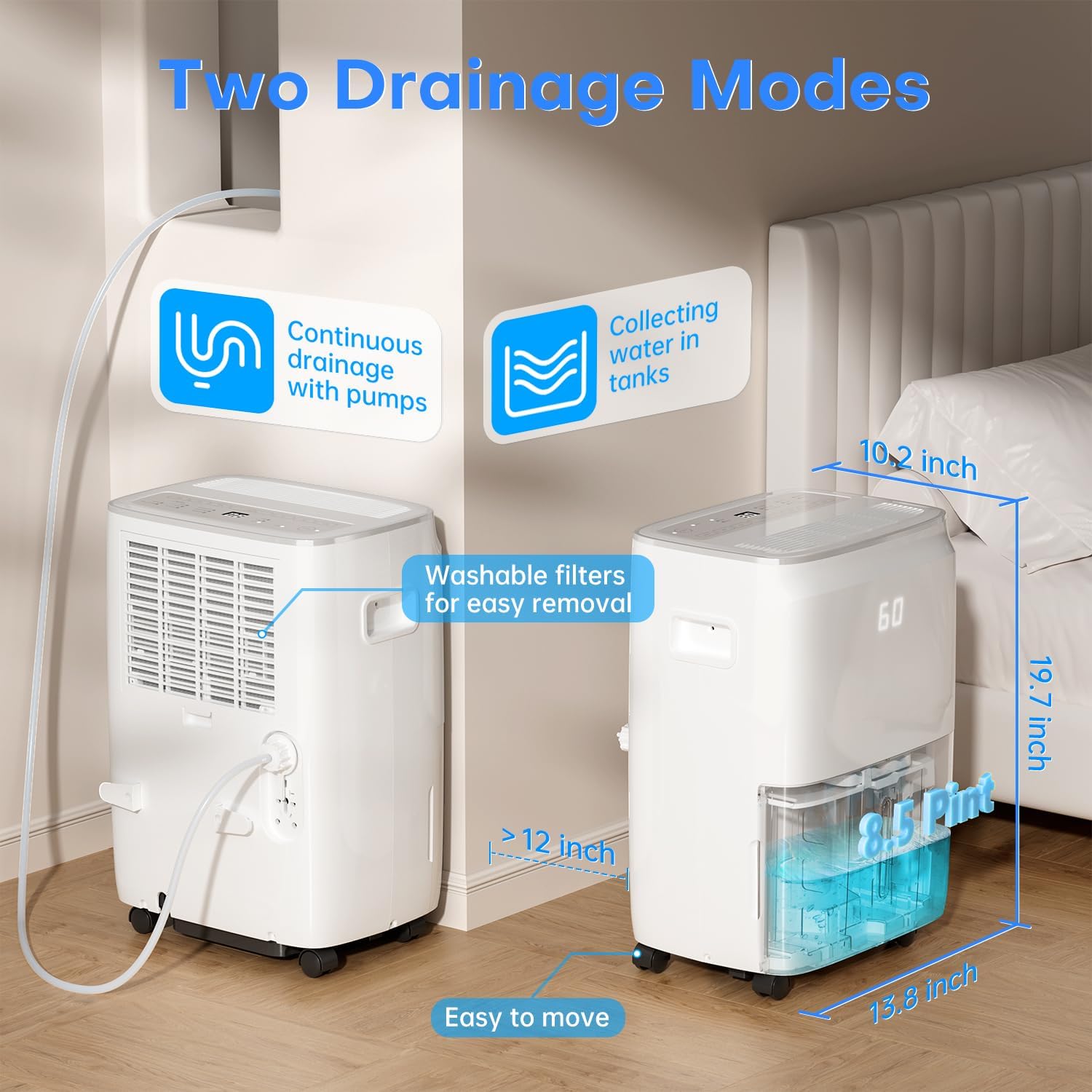
Figure 3: Illustration of continuous drainage with pump and water tank collection.
- Manual Drainage (Water Tank): The unit will collect moisture in its internal 8.5-pint water tank. When the tank is full, the unit will automatically shut off and the "Bucket Full" indicator will illuminate. Empty the tank and reinsert it to resume operation.
- Continuous Drainage (Gravity or Pump):
- Gravity Drain: Connect a standard garden hose (not included) to the continuous drain port on the back of the unit. Ensure the hose is sloped downwards to a suitable drain to allow water to flow out by gravity.
- Pump Drain: For vertical drainage or when a gravity drain is not available, use the built-in drain pump. Connect the included 5-meter drain hose to the pump drain port. Press the "Pump" button on the control panel to activate the pump. The pump can lift water up to 5 meters, allowing drainage into a sink or out a window.
5. Operating Instructions
5.1 Power On/Off
Press the Power button to turn the dehumidifier on or off.
5.2 Setting Desired Humidity
When the unit is running, press the Humidity % buttons (up/down arrows) to set your desired humidity level. The humidity can be set between 30% RH and 80% RH in 5% increments. The unit will operate until the ambient humidity reaches the set level, then cycle on and off to maintain it.
5.3 Operating Modes
Press the Mode button to cycle through the available operating modes:

Figure 4: Visual representation of the four dehumidification modes.
- Auto Mode: The unit automatically adjusts its operation based on the ambient humidity to maintain a comfortable level. The fan runs continuously to ensure consistent air circulation.
- Comfort Mode: Designed to maintain a comfortable humidity range, typically between 45% and 55% RH.
- Basement Mode: Optimized for higher humidity environments like basements, aiming for a lower humidity level.
- Continuous Mode: The unit will run continuously regardless of the ambient humidity level until the water tank is full or the unit is manually turned off. Ideal for very damp conditions.
5.4 Fan Speed
Press the Fan button to select between Low, Medium, or High fan speeds.
5.5 Timer Function
The 24-hour programmable timer allows you to set the unit to automatically turn on or off after a specified period. Press the Timer H buttons to set the desired time in hours.
5.6 WiFi and App Control
The dehumidifier supports WiFi connectivity for remote control via a smartphone app. Download the compatible app (refer to the quick start guide for app details) and follow the in-app instructions to pair your device. Press and hold the WiFi button for 3 seconds to activate pairing mode.
Figure 5: Remote control via smartphone app.
5.7 Child Lock
To prevent accidental changes to settings, activate the Child Lock feature. Press and hold the Timer button for 2 seconds to engage or disengage the Child Lock. The Lock indicator will illuminate when active.

Figure 6: Activating the Child Lock feature.
6. Maintenance
Regular maintenance ensures the efficient operation and longevity of your dehumidifier. Always unplug the unit before cleaning.
6.1 Cleaning the Air Filter
The dehumidifier is equipped with a washable air filter. It is recommended to clean the filter every 30 days or more frequently depending on usage and air quality.
- Gently pull out the air filter from the back or side of the unit.
- Wash the filter with clean water and a mild detergent.
- Rinse thoroughly and allow the filter to air dry completely before reinserting.
- Do not operate the dehumidifier without the filter installed.
6.2 Emptying and Cleaning the Water Tank
If using manual drainage, empty the water tank when the "Bucket Full" indicator illuminates. Periodically clean the water tank to prevent mold and mildew growth.
- Carefully remove the water tank from the unit.
- Pour out the collected water.
- Clean the tank with warm water and a mild detergent. Rinse thoroughly.
- Ensure the tank is completely dry before placing it back into the unit.
6.3 Storage
If the unit will not be used for an extended period, unplug it, empty and clean the water tank, and clean the air filter. Store the unit upright in a cool, dry place, away from direct sunlight.
7. Troubleshooting
Before contacting customer support, please refer to the following troubleshooting guide for common issues.
| Problem | Possible Cause | Solution |
|---|---|---|
| Unit does not turn on. | No power; Power cord loose; Water tank full. | Check power connection; Ensure tank is empty and correctly inserted. |
| No dehumidification. | Air filter clogged; Room temperature too low; Humidity setting too high. | Clean air filter; Ensure room temperature is above 41°F (5°C); Lower humidity setting. |
| "Bucket Full" indicator on, but tank is not full. | Water tank not properly inserted; Float switch stuck. | Reinsert water tank correctly; Check float switch for obstructions. |
| Unit freezes up (frost on coils). | Low ambient temperature. | The unit features a dynamic defrost system that activates automatically when coil temperature drops to ≤ -41°F. Dehumidification resumes once temperature rises to ≥ 35.6°F and remains stable for 3 minutes. Allow the unit to defrost naturally. |
| Unit is noisy. | Unit not on a level surface; Air filter clogged. | Place on a level surface; Clean air filter. |
8. Specifications
Technical specifications for the TABYIK D025F-25Pt3M-P Dehumidifier.
| Feature | Specification |
|---|---|
| Model Name | D025F-25Pt3M-P |
| Dehumidification Capacity | 80 Pints/Day (Standard 60 Pints/Day) |
| Coverage Area | Up to 4500 Square Feet |
| Water Tank Volume | 8.5 Pints |
| Product Dimensions (D x W x H) | 13.8" x 10.2" x 19.7" |
| Operation Mode | Auto, Comfort, Basement, Continuous |
| Special Features | Automatic Shutoff, Smart WiFi Control, Built-in Drain Pump, Dynamic Defrost System, Washable Filter |
| Included Components | User Manual, 5m Drain Hose |
9. Warranty and Support
TABYIK is committed to providing quality products and customer satisfaction. This product is equipped with 5 years of support.
For technical assistance, troubleshooting, or warranty inquiries, please contact TABYIK customer support through the retailer's platform or the official TABYIK website. Please have your model number (D025F-25Pt3M-P) and purchase information ready when contacting support.


