
Balter TS-34-BL-US
Balter 4-Slice Toaster User Manual
Model: TS-34-BL-US
Introduction
Thank you for choosing the Balter 4-Slice Toaster, Model TS-34-BL-US. This appliance is designed to provide efficient and consistent toasting for various bread types. Please read this manual carefully before using the toaster to ensure safe operation and optimal performance. Keep these instructions for future reference.
Important Safety Instructions
WARNING: To reduce the risk of fire, electric shock, and/or injury, basic safety precautions should always be followed.
- Read all instructions before operating the toaster.
- Do not touch hot surfaces. Use handles or knobs.
- To protect against electrical hazards, do not immerse the cord, plug, or toaster in water or other liquids.
- Close supervision is necessary when any appliance is used by or near children.
- Unplug from outlet when not in use and before cleaning. Allow to cool before putting on or taking off parts.
- Do not operate any appliance with a damaged cord or plug, or after the appliance malfunctions or has been damaged in any manner.
- The use of accessory attachments not recommended by the appliance manufacturer may cause injuries.
- Do not use outdoors.
- Do not let the cord hang over the edge of a table or counter, or touch hot surfaces.
- Do not place on or near a hot gas or electric burner, or in a heated oven.
- Always attach the plug to the appliance first, then plug the cord into the wall outlet. To disconnect, turn any control to "off", then remove the plug from the wall outlet.
- Do not use the appliance for other than intended use.
- Oversize foods, metal foil packages, or utensils must not be inserted into a toaster as they may create a risk of fire or electric shock.
- A fire may occur if toasters are covered or touching flammable material, including curtains, draperies, walls, and the like, when in operation.
- Do not attempt to dislodge food when the toaster is plugged in.
- Do not operate unattended.
Product Overview
Familiarize yourself with the components of your Balter 4-Slice Toaster for optimal use.

Figure 1: Toaster Components Diagram
This image displays a cutaway view of the Balter 4-Slice Toaster, highlighting its internal structure and key components. Labels indicate the outer housing, plastic casing, safety shield, mica sheet, and heating elements. This design ensures thermally insulated housing with a stainless steel cover for safety and efficiency.
Key Features:
- Extra-Wide 1.5" Slots: Accommodates various bread types, including thick artisan slices, bagels, and waffles.
- Intuitive LED Touch Control: Allows selection of 6 browning levels and displays a digital countdown timer.
- Built-in Warming Rack: Integrated rack for gently reheating croissants, bagels, and rolls.
- Cool-Touch Housing: Double-layer insulated design keeps the exterior safe to handle during operation.
- Removable Crumb Tray: For easy cleaning and maintenance.
- Automatic Bread Centering: Guides align each slice for uniform heat distribution and even toasting.
Setup
- Unpack: Carefully remove the toaster and all packaging materials.
- Placement: Place the toaster on a stable, flat, heat-resistant surface, away from flammable materials like curtains. Ensure adequate ventilation around the appliance.
- First Use (Burn-off): Before toasting food for the first time, operate the toaster without bread for 2-3 cycles at the highest browning setting. This will burn off any manufacturing residues and eliminate initial odors. Ensure the area is well-ventilated during this process.
- Connect Power: Plug the power cord into a grounded electrical outlet.
Operating Instructions
The Balter 4-Slice Toaster features an intuitive LED touch control panel for easy operation.

Figure 2: Extra-Wide Long Slots
This image illustrates the extra-wide 1.5-inch slots of the Balter toaster, designed to accommodate various bread sizes, including long and thick slices. The overall dimensions of the toaster are also indicated.
Basic Toasting:
- Insert Bread: Place up to four slices of bread into the toaster slots. The automatic centering guides will hold the bread in place.
- Lower Lever: Push the toast lever down until it locks into place. This will activate the toaster and illuminate the LED touch panel.
- Select Browning Level: Use the touch controls on the LED panel to select your desired browning level from 1 (lightest) to 6 (darkest). The digital display will show the selected level and a countdown timer.
- Start Toasting: The toaster will begin toasting automatically.
- Ejection: Once the toasting cycle is complete, the toast will automatically pop up, and the toaster will turn off.
- Cancel: To stop the toasting cycle at any time, press the "CANCEL" button on the touch panel.

Figure 3: Control Panel Overview
This image details the Balter toaster's control panel, showing the LCD display for browning level and remaining time, soft touch controls for intuitive selection, three function buttons (Bagel, Defrost, Reheat), and a Cancel button to interrupt the toasting process.
Special Functions:
- Bagel Function: Ideal for bagels and buns. This function toasts the cut side of the bagel while gently warming the outer side.
- Insert the bagel halves with the cut side facing inwards.
- Lower the toast lever.
- Press the BAGEL button on the touch panel.
- Select your desired browning level.
- Defrost Function: For toasting frozen bread. This function first thaws the bread and then toasts it to your selected browning level.
- Insert frozen bread slices.
- Lower the toast lever.
- Press the DEFROST button on the touch panel.
- Select your desired browning level.
- Reheat Function: To warm up previously toasted bread without further browning.
- Insert the bread slices.
- Lower the toast lever.
- Press the REHEAT button on the touch panel.
- The toaster will briefly warm the bread.
Video 1: Balter Toaster 4 Slice Wide Slot Demonstration
This video provides a demonstration of the Balter 4-Slice Toaster, showcasing its features and operation, including the wide slots and touch controls.
Using the Warming Rack:
The integrated warming rack is designed for warming croissants, bagels, rolls, or pastries that cannot be inserted into the toasting slots.
- Activate Rack: Push the lever on the side of the toaster to raise the warming rack.
- Place Items: Place the items to be warmed on the rack.
- Start Warming: Lower the toast lever. Select a low browning setting (e.g., 1 or 2) or use the Reheat function.
- Monitor: Keep an eye on the items to prevent burning.
- Retract Rack: Once warmed, push the lever back to retract the warming rack.
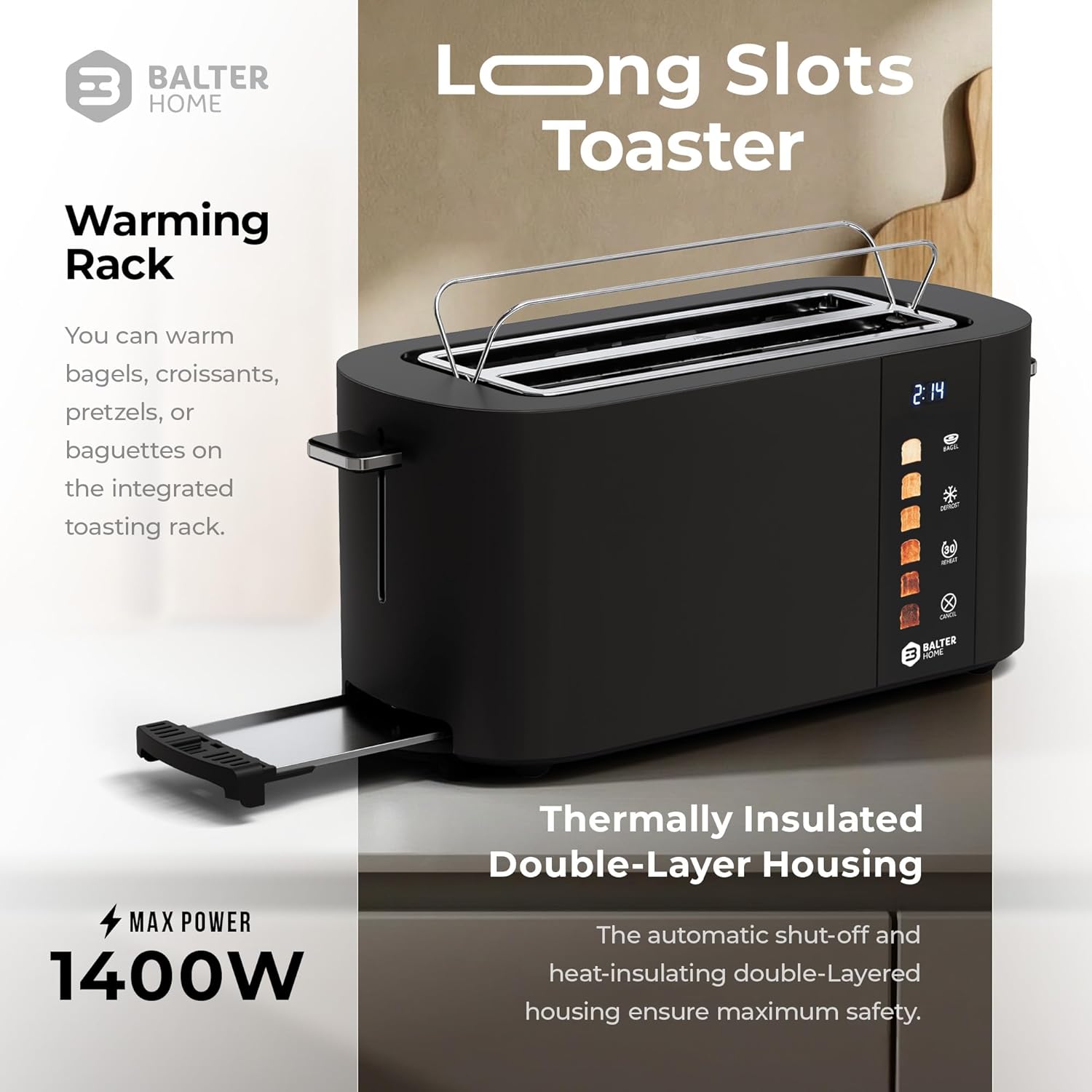
Figure 4: Warming Rack in Use
This image shows the Balter toaster with its integrated warming rack extended, holding several bread rolls. The image also highlights the 1400W power and thermally insulated double-layer housing for safety.
Cleaning and Maintenance
Regular cleaning ensures the longevity and hygienic operation of your toaster.
- Unplug and Cool: Always unplug the toaster from the power outlet and allow it to cool completely before cleaning.
- Clean Exterior: Wipe the exterior surfaces with a soft, damp cloth. Do not use abrasive cleaners or metal scouring pads, as these can scratch the stainless steel finish.
- Empty Crumb Tray:

Figure 5: Removable Crumb Tray
This image shows a hand pulling out the removable crumb tray from the Balter toaster, demonstrating the ease of cleaning. The text emphasizes that the tray slides out smoothly, keeping the counter clean.
- Locate the removable crumb tray at the bottom of the toaster.
- Pull the tray out to remove accumulated crumbs.
- Discard crumbs and wipe the tray clean with a damp cloth.
- Ensure the tray is completely dry before reinserting it into the toaster.
- Do Not Immerse: Never immerse the toaster in water or any other liquid.
- Storage: Store the toaster in a clean, dry place when not in use.
Troubleshooting
If you encounter any issues with your Balter Toaster, refer to the following common problems and solutions:
| Problem | Possible Cause | Solution |
|---|---|---|
| Toaster does not turn on. | Not plugged in; power outlet malfunction; toast lever not fully depressed. | Ensure the toaster is securely plugged into a working outlet. Press the toast lever down until it locks. Check your circuit breaker. |
| Bread is not toasting evenly. | Uneven bread thickness; crumb buildup; internal issue. | Ensure bread slices are of similar thickness. Empty the crumb tray. If the problem persists, contact customer support. |
| Smoke coming from toaster. | Food lodged in slots; excessive crumb buildup; incorrect browning setting. | Immediately unplug the toaster. Allow to cool. Carefully remove any lodged food (do not use metal). Empty crumb tray. Reduce browning setting for next use. |
| Toast is too light or too dark. | Browning level setting is incorrect. | Adjust the browning level using the touch controls. Experiment to find your preferred setting. |
| Toast lever does not stay down. | Toaster is not plugged in or not receiving power; internal mechanism issue. | Ensure the toaster is plugged in and the outlet is functional. If the issue persists, contact customer support. |
Specifications
| Feature | Detail |
|---|---|
| Brand | Balter |
| Model Number | TS-34-BL-US |
| Color | Black |
| Material | Stainless Steel |
| Product Dimensions (D x W x H) | 6.7"D x 14.76"W x 6.7"H |
| Wattage | 1400 watts |
| Slot Count | 2 (Long slots, accommodates 4 slices) |
| Slot Width | 1.5 inches |
| Number of Browning Settings | 6 |
| Special Features | Cool Touch Exterior, Defrost Mode, Reheat Mode, Touch Panel, Warming Rack, Bagel Function |
| Included Components | 4 Slice Toaster, User Manual |
Warranty and Support
Balter products are designed for quality and durability. For specific warranty information, please refer to the warranty card included with your product or visit the official Balter website. If you require technical support or have questions about your toaster, please contact Balter customer service.
For more information about Balter and their product range, you can visit their brand page: Balter Brand Page
Ask a question about this manual
Ask about setup, troubleshooting, compatibility, parts, safety, or missing instructions. Manuals+ will review the question and use this page’s manual context to help answer it.