
1. Introduction
Thank you for choosing the Anona Pano 4K UHD Indoor Camera. This manual provides detailed instructions for setting up, operating, and maintaining your camera and the included 512GB Micro SD card. Please read this manual thoroughly before use to ensure proper functionality and safety.
2. Product Overview
2.1 Package Contents
- Anona Pano 4K UHD Indoor Camera
- 512GB Micro SD Card
- Charging Cable
2.2 Key Features
- 4K UHD Video Resolution: Captures clear, high-definition video.
- 360-Degree Pan & 110-Degree Tilt: Provides comprehensive room coverage.
- AI Detection: Includes human, pet, and baby crying detection.
- Dual-Band Wi-Fi 6: Supports 2.4 GHz and 5 GHz for stable connectivity.
- Two-Way Audio: Allows communication through the camera.
- Local Storage: Supports up to 512GB Micro SD card for local recording.
- Privacy Mode: Instantly stops recording via the Anona App.
- Smart Home Integration: Compatible with Amazon Alexa and Google Assistant.

Figure 1: Anona Pano 4K UHD Indoor Camera and 512GB Micro SD Card. The camera is white with a black lens, and the Micro SD card is shown next to it.

Figure 2: Demonstration of 4K UHD resolution with 8X zoom capability. The image shows a baby and a dog, highlighting the clarity difference between 2K HD and 4K UHD.
3. Setup
3.1 Micro SD Card Installation
- Locate the Micro SD card slot on the camera. This is typically found by gently tilting the camera lens upwards to reveal the slot underneath.
- Insert the provided 512GB Micro SD card into the slot with the gold contacts facing down, until it clicks into place.
- To remove, gently press the card until it springs out.

Figure 3: Illustrates the process of inserting a Micro SD card into the camera for local storage. The camera supports up to 512GB, allowing for extensive video recording.
3.2 Power Connection
- Connect the provided charging cable to the camera's power input port.
- Plug the other end of the charging cable into a compatible USB power adapter (not included) and then into a wall outlet.
- The camera will power on, and an indicator light will show its status.
3.3 App Installation and Pairing
- Download the Anona App from your smartphone's app store (iOS or Android).
- Create an account or log in if you already have one.
- Follow the in-app instructions to add your new Anona Pano camera. This typically involves scanning a QR code on the camera or manually selecting the device.
- Ensure your smartphone is connected to a 2.4 GHz or 5 GHz Wi-Fi network during the pairing process. The camera supports Wi-Fi 6 for improved connectivity.

Figure 4: Illustrates the camera's support for dual-band 2.4/5 GHz Wi-Fi 6, providing faster and smoother network connectivity compared to older Wi-Fi standards.
3.4 Physical Installation (Wall Mount)
The Anona Pano camera is designed for wall mounting. Use appropriate screws and anchors for your wall type to securely mount the camera in your desired location. Ensure the camera has a clear line of sight to the area you wish to monitor.
4. Operating Instructions
4.1 Basic Operation
- Live View: Open the Anona App and select your camera to view the live feed.
- Recording: The camera automatically records based on motion detection or continuous recording settings, saving to the Micro SD card.
4.2 Pan and Tilt Control
Within the Anona App, use the directional controls to remotely pan the camera 360 degrees horizontally and tilt it 110 degrees vertically. The camera also features auto-tracking to follow detected movement.

Figure 5: Depicts the camera's 360-degree pan and 110-degree tilt capabilities, ensuring comprehensive coverage of an indoor space. Auto-tracking functionality is also indicated.
4.3 AI Detection
The camera offers advanced AI detection features:
- Human Tracking: Detects and tracks human movement.
- Pet Tracking: Identifies and tracks pet movement.
- Baby Crying Detection: Alerts you when a baby's cry is detected.
Configure these detection settings and notification preferences within the Anona App.

Figure 6: Illustrates the camera's AI detection features, including human, pet, and baby crying detection, with a notification example shown on a smartphone.
4.4 Two-Way Audio
Use the microphone and speaker functions in the Anona App to communicate with individuals near the camera. This feature allows for real-time interaction.

Figure 7: Demonstrates the two-way audio feature, showing chat bubbles between a person on a phone and individuals near the camera, enabling remote communication.
4.5 Privacy Mode
Activate Privacy Mode through the Anona App to instantly stop all recording and live viewing. This feature ensures your privacy without needing to physically unplug the camera.

Figure 8: Shows the Privacy Mode feature, which can be activated via the Anona App to temporarily disable recording and live viewing for enhanced privacy.
4.6 Smart Home Integration
The Anona Pano camera can be integrated with Amazon Alexa and Google Assistant for voice control and smart home automation. Follow the instructions in your respective smart home app to link your Anona account.

Figure 9: Illustrates the camera's compatibility with Amazon Alexa and Google Assistant, allowing for integration into a smart home ecosystem and voice control.
4.7 Night Vision
The camera is equipped with enhanced night vision capabilities, allowing for clear monitoring even in low-light conditions. The F1.6 aperture provides improved light gathering compared to F2.0, resulting in brighter and more detailed night vision footage.

Figure 10: Compares night vision performance with different aperture settings (F2.0 vs F1.6), demonstrating the improved clarity and brightness offered by the F1.6 lens in low-light environments.
5. Maintenance
- Cleaning: Use a soft, dry cloth to clean the camera lens and body. Avoid abrasive cleaners or solvents.
- Firmware Updates: Regularly check the Anona App for available firmware updates to ensure optimal performance and security.
- SD Card Management: Periodically review recorded footage and format the Micro SD card through the app to maintain performance and free up space.
6. Troubleshooting
- Camera Not Powering On: Ensure the charging cable is securely connected and the power adapter is working.
- Cannot Connect to Wi-Fi: Verify your Wi-Fi network is active and you are entering the correct password. Ensure your router is within range and supports 2.4 GHz or 5 GHz.
- Poor Video Quality: Check your internet connection speed. Ensure the camera lens is clean and free from obstructions.
- SD Card Not Recording: Ensure the Micro SD card is correctly inserted and formatted. Check the recording settings in the Anona App.
- No Audio: Check the microphone and speaker settings in the app. Ensure your phone's volume is up.
7. Specifications
| Feature | Specification |
|---|---|
| Model Name | HM1010 |
| Video Capture Resolution | 4K UHD |
| Effective Video Resolution | 8.0 Megapixels |
| Viewing Angle | 360 Degrees (Pan) |
| Tilt Angle | 110 Degrees |
| Connectivity Technology | Wireless (Wi-Fi) |
| Connectivity Protocol | Wi-Fi (2.4/5 GHz Dual Band, Wi-Fi 6) |
| Power Source | Corded Electric |
| Voltage | 5 Volts |
| Wattage | 10 Watts |
| Storage | 512GB Micro SD Card (Included) |
| Item Dimensions (L x W x H) | 8.2 x 7.9 x 12.1 cm |
| Item Weight | 422 g |
| Indoor/Outdoor Usage | Indoor |
| Mounting Type | Wall Mount |
| Compatible Devices | Smartphone, Amazon Alexa, Google Assistant |
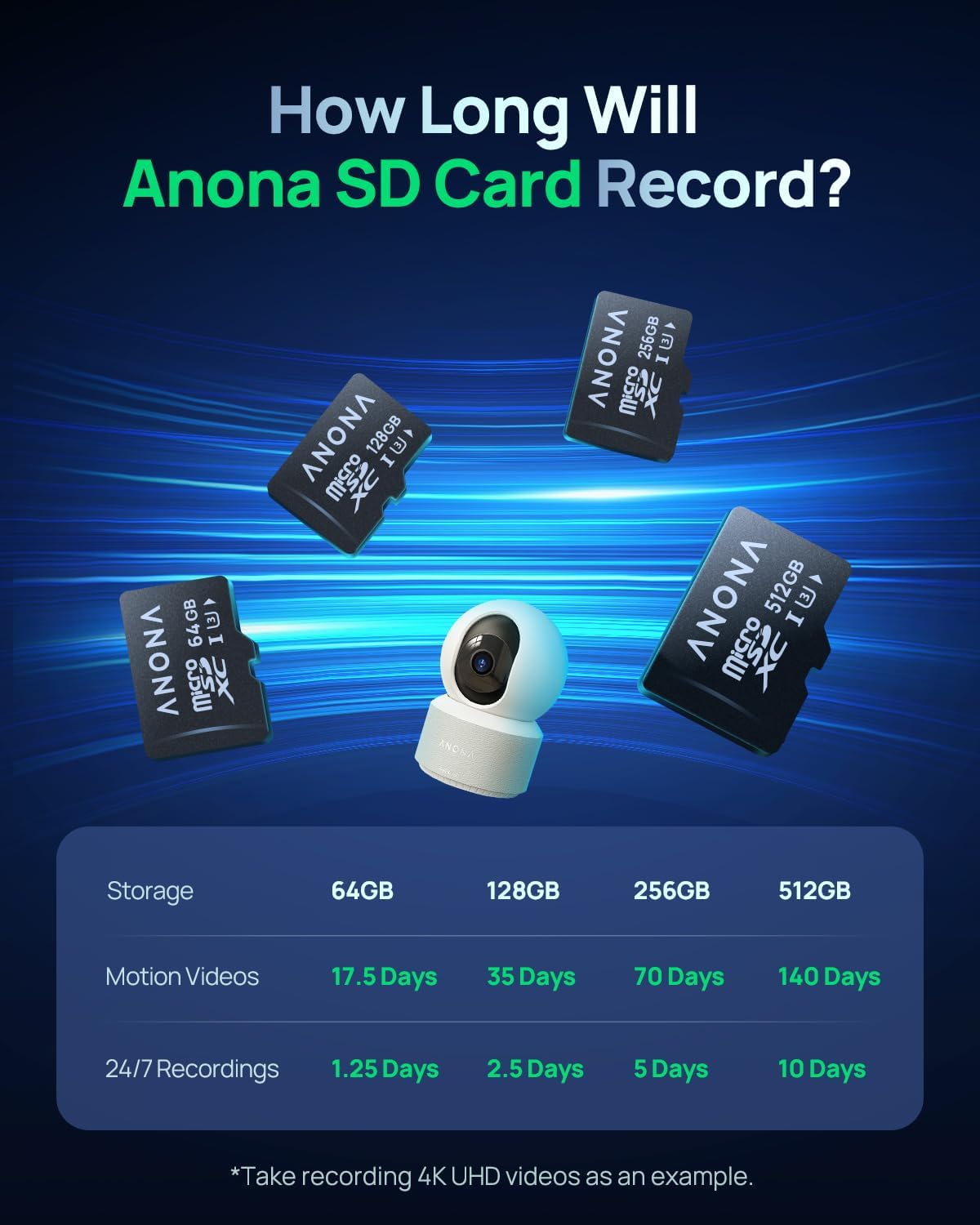
Figure 11: Table illustrating the approximate recording duration for different Anona SD card sizes, based on 4K UHD video recording for both motion-triggered and 24/7 recordings.

Figure 12: Highlights the features of the Anona Micro SD card, including its 100 MB/s transmission speed, ultra-fast read/write capabilities, exceptional durability, and suitability for 24/7 4K UHD recording workloads.
8. Warranty and Support
For warranty information and technical support, please refer to the official Anona website or contact Anona customer service directly. Keep your purchase receipt as proof of purchase for warranty claims.