1. Introduction
This manual provides instructions for the safe and effective use of your DUMOS 4 Panel Partition Room Divider. This freestanding privacy screen is designed to create temporary partitions in various indoor settings, offering flexibility and space definition without permanent installation.
2. Safety Information
- Ensure the room divider is placed on a flat, stable surface to prevent tipping.
- Do not climb on or hang objects from the divider, as this may cause instability.
- Keep children and pets away from the divider during setup and relocation to avoid accidents.
- Avoid placing the divider near open flames, heaters, or other heat sources.
- Do not expose the fabric panels to sharp objects that could cause tears.
3. Package Contents
Verify that all components are present before proceeding with setup:
- 4 x Fabric Panels (pre-assembled with steel frame sections)
- Connecting Hinges (pre-installed)
If any parts are missing or damaged, please contact DUMOS customer service.
4. Setup Instructions
The DUMOS 4 Panel Partition Room Divider is designed for tool-free setup. Simply unfold the panels to your desired configuration.
- Unpack: Carefully remove the folded room divider from its packaging.
- Position: Place the folded divider in the desired location where you intend to use it.
- Unfold: Gently extend the panels one by one, adjusting the angles to create a stable, freestanding partition. Ensure the feet of each panel section are fully extended and flat on the floor.
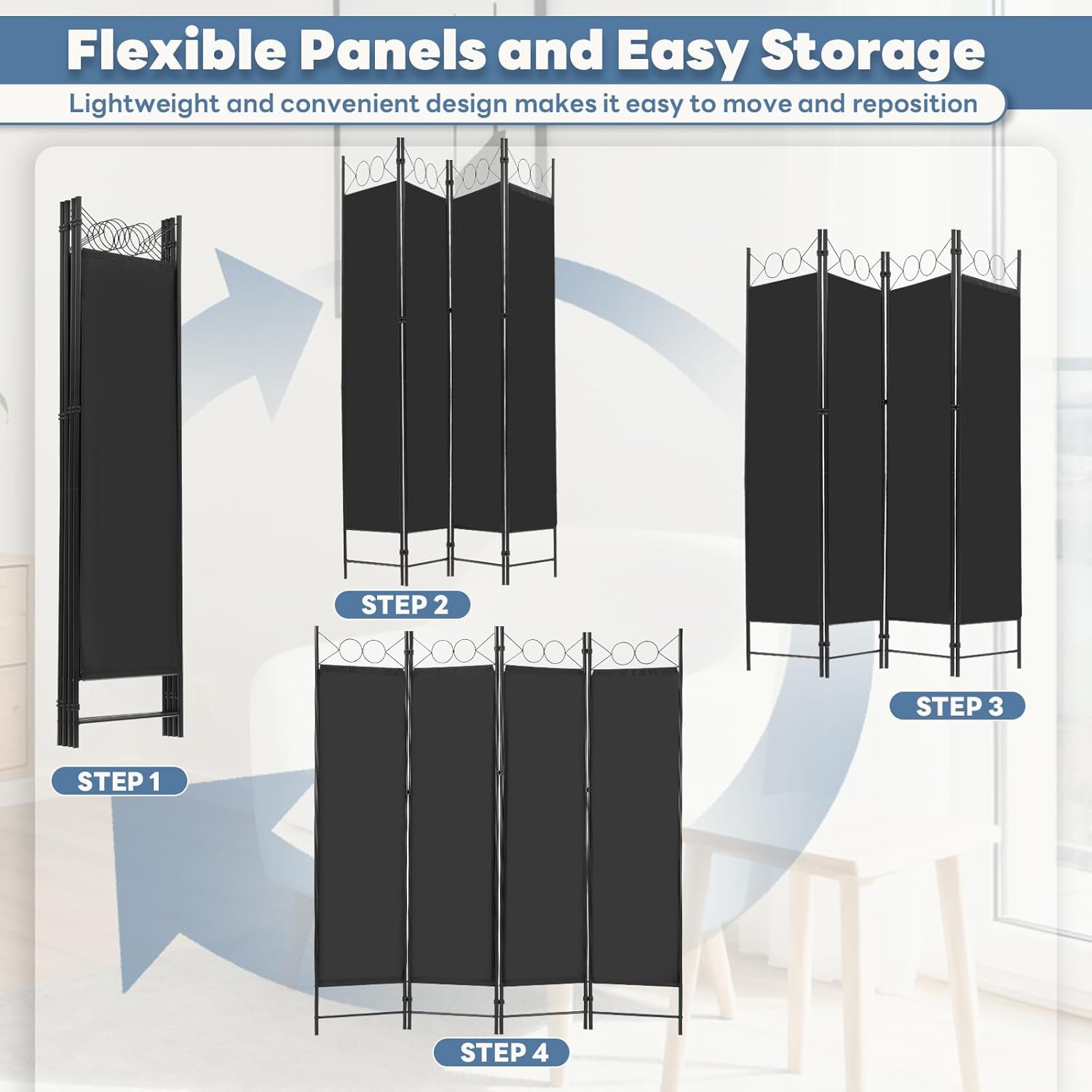
Image: Visual guide for unfolding the room divider from a compact state to a fully extended position.
Key Components
- Anti-collision Sleeve: Durable sleeves protect the frame connections.
- Reinforced Plastic Connector: Ensures secure and flexible panel connections.
- Tightly Woven Polyester Panel: Provides privacy and durability.
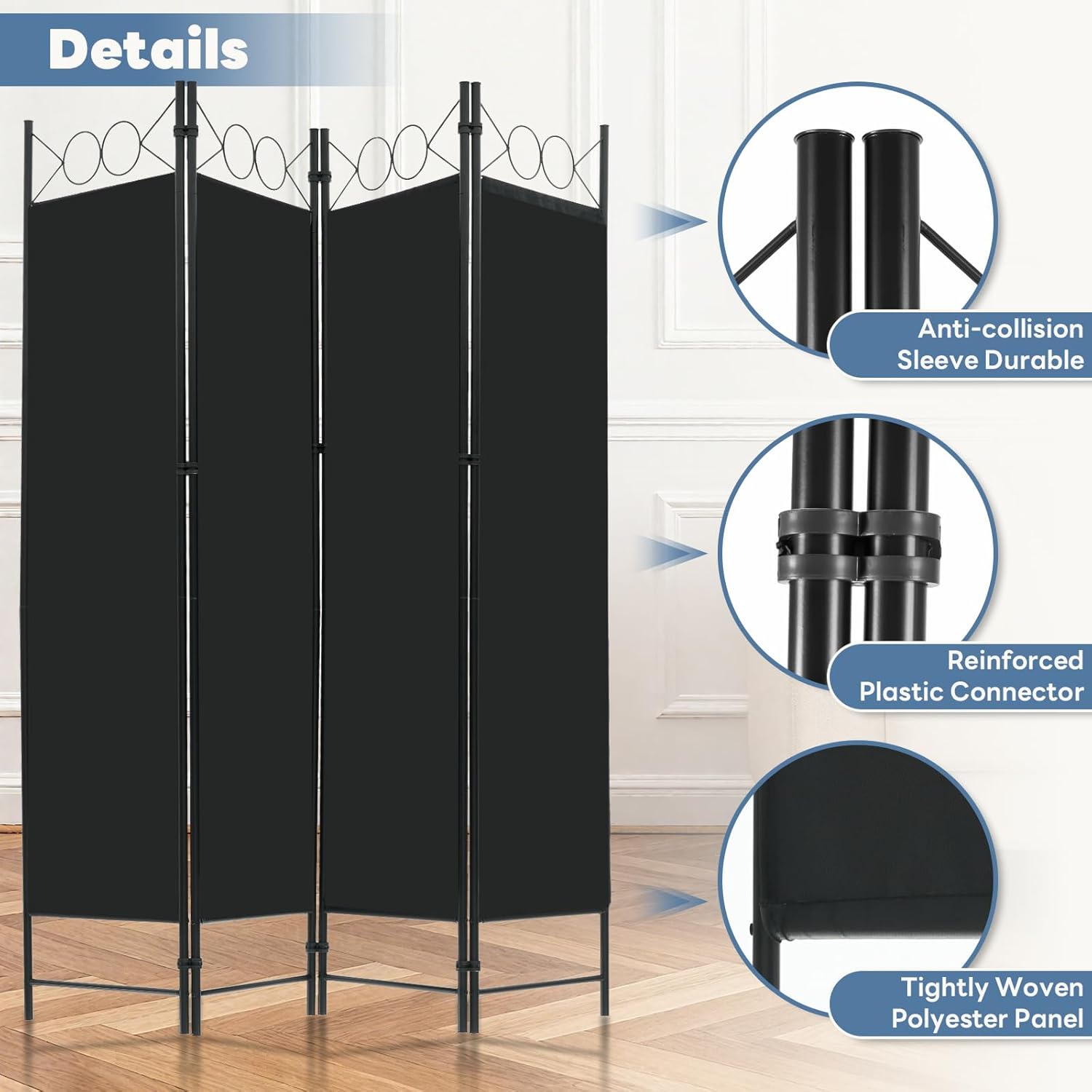
Image: Detailed view of the anti-collision sleeve, reinforced plastic connector, and tightly woven polyester panel.
5. Operating Instructions
The DUMOS room divider is designed for ease of use and portability.
Positioning the Divider
Once unfolded, adjust the angle of each panel to achieve the desired privacy or space separation. The flexible hinges allow for various configurations, such as a straight line, L-shape, or zigzag pattern, to best suit your needs.

Image: The DUMOS 4 Panel Partition Room Divider shown fully extended, providing privacy.
Folding for Storage
When not in use, the divider can be easily folded for compact storage. Simply collapse the panels inward until they are stacked together. This design allows for convenient storage behind a door or in a closet.

Image: The room divider shown in its folded, compact state, positioned for storage.
6. Maintenance
To ensure the longevity and appearance of your DUMOS room divider, follow these maintenance guidelines:
- Cleaning: The fabric panels are easy to clean. Wipe them with a damp cloth and mild soap if necessary. Avoid harsh chemicals or abrasive cleaners.
- Frame Care: The steel frame can be wiped clean with a dry or slightly damp cloth.
- Storage: When not in use, fold the divider and store it in a dry place away from direct sunlight to prevent fading or material degradation.

Image: Close-up of the fabric material highlighting its breathable, sun-protective, easy-to-clean, and waterproof properties.
7. Troubleshooting
If you encounter any issues with your room divider, refer to the following common solutions:
- Divider is unstable: Ensure all panels are fully extended and positioned on a flat, level surface. Adjust the angles of the panels to create a wider base for increased stability.
- Difficulty folding/unfolding: Check for any obstructions in the hinges. Ensure panels are aligned correctly before folding. Do not force the panels.
- Fabric panel is loose: Inspect the connections between the fabric and the frame. If a panel becomes detached, re-secure it carefully.
For issues not resolved by these steps, please contact DUMOS customer support.
8. Specifications
| Product Dimensions (Extended) | 64.57"W x 67.72"H (164cm W x 172cm H) |
| Brand | DUMOS |
| Model Number | PF |
| Color | Black |
| Number of Panels | 4 |
| Material | Fabric (Polyester) and Steel Frame |
| Item Weight | 11.24 pounds (5.1 kg) |
| Mounting Type | Freestanding, Floor Mount |
| Indoor/Outdoor Usage | Indoor |
| UPC | 751074070726 |

Image: Diagram illustrating the dimensions (64.57"W x 67.72"H) and weight (11.24 lbs) of the room divider.
9. Warranty Information
DUMOS products are manufactured to high-quality standards. For specific warranty details, including coverage and duration, please refer to the product packaging or visit the official DUMOS website. Please retain your proof of purchase for any warranty claims.
10. Customer Support
If you have any questions, require assistance, or need to report a problem with your DUMOS 4 Panel Partition Room Divider, please contact DUMOS customer service through the retailer where the product was purchased or visit the official DUMOS website for contact information.


