1. Introduction
The UGREEN HDMI 2.1 KVM Switch is designed to streamline your workspace by allowing two computers to share two HDMI displays and multiple USB devices. This device supports high-resolution video up to 8K@60Hz and offers flexible switching options, making it ideal for various professional and personal setups. Enhance your productivity by seamlessly switching between two PCs without re-plugging cables.

Image: UGREEN HDMI 2.1 KVM Switch connected to two monitors and various peripherals.
2. Package Contents
Please verify that all items listed below are included in your package:
- 1x UGREEN HDMI KVM Switch (Model 85100)
- 4x HDMI 2.1 Cables (1.5m)
- 2x USB-A to USB-B Cables (1.5m)
- 1x Power Adapter (12V/2A)
- 1x Wired Desktop Controller
- 1x User Manual

Image: All components included in the UGREEN HDMI 2.1 KVM Switch package.
3. Product Overview
The UGREEN HDMI 2.1 KVM Switch features a robust aluminum alloy body designed for efficient heat dissipation and durability. It provides multiple ports for seamless connectivity between your computers and peripherals.
Front Panel
- USB 3.0 Ports (x3): For connecting USB peripherals like keyboards, mice, USB memory sticks, and external SSDs.
- USB-C Port (x1): For connecting USB-C peripherals (data transfer only, not for charging).
- Switch Button: Main button for switching between connected computers.
- LED Indicators: Show which computer is currently active.
Rear Panel
- HDMI Output Ports (x2): Connect to your two HDMI monitors.
- PC Input 1 (HDMI x2, USB-B x1): Connects to your first computer for dual HDMI video and USB data.
- PC Input 2 (HDMI x2, USB-B x1): Connects to your second computer for dual HDMI video and USB data.
- DC 12V Power Port: Connect the included power adapter for stable operation.
- Control Port: Connect the wired desktop controller.
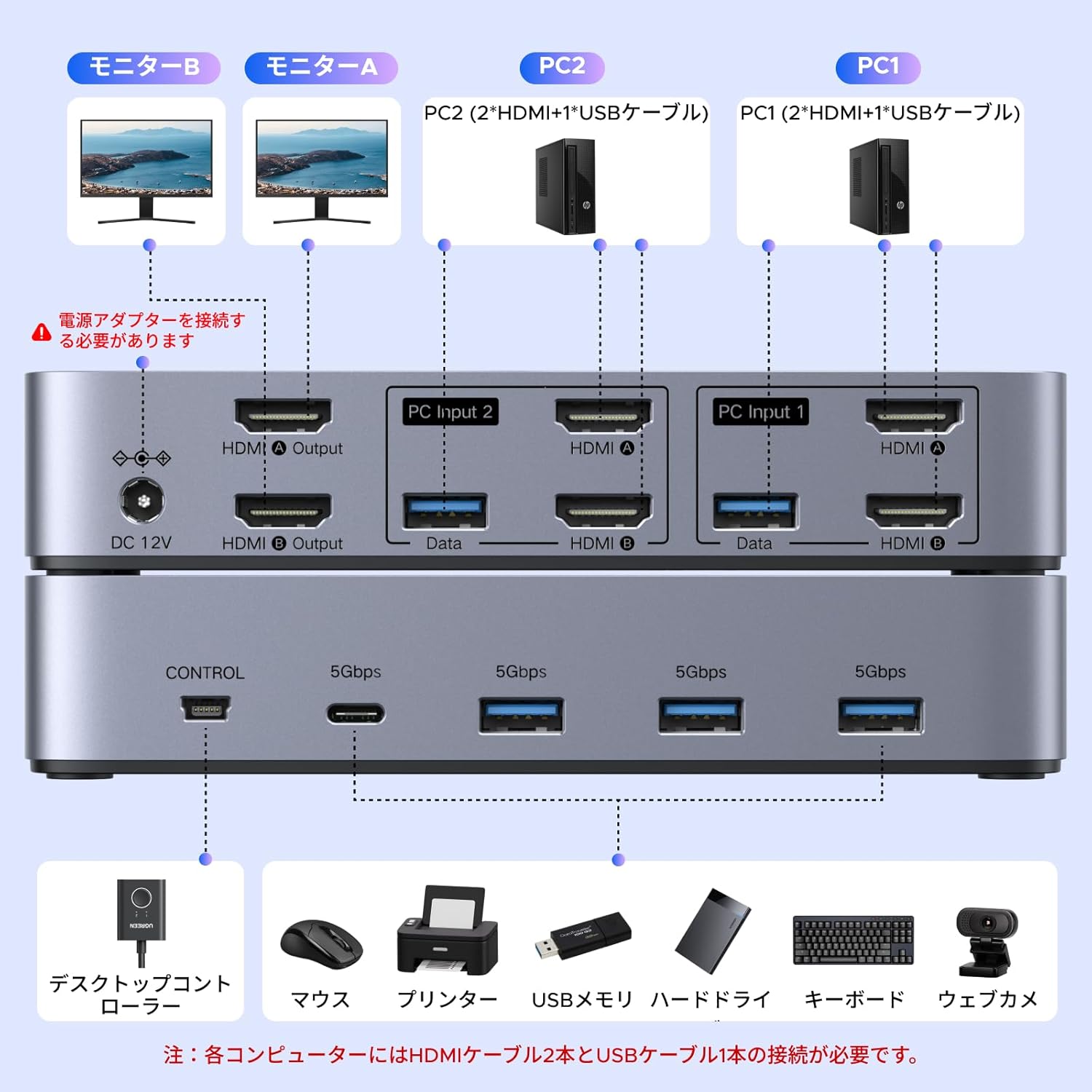
Image: Detailed view of the KVM switch's input and output ports.
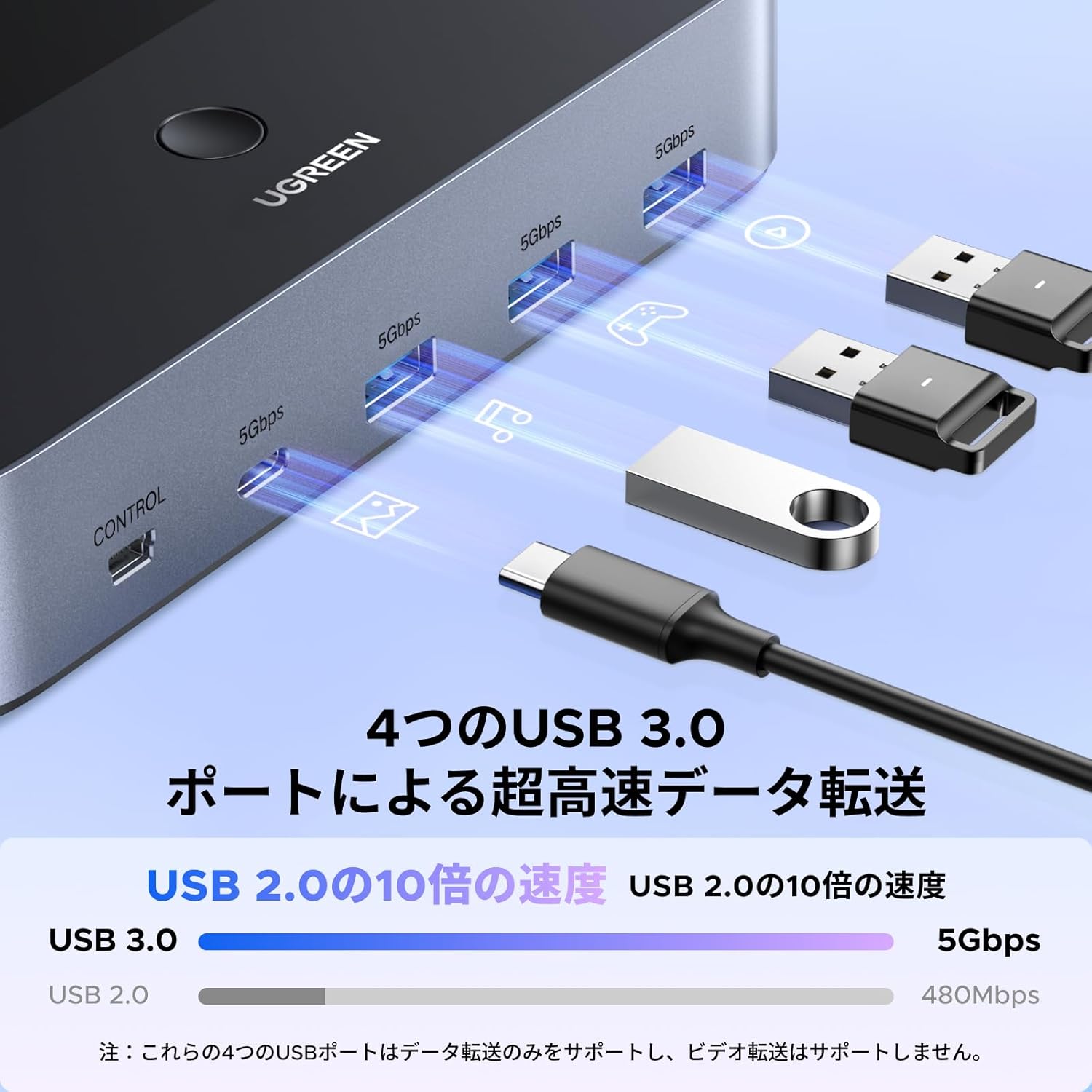
Image: High-speed data transfer via USB 3.0 ports on the KVM switch.
4. Setup Instructions
Follow these steps to correctly set up your UGREEN HDMI 2.1 KVM Switch:
- Connect PC 1: Connect two HDMI cables and one USB-A to USB-B cable from your first computer (PC1) to the 'PC Input 1' section of the KVM switch. Ensure both HDMI ports and the USB-A port on your computer are used.
- Connect PC 2: Connect two HDMI cables and one USB-A to USB-B cable from your second computer (PC2) to the 'PC Input 2' section of the KVM switch. Ensure both HDMI ports and the USB-A port on your computer are used.
- Connect Monitors: Connect your two HDMI monitors to the 'HDMI Output' ports on the KVM switch.
- Connect Peripherals: Plug your keyboard, mouse, USB memory, external SSD, printer, or other USB devices into the USB 3.0 and USB-C ports on the front panel of the KVM switch.
- Connect Wired Controller: Plug the wired desktop controller into the 'Control' port on the rear panel.
- Connect Power: Connect the included 12V/2A power adapter to the 'DC 12V' port on the KVM switch and then to a power outlet. This is essential for stable operation.

Image: Connecting the power adapter to the KVM switch.
Important Connection Notes:
- Each computer must support dual-screen display simultaneously. Test this before connecting.
- Each computer requires two HDMI ports and one USB-A port for full functionality.
- The two monitors can only output video from one computer source at a time; simultaneous output from PC1 and PC2 is not possible.
- Ensure all input and output devices (HDMI cables, graphics card, monitors) support 8K@60Hz if you intend to use this resolution.
Video: A demonstration of connecting the UGREEN HDMI KVM switch to a computer and peripherals.
5. Operating Instructions
The UGREEN HDMI 2.1 KVM Switch offers convenient methods for switching between your connected computers and managing display modes.
Switching Methods
You can switch between PC1 and PC2 using two methods:
- Main Unit Button: Press the button on the top of the KVM switch to toggle between PC1 and PC2.
- Wired Desktop Controller: Use the external wired controller for quick and easy switching from your desktop.

Image: Two methods for switching between connected computers.
Display Modes
The KVM switch supports two primary display modes for your dual monitors:
- Mirror Mode: Displays the same image on both monitors.
- Extended Mode: Displays different images across the two monitors, extending your desktop.
To select your desired mode, press Windows + P on your keyboard and choose 'Mirror' or 'Extend'.
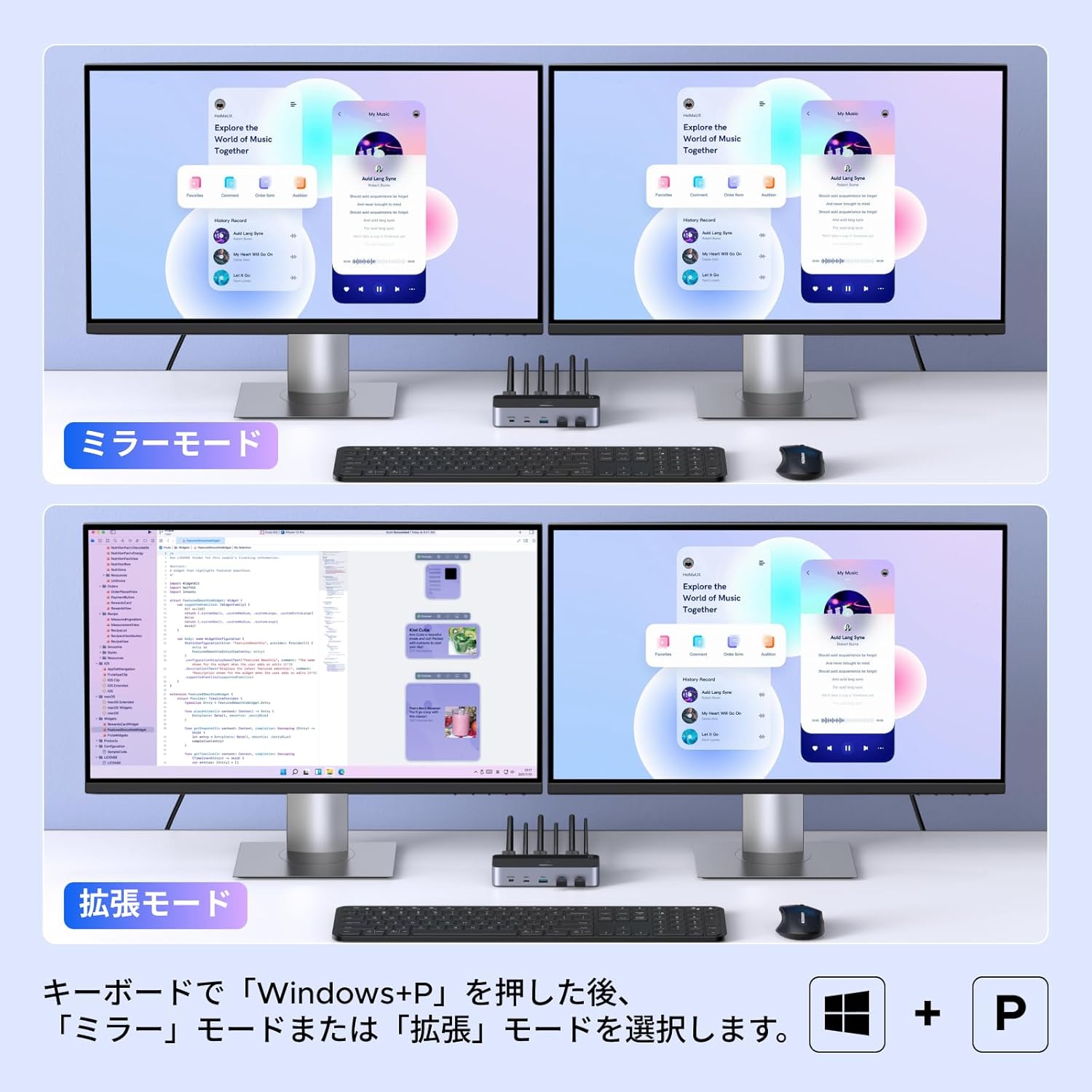
Image: Mirror mode and Extended mode for dual monitor setup.
High-Resolution Support
This KVM switch supports HDMI 2.1, allowing for resolutions up to 8K@60Hz. It is also backward compatible with 4K resolutions at higher refresh rates (e.g., 4K@240Hz/144Hz/120Hz), providing clear and crisp visuals for demanding tasks like design, video editing, and gaming.

Image: Support for up to 8K@60Hz ultra-high-definition video experience.
6. Maintenance
To ensure the longevity and optimal performance of your UGREEN HDMI 2.1 KVM Switch, please follow these maintenance guidelines:
- Keep the device in a clean, dry environment away from direct sunlight, excessive heat, and moisture.
- Clean the exterior of the device with a soft, dry cloth. Avoid using liquid cleaners or aerosols.
- Ensure all cables are securely connected and not under strain.
- Do not attempt to disassemble or repair the device yourself, as this will void the warranty.
7. Troubleshooting
If you encounter issues with your KVM switch, please refer to the following common troubleshooting steps:
- No Display/Flickering Screen:
- Ensure all HDMI cables are securely connected to both the KVM switch and your computers/monitors.
- Verify that the resolution settings of your input devices (computers) match the capabilities of your output devices (monitors).
- Check if the power adapter is correctly connected and providing power to the KVM switch.
- Try using different HDMI cables, especially if experiencing issues with high resolutions or refresh rates.
- USB Devices Not Working:
- Ensure the USB-A to USB-B data cables are properly connected from each PC to the KVM switch.
- Try connecting the USB device to a different USB port on the KVM switch.
- Ensure the KVM switch is receiving adequate power from the power adapter.
- Switching Issues:
- Confirm that the wired desktop controller is securely plugged into the 'Control' port.
- Ensure the KVM switch is powered on.
- Compatibility:
- Verify that your computers support dual-screen display simultaneously.
- This product is an HDMI KVM switch and is not compatible with DisplayPort KVM switches.
If problems persist, please contact UGREEN customer support for further assistance.
8. Specifications
| Manufacturer | Ugreen Group Limited |
| Part Number | 85100 |
| Product Weight | 1.27 Kilograms |
| Product Dimensions (LxWxH) | 15.7 x 7.2 x 3 cm |
| Color | Black |
| Switch Type | 2-way |
| Included Accessories | HDMI 2.1 Cables, USB-A Cables, Desktop Controller, Power Adapter |
| Batteries Required | No |
| Operation Mode | ON-OFF-ON |
| Current Rating | 2 Amperes |
| Operating Voltage | 12 Volts |
| Contact Type | A Contact |
| Connector Type | Crimp |
| Switch Style | DIP Switch |
| Terminal | Spade |
| Material | ABS |
9. Warranty and Support
This product comes with a 24-month warranty period from the date of purchase. This warranty covers manufacturing defects and ensures reliable performance under normal use.
Please note that the warranty does not cover damages caused by intentional misuse or third-party modifications. For warranty claims or technical support, please contact UGREEN customer service with your purchase details.
10. Important Notes
- This product is an HDMI KVM switch (2 monitors, 2 computers compatible) and supports 2 input/2 output systems. It is not a DisplayPort KVM switch.
- Please confirm that each of your computers supports dual-screen display simultaneously before purchase. Test if your computer supports dual monitors directly.
- Ensure your computer has two HDMI ports and one USB-A port.
- Each computer needs to be connected with two HDMI cables and one USB-A cable for the keyboard, mouse, and dual monitors to function correctly.
- The two monitors can only output video from one computer source; it is not possible to output signals from PC1 and PC2 simultaneously.
- To ensure normal use, always connect the power adapter for power supply.
- If 8K@60Hz resolution is required, please confirm that your HDMI cables, graphics card, and monitors are all 8K@60Hz compatible.
- Hot-key switching and EDID emulation are not supported.


