
edelkrone HeadONE v2
edelkrone HeadONE v2 Tripod Head User Manual
Motion Control Device for Camera and Phone
Introduction
The edelkrone HeadONE v2 is a compact, motorized pan/tilt head designed to add precise motion control to your camera or smartphone setups. It offers versatile features such as automatic point tracking, time-lapse programming, and seamless wireless control via a dedicated app. This manual provides essential information for setting up, operating, and maintaining your HeadONE v2.

Image: The edelkrone HeadONE v2 with a camera mounted on a tripod, showcasing its compact design.
What's in the Box
- HeadONE (with LP-E6 battery mount)
- Note: Batteries are NOT included and must be purchased separately.
Setup
1. Powering On
- Insert a compatible LP-E6 battery into the battery mount on the HeadONE v2.
- Press and hold the power button until the indicator light illuminates.
2. Mounting Your Camera or Phone
The HeadONE v2 features a standard 1/4"-20 screw for mounting cameras. For smartphones, a separate phone clamp (not included) is required.
- Securely attach your camera or phone clamp to the mounting screw on the HeadONE v2.
- Ensure the device is balanced to prevent strain on the motor.

Image: HeadONE v2 with a camera mounted, ready for outdoor use.
3. App Connection
The HeadONE v2 is controlled wirelessly via the edelkrone App, available for iOS and Android devices.
- Download the edelkrone App from your device's app store.
- Enable Bluetooth on your mobile device.
- Open the edelkrone App and follow the on-screen instructions to pair with your HeadONE v2.
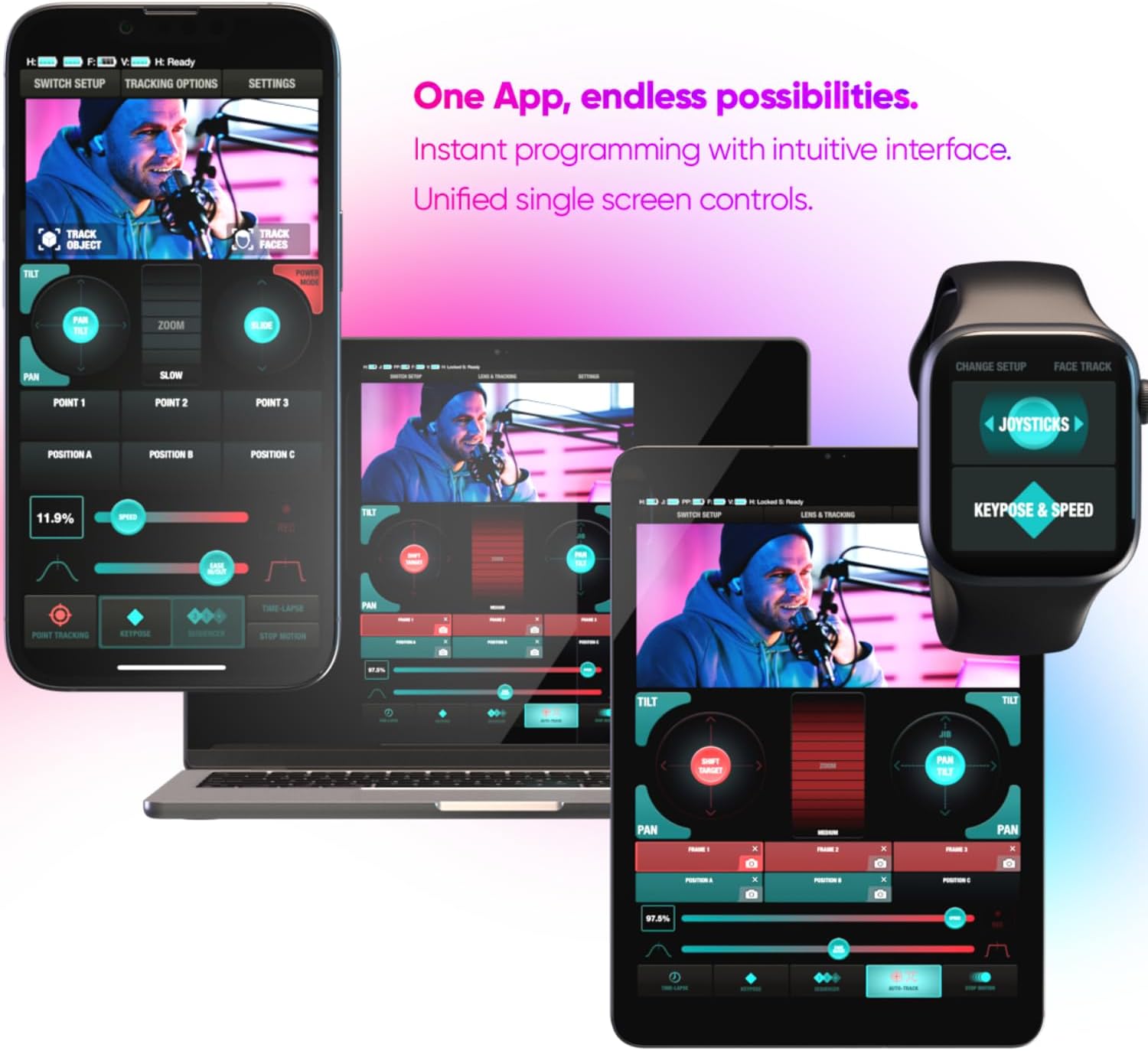
Image: The edelkrone app interface shown on various devices, demonstrating wireless control capabilities.
Operating Instructions
Basic Movement
Use the virtual joystick or directional controls within the edelkrone App to pan (horizontal rotation) and tilt (vertical movement) your camera. The HeadONE v2 offers 360° pan rotation.
Advanced Features
- Automatic Point Tracking: Select a subject in the app, and the HeadONE v2 will automatically track its movement, keeping it in frame.
- Time-Lapse Programming: Create custom time-lapse sequences by setting start and end points, duration, and interval. The app provides an intuitive interface for programming complex movements.
- 360° Mode: Utilize the 360° mode for panoramic photos or product photography, capturing a full rotation of your subject.
- Wireless Connectivity: The HeadONE v2 connects wirelessly with other edelkrone devices like sliders, dollies, and jibs for synchronized multi-axis motion control.

Image: The HeadONE v2 setup for motion control, compatible with both cameras and phones.
Video Demonstration
Watch this official video for a comprehensive overview of the HeadONE v2's features and operation.
Video: Official edelkrone HeadONE v2 product video demonstrating various features like face tracking, time-lapse, and modular design.
Maintenance
- Keep the HeadONE v2 clean and free from dust and debris. Use a soft, dry cloth for cleaning.
- Avoid exposing the device to extreme temperatures or moisture.
- Regularly check all screws and connections to ensure they are secure.
- Store the HeadONE v2 in a protective case when not in use to prevent damage.
Troubleshooting
| Problem | Possible Cause | Solution |
|---|---|---|
| Device does not power on. | Low or dead battery. | Replace or recharge the LP-E6 battery. |
| Cannot connect to app. | Bluetooth is off or device is out of range. | Ensure Bluetooth is enabled and the device is within range. Restart both the HeadONE v2 and the app. |
| Jerky or inconsistent movement. | Camera/phone is not properly balanced. | Re-balance your camera or phone on the HeadONE v2. |
Specifications
| Feature | Detail |
|---|---|
| Brand | edelkrone |
| Model | HeadONE v2 |
| Compatible Devices | Camera, Cellphone |
| Item Weight | 600 Grams |
| Power Source | LP-E6 battery (not included) |
| Connectivity | Bluetooth (via edelkrone App) |
| Motion Control | Pan (360°), Tilt (when paired with another HeadONE or FlexTILT Head) |
| Features | Automatic Point Tracking, Time-Lapse Programming, 360° Product Photography, Wireless Integration with other edelkrone devices. |
Warranty Information
The edelkrone HeadONE v2 comes with a 2-Year Warranty from the date of purchase. This warranty covers manufacturing defects and malfunctions under normal use. Please retain your proof of purchase for warranty claims. For full terms and conditions, refer to the official edelkrone website.
Support
For technical assistance, troubleshooting, or further inquiries, please visit the official edelkrone support page or contact their customer service. You can find detailed FAQs, video tutorials, and contact information on their website:
Official edelkrone Website: www.edelkrone.com
Related documentsHeadONE v2


Ask a question about this manual
Ask about setup, troubleshooting, compatibility, parts, safety, or missing instructions. Manuals+ will review the question and use this page’s manual context to help answer it.