
Introduction
This manual provides detailed instructions for the KOWSI AI ChatGPT Interactive Talking Unicorn Plush, Model DuJiaoShou. This product combines a soft plush toy with advanced AI capabilities and a comforting heat function. Please read this manual thoroughly to ensure proper use and maintenance of your interactive unicorn plush.

Image: The KOWSI AI ChatGPT Interactive Talking Unicorn Plush, presented with its gift box and lavender, highlighting its key features.
Safety Information
- This product is certified safe (ASTM/EN71/UKCA) for its intended use.
- Always supervise children during use, especially when interacting with the AI features or heating the plush.
- Do not ingest any parts of the product, including the heat pad contents.
- Ensure the heat pad is removed from the plush before microwaving.
- Do not overheat the heat pad. Follow microwave instructions carefully.
- Keep the product away from open flames or direct heat sources.
- If any damage occurs to the product, discontinue use immediately.
Product Overview
The KOWSI Interactive Unicorn Plush features an integrated AI module, a removable heat pad, and user-friendly controls.

Image: A diagram illustrating the internal "GeniusBrain" AI Interaction Core, the Chat Button, and the ON/OFF/RESET Switch Button located on the plush.
Key Components:
- AI Interaction Core (GeniusBrain): The central processing unit for AI functions.
- Chat Button: Press once to initiate interaction with the AI.
- Switch Button (ON/OFF/RESET): Controls power and allows for device reset.
- Removable Heat Pad: Contains natural tourmaline and lavender for warmth and aromatherapy.
- Rechargeable AI Core: The AI module is rechargeable.
Setup
1. Unboxing and Initial Inspection
Upon receiving your KOWSI Interactive Unicorn Plush, carefully remove all packaging. The product includes:
- KOWSI AI ChatGPT Interactive Talking Unicorn Plush
- User Manual (this document)
- Greeting Card
- AI Chip (pre-installed)
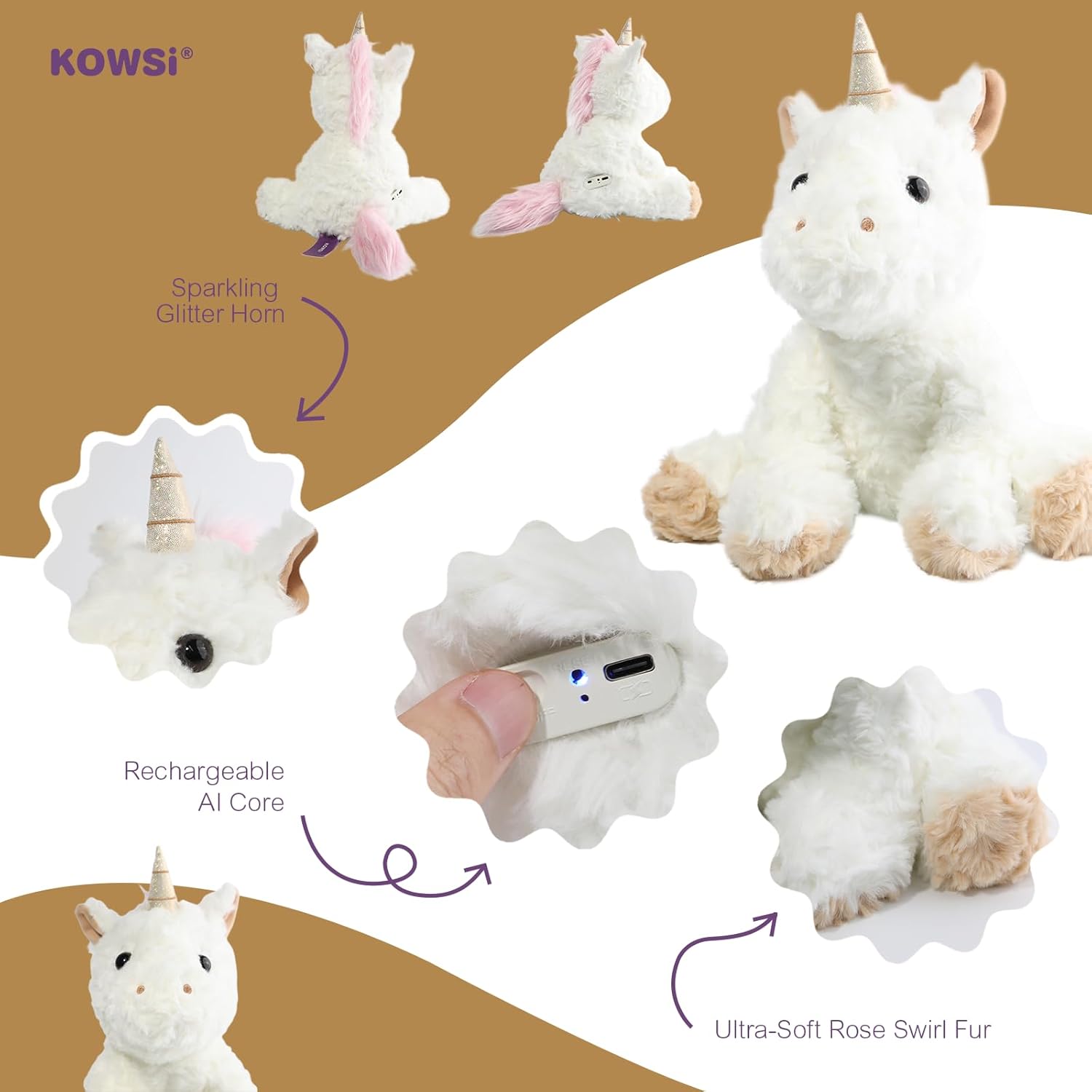
Image: The KOWSI unicorn plush alongside its gift box, user guide, and greeting cards, illustrating the complete package contents.
2. Powering On and Charging
The unicorn plush requires 1 Lithium Ion battery, which is included and pre-installed. To power on the device, locate the Switch Button (refer to Product Overview section) and slide it to the "ON" position. Ensure the AI core is charged for optimal performance. A charging cable is typically included for the rechargeable AI core.
3. Wi-Fi Setup via Smart Life App
To enable the AI ChatGPT features, the unicorn plush must be connected to a Wi-Fi network using the "Smart Life" app.
- Download the "Smart Life" app from the App Store (iOS) or Google Play Store (Android).
- Open the app and create an account or log in.
- Ensure your mobile device is connected to a 2.4GHz Wi-Fi network. The plush only supports 2.4GHz networks.
- In the "Smart Life" app, tap "Add Device" or the "+" icon.
- Follow the on-screen instructions to add the KOWSI unicorn plush. This typically involves putting the plush into pairing mode (often by pressing and holding the Chat Button or a specific sequence).
- Once connected, you can manage settings like volume and chat history within the app.

Image: A visual guide demonstrating the steps to connect the KOWSI unicorn plush to Wi-Fi using the "Smart Life" mobile application, including adding a device and accessing settings.
Operating Instructions
1. AI Interaction (ChatGPT-4o)
Your KOWSI unicorn plush is equipped with an AI module powered by ChatGPT-4o, enabling interactive conversations.
- Ensure the plush is powered on and connected to Wi-Fi.
- Press the Chat Button (located on the plush) once to activate the AI.
- Speak clearly to the unicorn. It can answer questions, tell stories, assist with learning, and engage in general conversation.
- The AI is designed to provide meaningful and engaging interactions.

Image: A child engaging with the KOWSI AI unicorn plush, demonstrating its interactive conversational capabilities with example dialogue bubbles.
2. Heating Function with Lavender Aromatherapy
The unicorn plush includes a removable heat pad for warmth and a relaxing lavender scent.
- Locate the zipper on the back of the plush and unzip it.
- Carefully remove the Tourmaline Lavender Heat Pack.
- Place the heat pack into a microwave.
- Microwave the heat pack for under 1.5 minutes. Do not exceed this time to prevent overheating.
- Once warmed, carefully place the heat pack back into the plush and zip it closed.
- The heat pad provides gentle, long-lasting warmth and releases a soothing lavender aroma.

Image: A five-step visual instruction on how to safely remove, microwave, and reinsert the Tourmaline Lavender Heat Pack into the KOWSI unicorn plush.

Image: An illustration detailing the composition of the KOWSI heat pad, indicating 90% natural tourmaline thermal beads and 10% Provence lavender for aromatherapy.
Maintenance and Care
Cleaning the Plush:
To maintain the quality of the plush material:
- Spot clean with a damp cloth and mild soap.
- Do not machine wash or tumble dry the entire plush, as this may damage the internal electronic components.
- Ensure the plush is completely dry before storing or prolonged use.
Heat Pad Care:
- The Tourmaline Lavender Heat Pack is 100% natural and microwave safe.
- Store the heat pack in a cool, dry place when not in use.
- Do not wash the heat pack.
Troubleshooting
| Problem | Possible Cause | Solution |
|---|---|---|
| Unicorn does not respond. | Device is off, battery low, or not connected to Wi-Fi. | Ensure the Switch Button is ON. Charge the AI core. Verify Wi-Fi connection in the Smart Life app. |
| Cannot connect to Wi-Fi. | Incorrect Wi-Fi band (not 2.4GHz), wrong password, or network interference. | Confirm your router is broadcasting a 2.4GHz network. Re-enter Wi-Fi password carefully. Try moving closer to the router. Reset the device using the Switch Button. |
| Heat pad is not warming up. | Insufficient microwave time or microwave malfunction. | Ensure the heat pad is microwaved for the recommended duration (under 1.5 minutes). Check if your microwave is functioning correctly. |
| AI responses are slow or inconsistent. | Poor Wi-Fi signal or network congestion. | Improve Wi-Fi signal strength. Reduce other network activity. |
Specifications
| Feature | Detail |
|---|---|
| Model Number | DuJiaoShou |
| Product Dimensions | 10 x 10 x 12 inches (25 x 25 x 30 cm) |
| Item Weight | Approximately 1.4 lbs (including heat pad) |
| AI Module | Built-in ChatGPT-4o |
| Connectivity | 2.4GHz Wi-Fi (via Smart Life app) |
| Heat Pad Contents | Natural Tourmaline (90%), Provence Lavender (10%) |
| Battery Type | 1 Lithium Ion battery (included, rechargeable AI core) |
| Certifications | ASTM/EN71/UKCA |
| Manufacturer | KOWSI |
Warranty and Support
For warranty information or technical support, please contact KOWSI customer service through the official brand website or your point of purchase. Please have your model number (DuJiaoShou) and purchase details available when contacting support.
You can visit the KOWSI Store for more information: KOWSI Official Store