
HuiTinJesh ATS MINI V4
HuiTinJesh ATS MINI V4 Shortwave Radio User Manual
Model: ATS MINI V4
1. Introduction
This manual provides instructions for the operation and maintenance of your HuiTinJesh ATS MINI V4 Shortwave Radio. This portable full-band receiver supports AM, FM, LSB, and USB, and features a built-in headphone amplifier and speaker. Please read this manual thoroughly before using the device to ensure proper function and longevity.
2. Package Contents
Verify that all items are present in the package:
- ATS MINI V4 Radio Receiver
- Pull Rod Antenna
- Loop Antenna
- USB Cable
- Owner's Manual (this document)

3. Product Overview
The ATS MINI V4 is a compact, portable shortwave radio designed for versatile reception. It incorporates advanced features for enhanced performance and user experience.
3.1 Key Features
- ESD-Protected Antenna Input: Prevents static damage for long-term durability.
- Shielded Si4732 Tuner: Isolates the circuit from electromagnetic noise.
- Hi-Z Circuit: Front-end placed to preserve signal resonance.
- Stable VCC RADIO Power: Reduces noise for clearer reception.
- Comprehensive Band Support: LSB, USB, AM, and FM.
- Built-in Headphone Amplifier: For improved audio quality.
- High-quality Speaker: For clear sound output.
- Corrected Channel Output: Fixed left/right orientation.
- Tuned Audio Amplifier: For superior sound quality.
- Compact Design: 1.9-inch HD screen, 800mAh built-in battery, ABS shell.
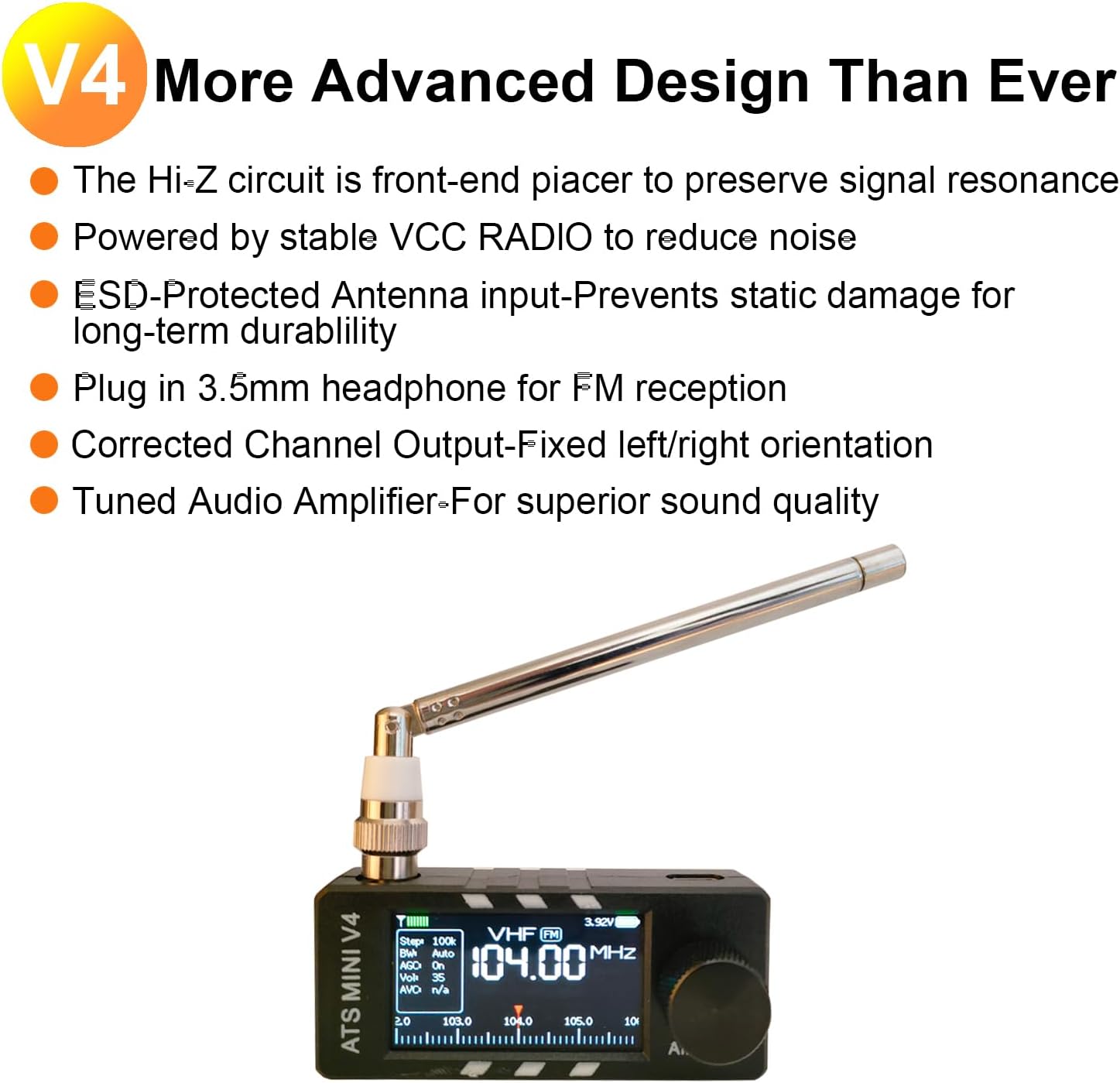
3.2 Components and Controls

- Type-C Port: For charging the device.
- 3.5mm Headphone Interface: For private listening.
- ON/OFF Switch: Powers the device on or off.
- Encoder: Used for tuning, volume control, and menu navigation.
4. Setup
4.1 Charging the Battery
Before first use, fully charge the built-in 800mAh battery using the provided USB Type-C cable. Connect the cable to the Type-C port on the radio and to a standard USB power source (e.g., computer, wall adapter).
4.2 Attaching the Antenna
The ATS MINI V4 supports two types of antennas: a pull rod (telescopic) antenna and a loop antenna. Choose the appropriate antenna based on your reception needs.

- Pull Rod Antenna: Screw the pull rod antenna into the antenna connector on the top of the radio. Extend the antenna fully for optimal reception.
- Loop Antenna: Connect the loop antenna to the antenna connector. This antenna is particularly effective for shortwave and AM reception.
Video 4.1: Unboxing and Antenna Installation. This video demonstrates the unboxing of the ATS MINI V4 radio and the process of attaching both the pull rod and loop antennas. It also shows basic operation like turning on the radio and adjusting volume.
5. Operating Instructions
5.1 Power On/Off
Locate the ON/OFF switch on the side of the radio. Slide it to the "ON" position to power on the device. Slide it to "OFF" to power down.
5.2 Tuning and Volume Control
Use the rotary encoder to adjust frequency and volume. Rotate clockwise to increase values, counter-clockwise to decrease. Press the encoder to confirm selections or access menus.
5.3 Band Selection
The radio supports AM, FM, LSB, and USB bands. Refer to the on-screen menu for band selection. Typically, pressing the encoder or a dedicated button (if present) will allow you to cycle through or select bands.
5.4 Display Themes
The ATS MINI V4 offers multiple display theme choices for personalized viewing. To change the theme, navigate to Settings >> Theme in the radio's menu.

6. Maintenance
6.1 Cleaning
Wipe the radio with a soft, dry cloth. Do not use liquid cleaners or abrasive materials, as these can damage the device's finish or internal components.
6.2 Storage
When not in use for extended periods, store the radio in a cool, dry place away from direct sunlight and extreme temperatures. Ensure the battery is partially charged (around 50%) before storage to prolong its lifespan.
6.3 Antenna Care
Handle antennas with care. Avoid bending or forcing the pull rod antenna. When using the loop antenna, ensure it is not subjected to excessive stress.
7. Troubleshooting
| Problem | Possible Cause | Solution |
|---|---|---|
| No power | Battery is depleted | Charge the radio using the USB Type-C cable. |
| Poor reception | Antenna not extended/connected properly; weak signal; interference | Ensure antenna is fully extended or properly connected. Try repositioning the radio or using the alternative antenna. Move away from electronic devices that may cause interference. |
| No sound | Volume too low; headphones connected; speaker issue | Increase volume using the encoder. Disconnect headphones if sound is desired from the speaker. If problem persists, contact support. |
| Screen unresponsive | Software glitch; low battery | Try restarting the device by powering it off and on. Ensure battery is charged. |
8. Specifications
- Model: ATS MINI V4
- Dimensions: 3.15 x 0.79 x 1.38 inches (8 x 2 x 3.5 cm)
- Weight: 5 ounces (141.75 grams)
- Battery: 800mAh Nonstandard Battery (included)
- Tuner Technology: AM/FM/LSB/USB (SI4732 chip)
- Connectivity: Antenna, USB Type-C
- Special Features: Lightweight, Portable, Rechargeable, Built-in Headphone Amplifier, Speaker, Hi-Z circuit, ESD-Protected Antenna Input

9. Warranty Information
HuiTinJesh products are covered by a limited warranty against defects in materials and workmanship. For specific warranty terms and conditions, please refer to the warranty card included with your product or contact customer support.
10. Customer Support
For technical assistance, troubleshooting, or warranty inquiries, please contact HuiTinJesh customer support through the retailer's platform or visit the official HuiTinJesh website for contact information.
Ask a question about this manual
Ask about setup, troubleshooting, compatibility, parts, safety, or missing instructions. Manuals+ will review the question and use this page’s manual context to help answer it.