
1. Setup and Installation
This section provides guidance on installing your SIXTOP Android Car Stereo. Ensure your vehicle is a Honda Odyssey model year 2010-2017 (left-hand drive version) for compatibility. The unit is designed for plug-and-play installation, but professional installation is recommended.
1.1 Included Components
The package includes the following items:
- Car Stereo with Frame
- AHD Backup Camera
- Microphone
- RCA cables (multiple)
- USB cables
- GPS antenna
- Rear view input cable
- Power cable
- Accessories (screws, tools)

Image: Detailed view of all components included in the SIXTOP Android Car Stereo package, laid out on a white surface.
1.2 Wiring and Module Placement
Carefully connect all cables according to the provided wiring diagram. The LVDS cable and other modules should be routed and placed securely, often within the glove box area. Ensure all connections are firm to prevent disconnections during vehicle operation.
Video: Demonstrates the installation process of the CarPlay module, including wiring and placement within the glove box for Acura and Odyssey vehicles.
Video: Provides detailed instructions on how to place modules into the glove box, ensuring proper cable management and secure fitting.

Image: A clear diagram illustrating the wiring connections for the rear camera, including video output, power, and ground connections to the car stereo.
2. Operating Instructions
Your SIXTOP Android Car Stereo offers a wide range of features designed to enhance your driving experience. This section covers the primary functions and how to operate them.
2.1 Wireless CarPlay & Android Auto
Connect your smartphone wirelessly via WiFi/Bluetooth to access CarPlay or Android Auto. This allows for voice control, GPS navigation, music streaming, messaging, and other apps directly on the car stereo's 9-inch IPS touchscreen.
Video: Step-by-step guide on how to connect your smartphone for wireless CarPlay and Android Auto functionality.
Video: Overview of main functions including CarPlay, Android Auto, and mirror link capabilities.

Image: Illustrates the user interface for Wireless CarPlay and Android Auto, showing various app icons and connectivity options.
2.2 DSP Audio and EQ Settings
Utilize the built-in DSP system with 32-band EQ to customize your audio experience. Adjust sound effects and sound fields to achieve optimal car audio quality. The system supports various popular sound effects like Standard, Rock, Pop, Live, Dance, Classical, Soft, and Jazz.

Image: Screenshots of the DSP 32-band equalizer interface, showing adjustable frequency bands and sound field settings.
2.3 GPS Navigation and Online Functions
The car stereo features integrated GPS navigation with support for both online and offline maps. Connect to your phone's hotspot or WiFi to access online functions, stream live video or music, and download additional applications.
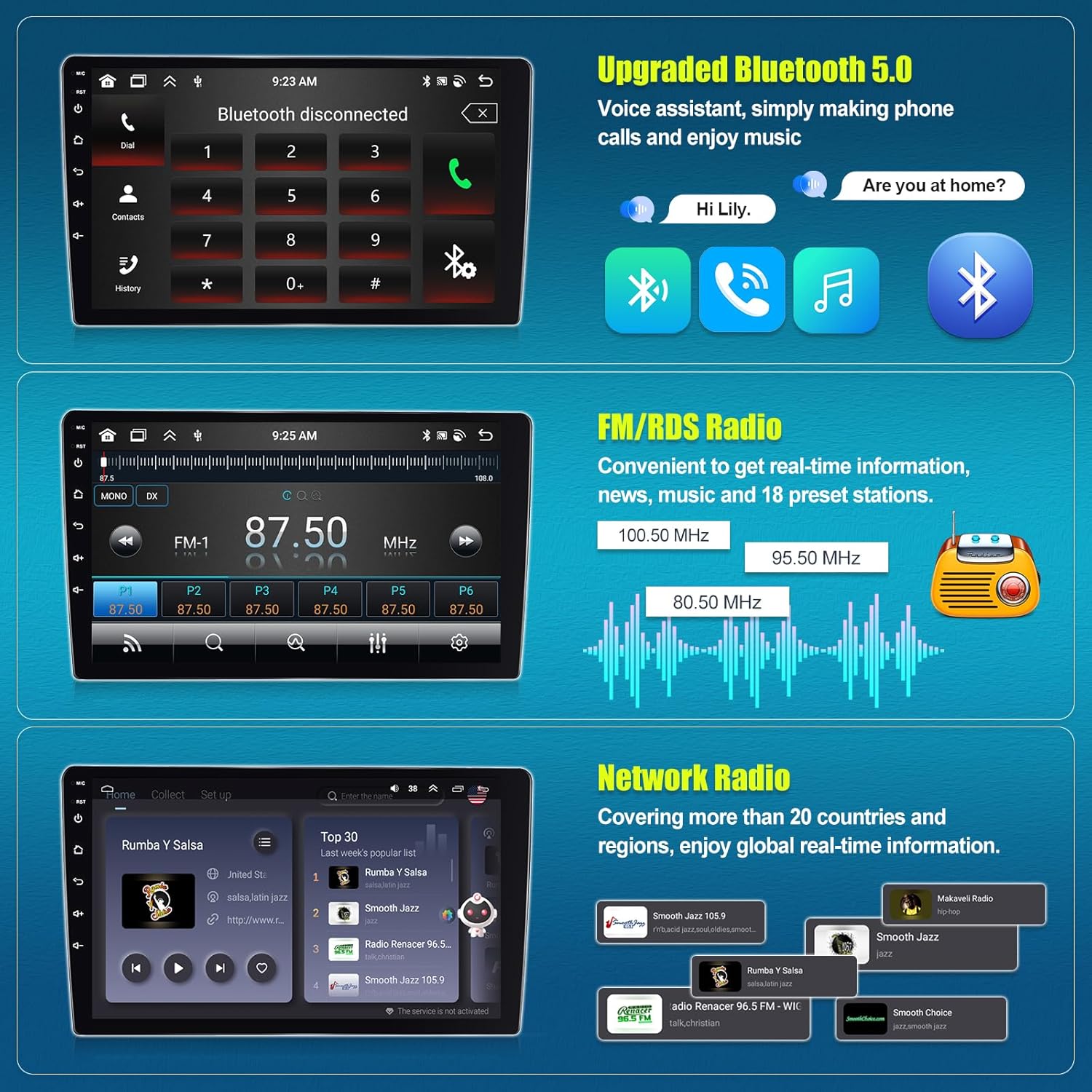
Image: Displays the GPS navigation interface with map views and icons for various online functions like music and video streaming.
2.4 Bluetooth 5.0 and FM/RDS Radio
Bluetooth 5.0 provides stable signal for hands-free calling, wireless audio streaming, and automatic phone book downloads. The FM/RDS radio includes 18 preset stations, allowing you to listen to your favorite tuners and receive real-time news and weather information.

Image: Shows the Bluetooth calling interface and the FM/RDS radio tuner with preset stations.
2.5 AHD Backup Camera and Steering Wheel Control
The included AHD backup camera automatically displays clear reversing images on the 9-inch touchscreen when reverse gear is engaged, enhancing parking safety. The unit also supports steering wheel control functions, allowing easy adjustment of volume, channel switching, and call management.

Image: Depicts the AHD rear view camera in action with parking guidelines and the steering wheel control interface for managing audio and calls.
2.6 AI Intelligent Voice and Display Features
Activate the AI Voice APP (activation code may be required) to control various functions using voice commands, such as calling contacts, playing music, or navigating. The 9-inch IPS HD touchscreen offers a 1280x720 resolution with wide visual angles. Enjoy features like 59 customizable UI themes, split-screen functionality for multitasking, and a global weather display.

Image: The main interface of the SIXTOP Android Car Stereo, showing various app icons and a clean layout.
3. Maintenance
To ensure the longevity and optimal performance of your SIXTOP Android Car Stereo, follow these maintenance guidelines:
- Screen Cleaning: Use a soft, lint-free cloth to gently wipe the touchscreen. For stubborn smudges, slightly dampen the cloth with water or a screen-safe cleaner. Avoid harsh chemicals or abrasive materials.
- Software Updates: Periodically check for software updates through the device's settings menu. Updates can improve performance, add new features, and enhance security.
- Cable Connections: Ensure all wiring connections remain secure. Loose connections can lead to intermittent functionality or signal loss.
- Environmental Care: Avoid exposing the unit to extreme temperatures or direct sunlight for prolonged periods, as this can affect screen and component lifespan.
4. Troubleshooting
If you encounter issues with your car stereo, refer to the following common troubleshooting steps:
- No Power/Display: Check all power connections. Ensure the vehicle's ignition is on. If the issue persists, consult a professional installer.
- Bluetooth Connectivity Issues: Ensure Bluetooth is enabled on both the stereo and your smartphone. Try unpairing and re-pairing the devices. Restarting both devices can also resolve minor glitches.
- CarPlay/Android Auto Not Connecting: Verify that WiFi and Bluetooth are active on your phone and the stereo. Ensure all necessary permissions are granted on your phone. If wireless connection fails, try a wired connection if supported.
- Sound Distortion/No Audio: Check speaker wiring connections. Adjust EQ settings to default. Ensure volume levels are appropriate on both the stereo and connected devices.
- Backup Camera Not Displaying: Verify the rear view input cable is securely connected. Ensure the camera is receiving power and the vehicle is in reverse gear.
- Steering Wheel Controls Not Working: Access the Steering Wheel Control settings in the stereo's menu to re-learn or configure the buttons. Ensure the SWC wiring is correctly installed.
5. Specifications
- Operating System: Android
- Display Size: 9 Inches
- Screen Resolution: 1280x720 HD IPS Touchscreen
- Processor: 8-Core
- RAM: 6GB
- ROM: 128GB
- Bluetooth: Version 5.0
- Connectivity: Bluetooth, Wi-Fi
- Audio Features: DSP, 32-band EQ Setting
- Special Features: Wireless CarPlay & Android Auto, Mirror Link, Split Screen, AI Intelligent Voice, Global Weather Display
- Vehicle Service Type: For Honda Odyssey 2010-2017
- Mounting Type: Dashboard Mount
- Item Weight: 5.28 pounds
- Package Dimensions: 14.57 x 11.81 x 5.71 inches
6. Warranty
This SIXTOP Android Car Stereo comes with a 1-Year Warranty. For warranty claims or service, please retain your proof of purchase and contact customer support.
7. Support
For any questions, technical assistance, or support regarding your SIXTOP Android Car Stereo, please contact the seller directly through the Amazon platform. You can typically find a 'Ask a question' link on the product page or the seller's store page.
Visit the SIXTOP Store on Amazon for more information and to contact support.


