
1. Introduction
Thank you for choosing the CYKOV Ergonomic Office Chair with Footrest. This manual provides comprehensive instructions for the safe and efficient use of your new chair. Please read all instructions carefully before assembly and use. This chair is designed to provide a personalized comfort zone for work, rest, and play, featuring adjustable lumbar support, headrest, reclining mesh back, and a retractable footrest.
2. Setup and Assembly
Your CYKOV Ergonomic Office Chair is designed for straightforward assembly. All necessary hardware is pre-sorted and instructions are provided to guide you through the process. It is recommended to assemble the chair on a soft, clean surface to prevent scratches.
2.1 Unpacking the Components
Carefully remove all components from the packaging. Verify that all parts listed in the assembly instructions are present. The package includes the chair components, an assembly tool, and gloves.
Video: Unboxing and laying out all chair components for assembly.
2.2 Base Assembly
Attach the five chair legs to the central base. Secure them using the provided screws and the assembly tool. Insert the casters into the ends of each leg until they click into place.

Image: The assembled five-star base with casters attached.
2.3 Seat and Backrest Attachment
Connect the seat cushion to the backrest using the designated screws. Ensure the "FRONT" label on the seat is facing the correct direction. Attach the assembled seat and backrest to the gas lift cylinder on the base.

Image: Fully assembled CYKOV ergonomic office chair.
3. Operating Instructions
Your CYKOV chair offers multiple adjustment options to customize your seating experience for optimal comfort and ergonomic support.
3.1 Seat Height Adjustment
To adjust the seat height, pull the lever located under the right side of the seat upwards while applying or releasing your weight from the seat. Release the lever to lock the height in place. The chair offers a 4-inch height lift to fit various desk heights.

Image: Illustration of the height adjustment handle and its function.
3.2 Lumbar Support Adjustment
The chair features 2-way adjustable lumbar support. Use the knob on the backrest to adjust the lumbar support's height (2 inches) and depth (1.18 inches) to hug your lower back comfortably. This can be engaged or disengaged for flexibility.

Image: Detailed view of the height and depth adjustable lumbar support.
3.3 Headrest Adjustment
The headrest offers 4.72-inch height adjustment and a 60° swivel. Press the buttons on the sides of the headrest to adjust its height to one of three levels. The headrest does not lock in place for angle adjustment, allowing it to follow your head movement naturally.

Image: Multi-function headrest showing adjustment capabilities.
3.4 Armrest Adjustment
The armrests can be adjusted up and down to different levels by pressing a button on the side. They also slide inward and outward, and can be pushed back to allow the chair to fit under a desk more easily.
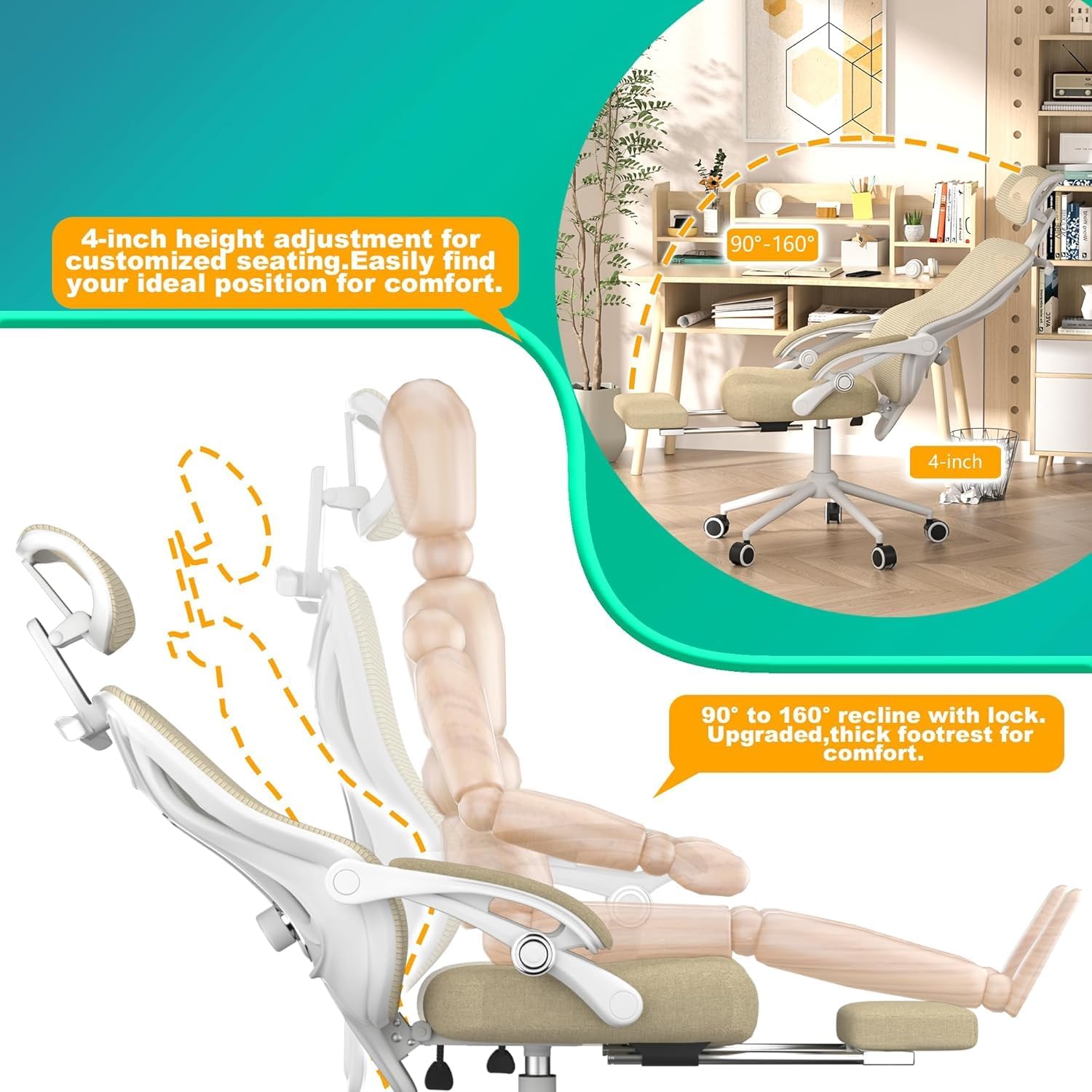
Image: Recline-linked padded armrests providing consistent arm support.
3.5 Reclining Function and Footrest
The chair reclines from 90° (work mode) to 160° (nap mode) with lockable angles. Pull the lever under the left side of the seat to recline. Push the lever in to lock the recline angle. The retractable footrest can be pulled out and flipped up to transform your chair into a "mini sofa" for relaxation. The footrest surface is made from a body-friendly, shock-absorbing material.
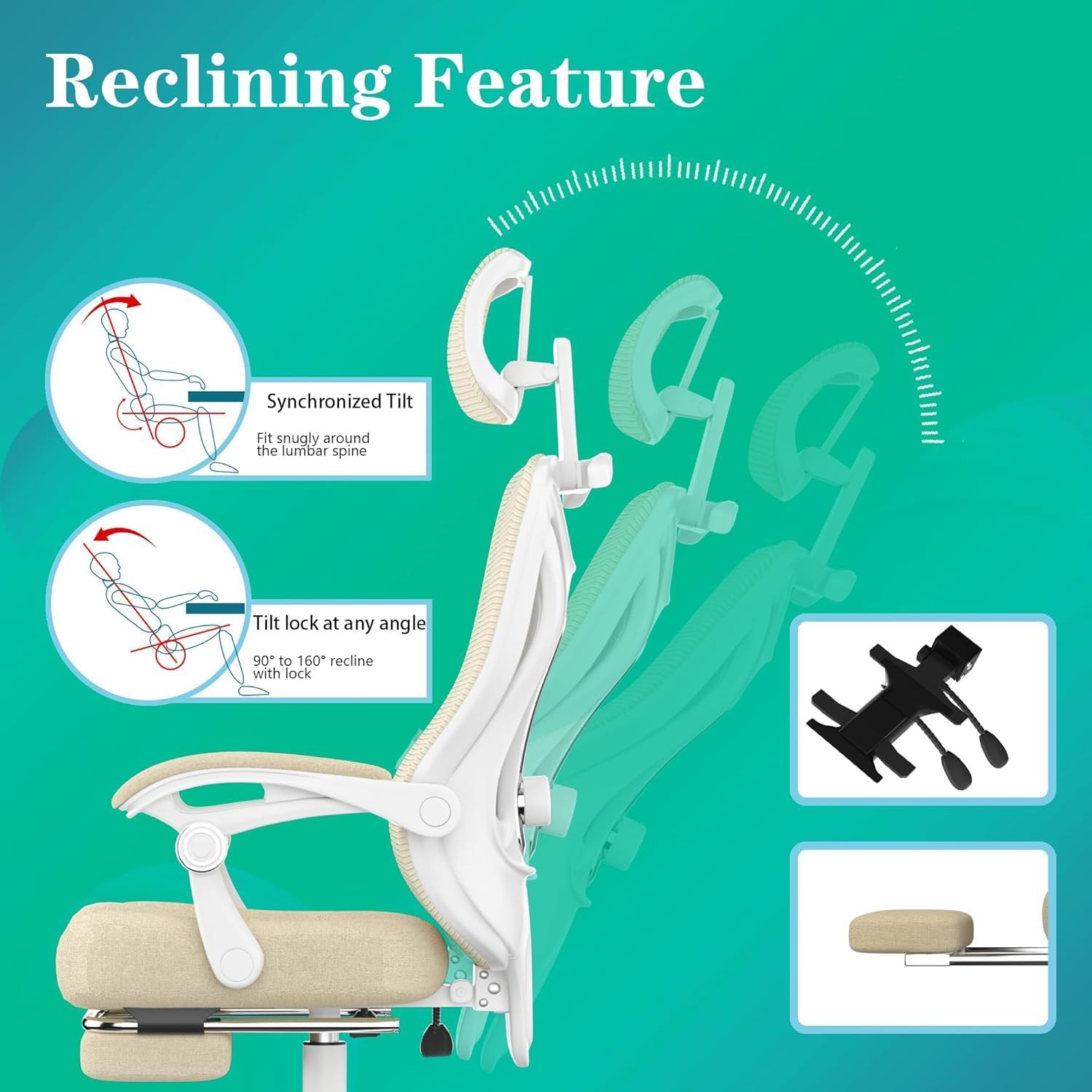
Image: Illustration of the reclining feature with synchronized tilt and tilt lock.
Video: Shows the various adjustable features of the CYKOV Ergonomic Home Office Desk Chair with Footrest.
3.6 Swivel Function
The chair features a 360° swivel, allowing you to easily rotate and access different areas of your workspace without standing up.
4. Maintenance
To ensure the longevity and performance of your CYKOV Ergonomic Office Chair, regular maintenance is recommended:
- Cleaning: The breathable mesh back and seat are skin-friendly and easy to clean. Use a damp cloth with mild soap for general cleaning. Avoid harsh chemicals.
- Inspection: Periodically check all screws and bolts to ensure they are tight. Retighten if necessary.
- Casters: Keep the casters clean from hair and debris to ensure smooth movement.
5. Troubleshooting
If you encounter any issues with your chair, please refer to the following common solutions:
- Chair wobbles: Ensure all screws are securely tightened. Check that the base and gas lift are correctly assembled.
- Difficulty reclining: Verify that the recline lock lever is disengaged. If the issue persists, check the tension knob under the seat.
- Casters not rolling smoothly: Clean any debris from the caster wheels. Ensure they are properly inserted into the chair legs.
6. Specifications
| Brand | CYKOV |
| Model Name | home office chair |
| Product Dimensions | 22"D x 20"W x 40"H |
| Maximum Weight Recommendation | 330 Pounds |
| Material | Nylon, Foam |
| Back Style | Mesh Back |
| Reclining Position Count | 3 (90°-160°) |
| Special Feature | Adjustable Height, Lumbar Support, Headrest, Footrest |
Important Information: This chair has a maximum weight recommendation of 300 pounds. Always assemble the chair according to the provided instructions for safe use.
7. Warranty
The CYKOV Ergonomic Office Chair comes with a 5-Year Warranty. We stand behind our product. For any quality issues, please contact our customer support for assistance.
8. Customer Support
For any questions, concerns, or support needs regarding your CYKOV Ergonomic Office Chair, please visit the CYKOV Store on Amazon or refer to the contact information provided in your product packaging. Our team is dedicated to ensuring your satisfaction.

Image: A customer support representative ready to assist with product inquiries.


